Prerequisites
- AWS account
- Red Hat account
- eksctl installed on your local machine
- kubectl installed on your local machine
- oc CLI installed on your local machine
- OpenShift cluster as Hub cluster
Install ACM on OpenShift Hub cluster
Login to the OpenShift Web Console as a Cluster administrator.
Install Red Hat Advanced Cluster Management (ACM) from the OperatorHub within OpenShift Web Console as shown here:
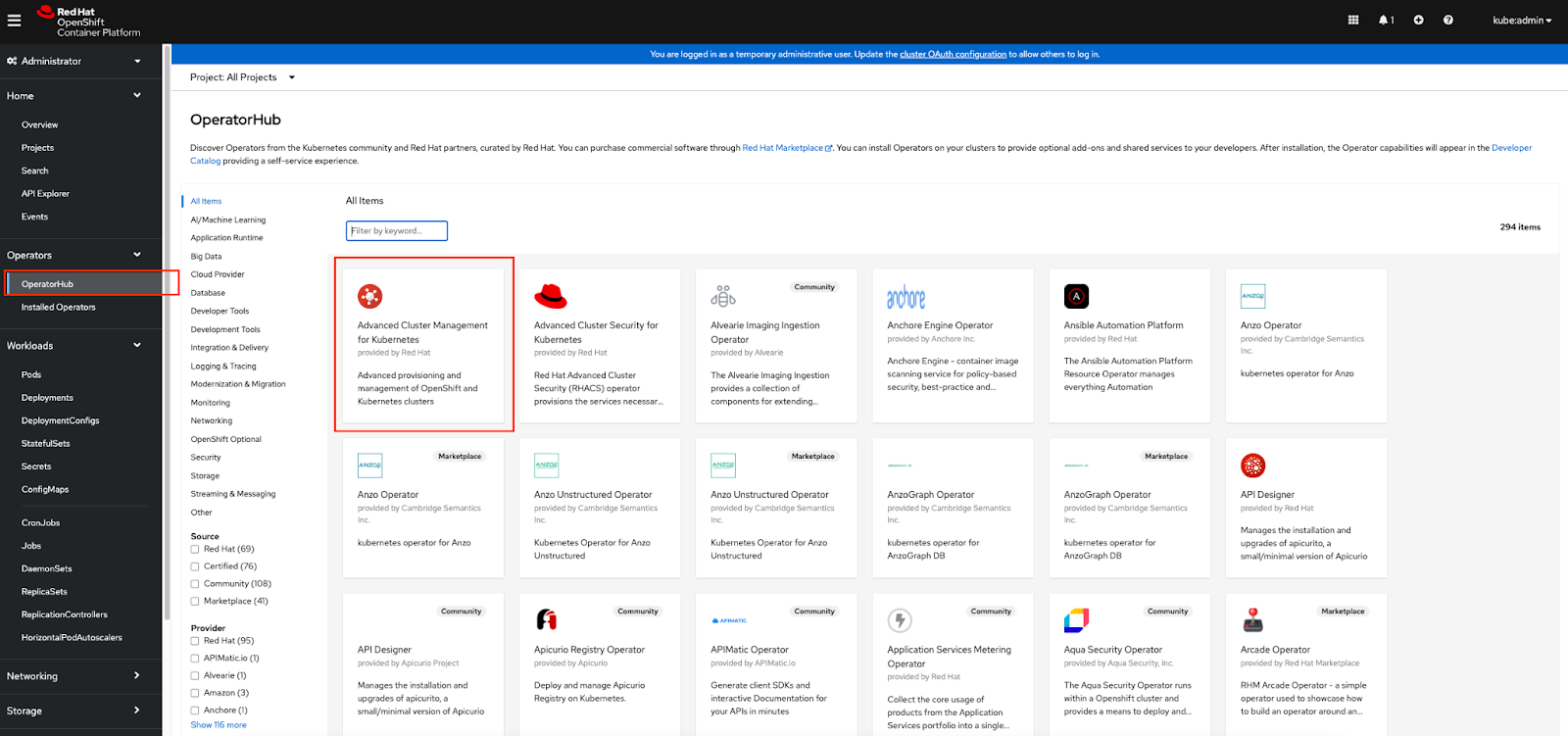
Note: ACM Operator gets installed in the open-cluster-management namespace/project
Download Pull Secret
Login to Red Hat Hybrid Cloud Console with your credentials.
Navigate to Downloads and scroll down to the Tokens section. Select Download to get a copy of your pull secret on your local machine.
Upload Pull Secret to ACM
Login to your OpenShift cluster using oc CLI.
Run the following command to switch to open-cluster-management namespace/project:
$ oc project open-cluster-management
Run the following command to upload the pull secret to open-cluster-management namespace/project:
$ oc create secret generic eks-secret \  --from-file=.dockerconfigjson=pull-secret.txt \
--type=kubernetes.io/dockerconfigjson
eks-secret is the name of the secrets object, and pull-secret.txt is the pull secret downloaded in the previous step.
Install MultiClusterHub
After the ACM Operator gets installed successfully, navigate to “Installed Operators” and select “Advanced Cluster Management for Kubernetes” as shown:
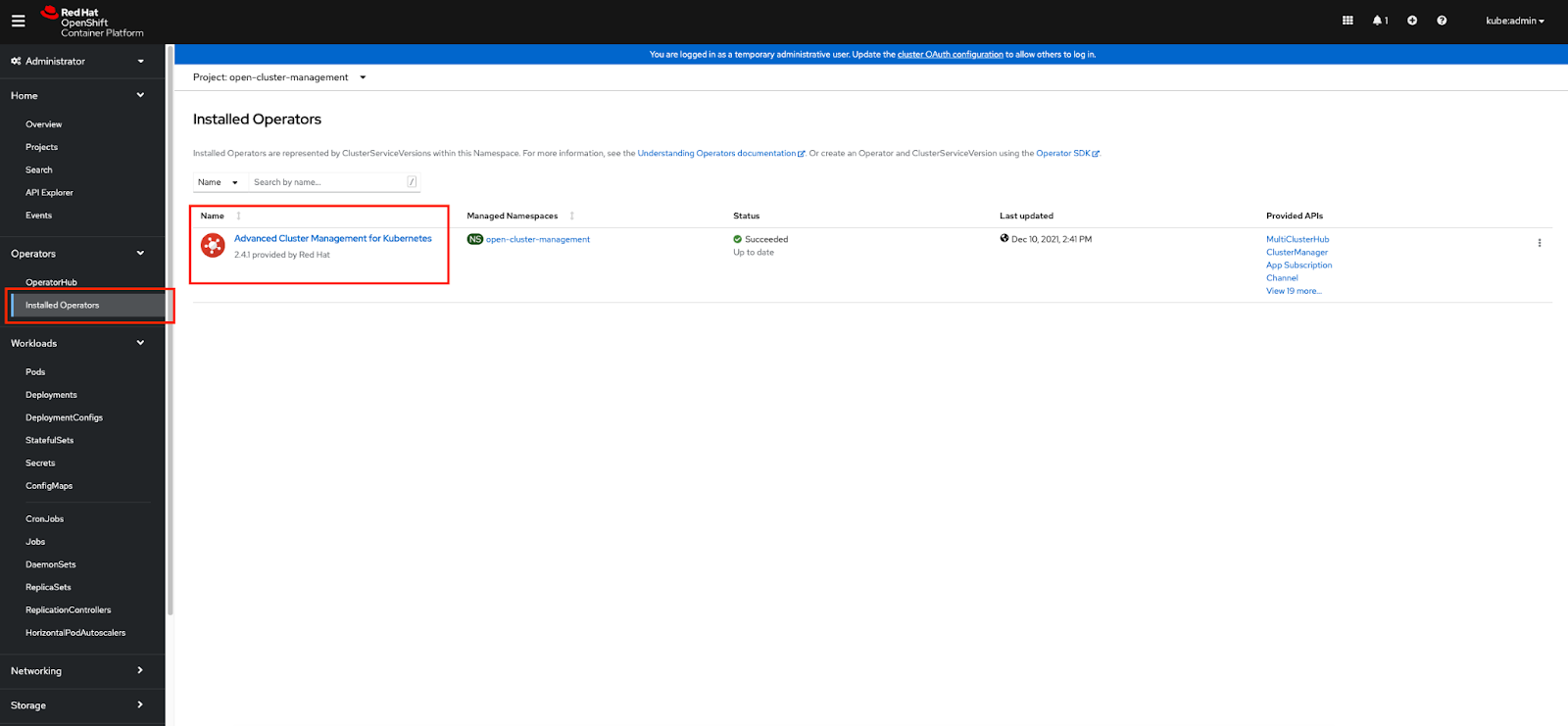
Click on “Create instance” for MultiClusterHub.
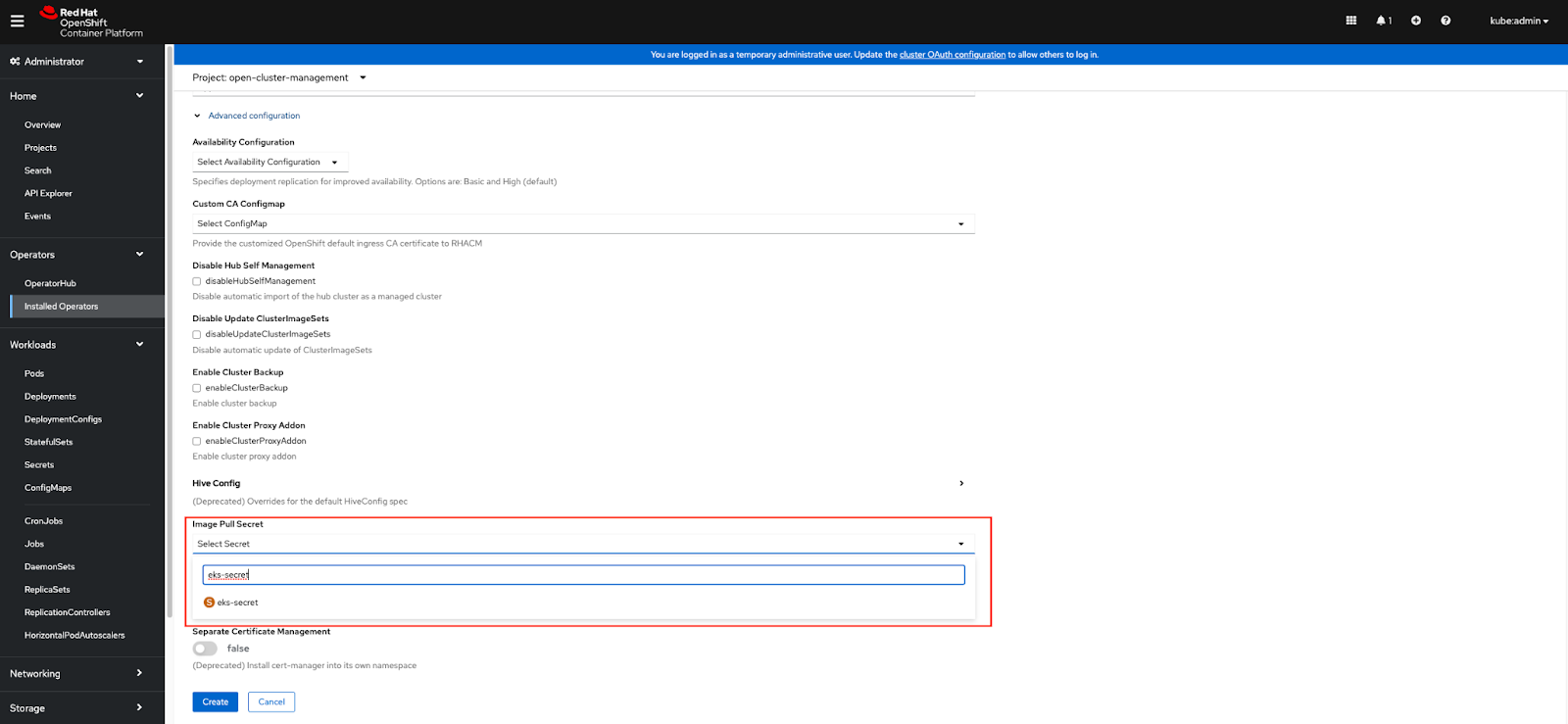
Expand “Advanced Configuration”. Scroll down to “Image Pull Secret” and search for the secret uploaded in the previous step (for example, eks-secret). Select this secret and hit “Create”.
Create an EKS cluster
Create a YAMIL file eks-cluster-1.21.yaml with the following information. Save it to your local machine.
apiVersion: eksctl.io/v1alpha5
kind: ClusterConfig
metadata:
  name: eks-cluster # EKS Cluster name
  region: us-east-2 # Region Code to place EKS Cluster
  version: "1.21"
managedNodeGroups:
- name: primary # Name of node group in EKS Cluster
  instanceType: t3.small # Instance type for node group
  desiredCapacity: 3 # Number of worker nodes- default is 2
Change the config parameter values according to your desired setting. There are many more configuration parameters, which you can find if you type eksctl create cluster –help.
Run the following command, which was used to create an EKS cluster.
$ eksctl create cluster --config-file eks-cluster-1.21.yaml
The above command creates an EKS cluster with worker nodes (EC2 instance type t3.small) in the us-east-2 region using Kubernetes version 1.21
Import EKS cluster
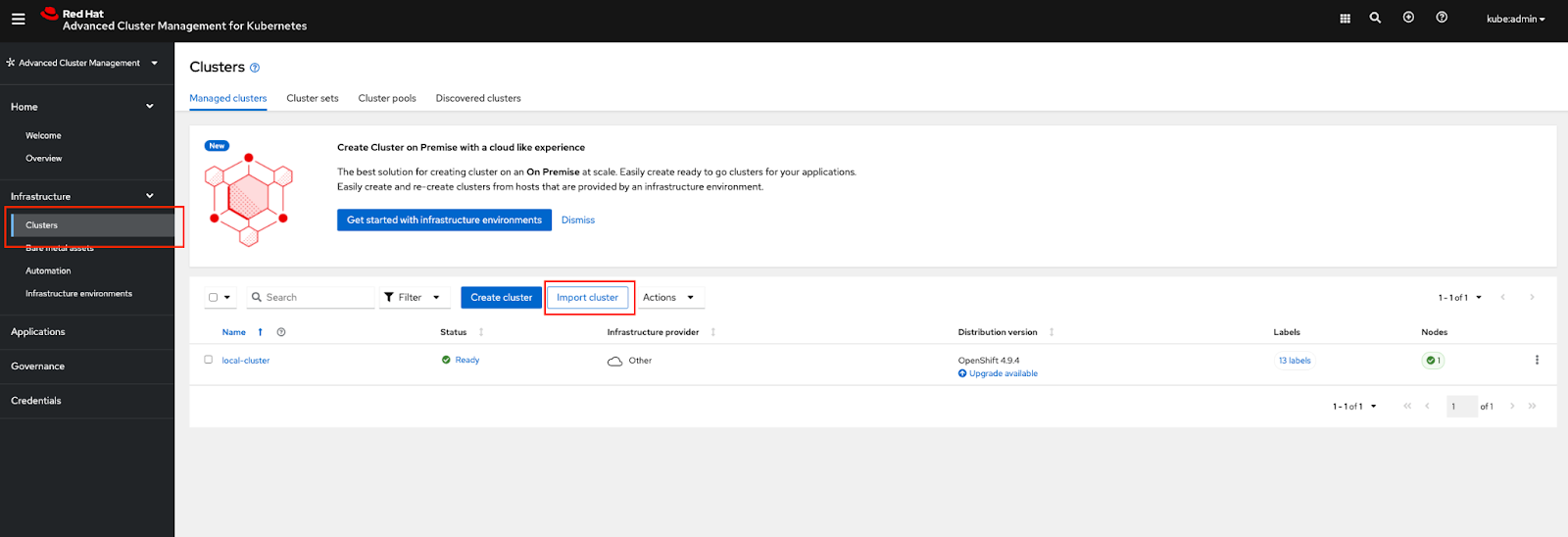
Switch to the “Advanced Cluster Management” view from the OpenShift Web Console:

Select “Clusters” under the Infrastructure menu and select “Import cluster”:
Provide a name for the EKS cluster that will be imported and choose “Run import commands manually” option from the drop down for Import mode:
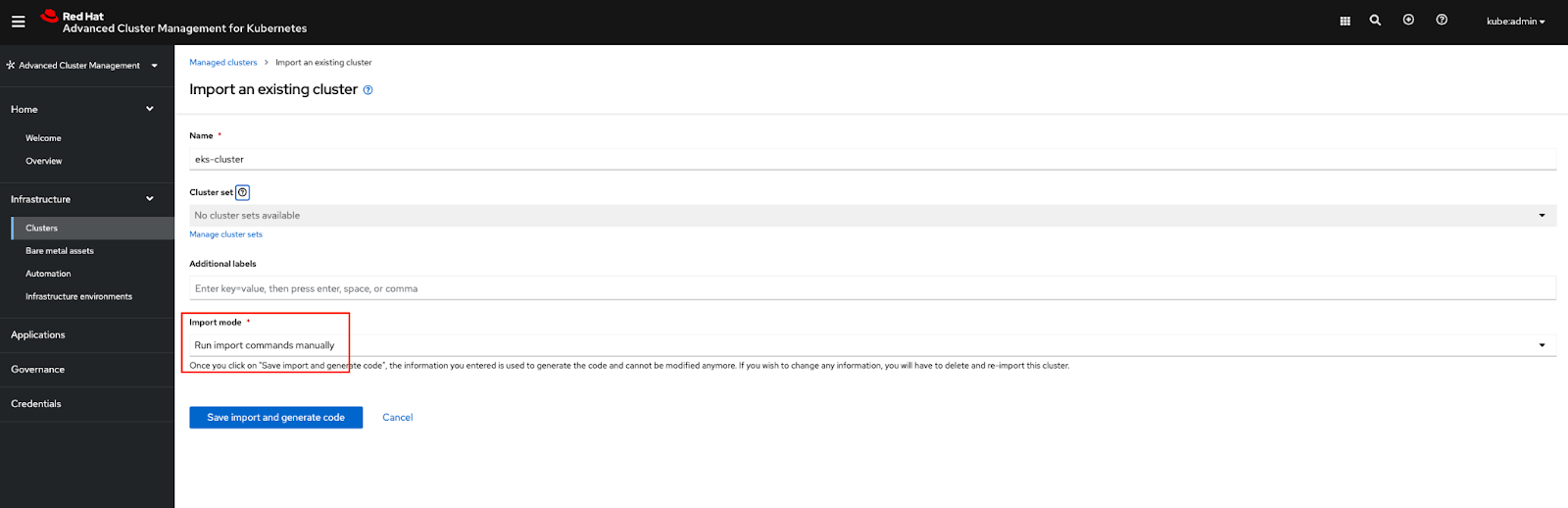
Select “Save import and generate code”.
Select “Copy command” and run the command from the command line against the EKS cluster.
Your EKS cluster will successfully get imported into ACM.

Sobre os autores

Mais como este
A decade of open innovation: Red Hat continues to scale the open hybrid cloud with Microsoft
Stop managing the past and start building IT’s future
Edge computing covered and diced | Technically Speaking
Navegue por canal

Automação
Últimas novidades em automação de TI para empresas de tecnologia, equipes e ambientes

Inteligência artificial
Descubra as atualizações nas plataformas que proporcionam aos clientes executar suas cargas de trabalho de IA em qualquer ambiente

Nuvem híbrida aberta
Veja como construímos um futuro mais flexível com a nuvem híbrida

Segurança
Veja as últimas novidades sobre como reduzimos riscos em ambientes e tecnologias

Edge computing
Saiba quais são as atualizações nas plataformas que simplificam as operações na borda

Infraestrutura
Saiba o que há de mais recente na plataforma Linux empresarial líder mundial

Aplicações
Conheça nossas soluções desenvolvidas para ajudar você a superar os desafios mais complexos de aplicações

Virtualização
O futuro da virtualização empresarial para suas cargas de trabalho on-premise ou na nuvem
