
Troubleshooting can be a tricky process, and fixing things requires the right tool. If any of you have ever played a title from From Software (i.e., Dark Souls, Bloodborne, or Sekiro) then you will understand the parallel I'm drawing here. These games are famous for being punishingly hard, particularly when it comes to boss fights. However, once you have a little experience, you realize that many of these seemingly impossible encounters aren't really that tricky, you just need the right tools. Most of these fights have a "mechanic" built into the battle that you can exploit to increase your chances of survival. For example, in Bloodborne, there is a difficult early boss fight against Father Gascoigne. This fight can be hairy (see what I did there), especially early on; however, there is a secret item that you can get by exploring the first area that turns certain death into a potentially survivable situation.
Now that I have exposed my nerd credentials, we can get back to the subject at hand. Like the Father Gascoine fight, troubleshooting a system can be difficult if you don't have the right information or tools at your disposal. Everyone has their favorite ways of approaching these challenges. Here are six of my go-to commands for quickly identifying a given issue and defeating it.
Ping and SSH
What's the first thing that people always ask? It's a big joke in the troubleshooting community, but "Is the system powered on?" can be a legitimate question. When you consider how many systems are remote to the end-user, being able to see if a given system is powered on is actually necessary.
This issue brings me to the first two commands that I always use for checking if a system is up. Ping is one of the most basic commands you can use. Hell, even people who aren't into technology know how to use ping. Its really simple: Either a system is up and will send you a response, or it is down and will time out. Okay, truthfully, it's not quite that simple. That is why SSH is my number two. A system can be configured to not acknowledge ICMP requests. Since ping uses ICMP traffic, the results might not be entirely accurate. If you can ssh into a system, even when ping times out, then you know it's up. Simple stuff.
For more information on how SSH works, click here.
Telnet
Telnet is fantastic for troubleshooting network problems. In my use case, telnet is simply a tool I use to see if the necessary ports are open. For example, if you are trying to set up a route between two remote systems for off-site data replication and the replication fails between your two devices, you want to ensure that the correct ports are opened across the firewalls.
For more info on telnet, please see this excellent piece by Dustin Minnich.
Top
Fourth is the top command. Think of top as an intelligence drone circling a battlefield. It feeds you real-time information on your system performance, showing you all manner of information regarding CPU load, memory usage, or "hungry" PIDs. This capability allows you to monitor your resources during peak hours, and the more information you have, the better prepared you are to solve issues as they arise.
Check out this article by one of our contributors on customizing the top command to make it even more useful.
Traceroute
If you are unable to reach a particular destination over a network, the obvious answer is traceroute. This tool does exactly what it says it does: It traces the path that packets take to reach their destination. With traceroute, you receive information for every device that it touches along the way, and if there are drops or timeouts, you can see exactly where it is happening. This fact is great for figuring out where the problem resides.
You can see a full breakdown of the command and its output here.
Grep and color
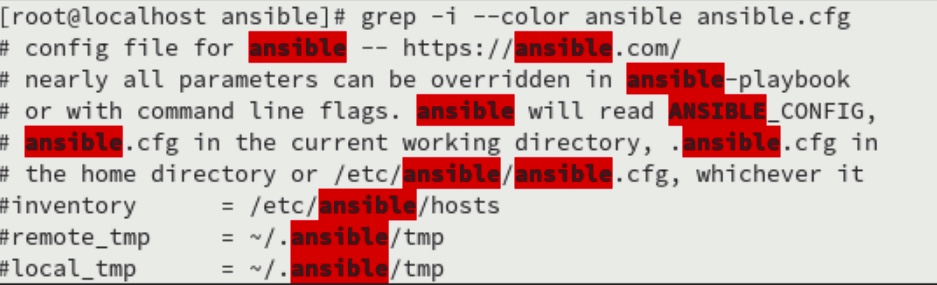
This is more of a useful trick than a full command, but adding color to your grep searches can make browsing log files for errors a much more user-friendly experience. Some distros include this setting by default, but many don't. The utility of this technique can be seen in the following screencap:
Carry on
I hope that you find my favorite commands useful in your troubleshooting efforts. I know that most of these are basic commands, but they are my go-to for narrowing down what the problem is and where it lives.
I would love to hear your take on this list. Reach out to us at enable-sysadmin@redhat.com if you are interested in sharing your own list of go-to commands!
[Need more on networking? Download the Linux networking cheat sheet.]
Sobre o autor
Tyler is the Sr. Community Manager at Enable Sysadmin, a submarine veteran, and an all-round tech enthusiast! He was first introduced to Red Hat in 2012 by way of a Red Hat Enterprise Linux-based combat system inside the USS Georgia Missile Control Center. Now that he has surfaced, he lives with his wife and son near Raleigh, where he worked as a data storage engineer before finding his way to the Red Hat team. He has written numerous technical documents, from military procedures to knowledgebase articles and even some training curricula. In his free time, he blends a passion for hiking, climbing, and bushcraft with video games and computer building. He is loves to read and enjoy a scotch or bourbon. Find him on Twitter or on LinkedIn.
Mais como este
Cinco motivos para não limitar sua estratégia do Lightwell aos patches
Por que a segurança pós-quântica financeira deve começar já
Container Roundup | Compiler
Untangling Networks | Compiler
Navegue por canal

Automação
Últimas novidades em automação de TI para empresas de tecnologia, equipes e ambientes

Inteligência artificial
Descubra as atualizações nas plataformas que proporcionam aos clientes executar suas cargas de trabalho de IA em qualquer ambiente

Nuvem híbrida aberta
Veja como construímos um futuro mais flexível com a nuvem híbrida

Segurança
Veja as últimas novidades sobre como reduzimos riscos em ambientes e tecnologias

Edge computing
Saiba quais são as atualizações nas plataformas que simplificam as operações na borda

Infraestrutura
Saiba o que há de mais recente na plataforma Linux empresarial líder mundial

Aplicações
Conheça nossas soluções desenvolvidas para ajudar você a superar os desafios mais complexos de aplicações

Virtualização
O futuro da virtualização empresarial para suas cargas de trabalho on-premise ou na nuvem
