
In Red Hat OpenShift 4.2 we introduced OpenShift Console customization via CRDs. Now, for OpenShift 4.3, we have extended the customization abilities to allow users to add their own YAML sample to a Kubernetes resource. These YAML sample will appear in a sidebar on the creation page for any Kube resource:

Out of the box, OpenShift 4 provides a few examples for users. With this new extension mechanism users can now add their own YAML sample for all users on the Cluster. Let us look at how we can manually add a YAML example to the cluster. First we need to navigate to the Custom Resource Definition navigation item and search for YAML:
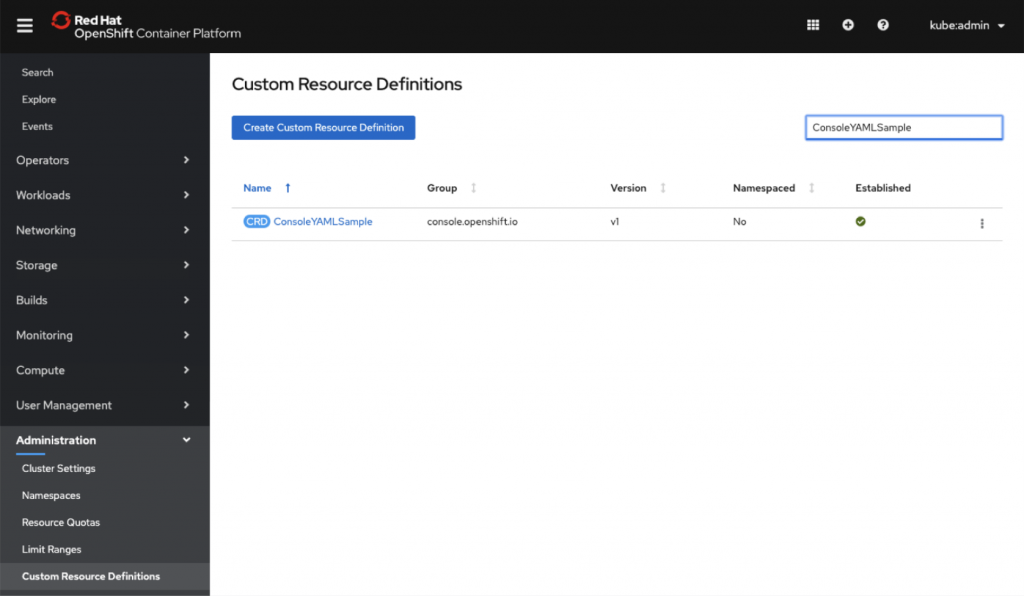
Next we select the ConsoleYAMLSample CRD and navigate to the instances tab:

In this example we are going to create a YAML Sample for “Job” Kube resource:
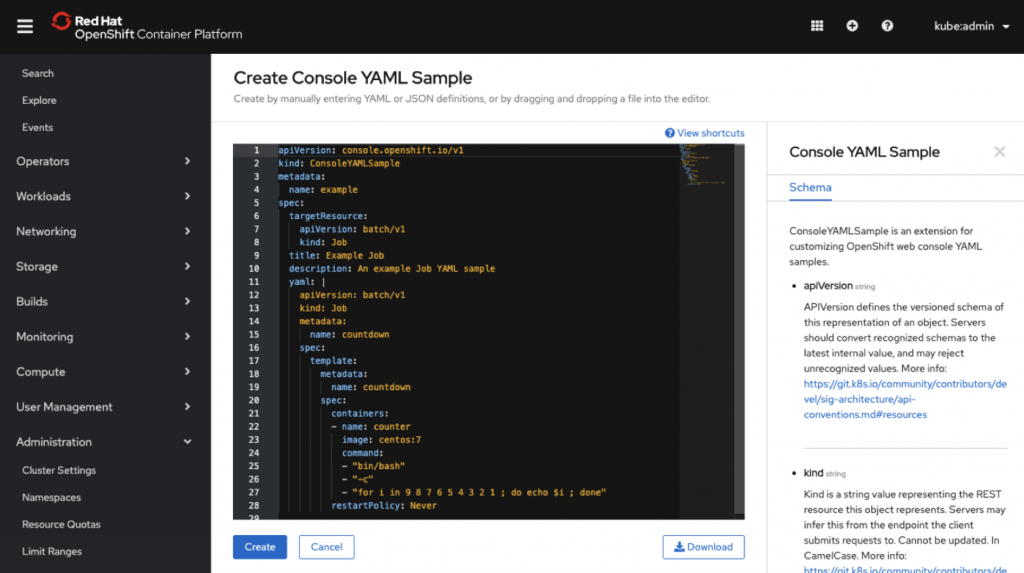
Let us take a closer look at the YAML:
description: An example Job YAML sample

 targetResource:

   apiVersion: batch/v1

   kind: Job                ---> Kube resource assigned this sample

 title: Example Job         ---> Display text in the sidebar

  Snippet: false            ---> YAML will be injected and not replaced if “true”

 yaml:                  ---> Sample YAML content

   apiVersion: batch/v1

   kind: Job

   metadata:

     name: countdown

   spec:

     template:

       metadata:

         name: countdown

       spec:

         containers:

         - name: counter

           image: centos:7

           command:

           - "bin/bash"

           - "-c"

           - "for i in 9 8 7 6 5 4 3 2 1 ; do echo $i ; done"

         restartPolicy: Never
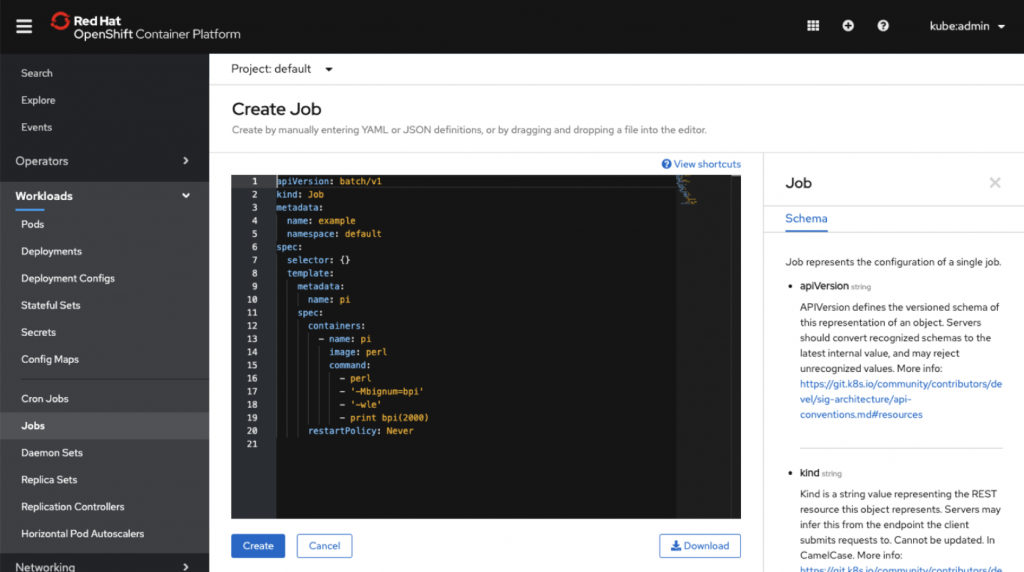
Before we create the ConsoleYAMLSample CRD, we can navigate to the Jobs menu item and attempt to create a new Job. You will see that no Sample section appears in the Job creation page, only the Schema tab appears in the sidebar:
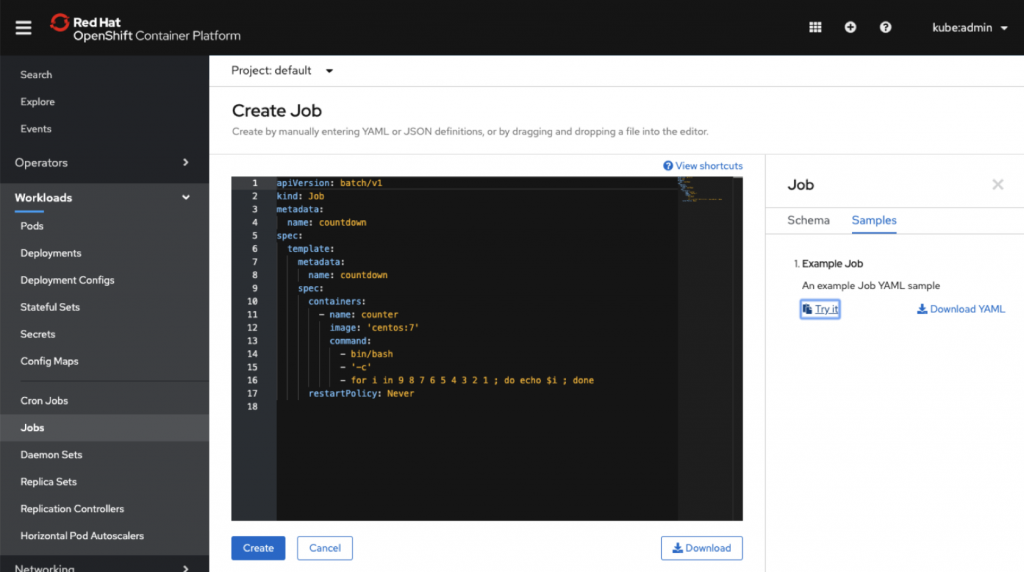
After we create the ConsoleYAMLSamples CRD, we can see our sample now shows up under the Samples section:
In addition to creating samples manually, this can be achieved programmatically, since the extensions mechanism was built using CRDs. An important use case: With this extension mechanism when a new Operator is installed and it adds new Kube resources (CRDs) to the cluster, the Operator can now add more YAML samples than just the default one.
Snippets
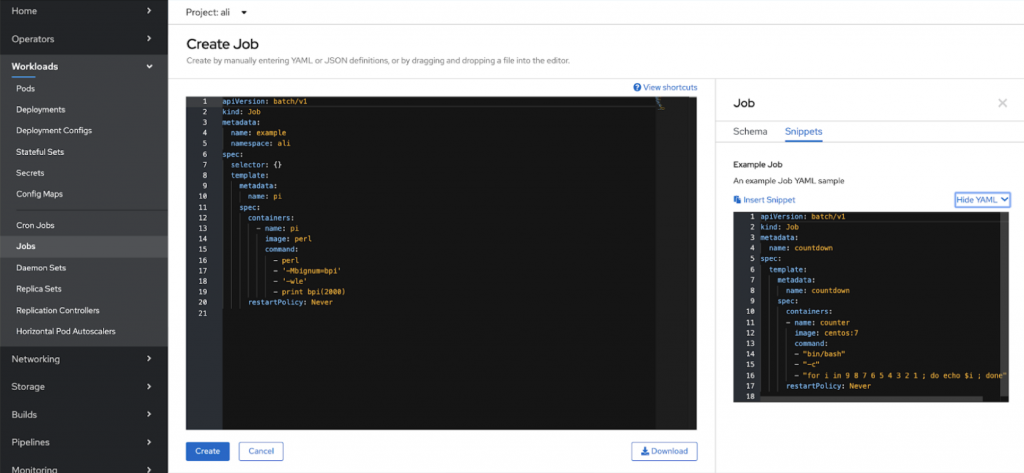
If the “snippet” flag is set to true, then the sample will show up as a snippet, and will be injected into the existing YAML at the location of the cursor in the YAML editor. Snippets will not replace the existing YAML. The Snippets section will show up as a tab in the sidebar:
If you’d like to learn more about what the OpenShift team is up to or provide feedback on any of the new 4.3 features, please take this brief 3-minute survey.
Sobre o autor
Red Hatter since 2018, technology historian and founder of The Museum of Art and Digital Entertainment. Two decades of journalism mixed with technology expertise, storytelling and oodles of computing experience from inception to ewaste recycling. I have taught or had my work used in classes at USF, SFSU, AAU, UC Law Hastings and Harvard Law.
I have worked with the EFF, Stanford, MIT, and Archive.org to brief the US Copyright Office and change US copyright law. We won multiple exemptions to the DMCA, accepted and implemented by the Librarian of Congress. My writings have appeared in Wired, Bloomberg, Make Magazine, SD Times, The Austin American Statesman, The Atlanta Journal Constitution and many other outlets.
I have been written about by the Wall Street Journal, The Washington Post, Wired and The Atlantic. I have been called "The Gertrude Stein of Video Games," an honor I accept, as I live less than a mile from her childhood home in Oakland, CA. I was project lead on the first successful institutional preservation and rebooting of the first massively multiplayer game, Habitat, for the C64, from 1986: https://neohabitat.org . I've consulted and collaborated with the NY MOMA, the Oakland Museum of California, Cisco, Semtech, Twilio, Game Developers Conference, NGNX, the Anti-Defamation League, the Library of Congress and the Oakland Public Library System on projects, contracts, and exhibitions.
Mais como este
Ansible Automation Platform 2.7 Visual Execution Environment Builder e Content Discovery Guide
Pare de reescrever código estável: como o Lightwell protege seus resultados financeiros e a velocidade do desenvolvedor
Can agentic AI patch the internet?
Random Acts Of Automation | Compiler
Navegue por canal

Automação
Últimas novidades em automação de TI para empresas de tecnologia, equipes e ambientes

Inteligência artificial
Descubra as atualizações nas plataformas que proporcionam aos clientes executar suas cargas de trabalho de IA em qualquer ambiente

Nuvem híbrida aberta
Veja como construímos um futuro mais flexível com a nuvem híbrida

Segurança
Veja as últimas novidades sobre como reduzimos riscos em ambientes e tecnologias

Edge computing
Saiba quais são as atualizações nas plataformas que simplificam as operações na borda

Infraestrutura
Saiba o que há de mais recente na plataforma Linux empresarial líder mundial

Aplicações
Conheça nossas soluções desenvolvidas para ajudar você a superar os desafios mais complexos de aplicações

Virtualização
O futuro da virtualização empresarial para suas cargas de trabalho on-premise ou na nuvem
