OpenShift 4.12 introduces a powerful way to deploy OpenShift clusters: the Agent-Based Installer. This new method eliminates the need for a connection to the internet, making it ideal for disconnected environments.
The Agent-Based installer combines the ease of use of the Assisted Installer cloud service with the ability to run completely offline. A new agent subcommand of the OpenShift installer openshift-install will do the magic generating a bootable image containing all of the information required to deploy an OpenShift cluster.
Why did we create the Agent-Based Installer?
For some users, OpenShift deployment methods are either too opinionated, too complex, or simply require internet access, which every user does not have. The Agent-Based Installer provides an easy and repeatable way to deploy your first cluster on-premises, disconnected, and without requiring any provisioning node.
Once you have your first cluster up and running you can keep deploying multiple clusters with the Multicluster Engine for Kubernetes Operator , which is part of the standard OpenShift Container Platform, or with the all-powerful Red Hat Advanced Cluster Management.
But you still need that first cluster, which is where the Agent-Based Installer is most powerful for standing it up.
What did you tell us?
We collected feedback from many users, here are some examples of what they told us:
- We have a requirement to bootstrap a single-node cluster without a dependency of a call-back to a hub cluster (MCE or RHACM).
- Our use case is to send an on site person without any prior knowledge [of OpenShift], to a remote site with a USB stick and install an OpenShift Container Platform cluster.
- I have a requirement to deploy a single-node OpenShift or a three-node cluster in a disconnected, on premise environment to host life-critical applications.
- We maintain many disconnected Openshift clusters, each in their own air-gapped network, with primary deployment on vSphere, most often without DHCP.
- Deploying, automating, and scaling user-provisioned infrastructure has been a constant challenge.
- In the installer-provisioned infrastructure method, a RHEL server is required but this is seen as an additional requirement for OCP tha we can’t always provide.
- Our use case is to only deploy on fully disconnected environments so the Assisted Installer service is not an option.
- The installer-provisioned infrastructure methods for our bare metal platform forces us to use the node’s BMCs for remote management, but we can’t use them at this site.
All of these are relevant and real-life problems that the Agent-Based Installer now solves for our users.
What features does it come with?
Here’s a summary of the top features:
|
Feature |
Agent-Based Installer |
|
Air-Gapped / fully disconnected |
✅ |
|
Install from bootable image |
✅ |
|
Agnostic platform (platform:none) |
✅ |
|
Bare metal platform |
✅ |
|
vSphere platform |
✅ |
|
Integrated in openshift-install |
✅ |
|
Single-node OpenShift (SNO) |
✅ |
|
3-node compact clusters (schedulable masters) |
✅ |
|
In-place bootstrap (provisioning node not required) |
✅ |
|
Host network configuration with Kubernetes NMstate |
✅ |
But we don’t stop there, many other functionalities are available in this first release, for example it uses NMState syntax to configure static IPs, VLANs, and Bonds. Followed by networking where , IPv4,IPv6, and dual-stack that is IPv4/IPv6 are parallelly supported.
To be sure of a successful installation, the Agent-Based Installer performs validation checks on user defined YAML files before the Agent ISO is created.
If you ever tried RHACM’s Zero Touch Provisioning, you’d like to know you can use the configuration manifests of ZTP with them.
And how about deploying a single-node OpenShift cluster ( SNO) on vSphere?
How does it work?
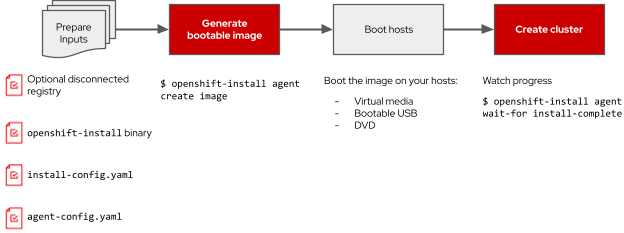
The Installer allows users to define the cluster configuration, including per-host configurations, with the install-config.yaml file and an additional agent-config.yaml, which are then used to generate an ISO image. You will then boot that single image in the target nodes and have a fully unattended installation.
Try it now
To know more, and to begin deploying OpenShift clusters follow the instructions in the official documentation.
See it in action!
Take a peek in this 5 minutes demo.
What’s coming next
The potential of the Agent-Based Installer is massive. The ability to provision nodes from an image that stands up OpenShift clusters allows for the integration of an interactive flow. Users could also enter the cluster configuration interactively after booting the image, that way you could use the same image to provision any cluster, anywhere. We are exploring this option in the upcoming releases, as well as a number of other improvements.
Thank you for reading and stay tuned!
Sobre los autores

Más como éste
The agentic paradox and the case for hybrid AI
Strengthening the enterprise foundation: Red Hat and Oracle’s expanding collaboration
Edge IT: A space odyssey | Technically Speaking
A vested interest in 5G | Technically Speaking
Navegar por canal

Automatización
Las últimas novedades en la automatización de la TI para los equipos, la tecnología y los entornos

Inteligencia artificial
Descubra las actualizaciones en las plataformas que permiten a los clientes ejecutar cargas de trabajo de inteligecia artificial en cualquier lugar

Nube híbrida abierta
Vea como construimos un futuro flexible con la nube híbrida

Seguridad
Vea las últimas novedades sobre cómo reducimos los riesgos en entornos y tecnologías

Edge computing
Conozca las actualizaciones en las plataformas que simplifican las operaciones en el edge

Infraestructura
Vea las últimas novedades sobre la plataforma Linux empresarial líder en el mundo

Aplicaciones
Conozca nuestras soluciones para abordar los desafíos más complejos de las aplicaciones

Virtualización
El futuro de la virtualización empresarial para tus cargas de trabajo locales o en la nube
