
An Operator Lifecycle Manager (OLM) CatalogSource is a collection of operator metadata. OLM uses CatalogSources to build the list of available operators that can be installed from OperatorHub in the OpenShift web console. In OpenShift 4.3, the web console has added support for managing the out-of-the-box CatalogSources as well as adding your own custom CatalogSources.
You can create a custom CatalogSource using the OLM Operator Registry. The operator-framework/operator-registry repository has a Dockerfile to build a minimal registry server image using some example manifests and can be used to create your own custom catalog images. Run the following commands (replacing quay.io/my-organization/example-registry with your own repository) to build the example. You’ll need a repository at an image registry like quay.io for your image.
git clone https://github.com/operator-framework/operator-registry.git

cd operator-registry

docker build -t quay.io/my-organization/example-registry:latest -f upstream-example.Dockerfile .

docker push quay.io/my-organization/example-registry:latest
To add the catalog source in OpenShift console, log in as a cluster administration. Go to the Cluster Settings page under the Administration navigation section and click on the Global Configuration tab. This page lists the configuration resources for various cluster components and is a great place to explore what cluster configuration is available.
Click the OperatorHub link and then click the Sources tab to see the currently installed CatalogSources.
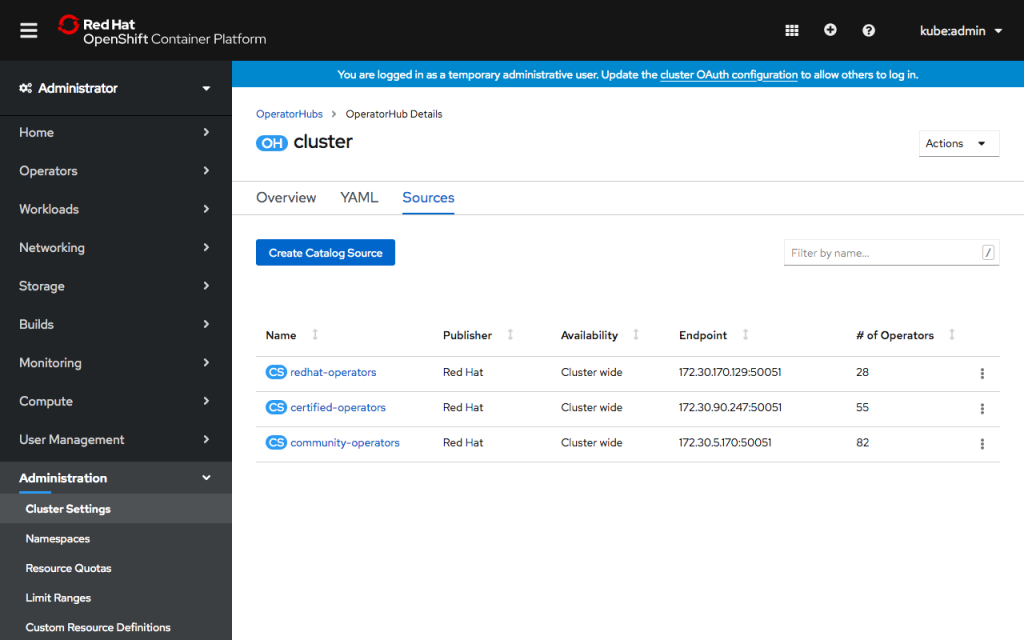
You’ll see several already present on the cluster, which populate OperatorHub with Red Hat, Certified and Community operators. These default catalog sources can now be enabled and disabled inside OpenShift console from the action menu for each table row.
To add a new CatalogSource, click Create Catalog Source. In the form, give the CatalogSource a name and optionally a display name and publisher. Enter the image name you built above. You can choose whether the CatalogSource is available for all namespaces or a single namespace.
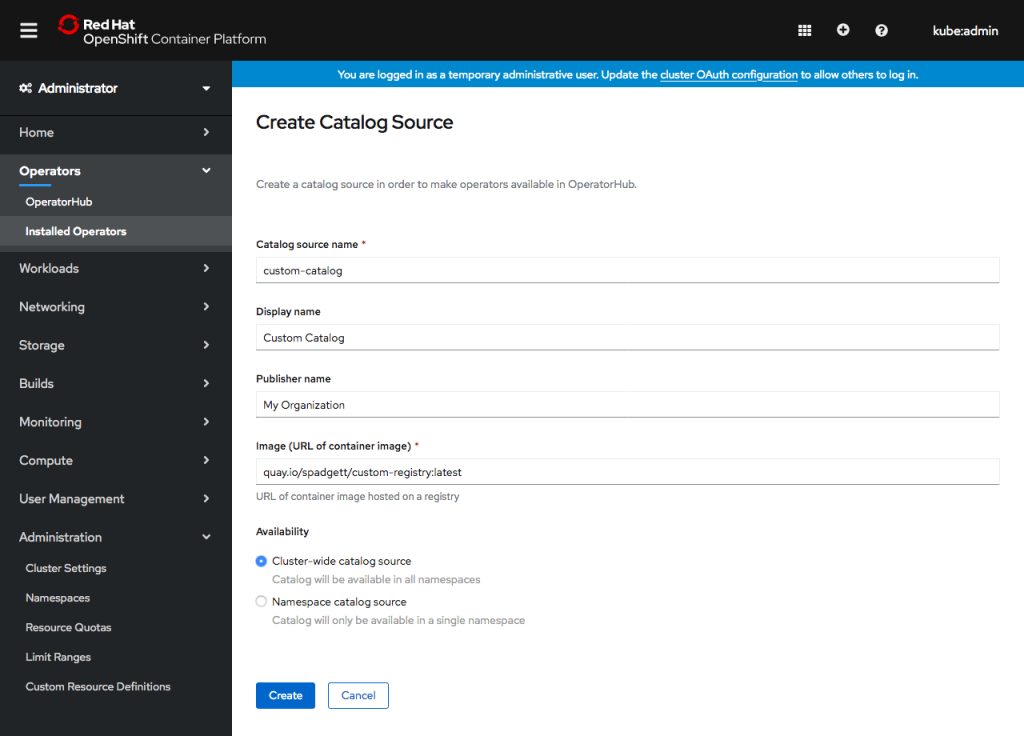
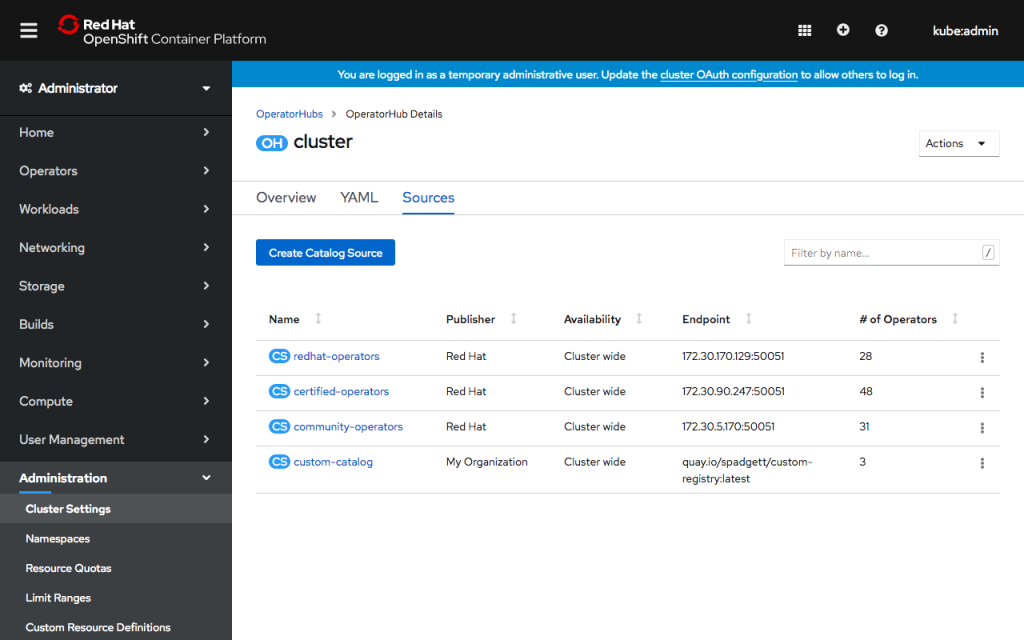
Click Create. You’ll see the new catalog source in the list. After a few minutes, OLM will load the catalog, and console will show the number of operators available.
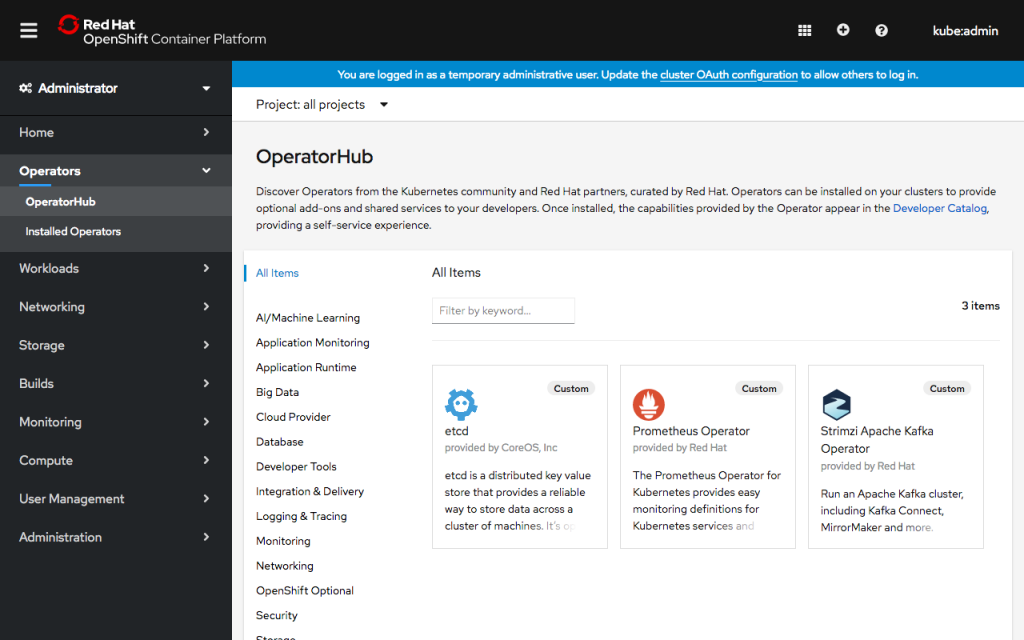
Visit the OperatorHub page under the Operators navigation section to see the new operators! Operators from a custom CatalogSource will be categorized as Provider Type “Custom,” and you can use the click the Provider Type “Custom” filter to the left of the page to see just the new operators.
If you’d like to learn more about what the OpenShift team is up to or provide feedback on any of the new 4.3 features, please take this brief 3-minute survey.
Sobre el autor
Más como éste
¿No puedes aplicar parches con la suficiente rapidez? La confianza cero como última línea de defensa
4 razones para comenzar a utilizar el modo de imagen para Red Hat Enterprise Linux
Scaling with Orchestrators | Compiler
Container Roundup | Compiler
Navegar por canal

Automatización
Las últimas novedades en la automatización de la TI para los equipos, la tecnología y los entornos

Inteligencia artificial
Descubra las actualizaciones en las plataformas que permiten a los clientes ejecutar cargas de trabajo de inteligecia artificial en cualquier lugar

Nube híbrida abierta
Vea como construimos un futuro flexible con la nube híbrida

Seguridad
Vea las últimas novedades sobre cómo reducimos los riesgos en entornos y tecnologías

Edge computing
Conozca las actualizaciones en las plataformas que simplifican las operaciones en el edge

Infraestructura
Vea las últimas novedades sobre la plataforma Linux empresarial líder en el mundo

Aplicaciones
Conozca nuestras soluciones para abordar los desafíos más complejos de las aplicaciones

Virtualización
El futuro de la virtualización empresarial para tus cargas de trabajo locales o en la nube
