
Imagine you’re a cluster administrator managing a huge number of users. A user reaches out to you with a problem: “My console is broken.” There’s seemingly an infinite number of possible explanations for why this user can’t access the console. However, you can’t see their system and they have difficulty explaining what the console is doing. The Red Hat OpenShift team recently met with a university customer whose admins frequently run into this scenario. Luckily, OpenShift 4.3’s web console UI addresses this exact problem. New to 4.3, we’ve introduced the ability to spoof users and groups.
Users of Red Hat OpenShift have long had the ability to impersonate Role Bindings through the web console UI. However, since the addition of the user management section, users and administrators can now spoof other users and groups.
To impersonate a user, simply navigate to the Users page under the User Management section of the navigation. Open the menu for a particular user and select “Impersonate User ‘[user]’”. In our case, we are impersonating the user “Ali.”
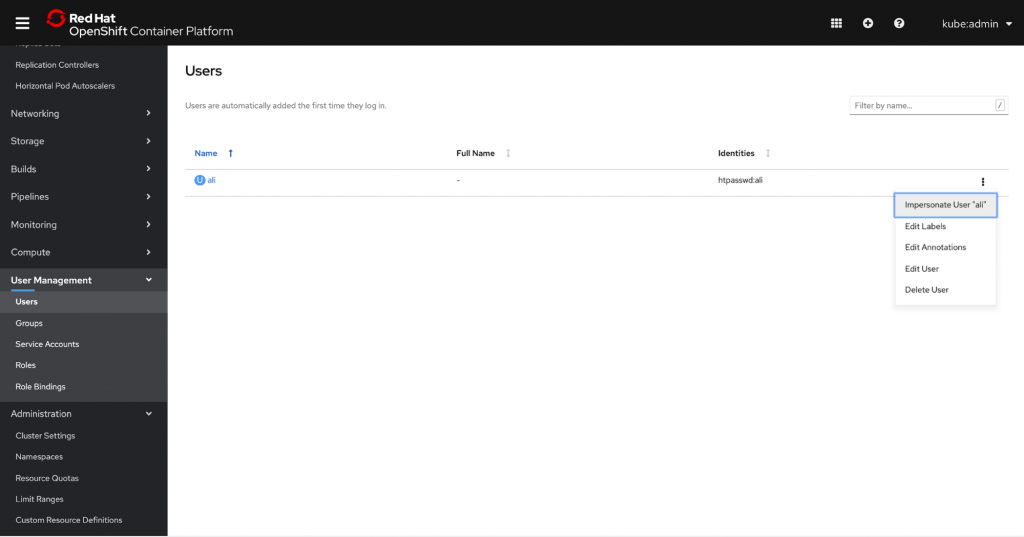
Note that a user can have multiple role bindings; thus, by spoofing the user instead of a role binding, system administrators can impersonate the user and see the console with their exact authorization credentials. This allows for much quicker and easier troubleshooting access, enabling admins to resolve issues faster and more efficiently.
Once you’ve elected to impersonate a user, you’ll be brought to the Projects page in their view. A console notification banner will appear to remind you that you are viewing the console from Ali’s perspective. You can stop by clicking the “Stop Impersonation” link in the banner.

Administrators can also choose to impersonate a group. To do this, simply navigate to the Groups page under the User Management section of the navigation. Just as we did for user impersonation, open the menu for a particular group and select “Impersonate Group ‘[group]’”. In this case, we are impersonating the group “system:authenticated”.
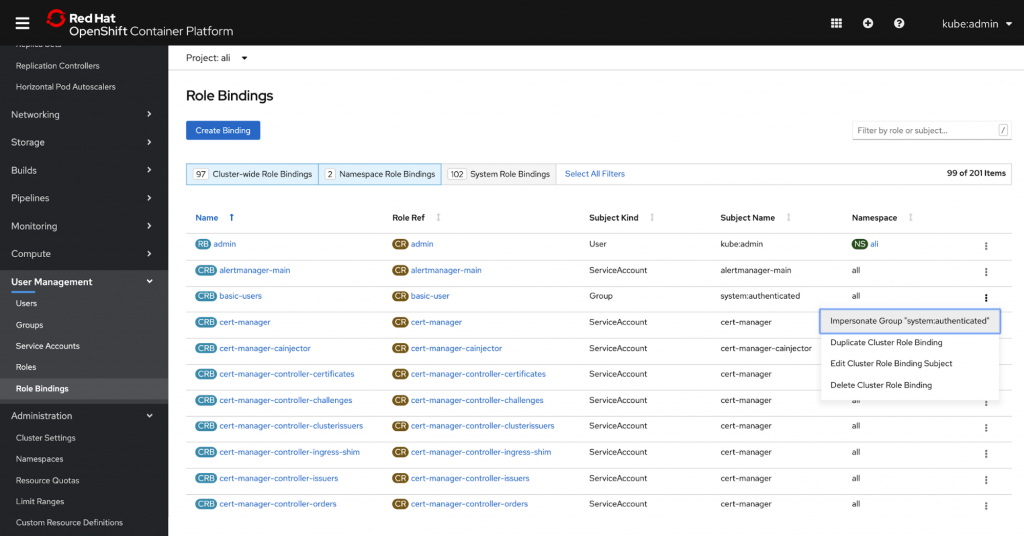
You can also access impersonation tools from the Role Bindings page. Again, open the menu for a particular role binding and subject and select “Impersonate User ‘[User]’”.

Access is also available from the Role Bindings tab within a particular role.
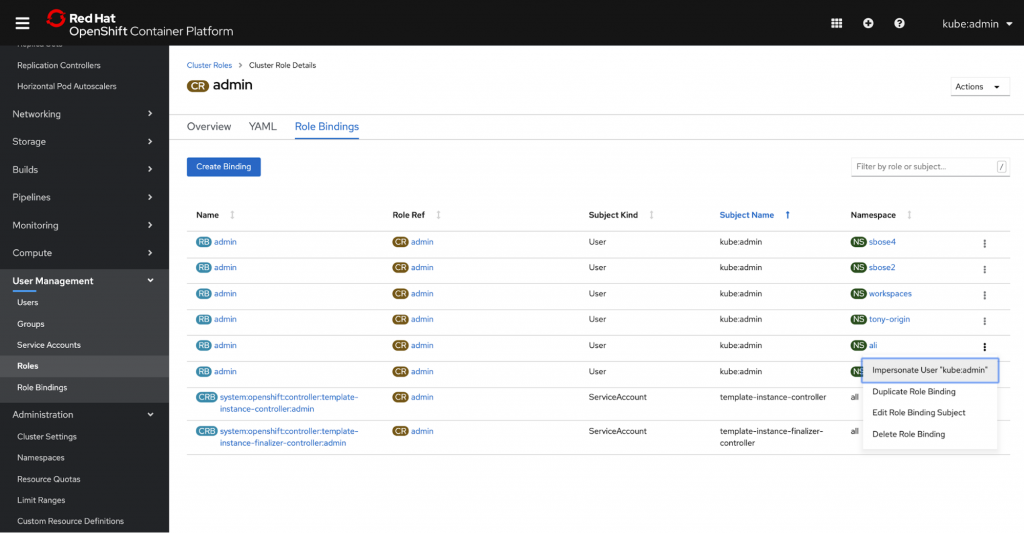
We know that helping others troubleshoot can be a huge pain point for our users, so we hope that this new feature helps administrators resolve issues faster and more easily. To learn more about our other user management updates, check out our User Management Improvements blog.
If you’d like to learn more about what the OpenShift team is up to or provide feedback on any of the new 4.3 features, please take this brief 3-minute survey.
Sobre el autor
Más como éste
¿No puedes aplicar parches con la suficiente rapidez? La confianza cero como última línea de defensa
4 razones para comenzar a utilizar el modo de imagen para Red Hat Enterprise Linux
Scaling with Orchestrators | Compiler
Container Roundup | Compiler
Navegar por canal

Automatización
Las últimas novedades en la automatización de la TI para los equipos, la tecnología y los entornos

Inteligencia artificial
Descubra las actualizaciones en las plataformas que permiten a los clientes ejecutar cargas de trabajo de inteligecia artificial en cualquier lugar

Nube híbrida abierta
Vea como construimos un futuro flexible con la nube híbrida

Seguridad
Vea las últimas novedades sobre cómo reducimos los riesgos en entornos y tecnologías

Edge computing
Conozca las actualizaciones en las plataformas que simplifican las operaciones en el edge

Infraestructura
Vea las últimas novedades sobre la plataforma Linux empresarial líder en el mundo

Aplicaciones
Conozca nuestras soluciones para abordar los desafíos más complejos de las aplicaciones

Virtualización
El futuro de la virtualización empresarial para tus cargas de trabajo locales o en la nube
