Red Hat Ansible Automation is widely known to automate and configure Linux and Windows hosts, as well as network automation for routers, switches, firewalls and load balancers. Plus, there are a variety of modules that deal with the cloud and the API around it such as Microsoft Azure, Amazon Web Services (AWS) and Google Compute Engine. And there are other modules that interact with Software as a Service (SaaS) tools like Slack or ServiceNow. Although the downtime for these APIs is very minimal, it does happen, and it is even more likely that the connection between your Ansible control host (where you are running Ansible from) and the cloud-centric API could be down.
In this blog post, I will cover some tips and tricks for dealing with unreliable connections to cloud-centric APIs and how I build Ansible Playbooks in a reliable manner. As a technical marketing engineer, I consider my customers the Red Hat field teams, and often Solutions Architects are running playbooks from unreliable hotel wireless, coffee shops and sometimes even airplanes! I have to make sure playbooks have some more robustness built in for these odd situations. It is hair-pulling frustrating to get through a 20 task playbook for it to fail on the 19th task because your wireless went out for a couple seconds. This is especially frustrating if you are at the airport just trying to setup a demo or playground to show something to a client.
The Until Loop
Many people that use Ansible are very familiar with the loop construct. A loop (previously known as with_items) is very simple and powerful and allows you to iterate over a list or dictionary in an easy fashion. However, I find that many people are not aware of the until loop. Let us look at how this can work.
The module ec2_vpc_net allows us to create an AWS Virtual Private Cloud.
- name: Create AWS VPC sean-vpc
      ec2_vpc_net:
        name: "sean-vpc”
        cidr_block: "192.168.1.0/16”
        region: "us-east-1”
      register: create_vpc
      until: create_vpc is not failed
      retries: 5
The name, cidr_block and region are module parameters for the ec2_vpc_net module. However the register, until and retries are task level parameters, meaning that you can use these on any module. This task will attempt to create the VPC five times before it gives up and fails.
Let's step back a minute to see how this works. Each time we run a task there are some common variables that the task returns to let us know how the task performed:
- name: test local playbook
      hosts: localhost
      gather_facts: false
      tasks:
          - name: dumb easy command
            shell: ls -la
            register: task_variable
          - name: debug the var
            debug:
              var: task_variable
When we run this playbook with ansible-playbook test_output.yml we get some standard output (via the debug module) printed to the terminal window (or browser window when using Ansible Tower).
TASK [debug the var] **************************************************************
    ok: [localhost] =>
     task_variable:
          changed: true
          cmd: ls -la
          delta: '0:00:00.011018'
          end: '2018-12-07 09:53:14.595811'
          failed: false
    ...
One of the key, value pairs we always get returned from any Ansible task is a failed key. If the task completed successfully the task will return a failed: false. If the task failed, the task will return a failed: true. Looking back at the until loop logic for the AWS VPC task:
register: create_vpc
    until: create_vpc is not failed
    retries: 5
We are registering the result of the task so we can look at the failed key, value pair. The until value is the conditional we are applying. In this case we keep running the task until the create_vpc does not have failed: true. However we don't want the task to run this for infinity. The default value for "retries" is 3, however I have increased this to 5. The until loop provides significant robustness to the task. There is also a delay parameter that can be combined with the until loop. The delay is how much time to wait between retries. The default value for the delay is 5 seconds. Check out the documentation for more details and examples of the until loop and the delay parameter.
Changing What A Failure Means
By default, if Ansible fails the playbook will end on that task, for the respective host it was running on. If I had a playbook running on 10 hosts, and it failed on 1 host on task three out of ten, the 7 subsequent tasks would not run for that host. The other hosts would remain unaffected.
With unreliable connections to an outside API we need to think about what is required and not required to define success for a playbook to finish. For example if you had a task spin up a DNS record on AWS's Route53 service, the DNS can be nice to have, but isn't required for you to begin using the instance you created. I can use an until loop to make the route53 tasks more reliable, but it might be OK if the Route53 service is down and unusable. I can use the IP address to get some work done done on my instance until I get a more reliable internet connection to re-run the playbook or the Route53 service becomes available again. There are some tasks that are "nice to have" vs. required.
The way to ignore a failed value is to use the ignore_errors parameter which is a task level parameter outlined in the documentation here. I think there is plenty of content in the docs and various blogs about using the ignore_errors so I think it is sufficient to summarize that ignore_errors will show red and report a failed: true key, value pair, but the playbook will continue on.
What happens if we want to combine the until loop with an ignore_errors?
- name: failure test playbook
      hosts: localhost
      gather_facts: false
      tasks:
        - name: purposely fail
          shell: /bin/false
          register: task_register_var
          until: task_register_var is not failed
          retries: 5
          ignore_errors: yes
        - name: debug task_register_var
          debug:
            msg: "{{ task_register_var }}"
We actually get the best of both worlds with an unreliable task. We get robustness with the until loop, combined with an ignore_errors which allows the playbook to complete regardless of that task completing successfully. I find myself using this combination of ignore_errors and until loops in conjunction with services like Let's Encrypt where it's not 100% required for me to have an SSL cert to start using the web app (I can rely on a self-signed cert until I can figure out the problem).
The Ansible Playbook outputs like this:
TASK [purposely fail] *************************************************************
    FAILED - RETRYING: purposely fail (5 retries left).
    FAILED - RETRYING: purposely fail (4 retries left).
    FAILED - RETRYING: purposely fail (3 retries left).
    FAILED - RETRYING: purposely fail (2 retries left).
    FAILED - RETRYING: purposely fail (1 retries left).
    fatal: [localhost]: FAILED! => changed=true
      attempts: 5
      cmd: /bin/false
      delta: '0:00:00.007936'
      end: '2018-12-07 13:23:13.277624'
      msg: non-zero return code
      rc: 127
      start: '2018-12-07 13:23:13.269688'
      stderr: '/bin/sh: /bin/false: No such file or directory'
      stderr_lines:
      - '/bin/sh: /bin/false: No such file or directory'
      stdout: ''
      stdout_lines:
    ...ignoring
    TASK [debug task_register_var] ****************************************************
      msg:
        attempts: 5
        changed: true
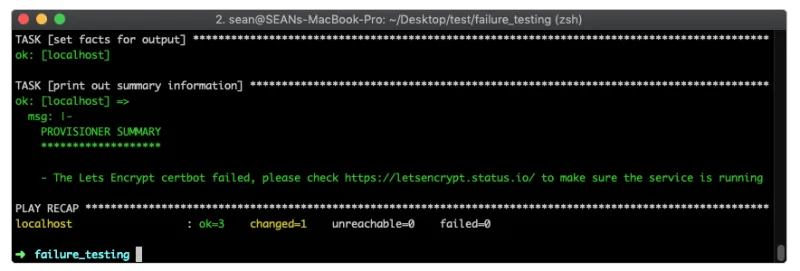
In the Ansible workshops I am actually using this combination of error handling for Let's Encrypt to make it easy for Ansible users to troubleshoot the issue. If there are any tasks that have a failure that can be skipped, I can add it to a variable and print it at the end of the workshop playbook (the playbook responsible for provisioning instances for students to use).
- name: failure test playbook
      hosts: localhost
      gather_facts: false
      vars:
        summary_information: |
          PROVISIONER SUMMARY
          *******************
      tasks:
        - name: ISSUE CERT
          shell: certbot certonly --standalone -d student1.testworkshop.rhdemo.io --email ansible-network@redhat.com --noninteractive --agree-tos
          register: issue_cert
          until: issue_cert is not failed
          retries: 5
          ignore_errors: yes
        - name: set facts for output
          set_fact:
          summary_information: |
            {{summary_information}}
            - The Lets Encrypt certbot failed, please check https://letsencrypt.status.io/ to make sure the service is running
          when: issue_cert is failed
        - name: print out summary information
          debug:
            msg: "{{summary_information}}"
This prints out a very easy to understand message to the terminal window:
In conclusion, Ansible is extremely flexible at adding some additional logic when it is necessary. The until loop can add robustness and the ignore_errors allows us to determine success criteria. In combination your Ansible Playbooks can be much more user proof, allowing you to have a proactive vs. a reactive approach to troubleshooting issues. Ansible can't control if an API or service is down, but we can definitely operate more robustly than home made scripts or DIY API implementations. The playbooks provided are extremely human readable and easy for novice users to understand.
À propos de l'auteur

Sean is a Principal Technical Marketing Manager, Ansible, where he brings over 10 years of experience building and automating computer networks. Sean previously worked for both Cumulus Networks (acquired by Nvidia) and Cisco Systems where he helped customers deploy, manage and automate their network infrastructure. He resides in Chapel Hill, NC with his wife and children and tweets from @IPvSean.
Plus de résultats similaires
KServe joins CNCF as an incubating project
Bringing intelligent, efficient routing to open source AI with vLLM Semantic Router
What’s The Recipe For Burnout? | Compiler
GitOps with Argo CD | Technically Speaking
Parcourir par canal

Automatisation
Les dernières nouveautés en matière d'automatisation informatique pour les technologies, les équipes et les environnements

Intelligence artificielle
Actualité sur les plateformes qui permettent aux clients d'exécuter des charges de travail d'IA sur tout type d'environnement

Cloud hybride ouvert
Découvrez comment créer un avenir flexible grâce au cloud hybride

Sécurité
Les dernières actualités sur la façon dont nous réduisons les risques dans tous les environnements et technologies

Edge computing
Actualité sur les plateformes qui simplifient les opérations en périphérie

Infrastructure
Les dernières nouveautés sur la plateforme Linux d'entreprise leader au monde

Applications
À l’intérieur de nos solutions aux défis d’application les plus difficiles

Virtualisation
L'avenir de la virtualisation d'entreprise pour vos charges de travail sur site ou sur le cloud
