
In my formative years working odd jobs in IT at small startups, I never had enough time off to warrant an out-of-office auto-response on my email. Recently, though, I've discovered that some companies promote a healthy work-life balance and not only enable but encourage employees to take a break. As with the all-powerful sudo command, however, with great power comes great responsibility, and a holiday demands an away message.
GNU Mailman
GNU Mailman is one of the most common open source mailing list services. It's self-hostable, there's a fancy web UI called Postorius that not nearly enough people deploy, and it's reliable and effective. There are many options, though, so here's how to find and modify your auto-responder.
1. Log in as a list administrator
The first step is to log in to Mailman. I use the open source Bitwarden to manage my passwords, so I open Bitwarden and click on the weblink to the mailing list admin panel, which otherwise I'd never remember. However you get there, you must be a list administrator to change list functions. If you're not a list administrator, your admin can add you from the General Options page, which is by default the first screen after logging in.

2. Navigate to the auto-responder panel
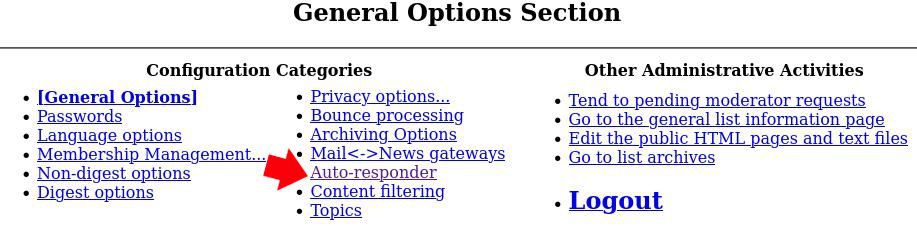
Once you've logged in as an administrator, look through Mailman's main menu at the top of the front page. Find Auto-responder and click the link.
3. Set your away message
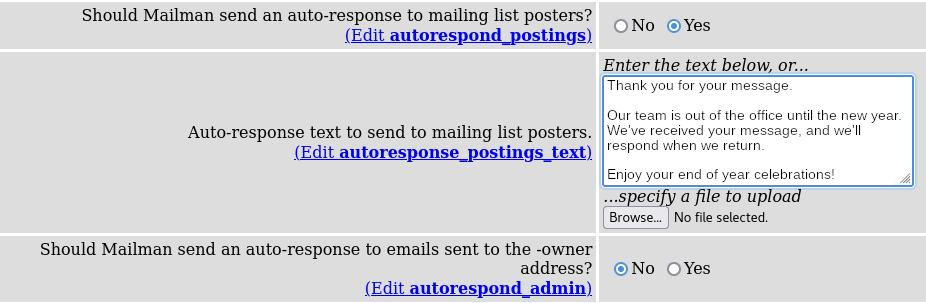
There are lots of options for the auto-responder, but the good news is that you decide what's important. Your options mostly come in couples: first, you're asked whether you want to auto-respond to a specific group of users, and then you're asked what the auto-response ought to be.
Respond to mailing list posters? Select this if you want to respond to people who post messages to your list. You probably want this when your team is going to be out but normally would respond to posts promptly.
If you do choose this option, set your message in the next block.
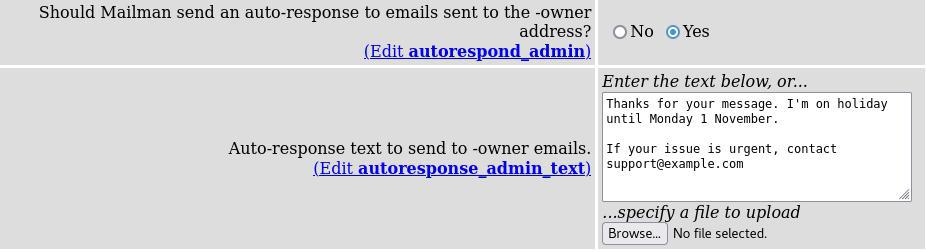
Respond to mailing list owner? Select this if you're the owner of the list and expect to receive emails about the list itself. In some organizations, this is important for the mitigation of list abuse.
Respond to list requests? The -request address is an automatically generated email address for your mailing list that accepts mailing list commands from users. It's designed to enable automation and user autonomy, and the commands aren't intended for humans. They speak directly to Mailman. You probably do not want to auto-respond to these emails.

If you're nervous about your Mailman robot receiving commands from users in your absence, you have the ability to discard them. Alternately, you can let the commands be processed and auto-respond anyway.
4. Set the number of responses to send
I hear horror stories of auto-responders responding to auto-responders, creating an infinite loop of out-of-office emails until the server crashes from insufficient disk space. You know your own mailing list best, so set your own value here, but I set mine to 90 days. Realistically, that means that anyone who mails my list while I'm on even a two-week holiday gets an auto-response just once.
When you're happy with your settings, click the Submit Your Changes button at the bottom of the page.
That's it. With these settings, you can control how your list responds to email while you're away from the office.
Automate it
Mailing lists are an important way to facilitate communication and keep your communities and teams organized. Don't be afraid to use the features of your mailing list!
À propos de l'auteur
Seth Kenlon is a Linux geek, open source enthusiast, free culture advocate, and tabletop gamer. Between gigs in the film industry and the tech industry (not necessarily exclusive of one another), he likes to design games and hack on code (also not necessarily exclusive of one another).
Plus de résultats similaires
L'importance de la sécurité post-quantique pour les services financiers
Red Hat Enterprise Linux Long-Life Add-On : votre solution RHEL sans date de fin prédéterminée
Infrastructure At The Edge | Compiler
Operating System Management | Compiler
Parcourir par canal

Automatisation
Les dernières nouveautés en matière d'automatisation informatique pour les technologies, les équipes et les environnements

Intelligence artificielle
Actualité sur les plateformes qui permettent aux clients d'exécuter des charges de travail d'IA sur tout type d'environnement

Cloud hybride ouvert
Découvrez comment créer un avenir flexible grâce au cloud hybride

Sécurité
Les dernières actualités sur la façon dont nous réduisons les risques dans tous les environnements et technologies

Edge computing
Actualité sur les plateformes qui simplifient les opérations en périphérie

Infrastructure
Les dernières nouveautés sur la plateforme Linux d'entreprise leader au monde

Applications
À l’intérieur de nos solutions aux défis d’application les plus difficiles

Virtualisation
L'avenir de la virtualisation d'entreprise pour vos charges de travail sur site ou sur le cloud
