
In Red Hat OpenShift 4.2, we introduced a number of new console customization features, including ConsoleNotifications, ConsoleExternalLogLinks, ConsoleLinks, and ConsoleCLIDownloads. New in 4.3, the ConsoleLink feature has been extended to cover even more use cases. In addition to the User Menu, Help Menu, and Application Menu, users can now add links to specific project dashboards.
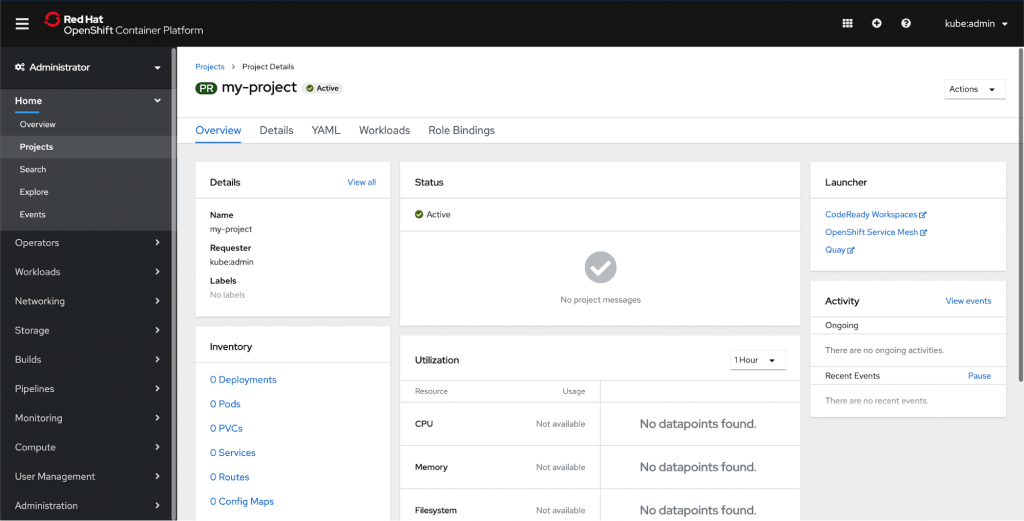
You can add a launcher card to a project dashboard by using the ConsoleLink CRD. Each of the links in the above screenshot is a separate ConsoleLink instance.
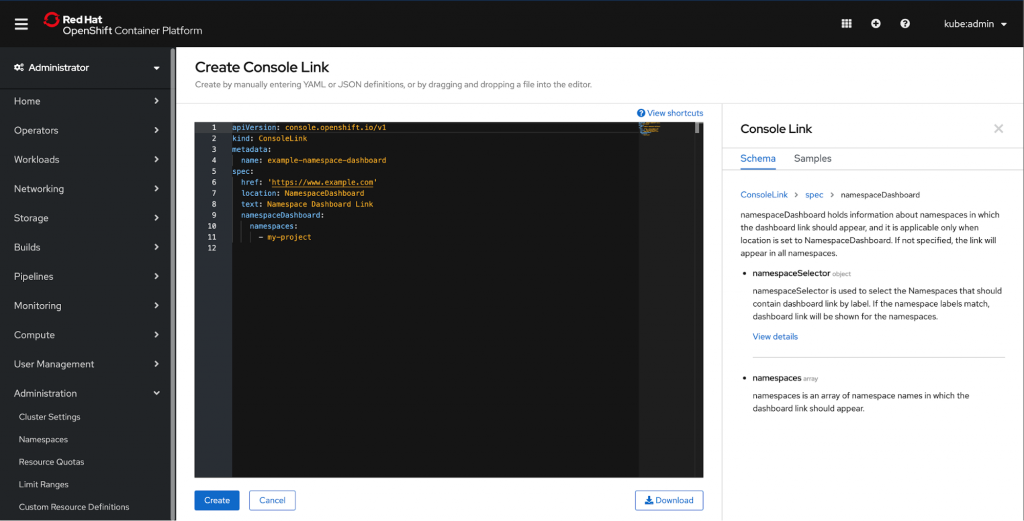
Users can define
namespaceDashboard, namespaceSelector
, and namespaces array to further customize their launcher.
namespaceDashboard
holds information about namespaces in which the dashboard link should appear, and it is applicable only when location is set to NamespaceDashboard. If not specified, the link will appear in all namespaces.
namespaceSelector
is used to select the Namespaces that should contain dashboard link by label. If the namespace labels match, dashboard link will be shown for the namespaces.
namespaces
is an array of namespace names in which the dashboard link should appear.
Take a closer look at the sample. We used namespaceDashboard to show the link in a single namespace; in this case, we’re adding it to the namespace ‘my-project’.
apiVersion: console.openshift.io/v1

kind: ConsoleLink

metadata:

 name: example-namespace-dashboard

spec:

 href: 'https://www.example.com'

 location: NamespaceDashboard

 text: Namespace Dashboard Link

 namespaceDashboard:

   namespaces:

     - my-project
This simple YAML will create the Launcher card below. Remember that you can add multiple links to the launcher card to easily display relevant external links. Operators can also use CRDs to add their own project level links in an automated fashion.

The new ConsoleLink location makes it easier than ever for cluster admins to link to project-specific applications relevant to a particular project. For adding cluster-wide scoped links to the User Menu, Help Menu, and Application Menu, check out our console customization blog.
If you’d like to learn more about what the OpenShift team is up to or provide feedback on any of the new 4.3 features, please take this brief 3-minute survey.
À propos de l'auteur
Plus de résultats similaires
Partenaires Red Hat : l'atout commercial ultime pour les télécommunications
Le paradoxe agentique et l'intérêt de l'IA hybride
Crack the Cloud_Open | Command Line Heroes
Edge computing covered and diced | Technically Speaking
Parcourir par canal

Automatisation
Les dernières nouveautés en matière d'automatisation informatique pour les technologies, les équipes et les environnements

Intelligence artificielle
Actualité sur les plateformes qui permettent aux clients d'exécuter des charges de travail d'IA sur tout type d'environnement

Cloud hybride ouvert
Découvrez comment créer un avenir flexible grâce au cloud hybride

Sécurité
Les dernières actualités sur la façon dont nous réduisons les risques dans tous les environnements et technologies

Edge computing
Actualité sur les plateformes qui simplifient les opérations en périphérie

Infrastructure
Les dernières nouveautés sur la plateforme Linux d'entreprise leader au monde

Applications
À l’intérieur de nos solutions aux défis d’application les plus difficiles

Virtualisation
L'avenir de la virtualisation d'entreprise pour vos charges de travail sur site ou sur le cloud
