
OpenShift is an enterprise application platform based on the Kubernetes orchestration tool. It can deploy applications from a number of sources, including prebuilt images as well as from source. In this article, I will talk about Source-to-Image (S2I) and how to automate the entire process using Git webhooks. You can follow along and try it out yourself for free at the OpenShift Interactive Learning Portal.
Source-to-Image
S2I is a process that takes source code for an application stored in a source control management tool like Git or SCM and puts it on a base image using BuildConfig, then deploys the application using DeploymentConfig. Below is a simple diagram that helps us to understand the entire process. In this process, if the code is updated on Git by a developer, we have to trigger a build manually by using this command:
oc start-build <build name>
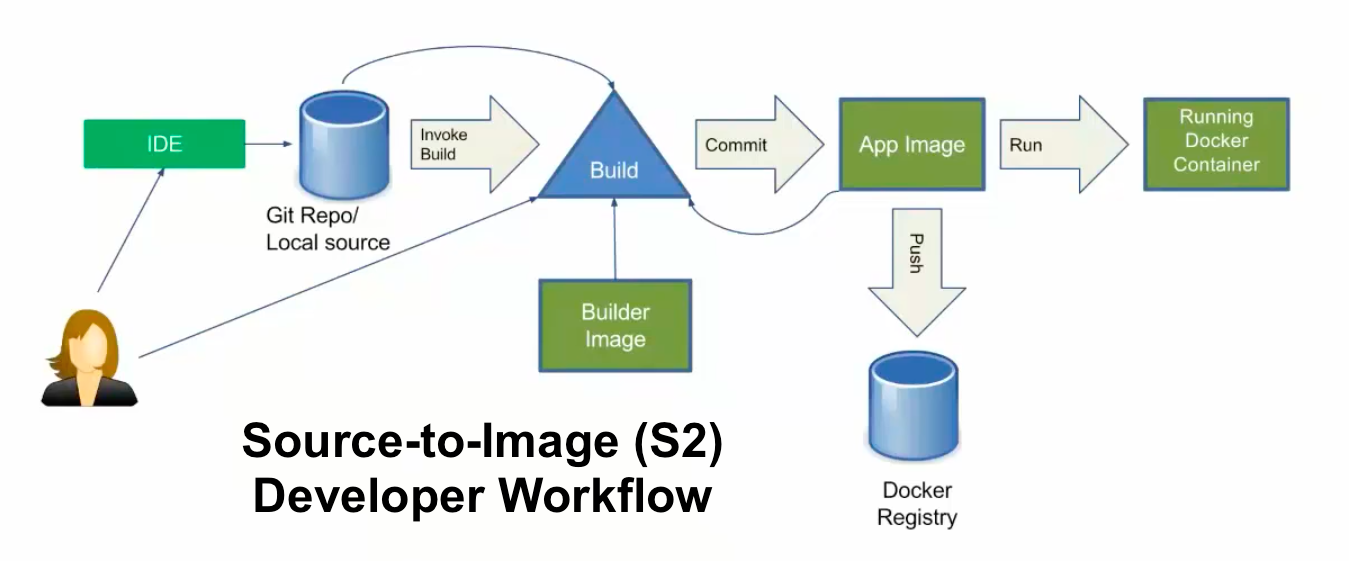
However, OpenShift provides a great way to deal with the automatic triggering of the BuildConfig by using webhooks. Let's see a quick demo of it. To do so, I am using learn.openshift.com running on OpenShift 4.2 CRC.
[ You might also enjoy reading: Troubleshooting handshake errors in OpenShift ]
To launch the application using the S2I process, which creates ImageStream, BuildConfig, DeploymentConfig, and the service in one go, you can do something like this:
$ oc new-app --name=demo https://github.com/ashutoshbhakare/php
$ oc expose svc demo  # to create the route
Now let's try to integrate OpenShift and GitHub by using webhooks. To achieve this, we need a webhooks URL and a secret, which authenticates our GitHub trigger to OpenShift. So whenever a developer updates the GitHub source code, it immediately triggers the build to OpenShift. Webhooks is an API call that is running on port 6443. To get the webhooks URL and secret, we can use:
$ oc describe bc demo
Which returns the output below:

In the above example, https://openshift:6443 must be replaced with our OpenShift's master URL, per my learn.openshift.com online labs.
To get the secret:
$ oc get bc demo -o yaml | grep secret
      secret: N58sBgReryjBwYIBp4FV
      secret: u1BaRZVDxAfvsT5lC3tX
We are going to use the second value, which is for generic webhooks: payload URL for GitHub.
Add the webhook
This was the most tricky part of the online labs.
Now let's go to GitHub and add the webhook payload URL to it. By clicking settings and the Selecting Webhooks option → Add Webhook, we will copy the entire payload URL like above and paste the secret in the text box.

This is how the GitHub and OpenShift webhooks integration successfully completed. We can test that by changing the Git code, which should result in the info below, which shows the recent deliveries.

[ Learn the basics of using Kubernetes in this free cheat sheet. ]
Wrap up
Source-to-Image (S2I) can help to automate the process of launching an application by using Git webhooks. The process can be straightforward, and you can demonstrate it yourself at the OpenShift Interactive Learning Portal.
À propos de l'auteur
Ashutosh is an open source software advocate, docker community leader, Fedora active contributor, Red Hat / SUSE Certified Instructor with 19 years of experience as a trainer and consultant.
Plus de résultats similaires
Vos correctifs sont trop lents ? Le Zero Trust comme dernière ligne de défense
Quatre raisons d'utiliser dès maintenant le mode image pour Red Hat Enterprise Linux
Scaling with Orchestrators | Compiler
Container Roundup | Compiler
Parcourir par canal

Automatisation
Les dernières nouveautés en matière d'automatisation informatique pour les technologies, les équipes et les environnements

Intelligence artificielle
Actualité sur les plateformes qui permettent aux clients d'exécuter des charges de travail d'IA sur tout type d'environnement

Cloud hybride ouvert
Découvrez comment créer un avenir flexible grâce au cloud hybride

Sécurité
Les dernières actualités sur la façon dont nous réduisons les risques dans tous les environnements et technologies

Edge computing
Actualité sur les plateformes qui simplifient les opérations en périphérie

Infrastructure
Les dernières nouveautés sur la plateforme Linux d'entreprise leader au monde

Applications
À l’intérieur de nos solutions aux défis d’application les plus difficiles

Virtualisation
L'avenir de la virtualisation d'entreprise pour vos charges de travail sur site ou sur le cloud
