
Chat, batch, and agentic traffic can run on the same graphics processing unit (GPU) without the chatbot waiting for the batch job to complete. Built on llm-d flow control and generally available in Red Hat AI 3.5, priority-aware serving decides which request goes first when the pool is full, and applications change nothing. On a NVIDIA H100, 95% of premium requests got their first token in under half a second, and batch rejections fell from 48,224 to 0.
Every separate pool pays for its own peak
Sooner or later, every shared inference platform gets the same question from 2 teams at once: Whose request goes first?
A foundation model on 1 cluster now often serves the customer chatbot, the batch summarization pipeline, the agentic retrieval-augmented generation (RAG) workflow, and the internal copilot. They share a model, but they don't share performance requirements. A chatbot needs its initial token in under a second. A batch document pipeline cares about throughput per dollar, not any single request. An agentic workflow sits idle for minutes, then fires 5 concurrent chains.
A shared pool with no notion of priority treats every request the same way: 1 queue, 1 dispatch order. When a batch job floods that queue during a traffic spike, the chatbot's requests wait behind it.
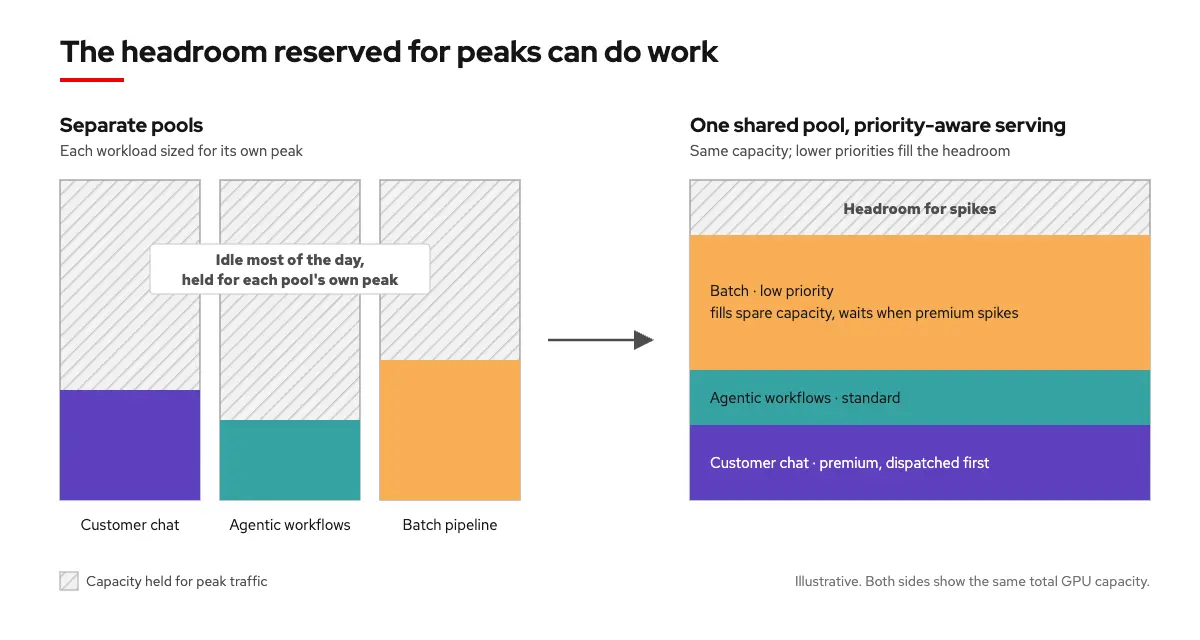
The rational answer has been a separate GPU pool per workload type, each sized for its own peak. It works, but it also means every pool carries its own reserve for traffic that is not there most of the time, and no pool can borrow another's idle capacity. Every new workload type adds another pool and another reserve. That headroom is what a shared pool can reclaim, as long as the pool knows whose request goes first.
Applications keep their endpoint and the pool decides who goes first
So how does the pool know whose request goes first? The application never has to tell it. That call moves to llm-d flow control, a layer in front of the model servers, and the application keeps calling the same endpoint it always has.
The operator gives each workload a priority in an InferenceObjective Kubernetes resource, sets the saturation threshold (the point at which the pool counts as full), and picks a fairness policy. The gateway reads a caller's credentials, and tags each request with a priority and tenant.
Once the pool saturates, requests line up by priority and tenant, and 3 rules decide who goes next:
- Priority: The highest band with waiting requests goes first
- Fairness: Within a band, dispatch rotates across tenants so that 1 tenant's burst doesn't crowd out its peers.
- Ordering: Within a tenant's queue, requests go on a first-come, first-served basis.
Below the threshold, spare capacity is never held back, and when contention arrives, it lands on the workloads built to absorb it.
Chat stays fast, and batch waits instead of failing
The results: 0 rejections under a batch flood, down from 48,224 without flow control, and 2.1 to 2.8 seconds premium P95 time to first token in every tested scenario (down from 6.7 to 8.3 seconds with the earlier detector).
Time to first token (TTFT) is the wait a chat user feels before a response starts to appear. On Red Hat AI 3.5, 4 tiers shared a H100 serving gpt-oss-20b under the same traffic, and the only thing that changed was the detector (the part of flow control that decides when the pool counts as full):
Concurrency detector (new)
- Platinum (realtime): 364 ms
- Gold (realtime): 430 ms
- Silver (standard): 699 ms
- Bronze (batch): 3.0 s
Utilization detector (old)
- Platinum (realtime): 1.3 s
- Gold (realtime): 1.5 s
- Silver (standard): 2.0 s
- Bronze (batch): 2.7 s
Both detectors kept the tiers in order. Only the concurrency detector, new in Red Hat AI 3.5, kept the realtime tiers well under a second, and batch workload took the wait.
Batch jobs queue instead of failing. Without flow control, a batch flood on the same GPU drew 48,224 rejections across 3 runs, each one a 429 too many requests error pushed back to the client to retry. With flow control, there were none. The requests waited their turn instead, at every output length tested.
Inside a tier, a single loud tenant can't crowd out the rest. With 3 premium tenants sharing a band, 1 burst to 82 requests per second while the other 2 held at 6. The 2 quiet tenants' wait time stayed flat at about 17 milliseconds. The burster waited longer (45 milliseconds) and still got served.
Different GPUs, different models, same result. In internal testing with premium, standard, and batch running together on 4 NVIDIA A100s, premium's first token stayed between 2.1 and 2.8 seconds in every scenario, and whichever tier ranked lowest took the wait. The earlier detector barely differentiated between the tiers on the same A100 test. The concurrency detector is what made the difference.
Batch can wait, so it doesn't need its own pool
Let's go back to the 3 separate pools. Suppose each has 8 GPUs and averages 30% utilization across the day. That's 24 GPUs doing roughly 7 GPUs' worth of work, with the rest held for peaks that mostly are not happening. Customer chat and agentic workflows peak during business hours, but the batch pipeline cares about finishing, not about when it runs. Put them in 1 pool and batch runs at low priority in whatever the interactive tiers leave free, then steps back when they spike. It no longer needs GPUs sized for its own peak.
Platform teams are already planning this way. A public-sector inference platform with an 80% GPU utilization target plans to run transcription at low priority to fill capacity around its business-hours peak.
How much that frees depends on how your peaks overlap, which is arithmetic worth running on your own utilization data. Flow control is what makes the sharing safe. The savings come from the sharing.
Tuning pays off when your pool fills up
Priority-aware serving has just 1 number you need to tune. Set the saturation threshold too high, and requests pile up inside the model servers before flow control steps in. Set it too low, and requests start queueing while GPUs still have room. To find the right number, step up the load until premium starts missing its latency target, then set the threshold to a fraction of that.
In an earlier upstream sweep, the best setting sat in the middle. Loosen it and standard catches up, from 12.7 seconds down to 2.7, while premium gives back a few hundred milliseconds. Go too tight and premium starts queuing against the cap too. Premium was fastest at 48, not 32. If your standard tier is a batch job that runs for minutes, a few extra seconds vanish into it. If it's a second chat product, those seconds represent someone waiting.
Once you've tuned your setting, you see the benefit in 3 situations:
- If you run interactive and batch work on the same model: Batch fills the pool's spare capacity, and new batch requests wait when interactive traffic spikes. OpenAI-compatible batch inference gives that work an asynchronous way in.
- If you serve several teams or customers from 1 pool: Tenants in the same band cannot crowd each other out.
- If you offer tiered service: Premium and standard share a model and GPUs instead of running separate deployments.
If all your traffic is the same kind of work, or your pool never fills up, then you don't need priority-aware serving.
There are 2 important limits when you plan a shared pool. Priority is strict, so sustained premium load holds batch workload back for as long as it lasts. Batch fills headroom that exists, and waits when it doesn't. When responses run to thousands of tokens, requests already past the gate dominate latency while they generate, so flow control can no longer guarantee premium protection. If your agentic or reasoning workloads produce long outputs, then test that case first. Red Hat AI documentation covers the rest, including how vLLM's own concurrency limit must line up with the flow control threshold.
If your GPU pools spend most of the day below their peak, then it's worth asking how much headroom a lower-priority workload could fill.
From "who goes first" to a latency target per tier
With priority-aware serving, the right request goes first. The next step is making sure each request meets its latency target.
Priority is a ranking, and the saturation threshold is where an operator manually translates a latency target, or service level objective (SLO), into a number.
SLO-aware serving closes that gap. The operator states a latency target per tier, and the system works toward it. That turns an internal priority setting into a service tier a platform team can offer (latency target included).
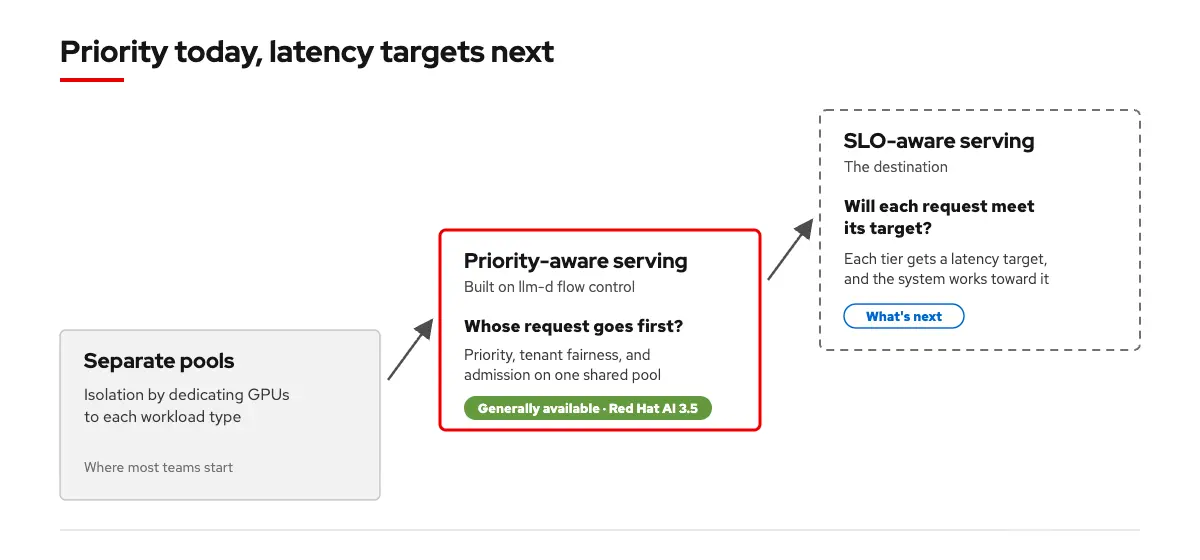
Which request goes first has an answer in 3.5. Meeting a latency target per tier is where llm-d goes next.
Start on 1 GPU, then size your shared pool
- Try it on 1 GPU: Read Will Parker's Optimize GPU efficiency with OpenShift AI and llm-d flow-control to learn how to deploy 2 priority bands, with a benchmark you can re-run
- Configure and tune: Red Hat AI documentation
- Talk to us: If you are planning to consolidate workloads onto a shared pool, then contact your Red Hat account team
Resources
- Alexa Griffith's flow control benchmark walkthrough
- Rishabh Saini's llm-d Flow Control: Priority Queuing for Shared GPU Inference
- Official llm-d flow control guide and architecture docs
Événement virtuel Red Hat | What’s next : la sécurité de l'Open Source
À propos de l'auteur
Naina Singh leads AI Inference Product Strategy at Red Hat, where she works with enterprises running LLM inference in production. She focuses on the operational and economic decisions that determine whether inference runs profitably at scale. She holds two patents and an MBA from UNC Kenan-Flagler.
Plus de résultats similaires
Pourquoi votre framework d'agent d'IA n'est pas suffisant : sept capacités de plateforme manquantes en production
Asago : orchestration de la sécurité et de la gouvernance de l'IA Open Source
Can agentic AI patch the internet?
How Red Hat cleared IT debt for scalable AI
Parcourir par canal

Automatisation
Les dernières nouveautés en matière d'automatisation informatique pour les technologies, les équipes et les environnements

Intelligence artificielle
Actualité sur les plateformes qui permettent aux clients d'exécuter des charges de travail d'IA sur tout type d'environnement

Cloud hybride ouvert
Découvrez comment créer un avenir flexible grâce au cloud hybride

Sécurité
Les dernières actualités sur la façon dont nous réduisons les risques dans tous les environnements et technologies

Edge computing
Actualité sur les plateformes qui simplifient les opérations en périphérie

Infrastructure
Les dernières nouveautés sur la plateforme Linux d'entreprise leader au monde

Applications
À l’intérieur de nos solutions aux défis d’application les plus difficiles

Virtualisation
L'avenir de la virtualisation d'entreprise pour vos charges de travail sur site ou sur le cloud
