
This is the second post of our blog series on Red Hat OpenShift and Splunk Integration. In the first post, we showed how to send application and system logs to Splunk. The second part is focused on how to use Splunk Kubernetes Objects.
Prerequisites
The prerequisites are the same as defined in the first part.
Architecture
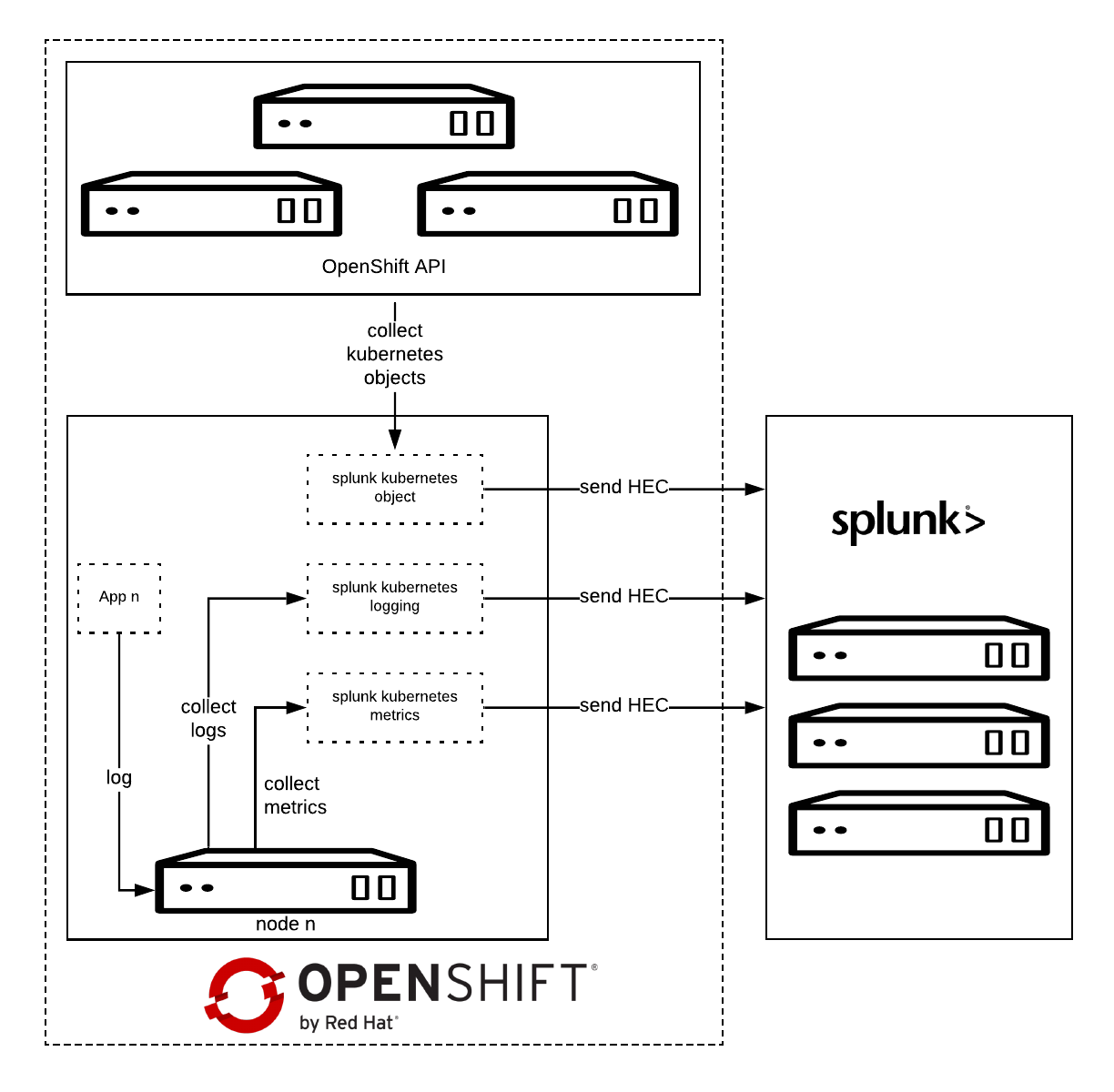
Splunk Connect for Kubernetes deploys:
- One DaemonSet on each OpenShift node for collecting log.
- One DaemonSet on each OpenShift node for collecting metrics.
- One Deployment to collect OpenShift Objects changes.
Installation
Before starting, please make sure you have already configured the Splunk Connect project as described in the first part.
Download the latest Helm Splunk Connect Helm package, which at the time of writing is 1.2.0.
wget <a href="https://github.com/splunk/splunk-connect-for-kubernetes/releases/download/1.1.0/splunk-kubernetes-objects-1.1.0.tgz">https://github.com/splunk/splunk-connect-for-kubernetes/releases/download/1.2.0/splunk-kubernetes-objects-1.2.0.tgz</a>
Download the source code as well; it is necessary to setup fine-grained permission.
wget https://github.com/splunk/splunk-connect-for-kubernetes/archive/1.2.0.zip
unzip 1.2.0.zip
cd splunk-connect-for-kubernetes-1.2.0/
Configure the variables for Helm; you can find sample values for the Splunk Connect on GitHub:
Minimal value example:
global:
  splunk:
    hec:
      host: splunk.openlab.red
      port: 8080
      token: xxxxxx-xxxx-xxxx-xxx-xxxxxxxxx
      protocol: https
rbac:
  create: false
Splunk Kubernetes Objects
Splunk Kubernetes Objects collect Kubernetes objects that can help users access cluster status. Splunk collects the object data by calling the Kubernetes API. This supports two modes:
- Watch mode: the Kubernetes API sends new changes to the plugin. In this mode, only the changed data is collected.
- Pull mode: the plugin queries the Kubernetes API periodically. In this mode, all data is collected.
Setup
1: Assign cluster-reader permission.
oc adm policy add-cluster-role-to-user cluster-reader -z splunk-kubernetes-objects --rolebinding-name=splunk-kubernetes-objects
Or Add fine-grained permission, check objects clusterRole manifests.
oc apply -f manifests/splunk-kubernetes-objects/clusterRole.yaml
oc adm policy add-cluster-role-to-user splunk-kubernetes-objects -z splunk-kubernetes-objects --rolebinding-name=splunk-kubernetes-objects
2: Install Helm package.
helm install --tiller-namespace=splunk-connect --name splunk-kubernetes-objects -f objects-value.yml splunk-kubernetes-objects-1.2.0.tgz
Verify on Splunk

Conclusion
In this article we have explored how we can capture and send to Splunk the entire definition of Kubernetes objects, once they get created or modified.
In the next post will see how to collect OpenShift/Kubernetes metrics to Splunk.
À propos de l'auteur
Plus de résultats similaires
Le paradoxe agentique et l'intérêt de l'IA hybride
Cessez de gérer le passé et commencez à bâtir l'avenir de l'informatique
Avoiding Failure In Distributed Databases | Code Comments
Transforming Your Secrets Management | Code Comments
Parcourir par canal

Automatisation
Les dernières nouveautés en matière d'automatisation informatique pour les technologies, les équipes et les environnements

Intelligence artificielle
Actualité sur les plateformes qui permettent aux clients d'exécuter des charges de travail d'IA sur tout type d'environnement

Cloud hybride ouvert
Découvrez comment créer un avenir flexible grâce au cloud hybride

Sécurité
Les dernières actualités sur la façon dont nous réduisons les risques dans tous les environnements et technologies

Edge computing
Actualité sur les plateformes qui simplifient les opérations en périphérie

Infrastructure
Les dernières nouveautés sur la plateforme Linux d'entreprise leader au monde

Applications
À l’intérieur de nos solutions aux défis d’application les plus difficiles

Virtualisation
L'avenir de la virtualisation d'entreprise pour vos charges de travail sur site ou sur le cloud
