Introduction
Ansible validated content is a set of collections containing pre-built YAML content (such as playbooks or roles) to address the most common automation use cases. You can use Ansible validated content out-of-the-box or as a learning opportunity to develop your automation skills. It's a trusted starting point to bootstrap your automation: use it, customize it and learn from it!
This content is curated by experts like the Red Hat Automation Community of Practice so:
- Use cases are based on successfully deployed customer examples
- Content creators are trusted and verified subject matter experts
- Content itself adheres to the latest best practices and guidelines issued by Red Hat’s engineering team
- Ansible validated content is tested against supported versions of Red Hat Ansible Automation Platform
Ansible Automation Platform is a trusted delivery system to access and leverage Ansible validated content in your organization.
How can I get this Ansible validated content into my Ansible Automation Platform on clouds (AWS, Azure, Google Cloud) deployment?
To do this there are a few short steps. Let’s walk through these together.
As part of your Ansible Automation Platform on cloud, you will also have a private automation hub. This is your own internal automation content repository. Login to private automation hub. You will have your own internal URL for the private automation hub, depending on your deployment type. Once you are logged in, go to Collections -> Remotes.
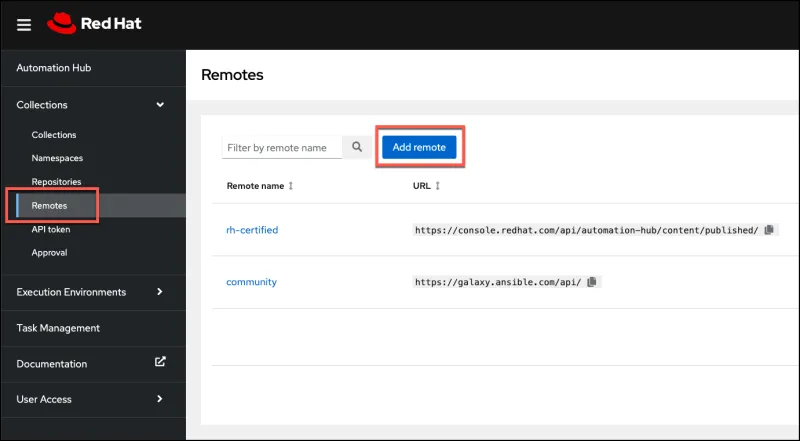
Let’s define the remote configuration for where we want to pull in the validated content from. Select Add Remote and provide the following configuration details.
For the Name provide: validated
For the URL provide: https://console.redhat.com/api/automation-hub/content/validated/
For the SSO URL provide: https://sso.redhat.com/auth/realms/redhat-external/protocol/openid-conn…
For the token, you will need to login to the Red Hat Hybrid Cloud Console and grab the token from there. Here’s exactly where you need to go to get the token: https://console.redhat.com/ansible/automation-hub/token
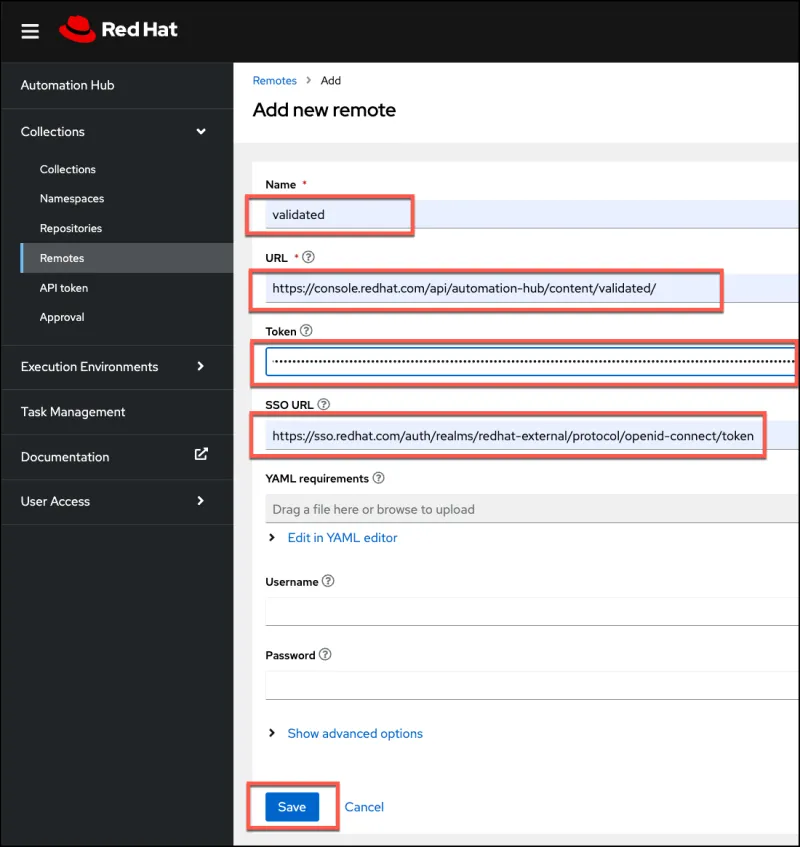
After you Save this remote configuration, you will have an additional entry in the remotes pane called validated.

Moving to the Collections -> Repositories menu, we need to edit the validated repository configuration and trigger a synchronization of the validated content.

Click on the validated repository name. This will give you the opportunity to go into edit mode. Click edit. Once you are editing the validated repository, there are a few necessary configuration changes needed.
For the Pipeline, from the drop-down select None.
For the Remote, from the drop-down select validated. Then click on Save.
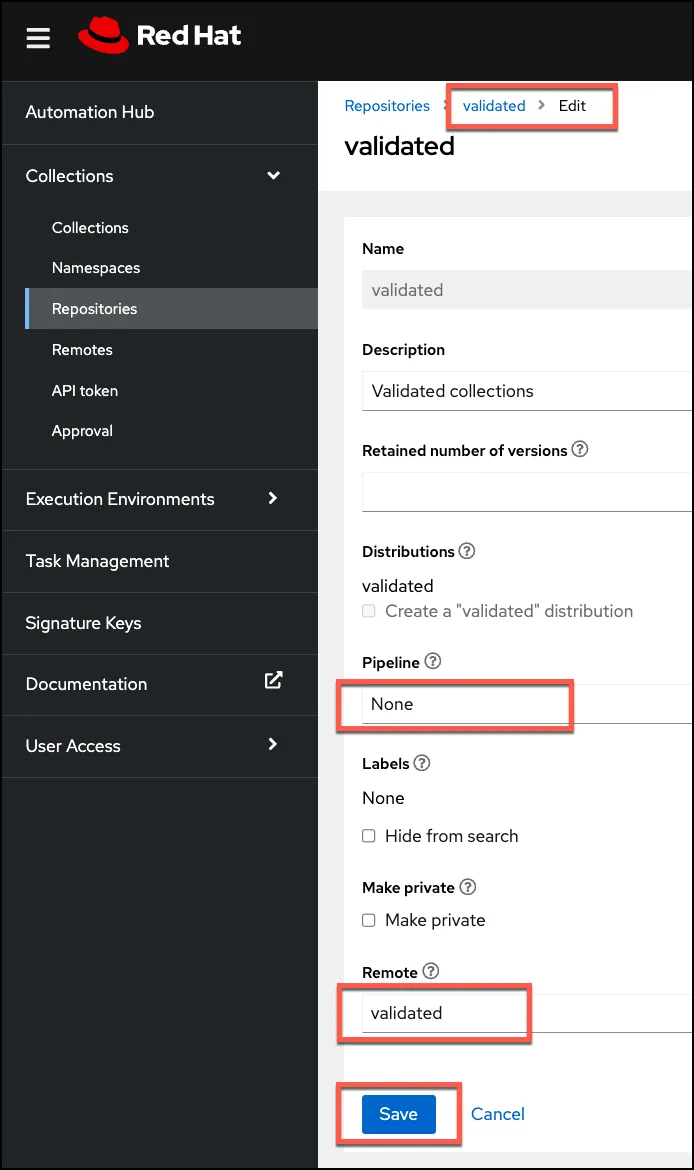
At this point, you are able to trigger the synchronization of the validated content to your private automation hub. This can be done in a couple of ways: One is from the Repositories menu, select the ellipsis at the far right of the validated row. Then click on Sync. The Sync status will change to running, and after a few minutes it will move to Completed.


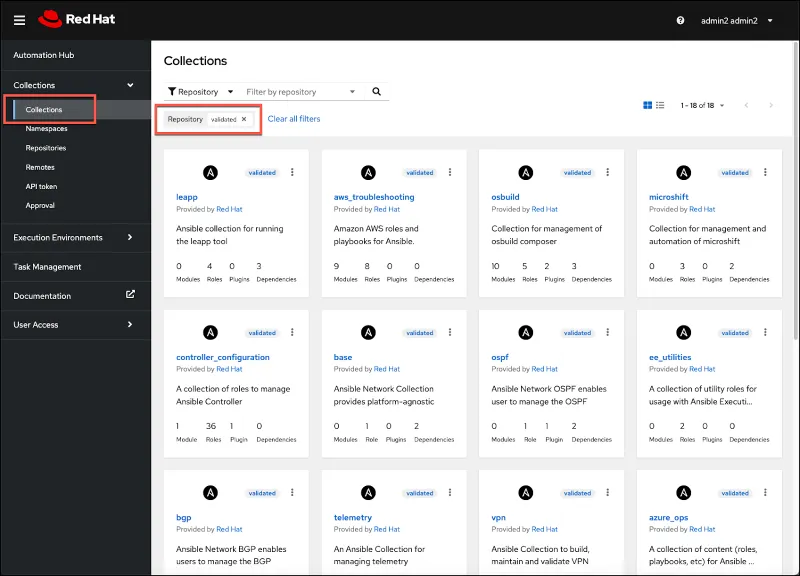
Once completed go back to the Collections menu option (1), and modify the filter. From the filter drop-down (2) change from Keywords to Repository (3).
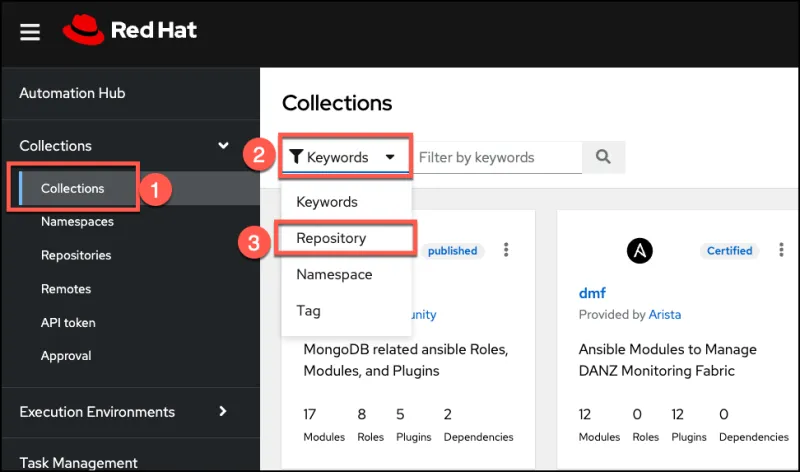
Then for the Filter by repository drop-down, select validated.

At this point you will be able to see all the available validated content, and you can start to explore this content and ways you can use this within your organization.
What can I do next?
To learn more about Ansible Automation Platform on hyperscaler clouds, please visit the page here.
Read a brief covering the use cases for validated content for each cloud provider:
For hands-on self-paced lab(s) on Ansible Automation Platform, you can visit here.
Sull'autore

Altri risultati simili a questo
Manage clusters and applications at scale with Argo CD Agent on Red Hat OpenShift GitOps
DxOperator from DH2i is now certified for Red Hat OpenShift 4.19
Ricerca per canale

Automazione
Novità sull'automazione IT di tecnologie, team e ambienti

Intelligenza artificiale
Aggiornamenti sulle piattaforme che consentono alle aziende di eseguire carichi di lavoro IA ovunque

Hybrid cloud open source
Scopri come affrontare il futuro in modo più agile grazie al cloud ibrido

Sicurezza
Le ultime novità sulle nostre soluzioni per ridurre i rischi nelle tecnologie e negli ambienti

Edge computing
Aggiornamenti sulle piattaforme che semplificano l'operatività edge

Infrastruttura
Le ultime novità sulla piattaforma Linux aziendale leader a livello mondiale

Applicazioni
Approfondimenti sulle nostre soluzioni alle sfide applicative più difficili

Virtualizzazione
Il futuro della virtualizzazione negli ambienti aziendali per i carichi di lavoro on premise o nel cloud
