
In Openshift 4, we built a brand new UI(Console) from the ground up with the goal in mind of keeping it simple, while still giving admins the ability to customize and extend it for their needs. In this blog, we’ll answer the following Console-related questions:
- What can I customize in the Console?
- What are some of the Console customization use cases?
- How can I enable the different Console customizations?
The new Console Customizations are built using Custom Resource Definitions(CRD), allowing cluster admins a powerful mechanism to modify the Console as they see fit. The Console code has been written to detect certain CRDs that dynamically update the Console views. New in Openshift 4.2, the following Console CRDs are available for use:
- ConsoleNotifications
- ConsoleExternalLogLinks
- ConsoleLinks
- ConsoleCLIDownloads
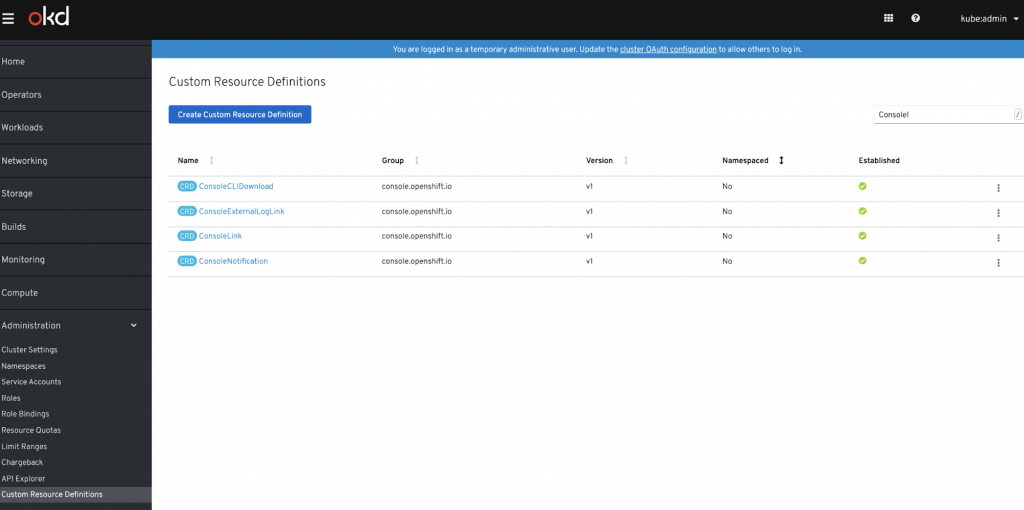
The first thing to notice is that we use the identifier “Console” as the prefix for all our Console Customization CRDs. You can access the Console CRDs from the Console/ Administration/ Custom Resource Definitions navigation item. Just filter by “Console” to remove other items from the list:
Now let's explore what each of these CRDs enable us to customize:
ConsoleNotifications CRD allows admins to create a banner of your choice of color with optional text and hyperlinks embedded into it. You have the option of placing the banner on the top, bottom, or top and bottom of the page. Take a look at the following sample schema:
apiVersion: console.openshift.io/v1
kind: ConsoleNotification
metadata:
 name: example
spec:
 text: This is an example notification message with an optional link.
 location: BannerTop ##Other options are BannerBottom, BannerTopBottom
 link:
href: 'https://www.example.com'
text: Optional link text
 color: '#fff'
 backgroundColor: purple
The results will generate you the following view:
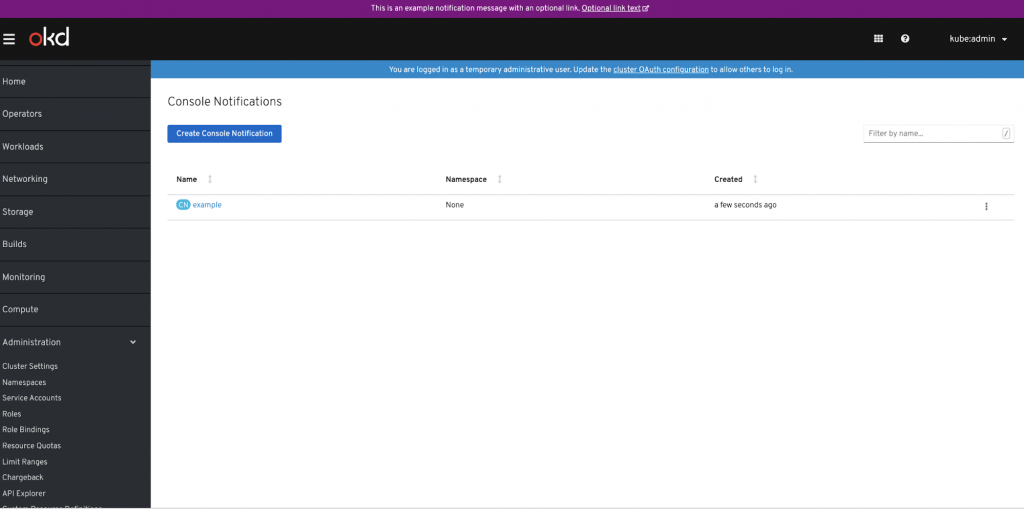
Potential Use Case: I want to clearly mark that this is a production cluster.
ConsoleExternalLogLinks CRD enable you to link to external logging solutions instead of using OpenShift Container Platform’s EFK logging stack.
hrefTemplate:
hrefTemplate is an absolute secure URL (must use https) for the log link including variables to be replaced. Variables are specified in the URL with the format ${variableName}, for instance, ${containerName} and will be replaced with the corresponding values from the resource. Resource is a pod.
Supported variables are
* ${resourceName} - name of the resource which contains the logs
* ${resourceUID} - UID of the resource which contains the logs
* e.g. `11111111-2222-3333-4444-555555555555`
* ${containerName} - name of the resource's container that contains the logs
* ${resourceNamespace} - namespace of the resource that contains the logs
* ${podLabels} - JSON representation of labels matching the pod with the logs
* e.g. `{"key1":"value1","key2":"value2"}`
Example hrefTemplate: https://example.com/logs?resourceName=${resourceName}&containerName=${containerName}&resourceNamespace=${resourceNamespace}&podLabels=${podLabels}
Take a look at the following sample logging configuration:
apiVersion: console.openshift.io/v1
kind: ConsoleExternalLogLink
metadata:
 creationTimestamp: '2019-09-09T18:50:09Z'
 generation: 1
 name: example
 resourceVersion: '310302'
 selfLink: /apis/console.openshift.io/v1/consoleexternalloglinks/example
 uid: a5a05876-d332-11e9-9414-0aebe39a74f4
spec:
 hrefTemplate: >-
https://example.com/logs?resourceName=${resourceName}&containerName=${containerName}&resourceNamespace=${resourceNamespace}&podLabels=${podLabels}
 text: Example Logs
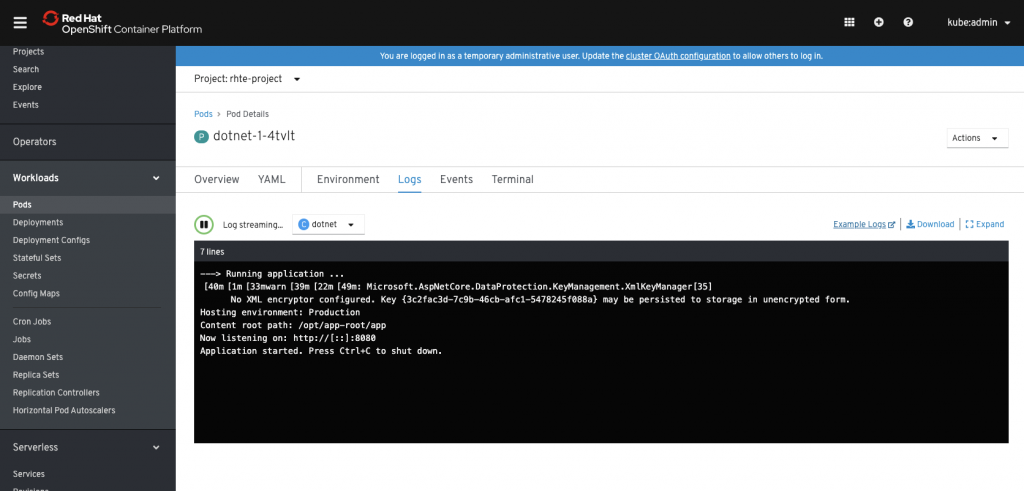
Potential Use Case: I want to send my logs to DataDog.
ConsoleLinks CRD enables a cluster admin to add links to the following menus:
- User Menu
- Help Menu
- Application Menu
User Menu
For the User menu you have the following configuration items:
- DISPLAY STRING
- URL
Take a look at the following sample link:
apiVersion: console.openshift.io/v1

kind: ConsoleLink

metadata:

 name: example

spec:

 href: 'https://www.example.com'

 location: UserMenu

 text: Additional user menu link
The results will generate you the following User Menu:
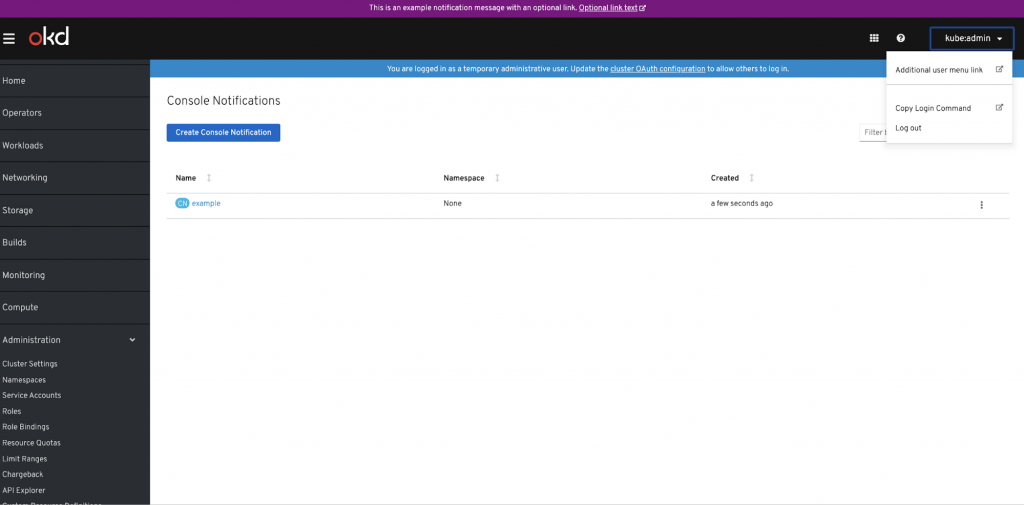
Potential Use Case: I want to link to additional user information.
Help Menu
For the Help menu you have the following configuration items:
- DISPLAY STRING
- URL
Take a look at the following sample link:
apiVersion: console.openshift.io/v1

kind: ConsoleLink

metadata:

 name: example

spec:

 href: 'https://www.example.com'

 location: HelpMenu

 text: Additional help menu link
The results will generate you the following Help Menu:
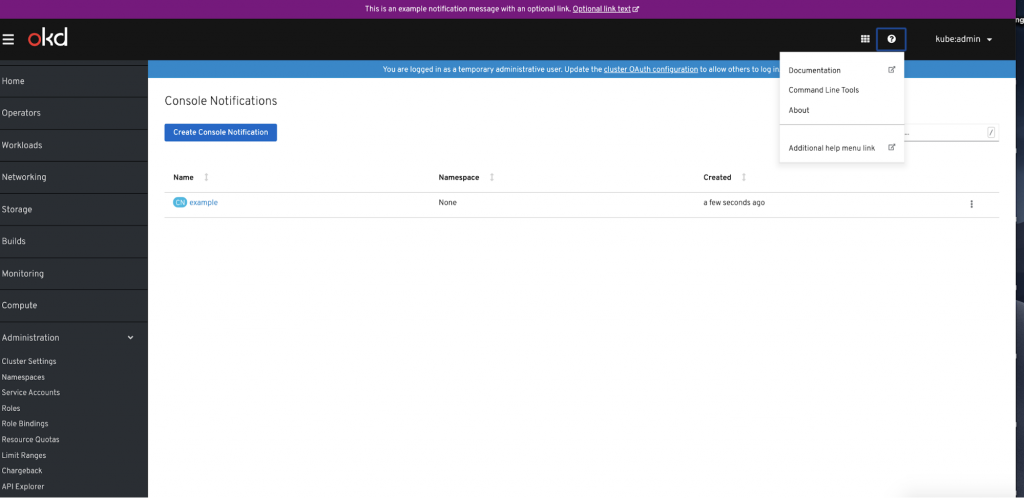
Potential Use Case: I want to link to additional help information.
Application Menu
For the Application menu you have the following configuration items:
- DISPLAY STRING
- URL
- SECTION
- LOGO
Take a look at the following sample link:
apiVersion: console.openshift.io/v1
kind: ConsoleLink
metadata:
 name: example
spec:
 applicationMenu:
section: ThirdParty Applications
 href: 'https://www.example.com'
 location: ApplicationMenu
 text: My App link
The results will generate you the following Application Menu:
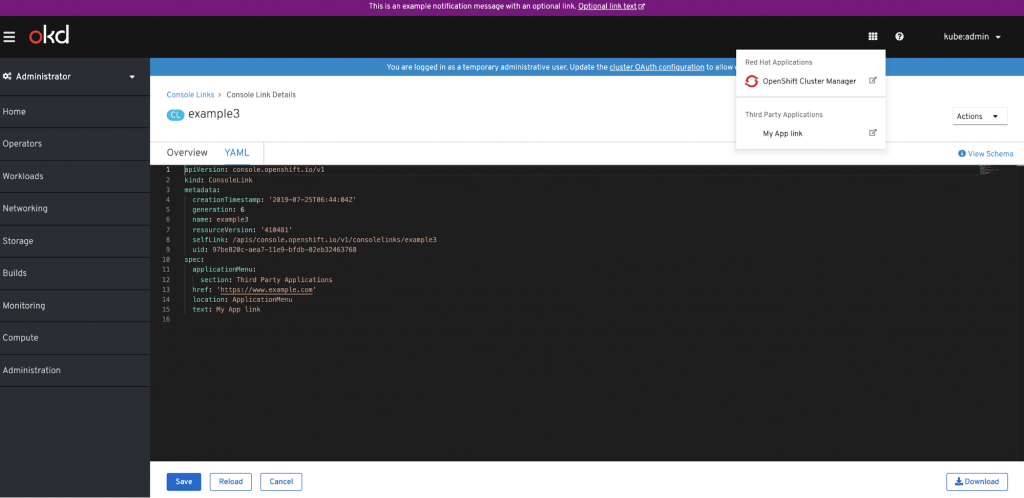
Potential Use Case: I want to link to another application dashboard.
ConsoleCLIDownloads CRDS is designed to enable admins to create links to useful command lines for their users. The CLI download description can include markdown such as paragraphs, unordered lists, code, links, etc.
Take a look at the following sample CLI:
apiVersion: console.openshift.io/v1
kind: ConsoleCLIDownload
metadata:
 creationTimestamp: '2019-07-25T07:03:43Z'
 generation: 1
 name: example
 resourceVersion: '413626'
 selfLink: /apis/console.openshift.io/v1/consoleclidownloads/example
 uid: 56df3c2e-aeaa-11e9-b4e5-0690f22365f6
spec:
 description: >
   This is an example CLI download description that can include markdown such
   as paragraphs, unordered lists, code, [links](https://www.example.com), etc.

  Lorem ipsum dolor sit amet, consectetur adipiscing elit. Fusce a lobortis
  justo, eu suscipit purus.
 displayName: examplecli
 links:
   - href: 'https://www.example.com'
The results will generate the following view:
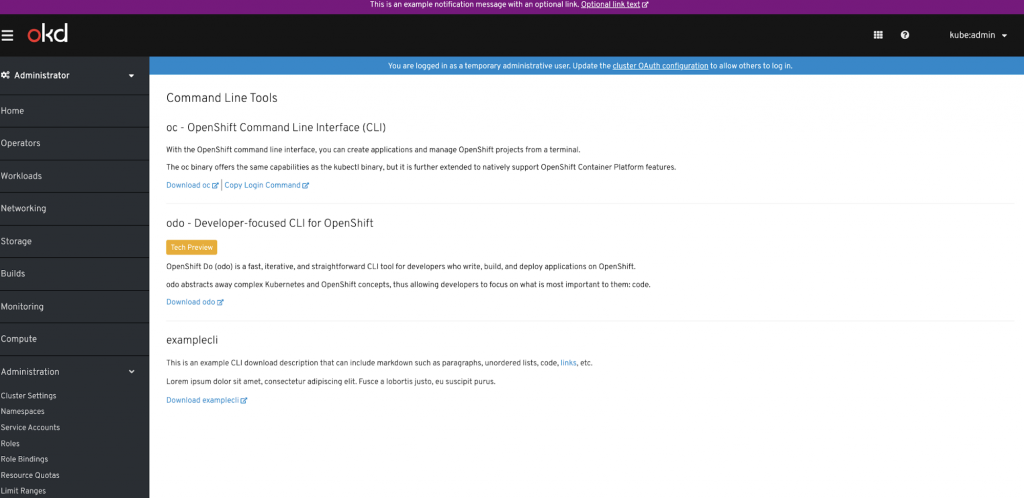
Potential Use Case: Allow third party\customer applications to offer their CLIs for download.
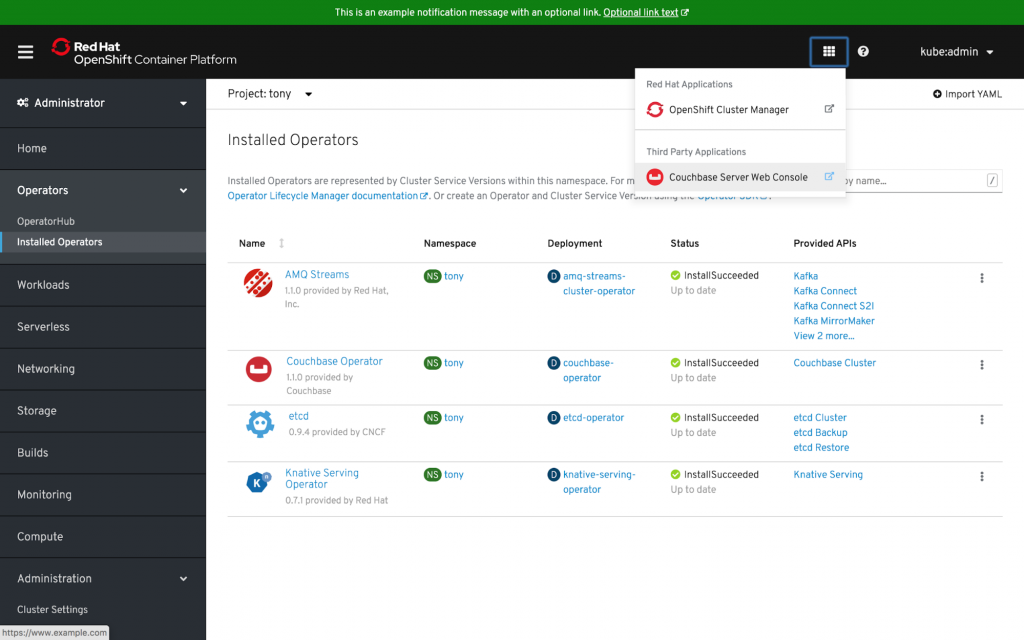
Using CRDs to enable customization now affords us the ability to programatically update the Console. Any Operator can now extend the Console by using the Console Customization CRDs. The following example shows a link to the Couchbase user interface via the Application Launcher Menu. This entry was programmatically added when the Couchbase Operator was installed. Operators now have the ability to use any of the Console CRDs to enhance their user experience in the Console.
Sull'autore
Altri risultati simili a questo
I partner di Red Hat sono una risorsa per i provider telco
Il paradosso degli agenti e il caso dell'IA ibrida
Crack the Cloud_Open | Command Line Heroes
Edge computing covered and diced | Technically Speaking
Ricerca per canale

Automazione
Novità sull'automazione IT di tecnologie, team e ambienti

Intelligenza artificiale
Aggiornamenti sulle piattaforme che consentono alle aziende di eseguire carichi di lavoro IA ovunque

Hybrid cloud open source
Scopri come affrontare il futuro in modo più agile grazie al cloud ibrido

Sicurezza
Le ultime novità sulle nostre soluzioni per ridurre i rischi nelle tecnologie e negli ambienti

Edge computing
Aggiornamenti sulle piattaforme che semplificano l'operatività edge

Infrastruttura
Le ultime novità sulla piattaforma Linux aziendale leader a livello mondiale

Applicazioni
Approfondimenti sulle nostre soluzioni alle sfide applicative più difficili

Virtualizzazione
Il futuro della virtualizzazione negli ambienti aziendali per i carichi di lavoro on premise o nel cloud
