
The Ansible 2.5 release includes an additional 13 Azure modules for automators to use in their hybrid cloud journey. We have a goal of making automation as accessible as possible. As part of this goal, we are working with technology partners to bring additional automation know-how to the Ansible blog.
Special thanks to Kylie Liang from the Microsoft Azure DevEx team for giving us a closer look at one of the new Azure module features.
---
Launch an Azure Container Instance
For this blog entry, we wanted to share a step by step guide to using the Azure Container Instance module that has been included in Ansible 2.5.
The Container Instance service is a PaaS offering on Azure that is designed to let users run containers without managing any of the underlying infrastructure. The Ansible Azure Container Instance module allows users to create, update and delete an Azure Container Instance.
Getting Started
For the purposes of this blog, we’ll assume that you are new to Azure and Ansible and want to automate the Container Instance service. This tutorial will guide you through automating the following steps:
- Install Ansible and Docker
- Set up credentials for your Azure modules
- Create an Azure Container Instance with the image from the Azure Container Registry
*Note: This tutorial was created running CentOS 7.4
Install Ansible:
## Install prerequisite packagessudo yum check-update; sudo yum install -y gcc libffi-devel python-devel openssl-devel epel-releasesudo yum install -y python-pip python-wheel
## Install Ansible and Azure SDKs via pipsudo pip install ansible[azure]
Install Docker:
#install docker and start itcurl -fsSL https://get.docker.com/ | shsudo systemctl start docker
#manage Docker as a non-root usersudo usermod -aG docker $USER
Log out and log back in so that your group membership is re-evaluated.
Visit Docker Docs for more information.
#install docker python SDKsudo pip install docker-py
*Note: You don’t need to set up Docker in your environment if you just need to create, update or delete an Azure resource (e.g. Azure Container Instance). Here we setting up Docker for sample, below, which will push a Docker image to Azure Container Registry.
Set up Credential for Azure Modules
Create a service principal on your host computer or cloud shell. az ad sp create-for-rbac --query '{"client_id": appId, "secret": password, "tenant": tenant}'
An example of the output from the preceding commands is as follows:{"client_id": "eec5624a-90f8-4386-8a87-02730b5410d5","secret": "531dcffa-3aff-4488-99bb-4816c395ea3f","tenant": "72f988bf-86f1-41af-91ab-2d7cd011db47"}
To authenticate to Azure, you also need to obtain your Azure subscription ID. az account show --query "{ subscription_id: id }"
Now create a create a credentials file for Ansible on your host computer as follows:mkdir ~/.azurevi ~/.azure/credentials
Enter your own values as follows: [default]subscription_id=xxxxxxx-xxxx-xxxx-xxxx-xxxxxxxxxxxxclient_id=eec5624a-90f8-4386-8a87-02730b5410d5secret=531dcffa-3aff-4488-99bb-4816c395ea3ftenant=72f988bf-86f1-41af-91ab-2d7cd011db47
Visit Microsoft Azure Docs for more information.
Create your Container Instance on Azure
Checkout the sample code, below, and you are ready to go.
git clone: https://github.com/Azure-Samples/ansible-playbooks.gitcd ansible-playbooksansible-playbook ACIcreatewithACR.yml
Output from example Ansible Playbook - ACIcreatewithACR.yml:

Note: You may need to run “sudo pip install azure-mgmt-containerinstance==0.3.1” to downgrade container instance API version if you meet error when creating Azure Container Instance.
Azure Portal displays the running container instance:
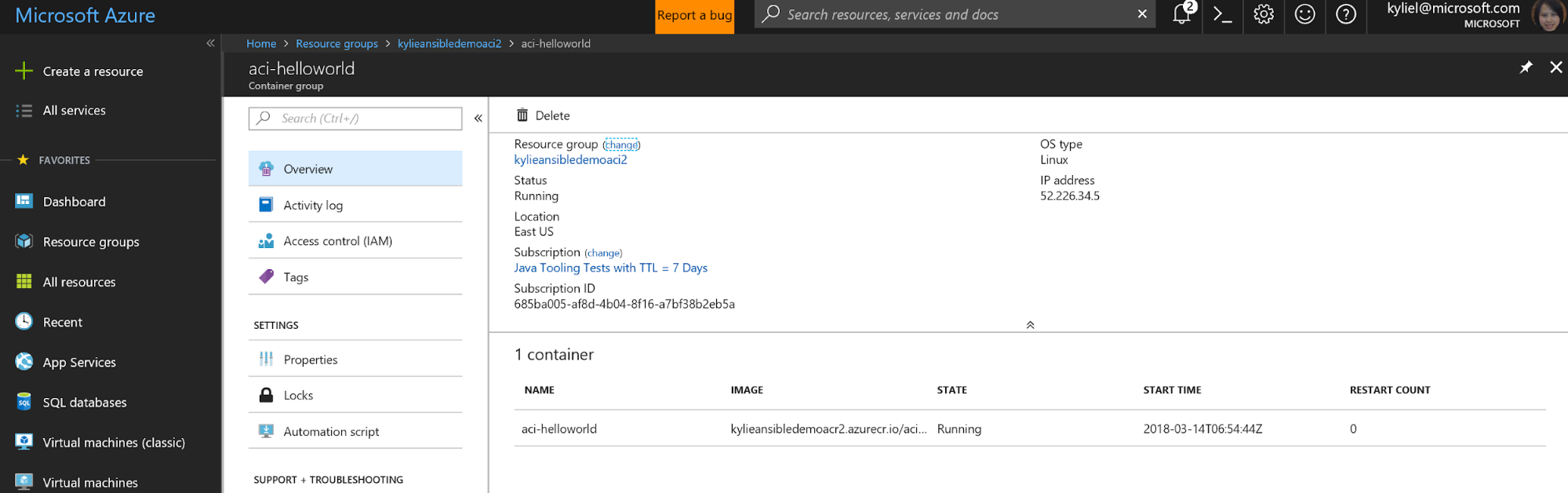
Navigate to the endpoint of the container instance. Confirm the container is running:

Congratulations! You have successfully automated the creation of a container instance in Azure. You can now modify the sample playbook, or write your own playbook leveraging the Container Instance module.
Additional Resources
For general information about using Ansible modules in Azure, visit Ansible Docs.
For additional information around installing Ansible in Azure, visit Azure Docs.
If you want to see more Ansible resources in Azure, consider filing a request or contributing to Ansible GitHub.
The Azure Team is proud to be the largest contributor of Ansible Azure content in the 2.5 release. We want to hear from you. Please try the new 2.5 modules and give us feedback and contact us at: AnsibleonAzure@service.microsoft.com
Sobre o autor
Mais como este
Gerencie máquinas virtuais no Red Hat OpenShift com Service Mesh
Não consegue aplicar patches com rapidez suficiente? Confiança zero como a última linha de defesa
Scaling with Orchestrators | Compiler
Container Roundup | Compiler
Navegue por canal

Automação
Últimas novidades em automação de TI para empresas de tecnologia, equipes e ambientes

Inteligência artificial
Descubra as atualizações nas plataformas que proporcionam aos clientes executar suas cargas de trabalho de IA em qualquer ambiente

Nuvem híbrida aberta
Veja como construímos um futuro mais flexível com a nuvem híbrida

Segurança
Veja as últimas novidades sobre como reduzimos riscos em ambientes e tecnologias

Edge computing
Saiba quais são as atualizações nas plataformas que simplificam as operações na borda

Infraestrutura
Saiba o que há de mais recente na plataforma Linux empresarial líder mundial

Aplicações
Conheça nossas soluções desenvolvidas para ajudar você a superar os desafios mais complexos de aplicações

Virtualização
O futuro da virtualização empresarial para suas cargas de trabalho on-premise ou na nuvem
