
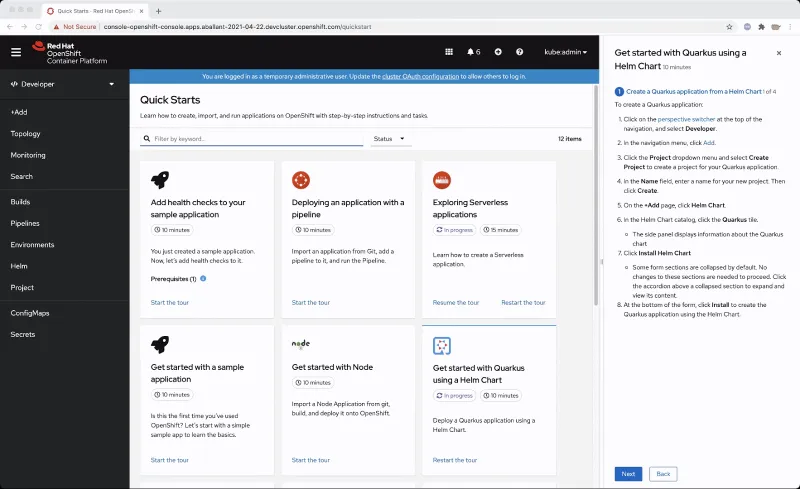
Navigation hints are tips that are featured in some quick starts to point to parts of the navigation.
After quick starts were initially added to OpenShift in 4.7, we saw the need to make the quick starts more integrated and interactive with the UI. We wanted to make it easier to figure out what areas of the UI a quick start might point you towards to complete a quick start.
That’s where the idea to add navigation hints came from. With navigation hints, users who have less OpenShift experience are able to get more familiarized with OpenShift’s navigation and layout.
If a quick start features a navigation hint, it will appear as a link in the quick start. You can click on the link to reveal the navigation hint which will appear as a blue rectangle around the navigation touch point. The navigation hint will go through a subtle animation cycle to point out where the navigation point is. Navigation hints are static and are always accessible from the quick start.
If you are writing a custom quick start, adding navigation hints is a great way to customize it.
Adding navigation hints to your quick starts:
- Introduces users to new parts of the UI that they might not have known about before.
- Points out navigation elements in an interactive way.
- Provides more context and support to the user while they complete a quick start.
If you’re interested in adding navigation hints to your quick start, consult this list of navigation elements that are currently supported as navigation hints:
- Perspective switcher
- Navigations elements in the administrator perspective such as:
- Home
- Operators
- Workloads
- Serverless
- Networking
- Storage
- Service catalog
- Compute
- User management
- Administration
- Navigations elements in the developer perspective such as:
- Add
- Topology
- Search
- Project
- Helm
- Navigation elements in both perspectives such as:
- Builds
- Pipelines
- Monitoring
- Masthead elements such as:
- CloudShell
- Utility menu
- User menu
- Applications
- Import
- Help
- Notifications
Try It Out
If you’d like to try this new feature, or if you’re just getting started with OpenShift, visit Try OpenShift to get instant access to a cluster.
And, as always, we want to connect with users like you. Learn more about what the OpenShift design team is up to on our OpenShift Design site, and be sure to catch us on the OpenShift Twitch channel.
Sobre el autor
Más como éste
La paradoja agéntica y los argumentos a favor de la IA híbrida
Deja de administrar el pasado y comienza a forjar el futuro de TI
Command Line Heroes en español. Temporada 1: Descifrando el código de la nube abierta
Edge computing covered and diced | Technically Speaking
Navegar por canal

Automatización
Las últimas novedades en la automatización de la TI para los equipos, la tecnología y los entornos

Inteligencia artificial
Descubra las actualizaciones en las plataformas que permiten a los clientes ejecutar cargas de trabajo de inteligecia artificial en cualquier lugar

Nube híbrida abierta
Vea como construimos un futuro flexible con la nube híbrida

Seguridad
Vea las últimas novedades sobre cómo reducimos los riesgos en entornos y tecnologías

Edge computing
Conozca las actualizaciones en las plataformas que simplifican las operaciones en el edge

Infraestructura
Vea las últimas novedades sobre la plataforma Linux empresarial líder en el mundo

Aplicaciones
Conozca nuestras soluciones para abordar los desafíos más complejos de las aplicaciones

Virtualización
El futuro de la virtualización empresarial para tus cargas de trabajo locales o en la nube
