On the OpenShift platform, both roles and cluster roles can be assigned to users and / or groups. However, assigning these roles quickly becomes unfeasible in an environment with many users.
Therefore, it is necessary to synchronize the active directory (AD) groups with the Openshift 4.x platform to simplify the process.
When an AD sync is performed, groups are created in OpenShift with the same data as group users in AD and Lightweight Directory Access Protocol (LDAP).
There are two ways to perform synchronization: manually or automated.
When performing the synchronization manually, the administrator can use the following command:
$ oc adm groups sync --whitelist=<whitelist_file> --sync-config=config.yaml --confirm
To use automated synchronization, a bridge machine is often used, relying on the SO's own CronJobs. However, in this blog, I will demonstrate how to configure an automated sync using the platform itself without a bridge machine.
In the following code, several resources need to be created and several features need to be configured, including:
- Service Account
- Cluster Role
- Cluster Role Binding
- Sync Config Map
- Whitelist Config Map of the groups
- CronJob
NOTE: I am using the openshift-authentication namespace to facilitate administration. However, resources can be created in their own namespace.
Service Account
It is necessary to create a service account that CronJob will use for actions to create groups on the platform:
kind: ServiceAccount
apiVersion: v1
metadata:
  name: ldap-group-syncer
  namespace: openshift-authentication
  labels:
    app: cronjob-ldap-group-sync
Cluster Role
To avoid unnecessary permissions such as a cluster-admin role on the new service account, a new cluster-role with the appropriate permissions needs to be created:
apiVersion: rbac.authorization.k8s.io/v1
kind: ClusterRole
metadata:
  name: ldap-group-syncer
  labels:
    app: cronjob-ldap-group-sync
rules:
  - apiGroups:
      - ''
      - user.openshift.io
    resources:
      - groups
    verbs:
      - get
      - list
      - create
      - update
Cluster Role Binding
After creating the Cluster Role, we have to link the Service Account with the Cluster Role that was created:
kind: ClusterRoleBinding
apiVersion: rbac.authorization.k8s.io/v1
metadata:
  name: ldap-group-syncer
  labels:
    app: cronjob-ldap-group-sync
subjects:
  - kind: ServiceAccount
    name: ldap-group-syncer
    namespace: openshift-authentication
roleRef:
  apiGroup: rbac.authorization.k8s.io
  kind: ClusterRole
  name: ldap-group-syncer
ConfigMap Sync and Whitelist
For the configuration of the sync file, we will be using the OpenShift platform's config map feature to store all the sync configuration content. These configuration artifacts are separated from the image content to keep the applications in portable containers.
We will have two config maps: syncing groups file using the RFC2307 schema with user-defined name mappings and a Whitelist file for synchronizing specific groups:
kind: ConfigMap
apiVersion: v1
metadata:
  name: ldap-group-syncer
  namespace: openshift-authentication
  labels:
    app: cronjob-ldap-group-sync
data:
  ldap-group-sync.yaml: |
    kind: LDAPSyncConfig
    apiVersion: v1
    url: ldap://ad.example.com:389
    bindDN: CN=user-ocp,OU=Users,DC=ad,DC=example,DC=com
    bindPassword:
      file: "/etc/secrets/bindPassword"
    insecure: true
    rfc2307:
        groupsQuery:
          baseDN: "DC=ad,DC=example,DC=com"
          scope: sub
          derefAliases: never
          filter: (objectclass=group)
        groupUIDAttribute: dn
        groupNameAttributes: [ cn ]
        groupMembershipAttributes: [ member ]
        usersQuery:
            baseDN: "DC=ad,DC=example,DC=com"
            scope: sub
            derefAliases: never
            pageSize: 0
        userUIDAttribute: dn
        userNameAttributes: [ sAMAccountName ]
        tolerateMemberNotFoundErrors: true
        tolerateMemberOutOfScopeErrors: true
kind: ConfigMap
apiVersion: v1
metadata:
  name: ldap-group-syncer-whitelist
  namespace: openshift-authentication
  labels:
    app: cronjob-ldap-group-sync
data:
  whitelist.txt: |
    CN=Cluster-Admins,CN=users,DC=ad,DC=example,DC=com
    CN=Developers,CN=users,DC=ad,DC=example,DC=com
CronJob
Finally, we can set up the CronJob configuration that will perform the groups' synchronism.
Before creating CronJob, it is necessary to gather the name of the secret that contains the login password of the user who searches for the information in AD/LDAP in the CronJob. This secret is created automatically when the Identity Provider LDAP is created. It is stored in the openshift-authentication namespace.
Note: This secret is generated automatically when the LDAP Identity provider is created.
Below is the command to search for the name of the secret:
$ oc get secret -n openshift-authentication | grep v4-0-config-user-idp
v4-0-config-user-idp-0-bind-password       Opaque                                1      16m
After obtaining the correct name of the secret, a CronJob must be created according to the example below:
kind: CronJob
apiVersion: batch/v1beta1
metadata:
  name: ldap-group-syncer
  namespace: openshift-authentication
  labels:
    app: cronjob-ldap-group-sync
spec:
  schedule: "*/1 * * * *"
  concurrencyPolicy: Forbid
  successfulJobsHistoryLimit: 5
  failedJobsHistoryLimit: 5
  jobTemplate:
    metadata:
      labels:
        app: cronjob-ldap-group-sync
    spec:
      backoffLimit: 0
      template:
        metadata:
          labels:
            app: cronjob-ldap-group-sync
        spec:
          containers:
            - name: ldap-group-sync
              image: "registry.redhat.io/openshift4/ose-cli:v4.7"
              command:
                - "/bin/bash"
                - "-c"
                - oc adm groups sync --whitelist=/etc/whitelist/whitelist.txt --sync-config=/etc/config/ldap-group-sync.yaml --confirm
              volumeMounts:
                - mountPath: "/etc/config"
                  name: "ldap-sync-volume"
                - mountPath: "/etc/whitelist"
                  name: "ldap-sync-volume-whitelist"
                - mountPath: "/etc/secrets"
                  name: "ldap-bind-password"
          volumes:
            - name: "ldap-sync-volume"
              configMap:
                name: "ldap-group-syncer"
            - name: "ldap-sync-volume-whitelist"
              configMap:
                name: "ldap-group-syncer-whitelist"
            - name: "ldap-bind-password"
              secret:
                secretName: "v4-0-config-user-idp-0-bind-password"
          restartPolicy: "Never"
          terminationGracePeriodSeconds: 30
          activeDeadlineSeconds: 500
          dnsPolicy: "ClusterFirst"
          serviceAccountName: "ldap-group-syncer"
          serviceAccount: "ldap-group-syncer"
In the code above, there are some adjustments that must be made in each deployment:
- AD/LDAP URL
- User bindDN to connect to AD/LDAP
- baseDN to search for groups
- baseDN to search for users
- Full baseDN of Whitelist groups
- Definition of the CronJob schedule;
- OpenShift client image. (In the example I am using, the image of OpenShift Client 4.7)
- Secret Name that has the user password to communicate with AD/LDAP
Note: CronJob will hold five successful or failed runs. To change this value, you must modify the CronJob config map in the parameters:
successfulJobsHistoryLimit: 5
failedJobsHistoryLimit: 5
The administrator can create the resources separately and store all the codes above in a single file and execute the command below:
$ oc create -f ldap-syncer.yml
Note: If there is an error in the configuration, the PODs will be in error. You should check the logs for the error and adjust the synchronism config map.

PODs generated for synchronism
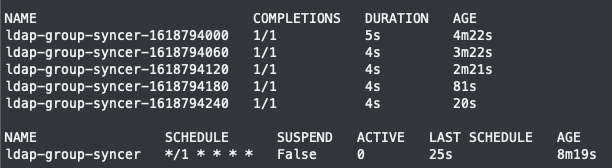
Jobs executed and CronJob

Authentication Operator Status
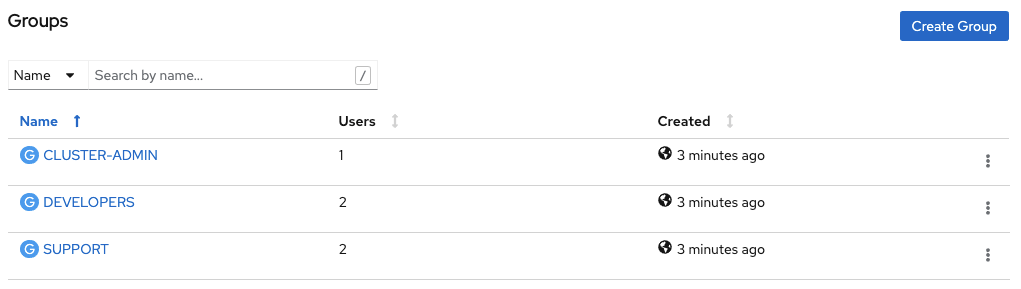

Synchronized Groups
OpenShift Container Platform creates the following group record as a result of the above sync operation:
kind: Group
apiVersion: user.openshift.io/v1
metadata:
 name: CLUSTER-ADMIN
 uid: 05adb646-b69a-4b54-b2a7-500f3f595d48
 resourceVersion: '6440583'
 creationTimestamp: '2021-04-19T00:57:04Z'
 labels:
   openshift.io/ldap.host: 10.36.250.190
 annotations:
   openshift.io/ldap.sync-time: '2021-04-19T01:21:04Z'
   openshift.io/ldap.uid: >- CN=CLUSTER-ADMIN,OU=GROUPS,OU=PAAS,OU=PRATICIES,OU=CONSULTING,DC=rhbr-lab,DC=com
   openshift.io/ldap.url: '10.36.250.190:389'
users:
 - user1
Configuration of Roles, Cluster Roles to Groups
After the synchronized groups, simply apply the roles or roles to cluster groups using the following commands:
Cluster Role
Binds a given role to specified groups for all projects in the cluster:
$ oc adm policy add-cluster-role-to-group <role> <groupname>
Removes a given role from specified groups for all projects in the cluster:
$ oc adm policy remove-cluster-role-from-group <role> <groupname>
Local Role (namespaces)
Binds a given role to specified groups in the namespace:
$ oc adm policy add-role-to-group <role> <groupname> -n <namespace>
Removes a given role from specified groups in the namespace:
$ oc adm policy remove-role-from-group <role> <groupname> -n <namespace>
Final Thoughts
So you can see how easy it is to create and manage groups in OpenShift using sync with AD/LDAP. The intention of this blog post was to demonstrate that this is possible and how easy it can be using the platform itself.
Sull'autore

Altri risultati simili a questo
Why building fast does not guarantee success
When AI finds the bugs: Why defense in depth was always the answer
Collaboration In Product Security | Compiler
Keeping Track Of Vulnerabilities With CVEs | Compiler
Ricerca per canale

Automazione
Novità sull'automazione IT di tecnologie, team e ambienti

Intelligenza artificiale
Aggiornamenti sulle piattaforme che consentono alle aziende di eseguire carichi di lavoro IA ovunque

Hybrid cloud open source
Scopri come affrontare il futuro in modo più agile grazie al cloud ibrido

Sicurezza
Le ultime novità sulle nostre soluzioni per ridurre i rischi nelle tecnologie e negli ambienti

Edge computing
Aggiornamenti sulle piattaforme che semplificano l'operatività edge

Infrastruttura
Le ultime novità sulla piattaforma Linux aziendale leader a livello mondiale

Applicazioni
Approfondimenti sulle nostre soluzioni alle sfide applicative più difficili

Virtualizzazione
Il futuro della virtualizzazione negli ambienti aziendali per i carichi di lavoro on premise o nel cloud
