This post was originally published by Marcos Entenza (Mak) on Mak's blog.
This is an update from my previous blog post on the same topic. Let’s Encrypt wildcards certificates support is now GA.
Wildcards can be requested using the ACME v2 compatible clients. For this post, I have used an ACME v2 compatible shell script, acme.sh.
There is still a limitation right now (this is a limitation on acme.sh script side) on the ability to request wildcards certificated directly using "*.domain.com". It must contain both domain.com and *.domain.com at least. Hopefully, this will be solved soon, or you can just use another ACME v2 supported client.
Use the following steps to request a wildcard certificate:
1. Clone acme.sh repository master branch.
$ git clone https://github.com/Neilpang/acme.sh.git

$ cd acme.sh
2. Add DNS API keys to the corresponding provider on ./dnsapi directory (using CloudFlare on this example). acme.sh currently supports the following list of DNS providers.
$ egrep 'CF_Key|CF_Email' dnsapi/dns_cf.sh | head -2

  CF_Key="xxxxxxxxxxxxxxxxxxxxxxxxx"

  CF_Email="xxxxxxxxxxxxxxx"
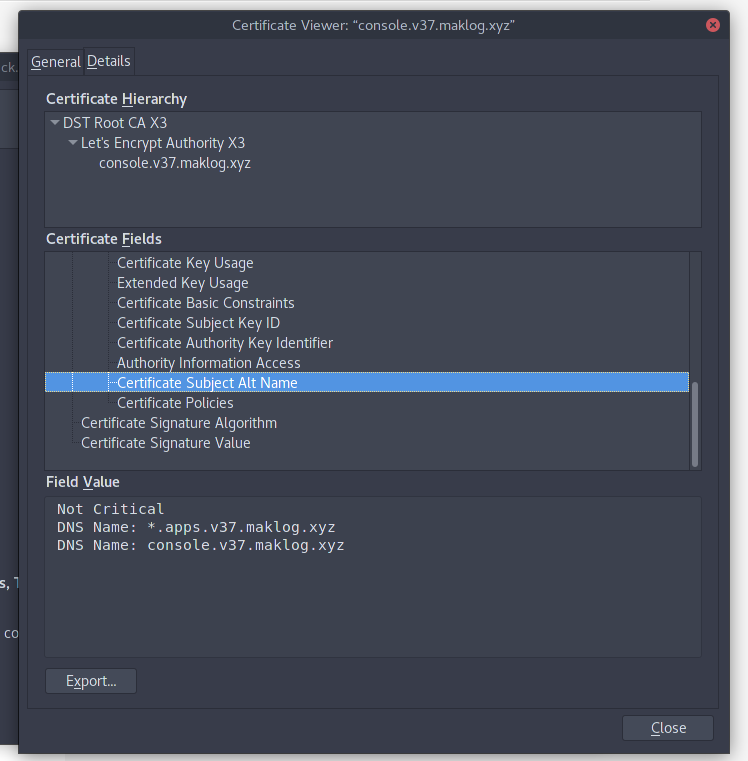
3. Request the wildcard certificate with the required Subject Alternative Names (on the example I’m requesting 2 DNS Names, one for the OpenShift API and another one for the SSL application endpoints running on my OpenShift Cluster).
$ ./acme.sh --issue -d console.v37.maklog.xyz -d *.apps.v37.maklog.xyz --dns dns_cf
$ $ ./acme.sh --issue -d console.v37.maklog.xyz -d *.apps.v37.maklog.xyz --dns dns_cf

[Thu 15 Mar 15:18:19 EET 2018] Creating domain key

[Thu 15 Mar 15:18:19 EET 2018] The domain key is here: /home/mak/.acme.sh/console.v37.maklog.xyz/console.v37.maklog.xyz.key

[Thu 15 Mar 15:18:19 EET 2018] Multi domain='DNS:console.v37.maklog.xyz,DNS:*.apps.v37.maklog.xyz'

[Thu 15 Mar 15:18:19 EET 2018] Getting domain auth token for each domain

[Thu 15 Mar 15:18:24 EET 2018] Getting webroot for domain='console.v37.maklog.xyz'

[Thu 15 Mar 15:18:25 EET 2018] Getting webroot for domain='*.apps.v37.maklog.xyz'

[Thu 15 Mar 15:18:25 EET 2018] console.v37.maklog.xyz is already verified, skip dns-01.

[Thu 15 Mar 15:18:25 EET 2018] *.apps.v37.maklog.xyz is already verified, skip dns-01.

[Thu 15 Mar 15:18:25 EET 2018] Verify finished, start to sign.

[Thu 15 Mar 15:18:28 EET 2018] Cert success.

-----BEGIN CERTIFICATE-----

xxxxxxxxxxxxxxxxxxxxxxxxxxxxxxxxxxxxxxxxxxxxxxxxxxxxxxxxxxxxxxxx

xxxxxxxxxxxxxxxxxxxxxxxxxxxxxxxxxxxxxxxxxxxxxxxxxxxxxxxxxxxxxxxx

xxxxxxxxxxxxxxxxxxxxxxxxxxxxxxxxxxxxxxxxxxxxxxxxxxxxxxxxxxxxxxxx

xxxxxxxxxxxxxxxxxxxxxxxxxxxxxxxxxxxxxxxxxxxxxxxxxxxxxxxxxxxxxxxx

xxxxxxxxxxxxxxxxxxxxxxxxxxxxxxxxxxxxxxxxxxxxxxxxxxxxxxxxxxxxxxxx

xxxxxxxxxxxxxxxxxxxxxxxxxxxxxxxxxxxxxxxxxxxxxxxxxxxxxxxxxxxxxxxx

xxxxxxxxxxxxxxxxxxxxxxxxxxxxxxxxxxxxxxxxxxxxxxxxxxxxxxxxxxxxxxxx

xxxxxxxxxxxxxxxxxxxxxxxxxxxxxxxxxxxxxxxxxxxxxxxxxxxxxxxxxxxxxxxx

xxxxxxxxxxxxxxxxxxxxxxxxxxxxxxxxxxxxxxxxxxxxxxxxxxxxxxxxxxxxxxxx

xxxxxxxxxxxxxxxxxxxxxxxxxxxxxxxxxxxxxxxxxxxxxxxxxxxxxxxxxxxxxxxx

...

...

...

xxxxxxxxxxxxxxxxxxxxxxxxxxxxxxxxxxxxxxxxxxxxxxxxxxxxxxxxxxxxxxxx

xxxxxxxxxxxxxxxxxxxxxxxxxxxxxxxxxxxxxxxxxxxxxxxxxxxxxxxxxxxxxxxx

-----END CERTIFICATE-----

[Thu 15 Mar 15:18:28 EET 2018] Your cert is in  /home/mak/.acme.sh/console.v37.maklog.xyz/console.v37.maklog.xyz.cer

[Thu 15 Mar 15:18:28 EET 2018] Your cert key is in  /home/mak/.acme.sh/console.v37.maklog.xyz/console.v37.maklog.xyz.key

[Thu 15 Mar 15:18:28 EET 2018] The intermediate CA cert is in  /home/mak/.acme.sh/console.v37.maklog.xyz/ca.cer

[Thu 15 Mar 15:18:28 EET 2018] And the full chain certs is there:  /home/mak/.acme.sh/console.v37.maklog.xyz/fullchain.cer
4. Copy generated certs to your preferred location. Certificates will be created under ~/.acme.sh/yourdomain directory
Your wildcard is now ready to be used. Follow the documentation to deploy or redeploy custom named certificates for your OpenShift public API, and custom wildcard certificates for your router.
As an example, in order to deploy your OpenShift Container Platform with your custom certificates, use the following steps assuming you are using the Advance Installation:
- Copy required certificates to your Ansible inventory directory
$ cp ~/.acme.sh/yourdomain/yourdomain.cer /<ansible_inventory_directory>

$ cp ~/.acme.sh/yourdomain/yourdomain.key /<ansible_inventory_directory>

$ cp ~/.acme.sh/yourdomain/ca.cer /<ansible_inventory_directory>
- Add the following entries to your
OSEv3group vars:
openshift_master_overwrite_named_certificates=true

openshift_master_named_certificates=[{"certfile": "{{ inventory_dir }}/yourdomain.cer", "keyfile": "{{ inventory_dir }}/yourdomain.key", "names": ["your_master_api_dns_name"], "cafile": "{{ inventory_dir }}/ca.cer"}]
- Deploy OpenShift Container Platform as usual
-
Once you have your OpenShift Container Platform deployed, we need to replace the Edge certificates from the Router. To do this we need to use the generated certificates to generate a new file including all the info, and replace the existing secret with this new certificate:
$ cat ~/.acme.sh/yourdomain/yourdomain.cer ~/.acme.sh/yourdomain/yourdomain.key ~/.acme.sh/yourdomain/ca.cer > /tmp/cloudapps.router.pem

$ oc secrets new router-certs tls.crt=/tmp/cloudapps.router.pem tls.key=~/.acme.sh/yourdomain/yourdomain.key -o json --type='kubernetes.io/tls' --confirm | oc replace -f -
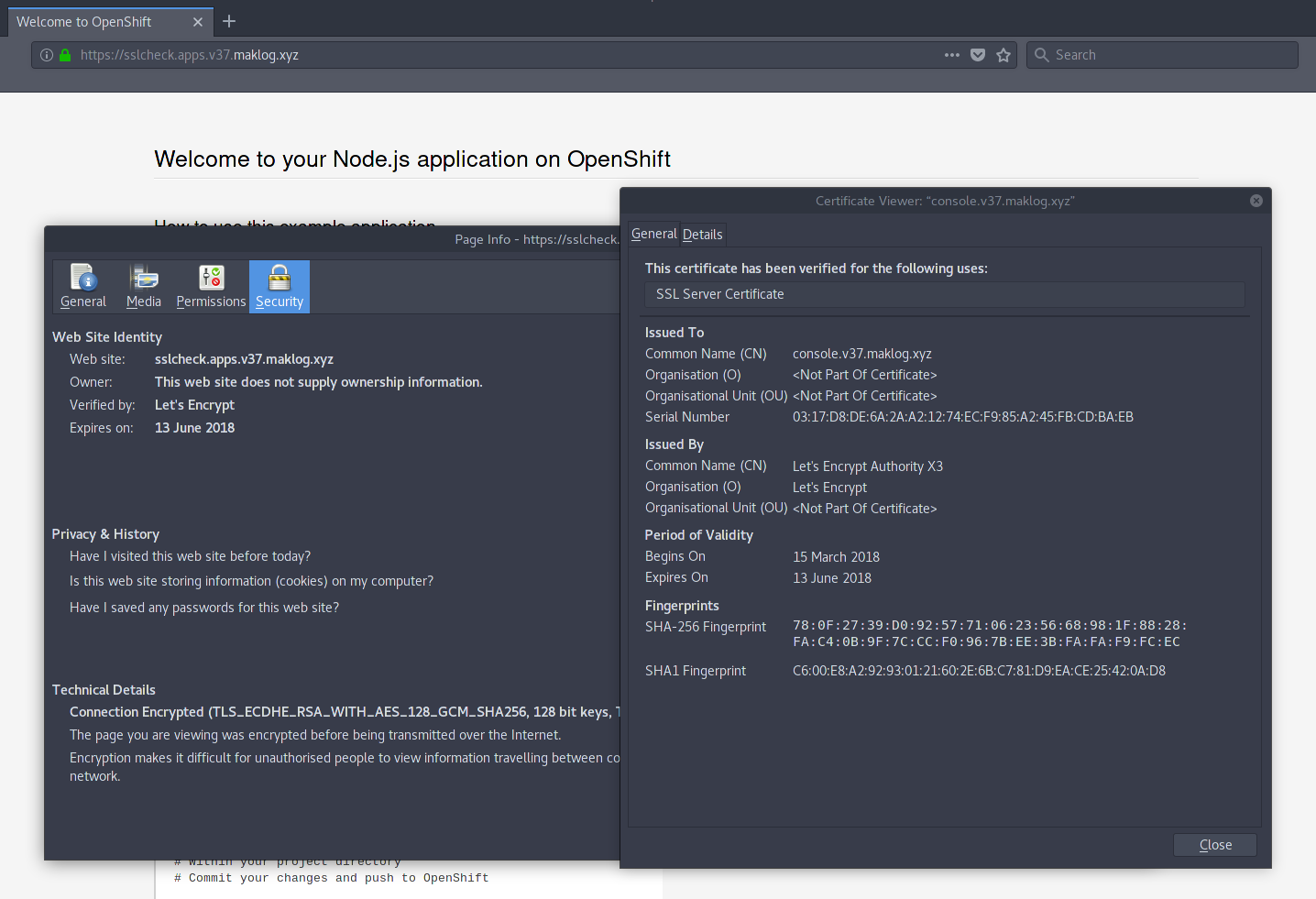
- Once you have deployed the certificates on your OpenShift Cluster, you will see valid certificates for both the public OpenShift API and any application deployed using the router Edge termination.
About the Author
At Red Hat's Open Innovation Labs, Marcos Entenza (aka Mak), helps build our Push Button Infrastructure that we use to accelerate customer residencies. He is part of the Consulting Team, where he has been played Consultant and Architect roles for Customer's engagements, helping Enterprise DevOps teams with PaaS and CI/CD adoption and transformation
Sull'autore
Altri risultati simili a questo
Ansible Automation Platform 2.7: Visual Execution Environment Builder e identificazione dei contenuti
Smetti di riscrivere codice stabile: in che modo Lightwell protegge il fatturato e la velocità dello sviluppo
Can agentic AI patch the internet?
Random Acts Of Automation | Compiler
Ricerca per canale

Automazione
Novità sull'automazione IT di tecnologie, team e ambienti

Intelligenza artificiale
Aggiornamenti sulle piattaforme che consentono alle aziende di eseguire carichi di lavoro IA ovunque

Hybrid cloud open source
Scopri come affrontare il futuro in modo più agile grazie al cloud ibrido

Sicurezza
Le ultime novità sulle nostre soluzioni per ridurre i rischi nelle tecnologie e negli ambienti

Edge computing
Aggiornamenti sulle piattaforme che semplificano l'operatività edge

Infrastruttura
Le ultime novità sulla piattaforma Linux aziendale leader a livello mondiale

Applicazioni
Approfondimenti sulle nostre soluzioni alle sfide applicative più difficili

Virtualizzazione
Il futuro della virtualizzazione negli ambienti aziendali per i carichi di lavoro on premise o nel cloud
