
This unit of work is a part of our continuous effort to improve the upgrade experience. Updates can be configured to receive information from Red Hat or via a custom update service. This set of enhancements allows customers to edit the Cincinnati server location directly in the console UI.
Let’s take a closer look.
How to edit the Cincinnati server location
Navigate to the Cluster Settings details page. The new Upstream configuration field enables users to receive updates from Red Hat or provide a custom update service:

Click the pencil icon to open a modal, where you can edit the way your cluster is configured to receive updates.
The modal provides two ways to configure the upstream service:
- Default. Receive updates from Red Hat.
- Custom update service.
We also provide a link to documentation to learn more about OpenShift local update services:
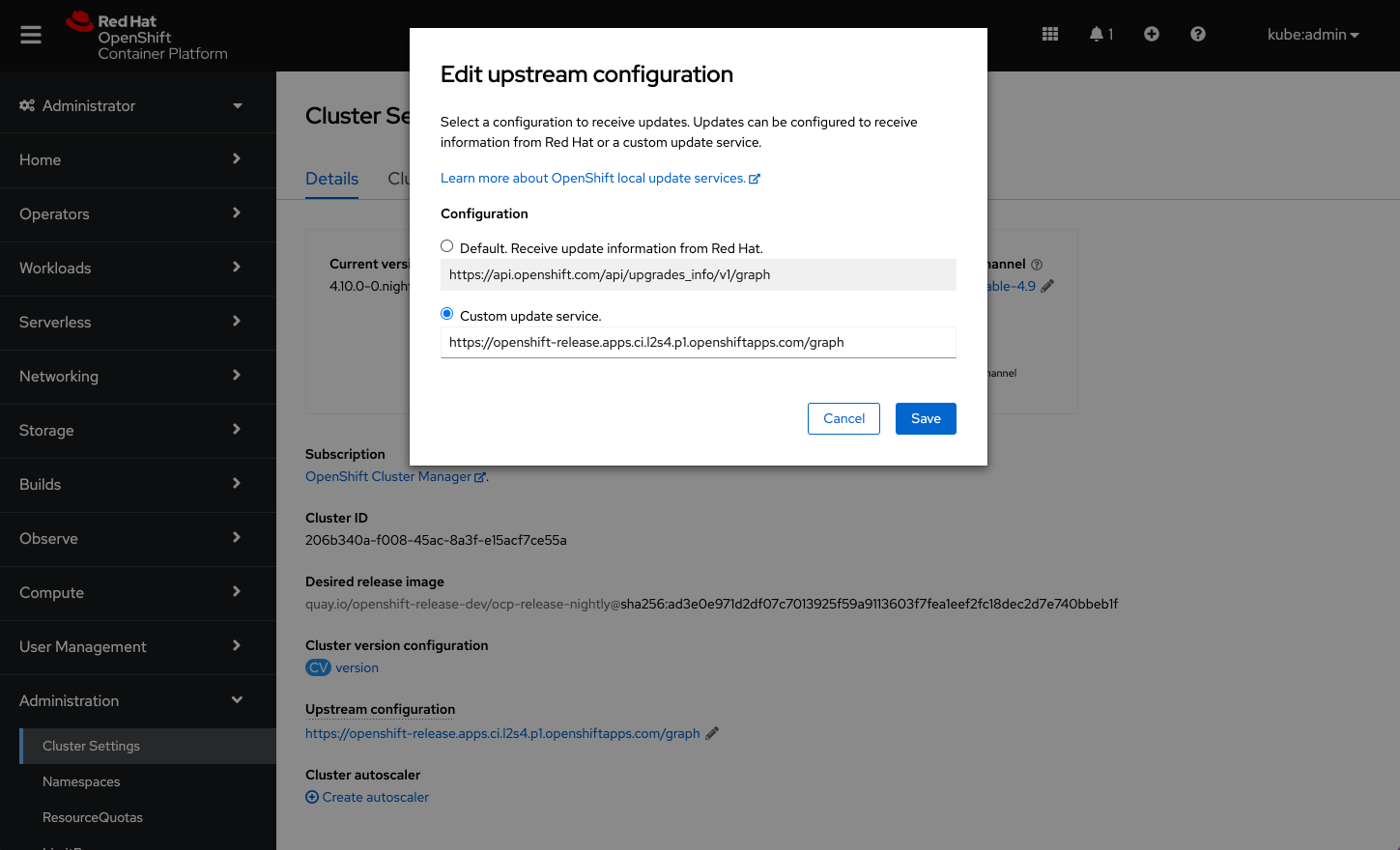
When the configuration is saved, it will appear on the Cluster Settings details page under the Upstream configuration field.
Note: Users can also edit the Upstream configuration on the Cluster Version details page. By default, the configuration will be set to receive update information from Red Hat. Any changes to the upstream configuration will take effect immediately.
Connect with us
Look for more user preference enhancements to come in upcoming releases.
We are always growing and evolving our improvements to OpenShift with a customer-first mindset. Be on the lookout for more enhancements in future releases. And do not forget to sign up to participate in future research opportunities to share your OpenShift experiences.
Let us know your thoughts. We would love to connect with users like you. Stay up to speed with the OpenShift design team on our OpenShift Design site, and be sure to catch us on the OpenShift Twitch channel.
Sull'autore
Altri risultati simili a questo
Smetti di riscrivere codice stabile: in che modo Lightwell protegge il fatturato e la velocità dello sviluppo
La nuova moneta di scambio delle aziende per guadagnare velocità
Can Compliance Be A Piece Of Cake? | Compiler
Collaboration In Product Security | Compiler
Ricerca per canale

Automazione
Novità sull'automazione IT di tecnologie, team e ambienti

Intelligenza artificiale
Aggiornamenti sulle piattaforme che consentono alle aziende di eseguire carichi di lavoro IA ovunque

Hybrid cloud open source
Scopri come affrontare il futuro in modo più agile grazie al cloud ibrido

Sicurezza
Le ultime novità sulle nostre soluzioni per ridurre i rischi nelle tecnologie e negli ambienti

Edge computing
Aggiornamenti sulle piattaforme che semplificano l'operatività edge

Infrastruttura
Le ultime novità sulla piattaforma Linux aziendale leader a livello mondiale

Applicazioni
Approfondimenti sulle nostre soluzioni alle sfide applicative più difficili

Virtualizzazione
Il futuro della virtualizzazione negli ambienti aziendali per i carichi di lavoro on premise o nel cloud
