
Ansible execution environments have largely replaced Python virtual environments for automation. Legacy virtual environments are sandboxes that start with Python and little more, meaning that you must rebuild your desired environments before you can use them.
Ansible's execution environments, on the other hand, are container images that can incorporate system-level dependencies and collection-based content, allowing you to have a custom image to run jobs. Each environment contains exactly what you need to run the job, nothing more and nothing less.
[ Download now: A system administrator's guide to IT automation. ]
You need a container image registry to make a controlled custom environment possible. You can use Satellite Server, Automation Hub, OpenShift Container Platform, or an alternative as an image registry service.
Automation execution environments in Ansible Automation Platform 2
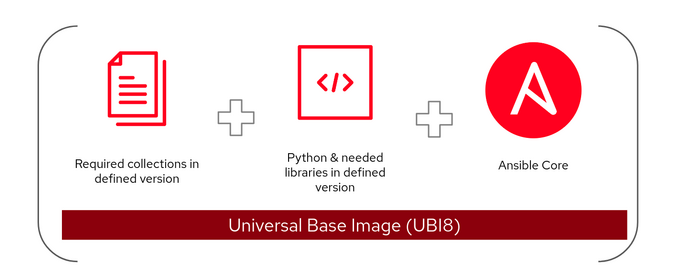
Ansible Automation Platform 2 introduces a new construct called automation execution environments. These are container images upon which all automation jobs are run. Automation execution environments contain the following:
- Red Hat Universal Base Image (UBI)
- Ansible or Ansible Core
- Python
- Any Ansible Content Collections
- Collection of Python or binary dependencies
[ Get started with IT automation by downloading the Red Hat Ansible Automation Platform beginner’s guide. ]
Automation execution environments provide a standardized way to define, build, and distribute customized environments as container images to run automation jobs.
[ Learn more: Ansible vs. Terraform, clarified ]
Use the container image registry
Prebuilt, supported automation execution environments are available on the Red Hat container image registry. By default, on-premises Ansible Automation Platform downloads those images from the container registry to your control plane nodes to create the automation execution environments before running automation jobs.
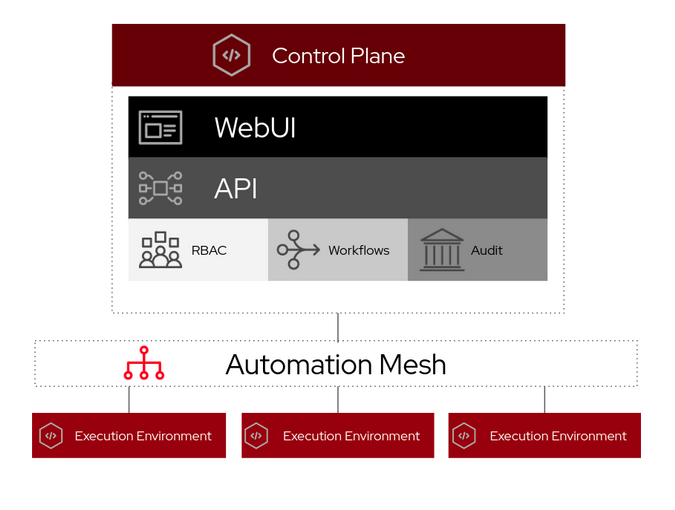
You must configure and maintain your on-premises container image registry in a disconnected environment. Download images from the container registry and push them to your local container image registry.
[ A free guide from Red Hat: 5 steps to automate your business. ]
You have many options to configure and maintain your local on-premises container image registry. Here are some examples:
Private Automation Hub: You can manage container image repositories in your infrastructure using the Automation Hub container registry. In addition, Automation Hub governs who can access individual container repositories, change tags on images, view activity, display image layers, and provide additional information related to each container repository. Find more details at Managing your private automation hub container registry.

Red Hat Satellite: You can configure and maintain a container image registry through the Red Hat Satellite Content View. You can import container images from various sources and distribute them to external containers using Content View. More details are found at Managing container images in the Red Hat Satellite product documentation.
Podman: Use Podman utilities to create and manage your on-premises container image registry running as a container. Use systemd to control and manage container processes, ensuring that your image registry container is up and running when needed.
Additional options: You can use Red Hat Quay or OpenShift's integrated container image registry as your container image registry if you have one in your environment.
Change the image registry configuration
The default Ansible Automation Platform installation points to the container registry. Ansible Automation Platform creates four execution environments that are ready to be used:
- Control plane execution environment
- Default execution environment
- Ansible Engine 2.9 execution environment
- Minimal execution environment
You can change any configuration of those execution environments from the control plane's web-based graphical user interface (GUI) except the control plane's execution environment. This is a read-only configuration that is normally used when the project syncs to the source code management (SCM) tool, like GitLab or GitHub.
You can, however, create an inventory variable file and run (or rerun) setup.sh to reflect the changes either during or after installing Ansible Automation Platform. Below is one example:
# vim ansible-automation-platform-setup-bundle-2.1.0-1/group_vars/automationcontroller
##########
#
# Credentials for container registry to pull execution environment images from,
# comment out registry_username if authentication is not required
# registry_url='localhost:5000'
# registry_username='local'
# registry_password='XXXXX'
#
# Execution Environments
control_plane_execution_environment: 'localhost:5000/ee-supported-rhel8:latest'
global_job_execution_environments:
  - name: "Default execution environment"
    image: "localhost:5000/ee-supported-rhel8:latest"
  - name: "Ansible Engine 2.9 execution environment"
    image: "localhost:5000/ee-29-rhel8:latest"
  - name: "Minimal execution environment"
    image: "localhost:5000/ee-minimal-rhel8:latest"
You can verify the execution environment's configuration and settings from the control plane's web-based GUI after the setup.sh script execution completes.
Wrap up
This article helps you understand small, medium, and large-scale Ansible Automation Platform setups in different environments. Separating production from development is important, so consider these environments for your execution environments.
Sull'autore
Munshi has spent almost 15 years in the IT industry with the world’s leading organizations including IBM. Currently, Munshi is part of the Red Hat Global Professional Services (GPS) organization as a senior consultant where he helps organizations adopt container technology and automation practices. He has a deep interest in emerging technology, especially in containers, automation, and the security domain.
Altri risultati simili a questo
Ansible Automation Platform 2.7: Visual Execution Environment Builder e identificazione dei contenuti
Red Hat Ansible All-Stars: alla guida del futuro dell'automazione delle reti e dell'infrastruttura
Random Acts Of Automation | Compiler
Scaling with Orchestrators | Compiler
Ricerca per canale

Automazione
Novità sull'automazione IT di tecnologie, team e ambienti

Intelligenza artificiale
Aggiornamenti sulle piattaforme che consentono alle aziende di eseguire carichi di lavoro IA ovunque

Hybrid cloud open source
Scopri come affrontare il futuro in modo più agile grazie al cloud ibrido

Sicurezza
Le ultime novità sulle nostre soluzioni per ridurre i rischi nelle tecnologie e negli ambienti

Edge computing
Aggiornamenti sulle piattaforme che semplificano l'operatività edge

Infrastruttura
Le ultime novità sulla piattaforma Linux aziendale leader a livello mondiale

Applicazioni
Approfondimenti sulle nostre soluzioni alle sfide applicative più difficili

Virtualizzazione
Il futuro della virtualizzazione negli ambienti aziendali per i carichi di lavoro on premise o nel cloud
