


This blog aims to take the first steps with Red Hat OpenShift GitOps and Microsoft Azure DevOps, with a short hands-on example that shows how to efficiently deploy a Quarkus application on top of your preferred Red Hat OpenShift managed cloud service.
This blog series also includes:
- CI/CD with Azure DevOps to managed Red Hat OpenShift cloud services
- Migrating to OpenShift Pipelines and integrating continuous deployment
The demonstrations in this series use:
- Azure Red Hat OpenShift/Red Hat OpenShift Service on AWS/OSD 4.12+ installed
- OpenShift Pipelines 1.12 installed
- OpenShift GitOps 1.10 installed
- A Quarkus application source code
- Azure Container Registry as an image repository
- Azure DevOps Repository as a source repository
About the test environment
I have successfully tested this integration on Red Hat OpenShift on AWS and Microsoft Azure Red Hat Openshift clusters, version 4.12.
The Azure DevOps config repository used here contains the Kubernetes manifests of a Quarkus application that exposes static and dynamic HTML pages. Since it is a private repo, a username and a personal access token (PAT) are needed to access it.
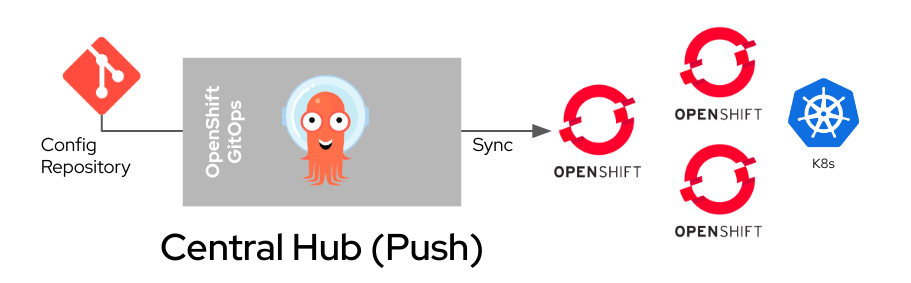
About the OpenShift GitOps operator
The Central Hub deployment model has been chosen to deploy the same application across different environments. In this case, the main instance of OpenShift GitOps v1.10 (Argo CD 2.8.4) is installed on a OpenShift Service on AWS cluster, which will be the PRODUCTION environment. An external Azure Red Hat OpenShift cluster will be added to this instance as the DEV/TEST environment.
Please note that Red Hat Advanced Cluster Management for Kubernetes is one way to effectively manage this type of deployment model, especially for PRODUCTION environments. It integrates with Argo CD and helps to extend GitOps flows to all OpenShift clusters.
Get started
There are five steps in this integration:
- Install the OpenShift GitOps Operator on OpenShift Service on AWS.
- Connect OpenShift GitOps to Azure DevOps.
- Add an external OpenShift cluster to your OpenShift GitOps instance.
- Onboard and deploy the Quarkus application.
- Manage your apps from the Argo CD dashboard.
1. Install the OpenShift GitOps Operator
Installing OpenShift GitOps is relatively straightforward. Log in to the OpenShift Service on AWS cluster and create a subscription object YAML file to subscribe a namespace to the Red Hat OpenShift GitOps. Here is an example:
cat <<EOF | oc apply -f -
apiVersion: operators.coreos.com/v1alpha1
kind: Subscription
metadata:
 name: openshift-gitops-operator
 namespace: openshift-operators
spec:
 channel: latest
 installPlanApproval: Automatic
 name: openshift-gitops-operator
 source: redhat-operators
 sourceNamespace: openshift-marketplace
EOF
Wait a couple of minutes to ensure all the pods in the openshift-gitops namespace are running:
oc get pods -n openshift-gitopsAllow the openshift-gitops-argocd-application-controller service account to create objects in the different namespaces:
oc adm policy add-cluster-role-to-user cluster-admin -z openshift-gitops-argocd-application-controller -n openshift-gitopsConsult the official Red Hat documentation if you need further info on installing OpenShift GitOps
2. Connect GitOps to Azure DevOps
Next, define a new repository by creating a Kubernetes Secret like the one below and store your Azure DevOps personal access token along with the other details. Make sure to replace the various fields per your needs (e.g., name, URL, password and username).
cat <<EOF | oc apply -f -
apiVersion: v1
kind: Secret
metadata:
 name: my-priv-https-repo
 namespace: openshift-gitops
 labels:
   argocd.argoproj.io/secret-type: repository
stringData:
 url: https://<your-user@dev.azure.com/your-repo/>
 password: <$your_Azuere_DevOps_personal_access_token>
 username: <$your_repo_username>
EOF
Since OpenShift Secrets are encoded in base64 and not encrypted, you may choose to take at least the following steps to use Secrets safely:
- Enable encryption at rest for Secrets
- Enable or configure role-based access control (RBAC) rules with least-privilege access to Secrets
- Restrict Secret access to specific containers
- Consider using external Secret store providers
3. Add an external OpenShift cluster to your OpenShift GitOps instance
The easiest way to do this is to apply a Secret like this. Make sure to add this Secret in the same namespace where OpenShift GitOps is installed:
cat <<EOF | oc apply -f -
apiVersion: v1
kind: Secret
metadata:
 namespace: openshift-gitops
 name: mycluster-secret
 labels:
   argocd.argoproj.io/secret-type: cluster
type: Opaque
stringData:
 name: dvshh9ai.eastus.aroapp.io
 server: https://<your-aro-cluster-API-URL-here>:6443
 config: |
   {
     "bearerToken": "sha256~c3_THIS_IS_AN_EXAMPLE_4XHPt1d3Nwfq_hgw8rd6G0C243uy_Wxc",
     "tlsClientConfig": {
       "insecure": false
     }
   }
EOF
In this example, an external Azure Red Hat OpenShift cluster (DEV) has been added to the OpenShift GitOps instance.
Find more details below:
- Label → argocd.argoproj.io/secret-type: cluster
- Name → cluster name
- Server → API URL
- bearerToken → can be obtained by executing the oc whoami --show-token on the cluster you want to add

Since the newly added cluster has no applications and is not monitored, the connection status will initially appear as Unknown.
4a. Onboard and deploy the Quarkus application on the PROD cluster (Red Hat OpenShift Service on AWS)
cat <<EOF | oc apply -f -
apiVersion: argoproj.io/v1alpha1
kind: Application
metadata:
 name: my-app-rosa
 namespace: openshift-gitops
spec:
 destination:
   namespace: quarkus-deploy
   server: https://kubernetes.default.svc
 project: default
 source:
   path: prod_rosa
   repoURL: https://<your-user@dev.azure.com/your-repo/>
   targetRevision: HEAD
   directory:
     recurse: true
 syncPolicy:
   automated:
     prune: true
     selfHeal: true
   syncOptions:
     - CreateNamespace=true
EOF
4b. Onboard and deploy the Quarkus application on the DEV cluster (Azure Red Hat OpenShift)
cat <<EOF | oc apply -f -
apiVersion: argoproj.io/v1alpha1
kind: Application
metadata:
 name: my-app-aro
 namespace: openshift-gitops
spec:
 destination:
   namespace: quarkus-deploy
   server: https://<your-aro-cluster-API-URL-here>:6443
 project: default
 source:
   path: dev_aro
   repoURL: https://<your-user@dev.azure.com/your-repo/>
   targetRevision: HEAD
   directory:
     recurse: true
 syncPolicy:
   automated:
     prune: true
     selfHeal: true
   syncOptions:
     - CreateNamespace=true
EOF
This installs the same application on an external Azure Red Hat OpenShift cluster, which resides in the same Azure DevOps repository but in a different folder (dev_aro) to distinguish it from the production environment.

In both cases, this will automatically deploy a new App in the quarkus-deploy namespace.
Note: The app image resides on an external registry, so create a Secret that the default serviceaccount will point to to get the credentials needed to pull from AzureCR. You can find further details here.
If you do not already have a Docker credentials file for the secured registry, you can create a Secret by running the following command:
$ oc create secret docker-registry <pull_secret_name> \
--docker-server="https://<your external image registry>" \
--docker-username=<username> \ --docker-password="<password>"
To use a Secret for pulling images for pods, add the Secret to your service account. The name of the service account should match the pod's service account. The default service account is default.
$ oc secrets link default <pull_secret_name> --for=pull5. Manage your app from the Argo CD dashboard
Access the Argo CD dashboard to view and manage the newly created resources on your OpenShift cluster.
In the Administrator perspective of the OpenShift web console, navigate to Menu → OpenShift GitOps → Cluster Argo CD.

The Argo CD user interface appears in a new window. Log in by using the Argo CD admin account. Use the admin password below.
To retrieve the admin password:
oc extract secret/openshift-gitops-cluster -n openshift-gitops --to=-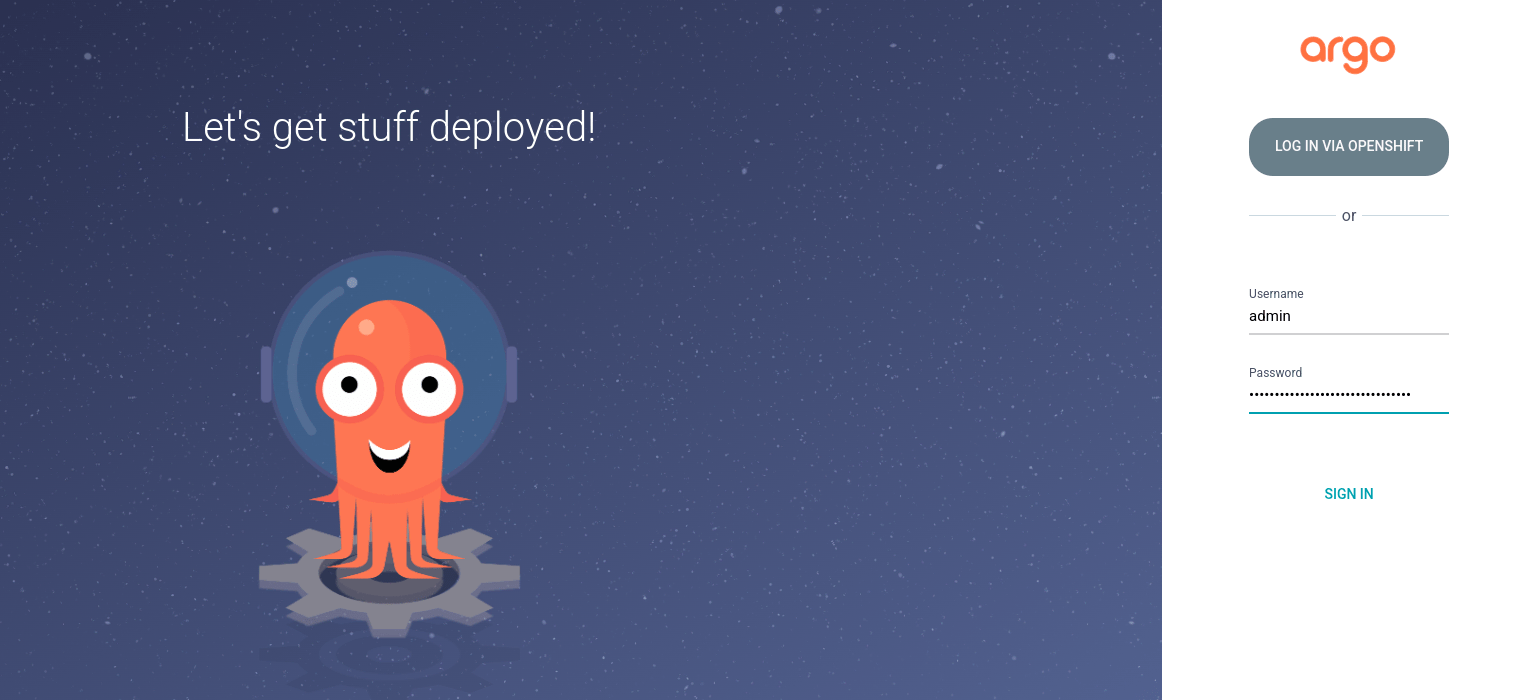
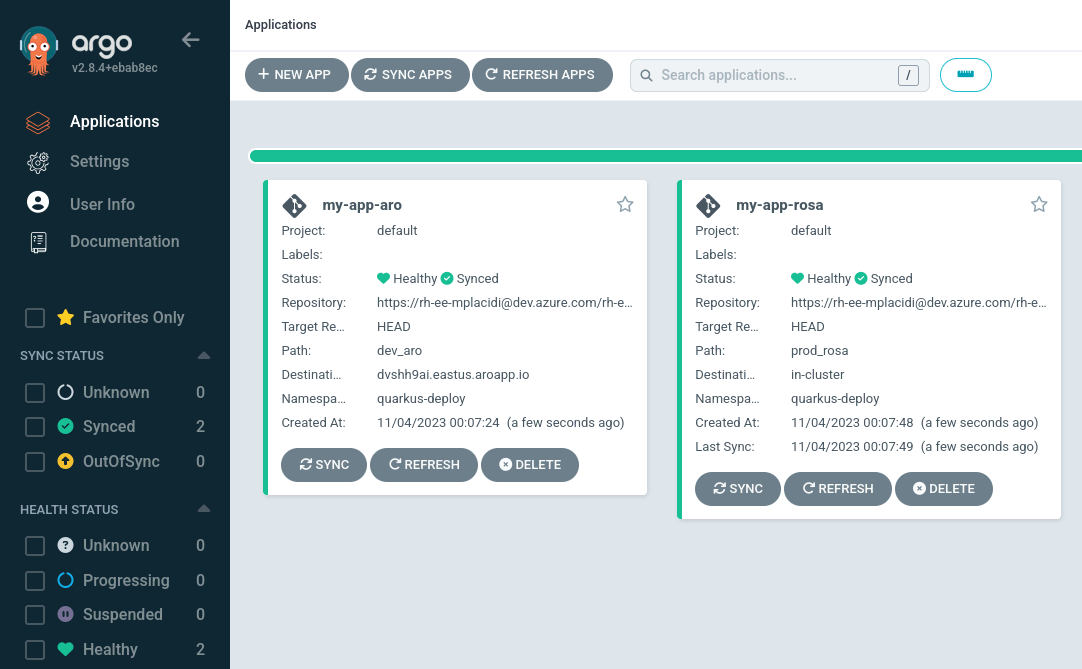
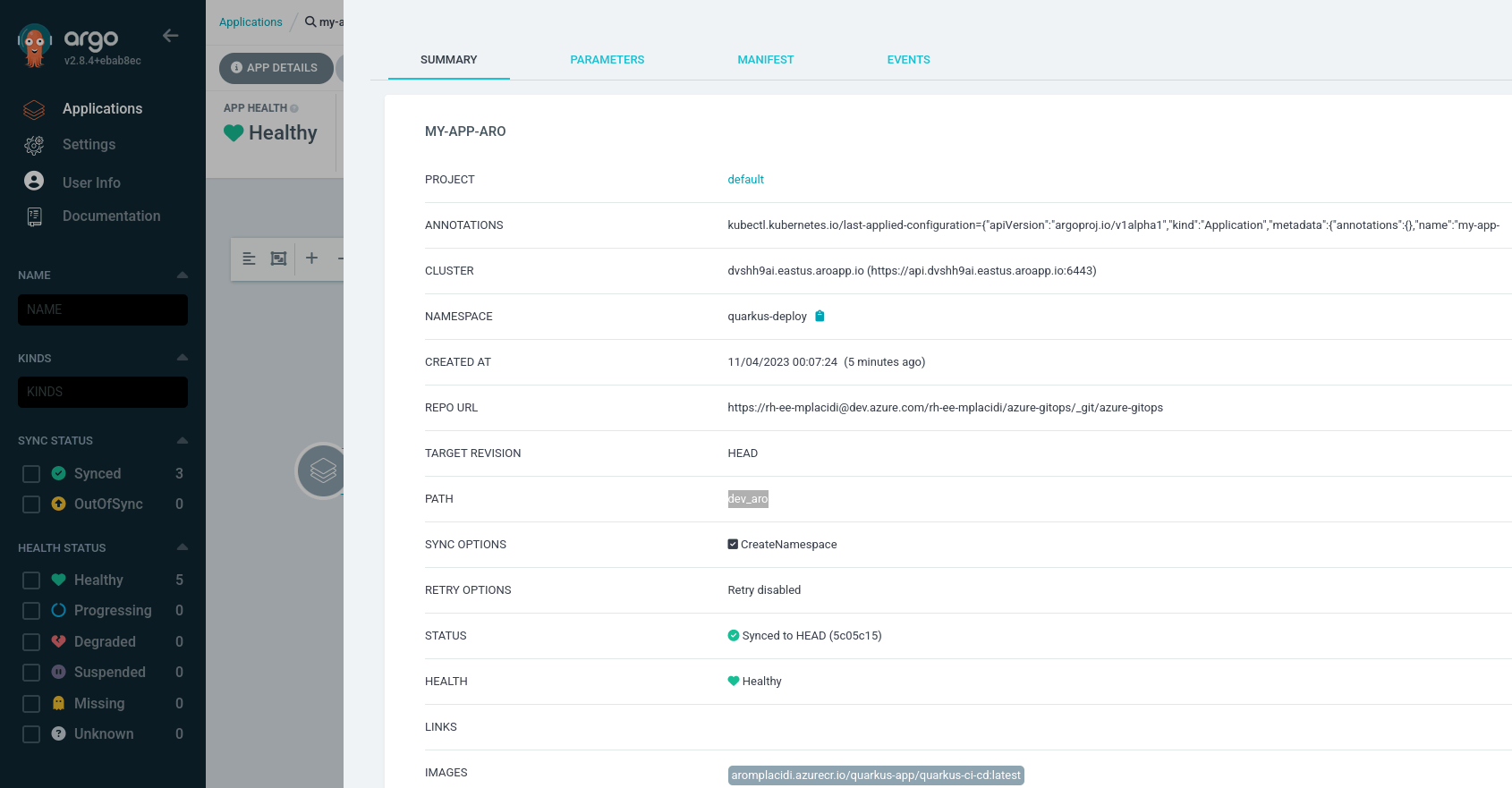
Once you get there, you will see a new resource called my-app-<something>. Since syncPolicy: is automated, you will see the sync phase already running (if not already finished) with a Healthy state, as seen in the image below.
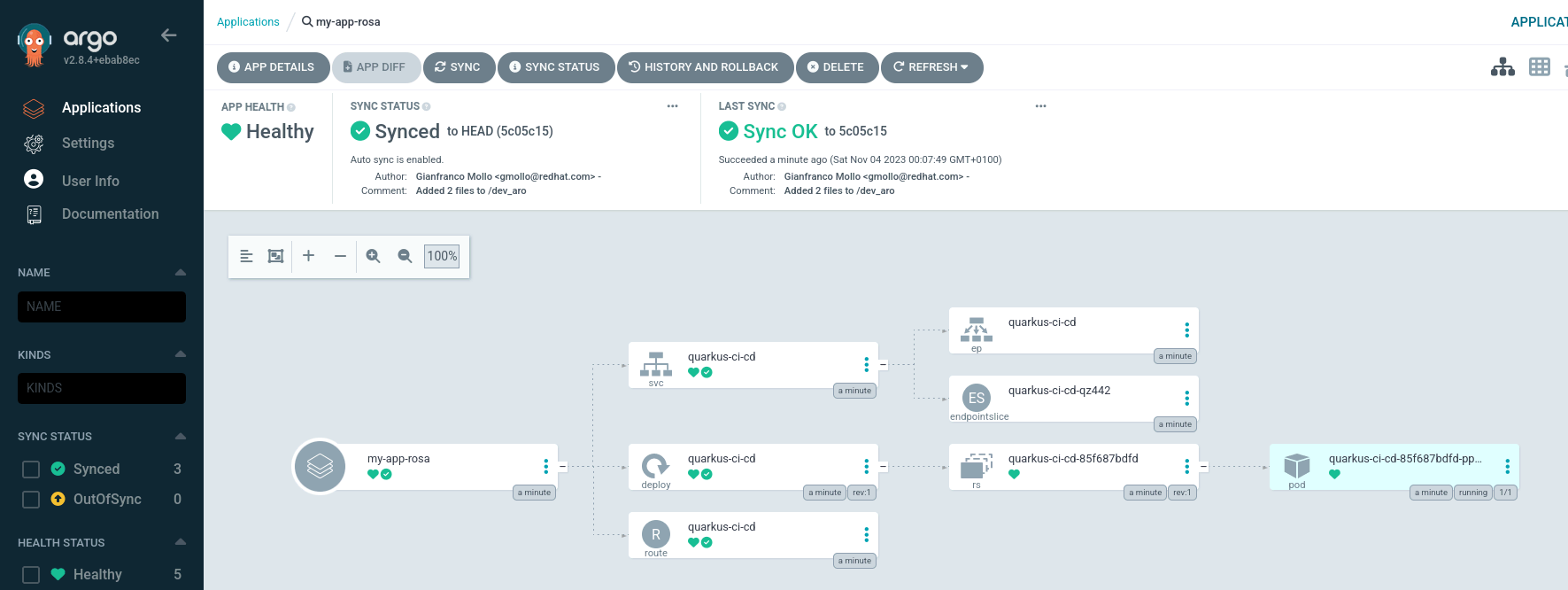
Both apps are now running, and you can view resource components, logs, events and health status assessed as shown in the images below:
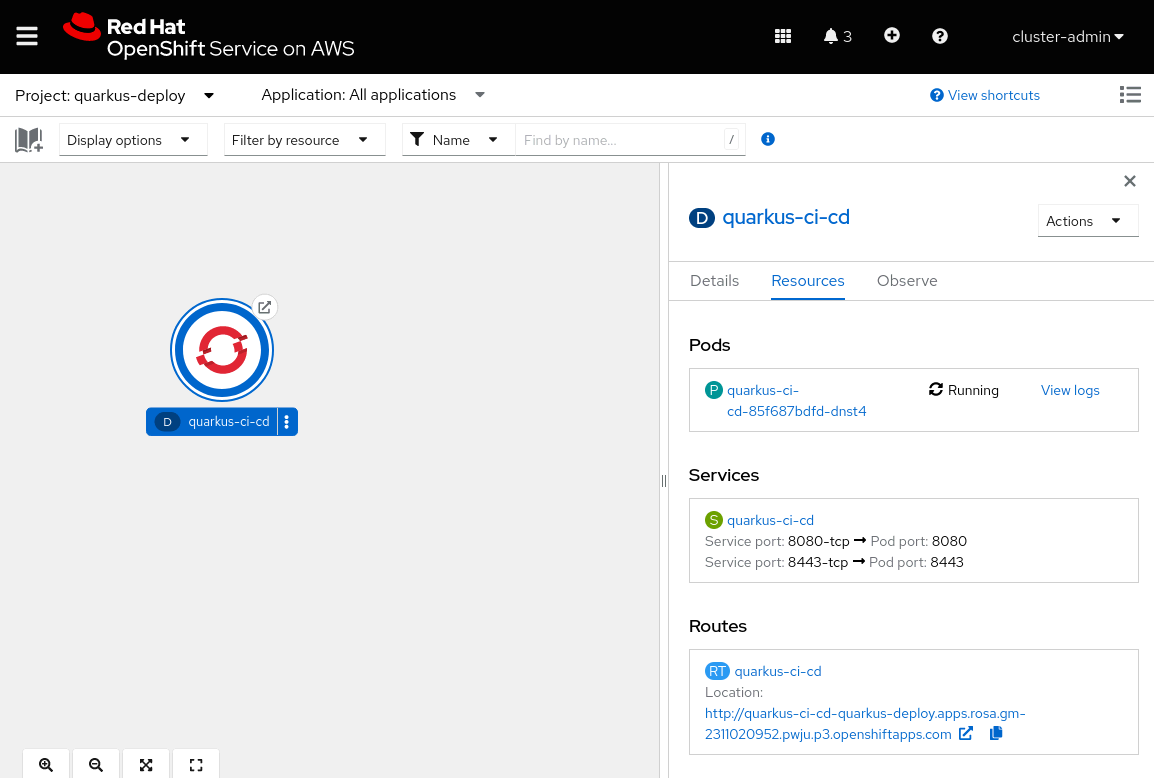
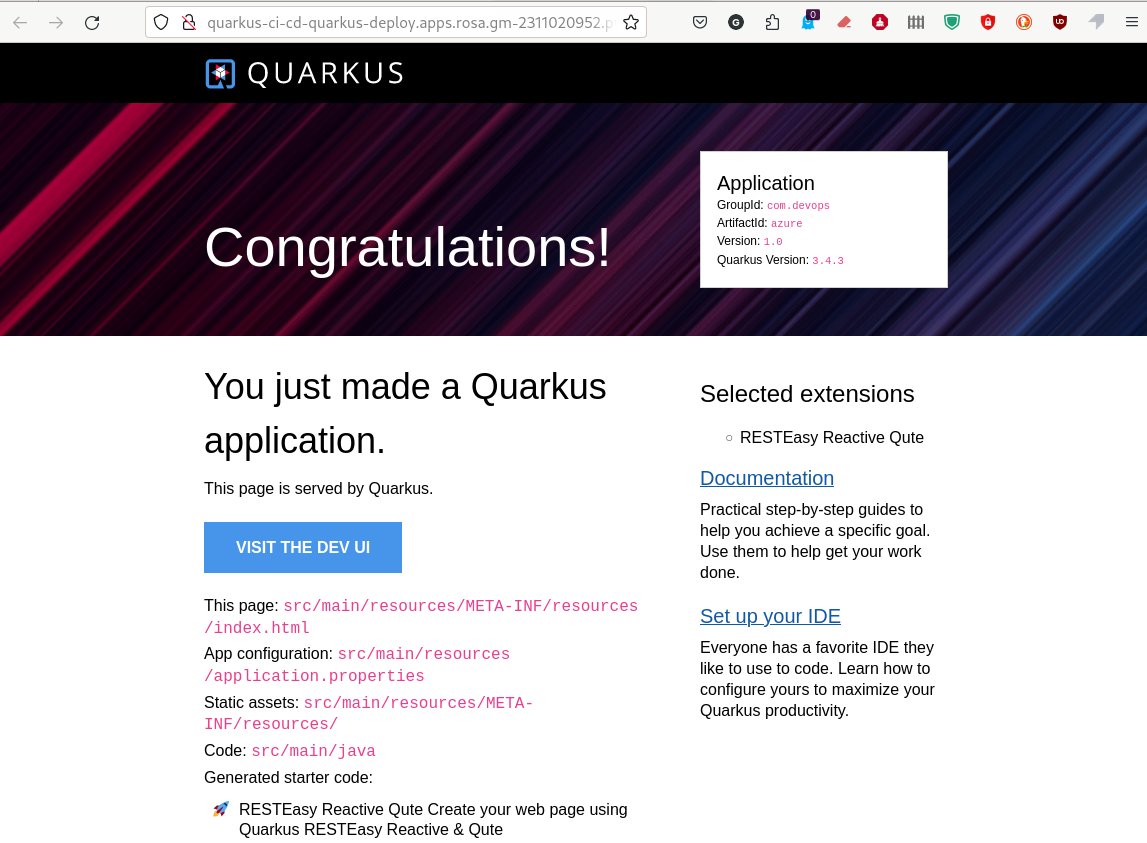
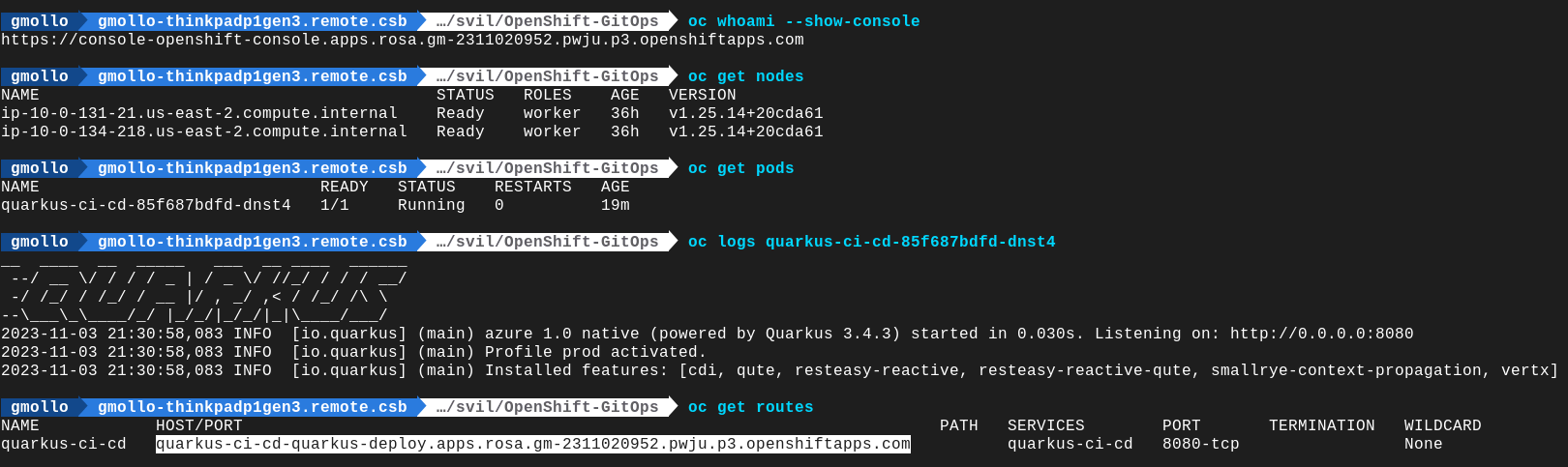
Once your apps have been deployed, you can view their status from OpenShift, either in the user interface (UI) or command-line interface (CLI). Here, you can find a few details related to the Red Hat OpenShift Service on AWS cluster:
As was done for the OpenShift Service on AWS cluster above, here you can find an OpenShift GitOps view of the same app deployed on an Azure Red Hat OpenShift cluster:
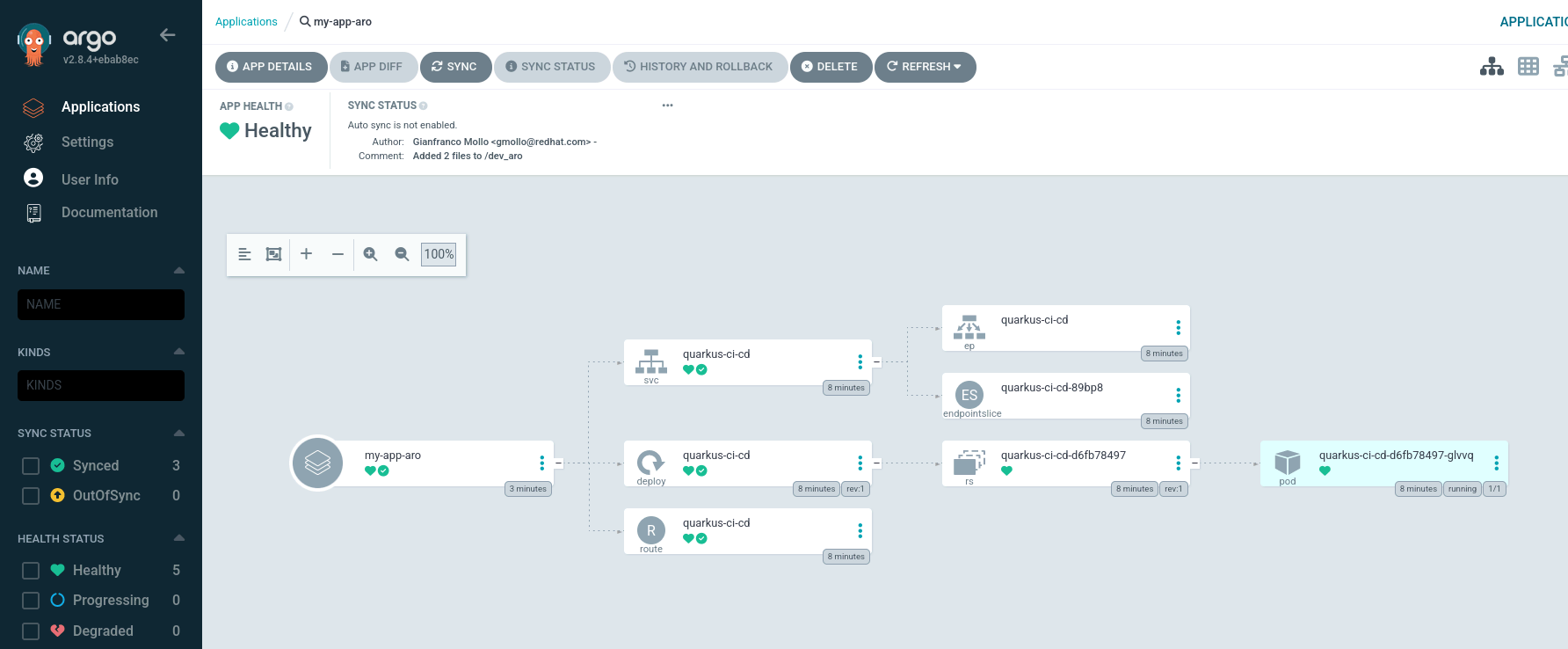
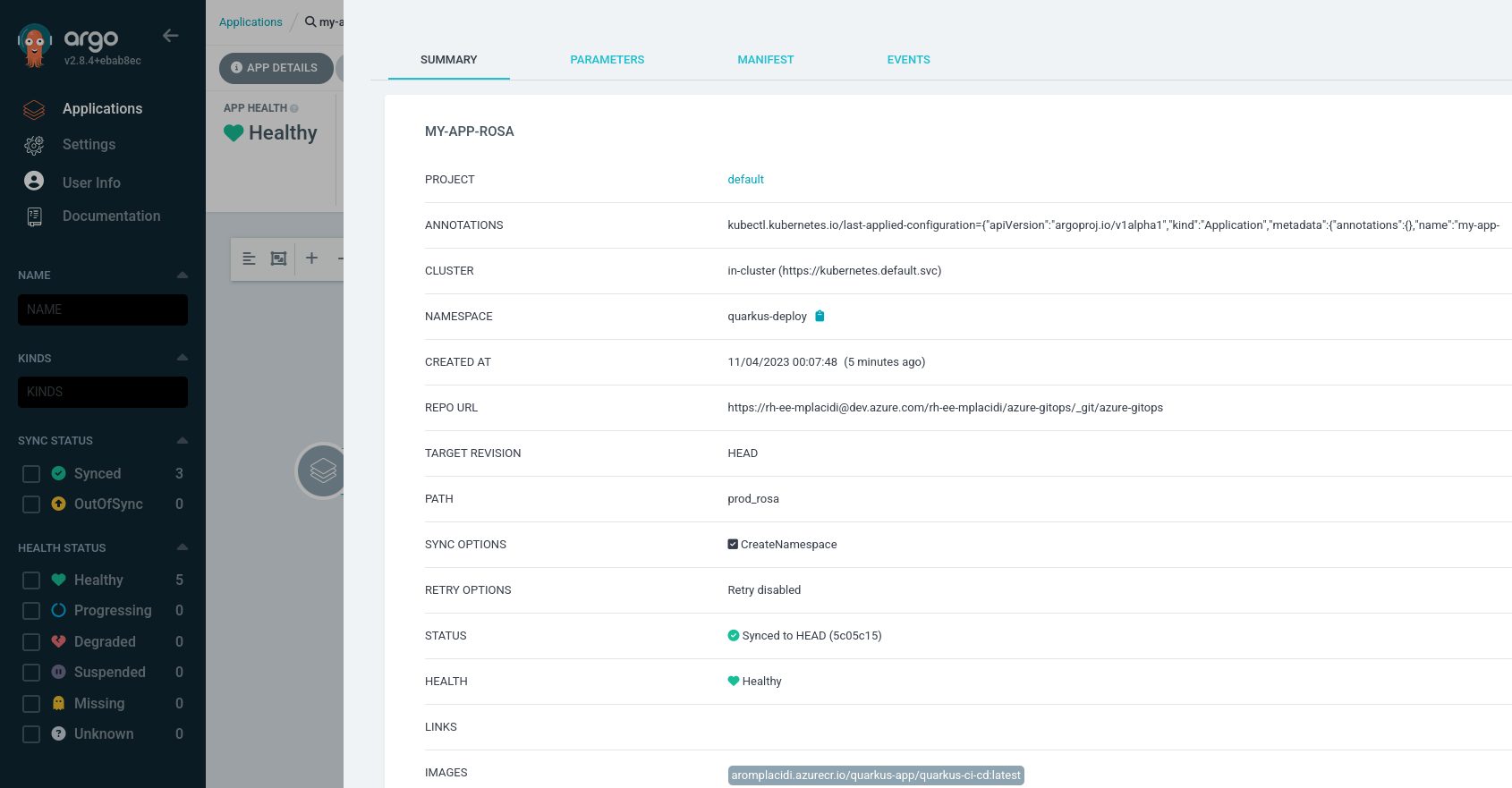
Since it is the same application installed on an Azure Red Hat OpenShift Cluster, in the following images we will find the same details at the end, in order to demonstrate what we have said.
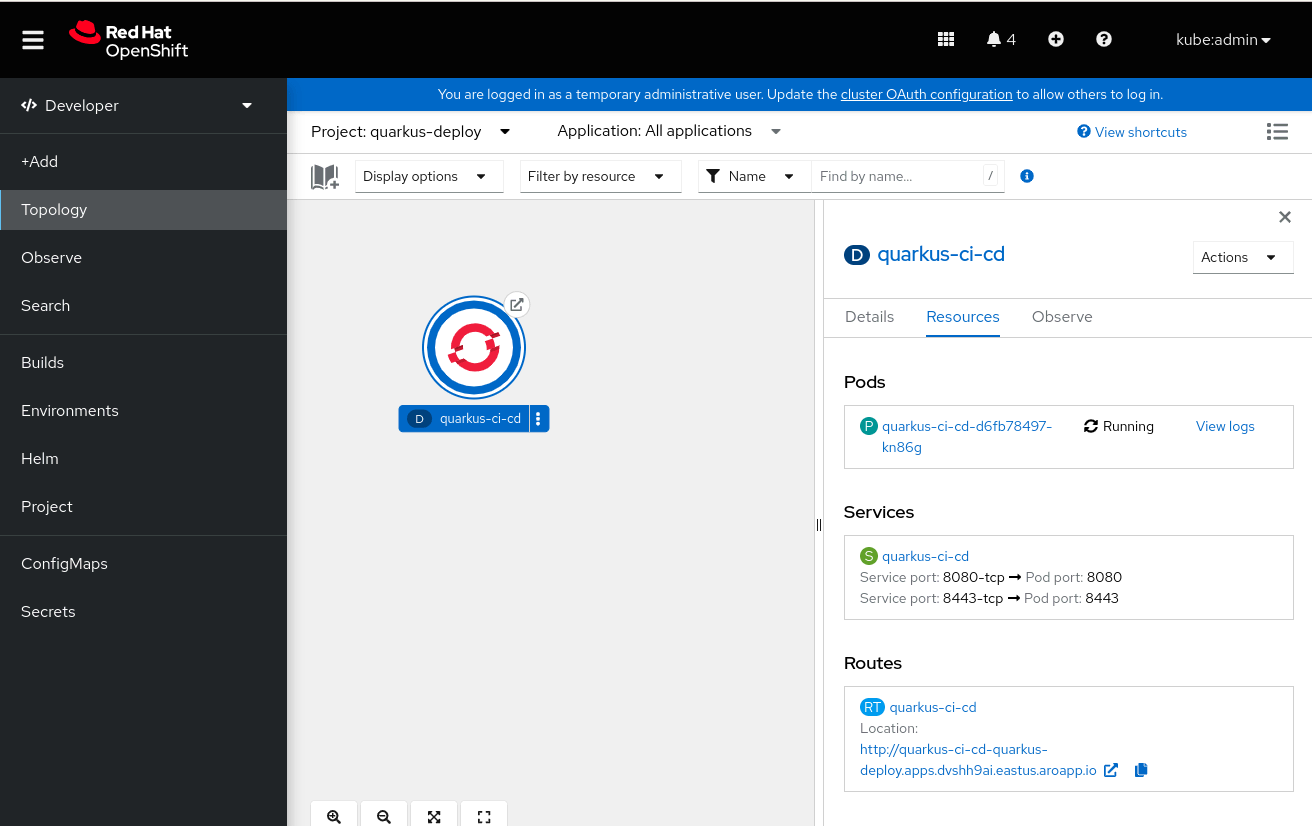

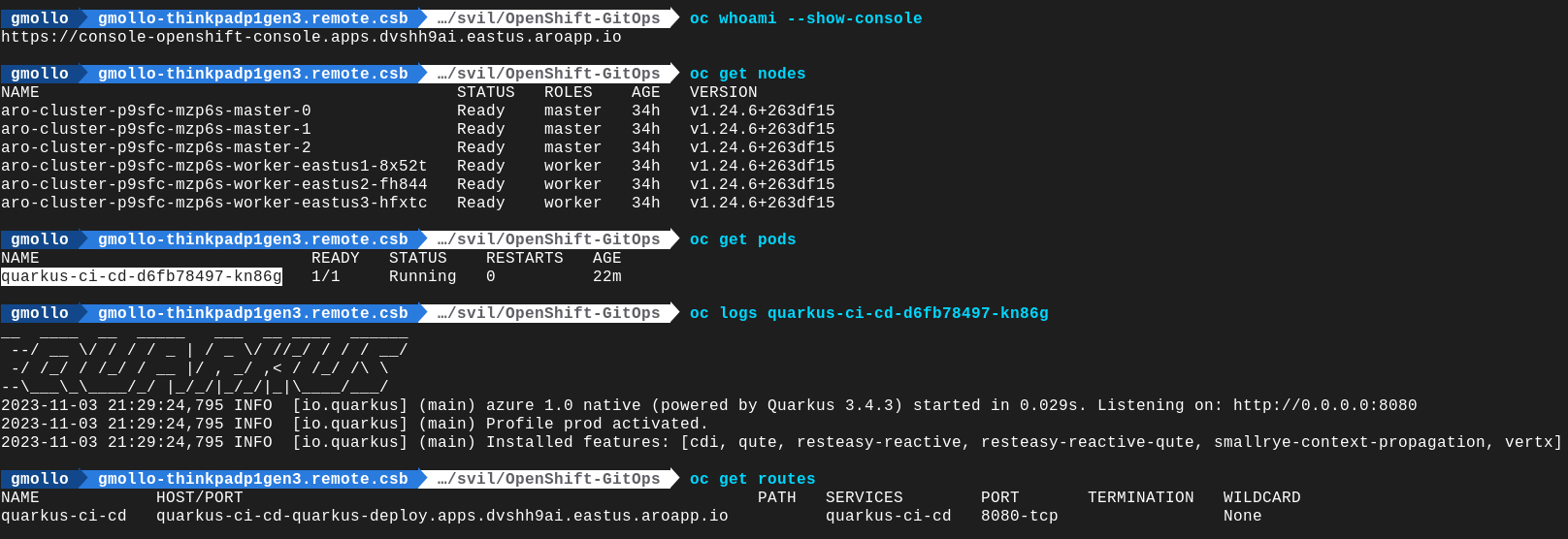
The app URL is an HTTP web link, as no SSL certificates are installed for this quick-start guide.
Wrap up
Hopefully, this three part blog series helps you take the first steps with OpenShift GitOps and Azure DevOps. For additional information, refer to the official Red Hat OpenShift GitOps documentation here, and read the other parts of this series here:
Sugli autori
Angelo has been working in the IT world since 2008, mostly on the infra side, and has held many roles, including System Administrator, Application Operations Engineer, Support Engineer and Technical Account Manager.
Since joining Red Hat in 2019, Angelo has had several roles, always involving OpenShift. Now, as a Cloud Success Architect, Angelo is providing guidance to adopt and accelerate adoption of Red Hat cloud service offerings such as Microsoft Azure Red Hat OpenShift, Red Hat OpenShift on AWS and Red Hat OpenShift Dedicated.
Gianfranco has over 20 years of experience in the IT industry, covering roles such as system engineer, technical project manager, entrepreneur, and cloud presales engineer. Since joining Red Hat’s EMEA CSA team in 2022, he has been helping customers design and adopt enterprise-grade solutions built on Red Hat OpenShift.
His expertise spans hybrid cloud architectures, container platforms, and AI-enabled infrastructures, with a strong focus on Red Hat OpenShift AI (RHOAI). He supports organizations in operationalizing AI/ML workloads, enabling collaboration between data scientists, developers, and platform teams, and ensuring consistent, scalable deployments across hybrid environments. Passionate about innovation, he works closely with customers to translate business needs into technical strategies that drive measurable outcomes and long-term value.
Gianfranco is motivated by continuous learning and the evolving landscape of cloud and AI technologies. His goal is to empower customers to fully leverage their OpenShift and AI investments while building resilient, future-ready platforms.
Proud husband and father, he enjoys cooking, traveling, and staying active through mountain biking, swimming, and scuba diving whenever possible.
Marco is an EMEA Specialist Adoption Architect at Red Hat, specialized in Red Hat OpenShift and managed cloud services such as ARO and ROSA. Marco is fueled by a love for nerdy culture and a good amount of passion for music and movies.
His journey began in 2010 as a Linux System Engineer and he spent almost a decade supporting Italian Public Administration customers: managing the stability of mid-to-large-scale public infrastructures provided a good technical foundation necessary for his transition into the world of containerization.
Since joining Red Hat in 2022, Marco’s role has evolved alongside the cloud landscape. Having transitioned from Customer Success Architect into his current position within the Launch Team as an SAA - OpenShift, he partners with customers across the EMEA region.
In this role, he provides the technical enablement and architectural guidance necessary to meet business outcomes and expectations by helping them consolidate their use of Red Hat products.
Altri risultati simili a questo
La tua piattaforma applicativa è pronta per il futuro?
Convalida delle competenze mirate: i principali aggiornamenti di Red Hat Certification
Scaling with Orchestrators | Compiler
Press Start | Command Line Heroes
Ricerca per canale

Automazione
Novità sull'automazione IT di tecnologie, team e ambienti

Intelligenza artificiale
Aggiornamenti sulle piattaforme che consentono alle aziende di eseguire carichi di lavoro IA ovunque

Hybrid cloud open source
Scopri come affrontare il futuro in modo più agile grazie al cloud ibrido

Sicurezza
Le ultime novità sulle nostre soluzioni per ridurre i rischi nelle tecnologie e negli ambienti

Edge computing
Aggiornamenti sulle piattaforme che semplificano l'operatività edge

Infrastruttura
Le ultime novità sulla piattaforma Linux aziendale leader a livello mondiale

Applicazioni
Approfondimenti sulle nostre soluzioni alle sfide applicative più difficili

Virtualizzazione
Il futuro della virtualizzazione negli ambienti aziendali per i carichi di lavoro on premise o nel cloud
