
The cat command on Linux concatenates files together. It's often used to concatenate one file to nothing to print the single file's contents to the terminal. This is a quick way to preview the contents of a text file without having to open the file in a large application.
There's nothing wrong with cat, but similar commands have been developed over the years, and the one with the most features is bat.
[ Keep your most commonly used commands handy with the Linux commands cheat sheet. ]
Syntax highlighting
Developers call bat, available under the terms of either the MIT License or the Apache License 2.0 (your choice), a "cat clone with wings." There's probably a healthy debate over what those wings are, but for me, it's the syntax highlighting and line numbering. It's a highly visual feature and can be a great help when scanning through files.

Because you're likely to use the bat output as the input for a second command, you can deactivate extra data like line numbers with the --plain option. Supported terminals retain syntax highlighting.
The --plain option is an alias for --style=plain, which hints at just how many ways you can customize the command's output. Here are some of my favorite options for the --style option:
- plain: Include no style that adds extra characters to the output
- header: Print the file name before the file's contents
- header-filesize: Print the file size before the file's contents
- grid: Add grid lines to separate output
- numbers: Print line numbers
That's not all of the style options, just the ones I use frequently.
[ Keep your favorite Git commands, aliases, and tips close at hand. Download the Git cheat sheet. ]
Git integration
Did I say syntax highlighting was my favorite feature? I meant that Git integration is my favorite feature. The bat command is Git-aware by default. When you're in a Git repository, you can use the --diff option to view just the changes to a file since it was last committed.
For instance, imagine I'm in the Git repository of my zombie apocalypse game. I've recently updated some code, but I can't quite recall the extent of it.
$ bat --diff Zombie.java
1  public class Player {
2
3  private BufferedImage image;
4+ private Position pos;
5  private Health health;
6-
7  public Zombie() {
8    loadImage();
[...]
When a line has been added since the previous commit, a plus sign (+) appears in the margin, and when a line has been changed or removed, a minus sign (-) appears.
The --diff option works only with Git. It's not a general-purpose diff tool.
[ Learn how to manage your Linux environment for success. ]
Highlight arbitrary lines
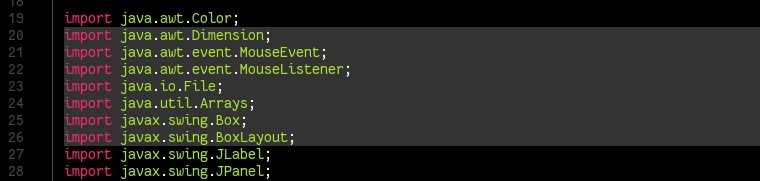
You can highlight a range of lines in a file. This isn't syntax highlighting, which bat does automatically. Instead, this marks each line with a solid box, as if to mimic a highlighter you use on paper.
$ bat --highlight-line=20:26 ZombieCruncher.java
Your results may vary with this effect. On some screens, I have a feeling that instead of highlighting, this effect obfuscates due to a drop in contrast. Still, it's a visual marker that might be useful to some.
Install bat
There are more features in bat than what I've covered here, but these are the ones I use the most. The bat command isn't strictly essential. Commands like cat and more, and even sed or awk in a pinch, perform basically the same function, but bat consciously does it with a lot more style. And that counts for something, if you like the visual aid of colorful output and a little extra context.
To install bat on Fedora, use the package manager:
$ sudo dnf install bat
On other systems, you can download a binary release from the bat Git repository or build it using the crate command.
Sull'autore
Seth Kenlon is a Linux geek, open source enthusiast, free culture advocate, and tabletop gamer. Between gigs in the film industry and the tech industry (not necessarily exclusive of one another), he likes to design games and hack on code (also not necessarily exclusive of one another).
Altri risultati simili a questo
Il tempo è prezioso: perché per il settore finanziario è necessario attivare subito la sicurezza post-quantistica
Red Hat Enterprise Linux Long-Life Add-On: un percorso verso RHEL senza una scadenza predeterminata
Infrastructure At The Edge | Compiler
Operating System Management | Compiler
Ricerca per canale

Automazione
Novità sull'automazione IT di tecnologie, team e ambienti

Intelligenza artificiale
Aggiornamenti sulle piattaforme che consentono alle aziende di eseguire carichi di lavoro IA ovunque

Hybrid cloud open source
Scopri come affrontare il futuro in modo più agile grazie al cloud ibrido

Sicurezza
Le ultime novità sulle nostre soluzioni per ridurre i rischi nelle tecnologie e negli ambienti

Edge computing
Aggiornamenti sulle piattaforme che semplificano l'operatività edge

Infrastruttura
Le ultime novità sulla piattaforma Linux aziendale leader a livello mondiale

Applicazioni
Approfondimenti sulle nostre soluzioni alle sfide applicative più difficili

Virtualizzazione
Il futuro della virtualizzazione negli ambienti aziendali per i carichi di lavoro on premise o nel cloud
