

Gli amministratori di sistema e gli sviluppatori di Red Hat Enterprise Linux (RHEL), oltre ad avere anni di esperienza e intuizione, si affidano da tempo a una serie di strumenti specifici per diagnosticare i problemi. Tuttavia, man mano che gli ambienti diventano più complessi, il carico cognitivo necessario per interpretare efficacemente i log e risolvere i problemi è aumentato.
Oggi siamo lieti di annunciare l’anteprima per sviluppatori di un nuovo server Model Context Protocol (MCP) per RHEL. Questo nuovo server MCP è progettato per colmare il divario tra RHEL e i Large Language Model (LLM), inaugurando una nuova era di risoluzione dei problemi più efficace.
Cos'è il server MCP per RHEL?
MCP è uno standard aperto che consente ai modelli di IA di interagire con dati e sistemi esterni, originariamente rilasciato da Anthropic e donato nel dicembre 2025 all'Agentic AI Foundation della Linux Foundation. Il nuovo server MCP di RHEL è ora disponibile in anteprima per sviluppatori e utilizza questo protocollo per fornire un accesso diretto e sensibile al contesto a RHEL dalle applicazioni IA che supportano il protocollo MCP, come Claude Desktop o goose.
In precedenza abbiamo rilasciato server MCP per Red Hat Lightspeed e Red Hat Satellite che abilitano una serie di interessanti scenari di utilizzo. Questo nuovo server MCP amplia questi scenari di utilizzo ed è progettato appositamente per il troubleshooting approfondito sui sistemi RHEL.
Risoluzione dei problemi più efficace
Ecco alcuni degli scenari di utilizzo abilitati dalla connessione del tuo LLM a RHEL con il nuovo server MCP.
- Analisi intelligente dei log: analizzare i dati dei log è un'attività complessa. Il server MCP consente agli LLM di acquisire e analizzare i log di sistema RHEL. Questa funzionalità permette l'analisi della causa principale basata sull'IA e il rilevamento di anomalie, aiutandoti a trasformare i dati di log grezzi in informazioni utili.
- Analisi delle prestazioni: il server MCP è in grado di accedere a informazioni quali il numero di CPU, il carico medio, i dati sulla memoria e l'utilizzo di CPU e memoria dei processi in esecuzione. Ciò consente a un sistema LLM di analizzare lo stato attuale del sistema, identificare potenziali cali delle prestazioni ed elaborare altri suggerimenti relativi alle prestazioni.
Per aiutarti a esplorare queste nuove funzionalità in modo più sicuro, l’anteprima per sviluppatori si concentra sull'abilitazione di MCP di sola lettura. Il server MCP consente a un LLM di ispezionare ed effettuare raccomandazioni e utilizza chiavi SSH standard per l'autenticazione. Inoltre, può essere configurato con una allowlist per l'accesso ai file di log e ai livelli di log. Il server MCP non consente l'accesso tramite shell aperta al tuo sistema RHEL, poiché i comandi che esegue sono pre-verificati.
Esempi di scenari di utilizzo
In questi esempi, utilizzo l'agente IA goose e il server MCP per lavorare con uno dei miei sistemi RHEL 10 denominato rhel10.example.com. Goose supporta diversi provider di LLM, inclusi provider in hosting online e in hosting locale. Io sto usando un modello in hosting locale.
Ho installato Goose e il server MCP sulla mia workstation Fedora, con l'autenticazione tramite chiave SSH configurata con rhel10.example.com.
Inizierò con un prompt che chiede all'LLM di aiutarmi a controllare l'integrità del sistema rhel10.example.com:

L'LLM utilizza una serie di strumenti forniti dal server MCP per raccogliere informazioni di sistema:
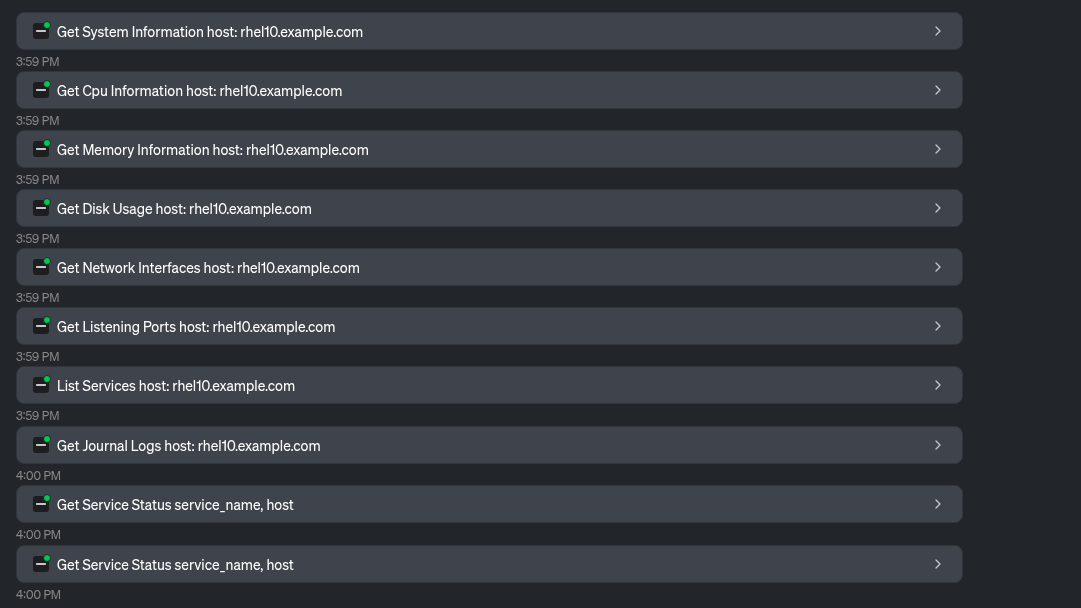
Sulla base di questi dati, l'LLM fornisce una panoramica del sistema e della sua integrità, inclusa questa tabella:
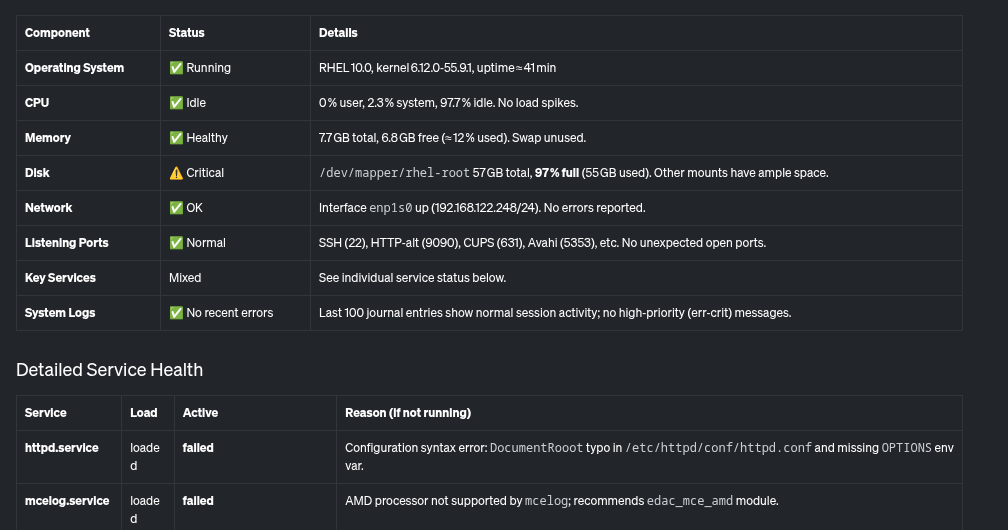
Inoltre, fornisce questo riepilogo, evidenziando i problemi critici che devono essere risolti, come il file system root quasi pieno e un paio di servizi che non funzionano sul sistema.

Analizziamo i problemi identificati. Chiederò all'LLM di aiutarmi a determinare perché l'utilizzo del disco è così elevato:

L'LLM utilizza gli strumenti forniti dal server MCP per determinare cosa sta utilizzando più spazio su disco:

In base a ciò, l'LLM determina che la directory /home/brian/virtual-machines contiene un file da 25 GB e che la directory /home/brian/.local occupa 24 GB di spazio:

Infine, chiederò anche all'LLM di aiutarmi con httpd.service, che era stato precedentemente segnalato come non funzionante.

L'LLM utilizza lo strumento Read File fornito dal server MCP:

Sulla base di ciò, l'LLM segnala le potenziali cause del malfunzionamento di httpd.service:
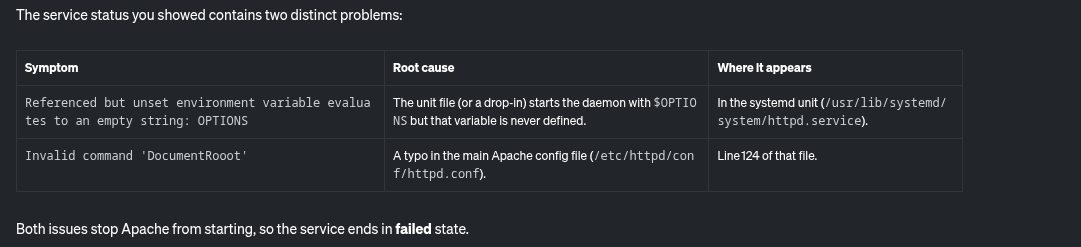
Inoltre, fornisce anche alcune istruzioni dettagliate per risolvere questo problema:

Il server MCP per RHEL mi ha permesso di identificare e risolvere facilmente i potenziali problemi relativi a un file system quasi pieno e a un servizio httpd non funzionante.
Quali sono i prossimi sviluppi?
Sebbene si parta dall'analisi di sola lettura, la roadmap prevede l'estensione ad altri casi d'uso. Per seguire il processo di sviluppo, tieni d'occhio il nostro repository GitHub upstream. I contributi upstream sono benvenuti. Siamo molto interessati ai tuoi suggerimenti: richieste di miglioramento, segnalazioni di bug e così via. Puoi contattare il team su GitHub o tramite il Fedora AI/ML Special Interest Group (SIG).
Vuoi sperimentare una risoluzione dei problemi più efficace?
Il server MCP per RHEL è ora disponibile in anteprima per sviluppatori. Connetti la tua applicazione client LLM e scopri come l'IA contestuale può cambiare il modo in cui gestisci RHEL. Per iniziare, consulta la documentazione Red Hat e la documentazione upstream.
Prova prodotto
Red Hat Enterprise Linux | Versione di prova
Sugli autori
Brian Smith is a product manager at Red Hat focused on RHEL automation and management. He has been at Red Hat since 2018, previously working with public sector customers as a technical account manager (TAM).
Máirín Duffy is a Red Hat Distinguished Engineer and leads the Red Hat Enterprise Linux Lightspeed Incubation team at Red Hat as a passionate advocate for human-centered AI and open source. A recipient of the O’Reilly Open Source Award, Máirín first joined Red Hat as an intern in 2004 and has spent two decades in open source communities focusing on user experience in order to expand the reach of open source. A sought-after speaker and author, Mo holds 19 patents and authored 6 open source coloring books, including The SELinux Coloring Book.
Altri risultati simili a questo
Perché il tuo framework degli agenti di IA non è completo: 7 funzionalità della piattaforma mancanti in produzione
Introduzione ad asago: orchestrazione della sicurezza e della governance dell'IA open source
Can agentic AI patch the internet?
How Red Hat cleared IT debt for scalable AI
Ricerca per canale

Automazione
Novità sull'automazione IT di tecnologie, team e ambienti

Intelligenza artificiale
Aggiornamenti sulle piattaforme che consentono alle aziende di eseguire carichi di lavoro IA ovunque

Hybrid cloud open source
Scopri come affrontare il futuro in modo più agile grazie al cloud ibrido

Sicurezza
Le ultime novità sulle nostre soluzioni per ridurre i rischi nelle tecnologie e negli ambienti

Edge computing
Aggiornamenti sulle piattaforme che semplificano l'operatività edge

Infrastruttura
Le ultime novità sulla piattaforma Linux aziendale leader a livello mondiale

Applicazioni
Approfondimenti sulle nostre soluzioni alle sfide applicative più difficili

Virtualizzazione
Il futuro della virtualizzazione negli ambienti aziendali per i carichi di lavoro on premise o nel cloud
