
OpenShift lets you develop, deploy, and manage your cloud-native applications efficiently. But many of us have stable and trusted applications running on Red Hat Enterprise Linux machines that we just want to keep running and up-to-date on the same cluster. In this article, I would like to present how to define RHEL VMs, hosted in OpenShift using OpenShift Virtualization, that subscribe for regular updates.
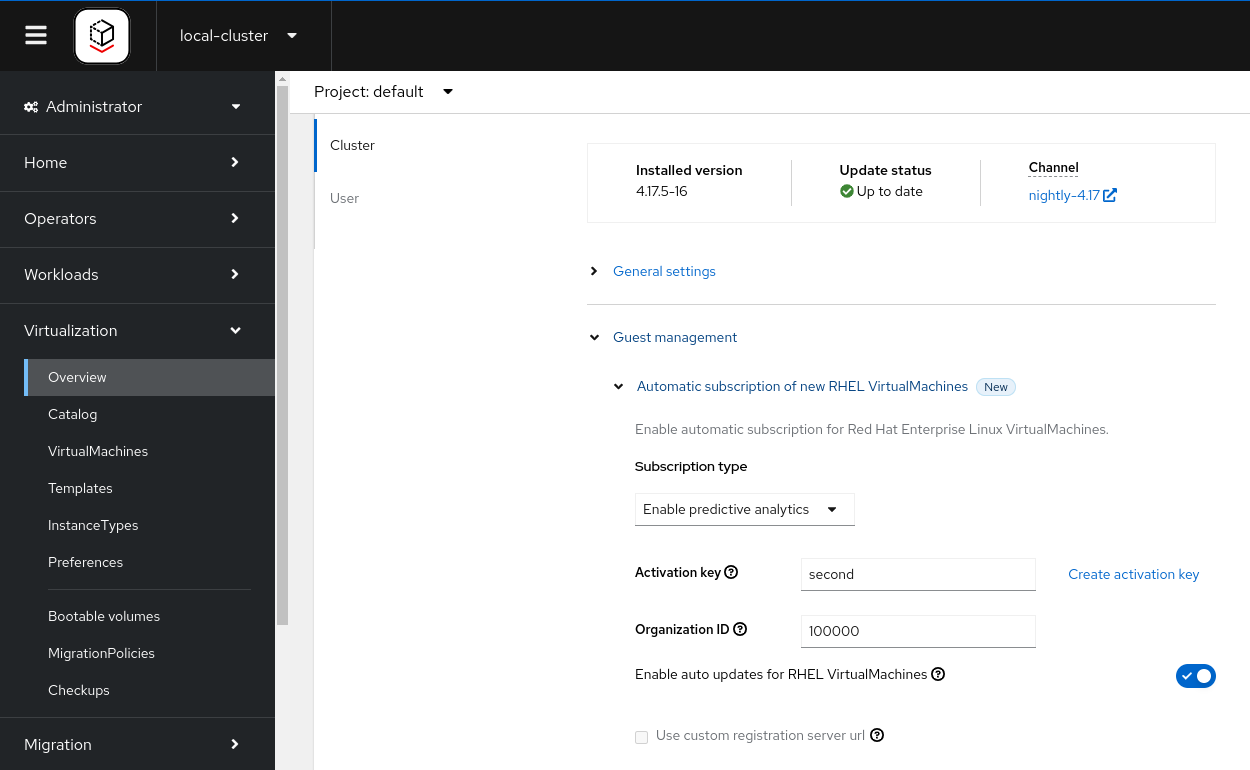
Starting OpenShift Virtualization 4.14 you don’t have to edit your VM yaml. As a cluster-admin, go to Virtualization -> Overview -> Settings -> Guest management. Choose the type of your subscription and fill your activation key and organization id to be used by the VMs that the cluster users are going to create.
Some history
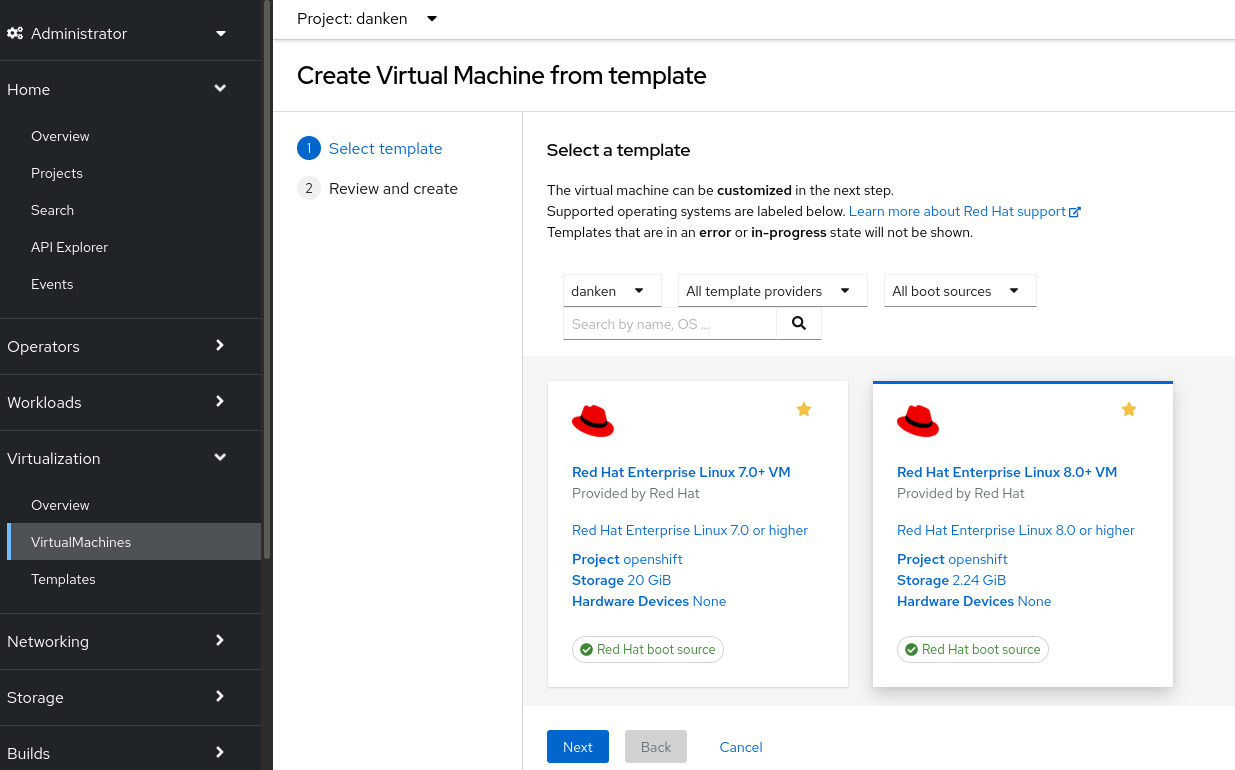
With OpenShift Virtualization 4.10 installed, your default storage class is automatically populated with the boot sources of multiple operating systems. This makes it super simple for you, a project owner, to define a new VM. In the administrator perspective, click Virtualization, click the Create button, choose “with Wizard”:

Select RHEL 8 (or if you enjoy some adventure, RHEL 9 Beta), click Next, click “Create virtual machine” and finally click “See virtual machine details.” That is all. You have the latest release of RHEL 8.
One of the greatest values of RHEL is its regular updates. As a Red Hat customer, you are used to seeing security faults and bugs fixed with dnf update. However, to enjoy this, you first have to subscribe the virtual machine you create.
If you are an OpenShift bare-metal customer, your OpenShift entitlement includes RHEL entitlements for any hosted RHEL virtual machines. This means you may subscribe as many RHEL VMs as you can fit in your cluster. In this blog, I would like to show a simple way to do so, which I tried with the MW01502 SKU - Red Hat OpenShift Container Platform (Bare Metal Node), Standard (1-2 sockets up to 64 cores.
Start by logging into https://access.redhat.com/management/activation_keys where you can create a new activation key and attach it to your OpenShift subscription. You would have to ask your Organization Administrator to do this if you do not have this permission yourself.
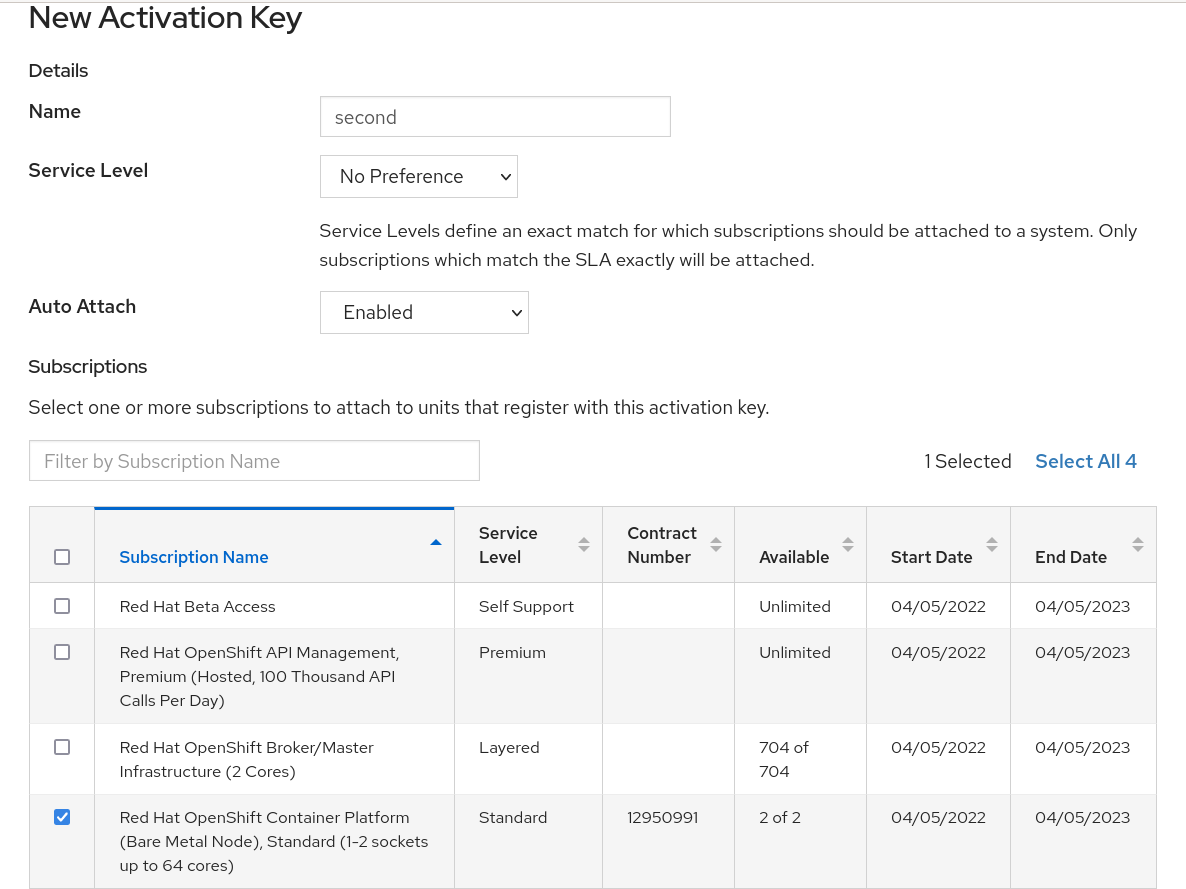
Take a note of the name you gave your activation key (mine has the uninspiring name “second”) and of your organization ID. I ticked my OpenShift subscription, but you can just enable Simple Content Access for your organization and stop worrying about this.
Now define a new VM, but this time click “Customize virtual machine” instead of “Create virtual machine.” Jump to the Advanced step in provisioning the VM and select the cloud-init yaml view, where we need to add a few lines with the activation key and org:
user: cloud-user
password: '${CLOUD_USER_PASSWORD}'
chpasswd:
  expire: false
rh_subscription:
  activation-key: second
  org: 100000
ssh_pwauth: true
packages:
- dnf-automatic
runcmd:
- systemctl enable --now dnf-automatic-install.timer
Then click “Review and confirm,” create the VM, and see it start.
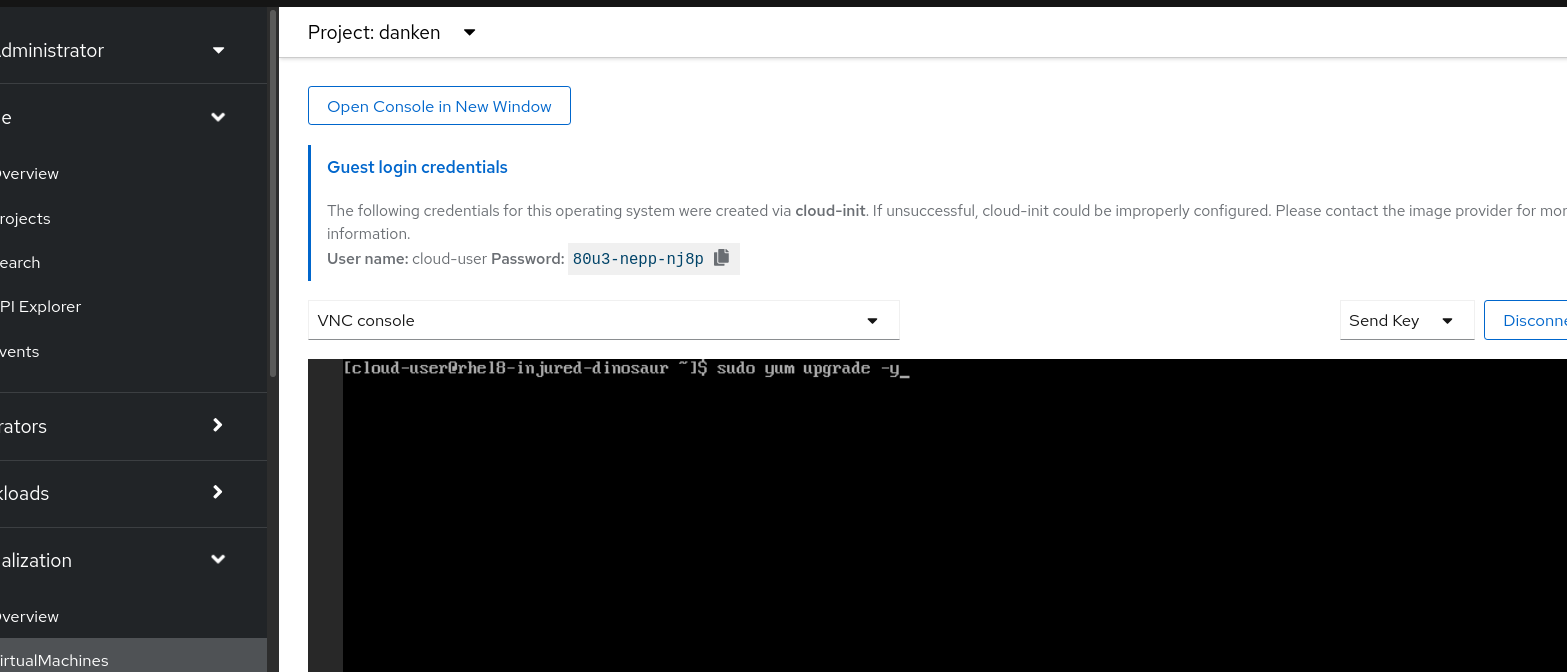
I am not very proud of my adding of “ssh_pwauth: true” there as using SSH keys is more secure. Still, enabling password authentication makes it more convenient to log into the VM over ssh using the cloud-user credentials. Once we do this, we can dnf update -y and get the latest and greatest of RHEL. Note that I have included dnf-automatic and enabled it, to ensure that the VM stays up to date.
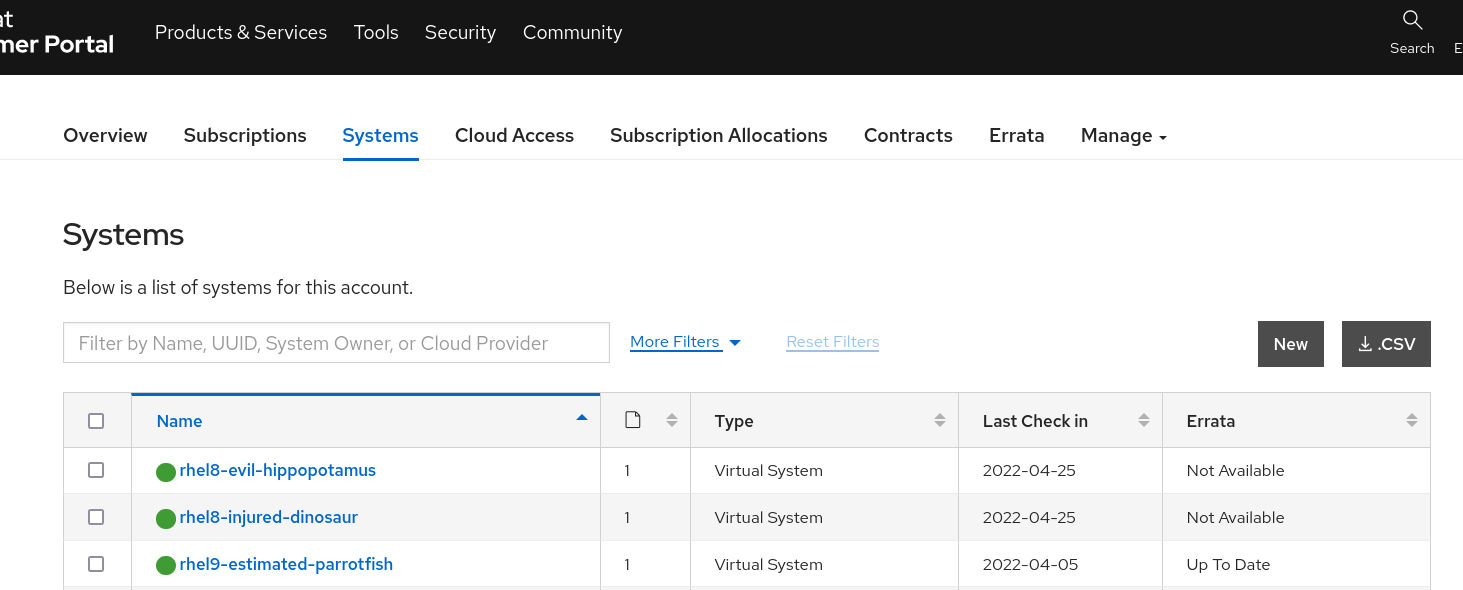
Finally, we can rejoice in tracking our newly-subscribed system in https://access.redhat.com/management/systems.
There are many methods to enable subscription for VMs. I hope you liked this simple and automatable method as much as I do. To learn more about OpenShift Virtualization, go to https://cloud.redhat.com/learn/topics/virtualization/.
Postscript
Actually, as a cluster admin you can make things even easier for your VM owners. Obtain a template from your cluster with oc get template -n openshift rhel8-server-tiny -o yaml > rhel8-server-tiny.yaml and edit it. You should modify a few lines (provider, display-name, name and VM label) but more importantly, modify the cloud-init data
apiVersion: template.openshift.io/v1
kind: Template
metadata:
 annotations:
...
    openshift.io/display-name: Subscribed Red Hat Enterprise Linux 8.0+ VM
    template.kubevirt.io/provider: my friendly cluster-admin
    template.kubevirt.io/provider-support-level: Full
    template.kubevirt.io/provider-url: https://www.my.corp
...
  name: rhel8-server-tiny-subscribed
  namespace: openshift
...
objects:
- apiVersion: kubevirt.io/v1
  kind: VirtualMachine
  metadata:
...
    labels:
      app: ${NAME}
      vm.kubevirt.io/template: rhel8-server-tiny-subscribed
...
       - cloudInitNoCloud:
            userData: |-
             #cloud-config
              user: cloud-user
              password: ${CLOUD_USER_PASSWORD}
              chpasswd: { expire: False }
              rh_subscription:
                activation-key: second
                org: 10000000
              ssh_pwauth: true
              packages:
              - dnf-automatic
              runcmd:
              - systemctl enable --now dnf-automatic-install.timer
...
After you apply this back to the cluster with oc apply -f rhel8-server-tiny.yaml, your VM owners would see a new tile in their VM catalog. All they need to do to run a subscribed VM is to click it, no cloud-init editing is required of them.

This simplicity to your users comes with two drawbacks: anyone with access to your cluster could see your activation key in this Subscribed template, and you should repeat this template-modification process if/when Red Hat releases fixes to the vanilla template.
Sull'autore
Altri risultati simili a questo
Gestisci le macchine virtuali su Red Hat OpenShift con Service Mesh
I partner di Red Hat sono una risorsa per i provider telco
Virtualization Is (Still) King | Compiler
Crack the Cloud_Open | Command Line Heroes
Ricerca per canale

Automazione
Novità sull'automazione IT di tecnologie, team e ambienti

Intelligenza artificiale
Aggiornamenti sulle piattaforme che consentono alle aziende di eseguire carichi di lavoro IA ovunque

Hybrid cloud open source
Scopri come affrontare il futuro in modo più agile grazie al cloud ibrido

Sicurezza
Le ultime novità sulle nostre soluzioni per ridurre i rischi nelle tecnologie e negli ambienti

Edge computing
Aggiornamenti sulle piattaforme che semplificano l'operatività edge

Infrastruttura
Le ultime novità sulla piattaforma Linux aziendale leader a livello mondiale

Applicazioni
Approfondimenti sulle nostre soluzioni alle sfide applicative più difficili

Virtualizzazione
Il futuro della virtualizzazione negli ambienti aziendali per i carichi di lavoro on premise o nel cloud
