

Organizations must balance the need for fast virtual machine (VM) migrations with predictable, low-risk execution. Red Hat has released the general availability (GA) of storage offload migrations in the migration toolkit for virtualization 2.11, included in Red Hat OpenShift. This update allows you to migrate with speed and confidence.
Migrate with speed: Storage offloading is now generally available
Storage offload migrations are now generally available to help you move critical VM workloads quickly with minimal downtime. This feature uses your existing storage systems for smoother migrations. While traditional migrations move data over the IP network, storage offloading transfers this work to the underlying storage array.
Bypassing the network eliminates the bandwidth constraints that slow migrations. Internal testing conducted by Hitachi shows that these migrations can run up to 10 times faster than traditional network migrations (actual results may vary by environment). A 10-hour migration window can potentially be reduced to just one hour, which preserves your network for production traffic and significantly reduces the migration timeline.
Flexibility and choice throughout your migration
You can still choose how to conduct your migrations through storage offloading. Use a cold migration for non-critical workloads that require simplicity. Use a warm migration to copy data while the VM remains running, with a brief shutdown period to complete the migration. The migration toolkit for virtualization 2.11 also introduces support for additional certified partners like Infinidat and IBM to give you more options for your migration.
How to get started with storage offload migrations
Follow these steps to use storage offloading and kickstart your migrations. For a more detailed view, review the demo walkthrough and interactive experience.
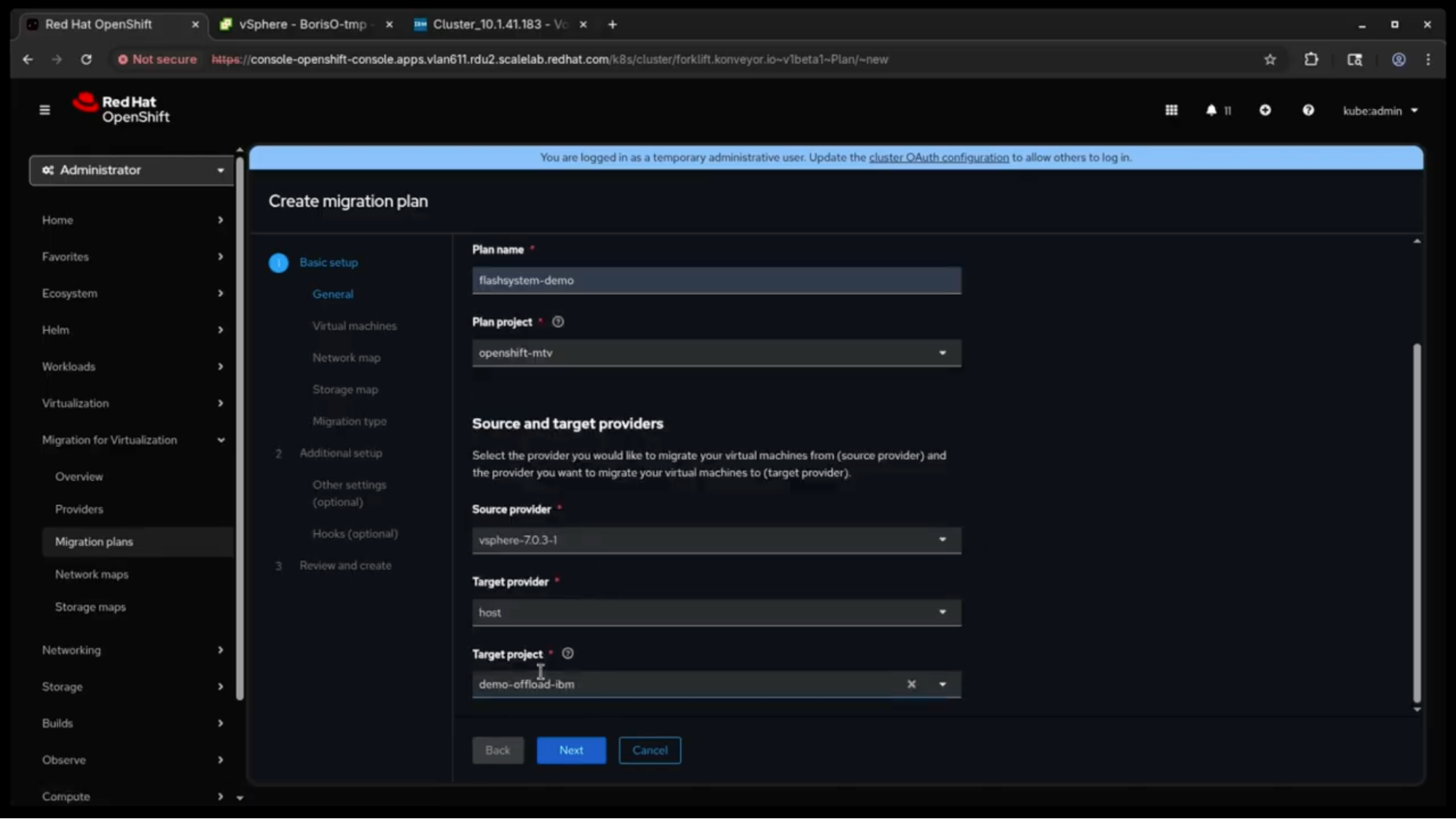
1. Create a migration plan
In the Red Hat OpenShift console, navigate to the Migration plans section. Give your plan a name and select your source provider, such as vSphere, and your target provider (the destination for your VM).
2. Choose your VMs
Select the specific VMs you want to migrate. You can select one or more VMs to move in a single plan.

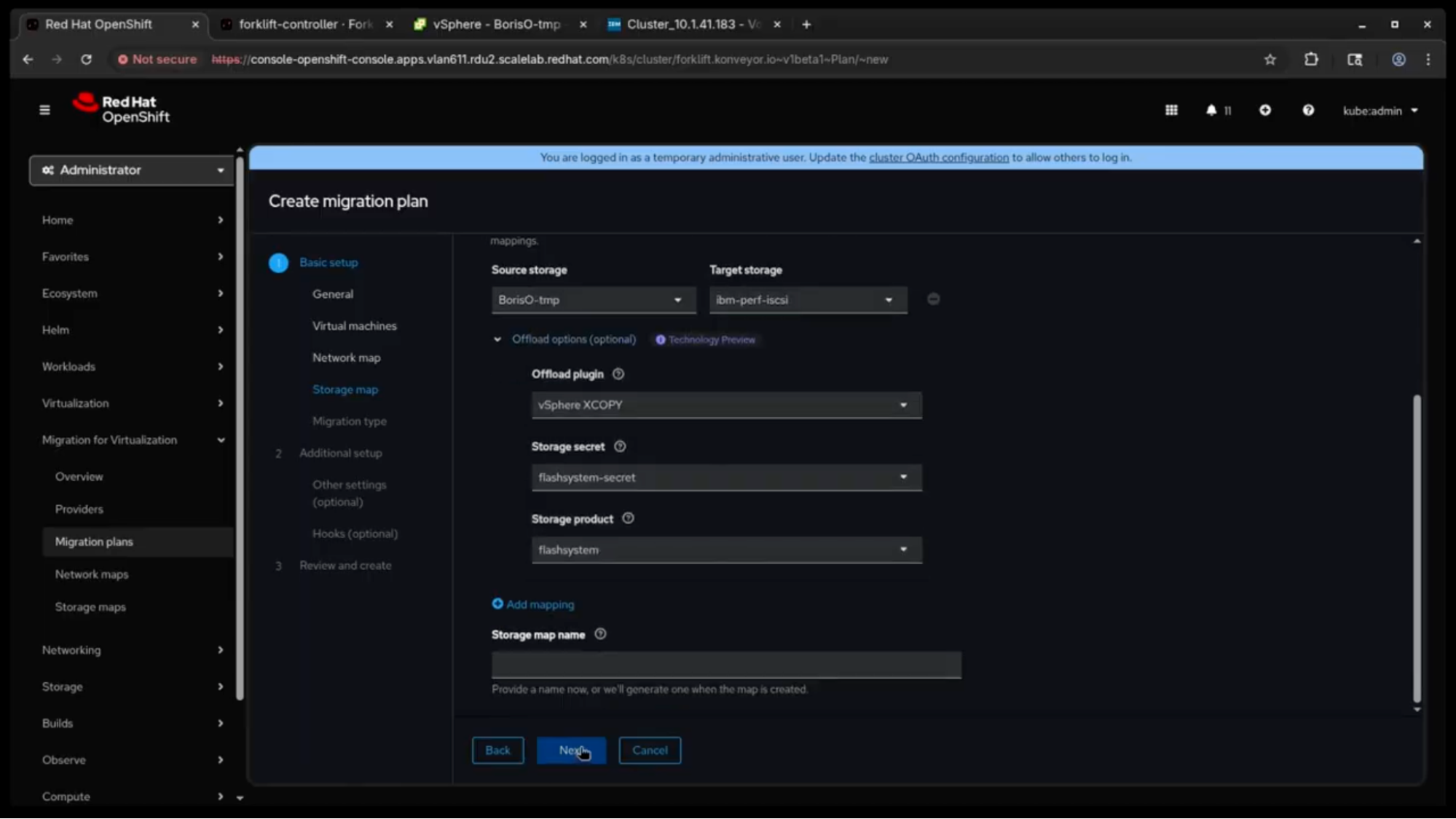
3. Map your networks and storage
This is the most important step for storage offloading.
- Network map: Select the appropriate network map to ensure your VM lands on the correct network in OpenShift.
- Storage map: Map your source datastore to a storage class that supports offloading, such as those from Hitachi, Pure, NetApp and Dell. This tells the migration toolkit for virtualization to trigger an array-level copy instead of a network stream.
4. Execute and complete
Once you create the plan, you can begin the migration. Monitor the status in the UI. When the migration is complete, the VM appears in the Red Hat OpenShift Virtualization console. Storage offloading saves time by using existing resources without overwhelming your network.

Additional updates
The migration toolkit for virtualization 2.11 includes additional updates designed to make your migration journey smoother. For a deep dive, check out the full release notes here.
Enhanced learning experience
The migration toolkit for virtualization helps you learn through research-backed content integration and a guided interaction experience for complex tasks. The Tips and Tricks section of the console expands the migration toolkit 2.10 release with more learning resources and guides for yourmigration journey, accessible directly in the console.
Plan your storage offload migration
Red Hat OpenShift Virtualization and storage offloading provide a faster, more predictable way to modernize your infrastructure or complete active migrations. With Red Hat's migration toolkit for virtualization 2.11, you can use storage from partners such as Hitachi, Pure, NetApp, Dell, and more to move data at the storage layer. This approach reduces your migration windows and preserves network bandwidth for production traffic.
Learn more:
Risorsa
Quindici motivi per adottare Red Hat OpenShift Virtualization
Sugli autori
Carolyn May is a Product Marketing Manager at Red Hat, specializing in OpenShift, the leading hybrid cloud application platform powered by Kubernetes. With a background in sales, Carolyn spearheads initiatives aimed at highlighting the value of OpenShift.
Jochen has been working in IT for more than 30 years and has been turning customer problems into technical solutions as a product manager for more than 15 years. For the past 2 years, he has been part of the Virtualization Product Management Team at RedHat.
Altri risultati simili a questo
I partner di Red Hat sono una risorsa per i provider telco
La virtualizzazione nel 2026: crea una piattaforma per VM, container e IA
Virtualization Is (Still) King | Compiler
Ricerca per canale

Automazione
Novità sull'automazione IT di tecnologie, team e ambienti

Intelligenza artificiale
Aggiornamenti sulle piattaforme che consentono alle aziende di eseguire carichi di lavoro IA ovunque

Hybrid cloud open source
Scopri come affrontare il futuro in modo più agile grazie al cloud ibrido

Sicurezza
Le ultime novità sulle nostre soluzioni per ridurre i rischi nelle tecnologie e negli ambienti

Edge computing
Aggiornamenti sulle piattaforme che semplificano l'operatività edge

Infrastruttura
Le ultime novità sulla piattaforma Linux aziendale leader a livello mondiale

Applicazioni
Approfondimenti sulle nostre soluzioni alle sfide applicative più difficili

Virtualizzazione
Il futuro della virtualizzazione negli ambienti aziendali per i carichi di lavoro on premise o nel cloud
