
2024 marks an important milestone in the CentOS Linux lifecycle. Following the End Of Life (EOL) of CentOS Linux 8 in late 2021, CentOS Linux 7 will soon reach its final stage. Red Hat offers a chance to more safely migrate your CentOS Linux servers to Red Hat Enterprise Linux, and the decision to transition from CentOS Linux to Red Hat Enterprise Linux (RHEL) marks a strategic move towards enhanced performance, greater system security, and enterprise-level support.
Preparing for conversion
Red Hat offers many alternatives to migrate from CentOS Linux to Red Hat Enterprise Linux. All of them are supported, and offer a more seamless transition.
- The convert2rhel command is supported, straightforward and easier to use than a manual process, performing all the required steps to convert your CentOS Linux setup to Red Hat Enterprise Linux. The tool guides you through the migration step by step, helping to confirm that your system state remains consistent throughout the process.
- If you already have a Red Hat Satellite instance and subscription, then you can convert a large number of systems at once, centrally, without having to manually run any commands.
- You can use Red Hat Insights for a pre-conversion analysis across many machines, directly from Red Hat Cloud Console.
Before starting the conversion process, it's essential to take steps to verify that everything is aligned with your requirements to reduce potential compatibility issues and to keep conversion errors to an absolute minimum. Here are 5 best practices for a smoother and more successful conversion:
1. Run a pre-conversion analysis
The convert2rhel command allows you to run a preliminary check for the most common configuration issues, blockers, and warnings that you should be aware of before proceeding.
It generates a report that you can easily browse to be sure that your system meets the requirements and can undergo a conversion without issue.
While converting using Red Hat Insights, the pre-conversion analysis is also available in the Red Hat Hybrid Cloud console, and shows you the results for each host directly in each host's page.
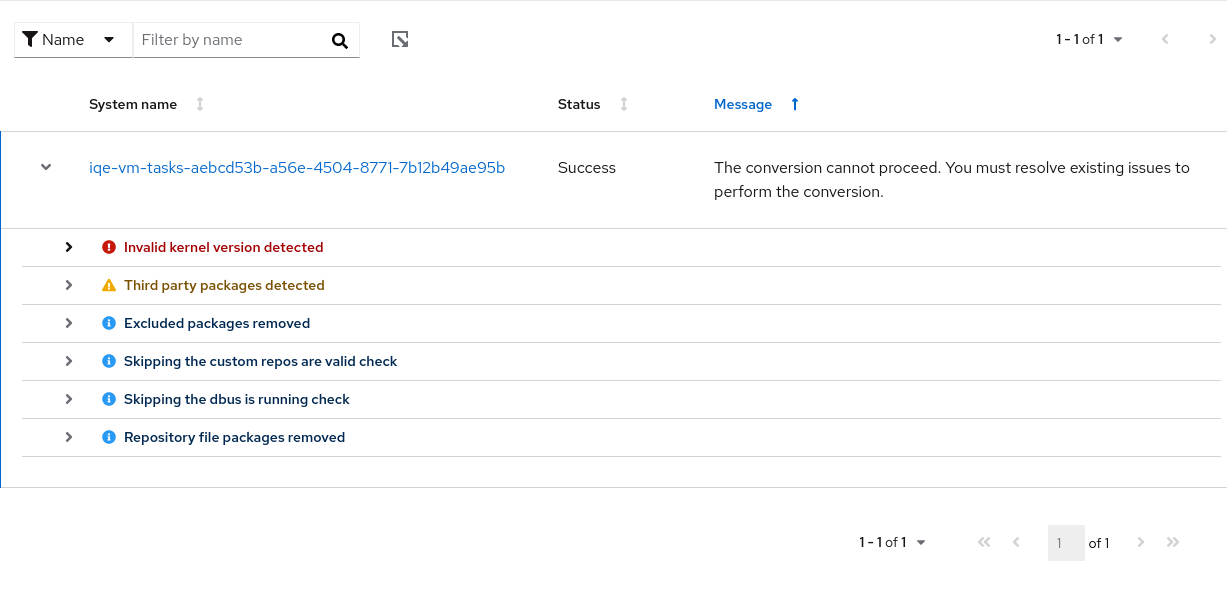
2. Backing up your data
While it may sound obvious,creating a comprehensive backup of your critical data before initiating the migration process is a crucial step. Of course, convert2rhel is designed to maintain consistency between all packages, dependencies, and system settings, but it can't make decisions about your custom configurations, third-party applications, and other customizations.
Before you migrate, backup your data! This includes configurations, databases, and any other important files you have.
The migration process offers many checkpoints before starting the conversion when modifications can be rolled back, but in case of unexpected issues during or after the migration, having a backup helps you to more quickly recover.
3. Document existing configurations
Having a backup of your system certainly helps when something doesn't go as planned. But a good backup plan is more than just an automated backup application. You must also document all customizations and critical configurations so that they can be checked and maintained after conversion.
By using an Infrastructure-as-code approach and combining it with automation, you can distribute and maintain all of your configurations and settings across all of your systems without the burden of error-prone and repetitive manual steps.
4. Verify the compatibility of your applications
While there aren’t production-breaking compatibility issues between CentOS Linux and RHEL when it comes to basic operating system packages and common applications, the same might not be true for a third-party application (in-house development, other vendors, and so on). Before a conversion, make sure that any application your system is using is compatible with RHEL. Many vendors and their associated partners work together with Red Hat to reach certification with Red Hat products, including RHEL itself. This can be verified in the Red Hat Ecosystem Catalog.
The same applies to third-party repositories that your systems might be using. Verify that those offer RHEL-compatible versions of packages.
5. Plan the conversion process
Before planning and executing the migration on production environments, verify that you can successfully migrate your test environments, not only to validate configurations but also to have a clear understanding of the time and effort required. With that knowledge, you can more accurately plan maintenance windows for your migration.
To help reduce any possible downtime, plan batch migrations as much as possible. This enables you to provide a service even during conversion.
Migrate to RHEL
Migrating to Red Hat Enterprise Linux from CentOS Linux has never been easier, and it's a direct process to move to an enterprise-grade, solid foundation for your hybrid cloud infrastructure.
By joining the RHEL world, you gain:
- Enhanced performance, stability and system security
- High-quality support and knowledge base
- Access to an enterprise-grade ecosystem
- Expert assistance to guide you through the migration journey
If you want to learn more about Insights or try it out for yourself, visit the Red Hat Migration initiative page or contact us.
Learn more
저자 소개
Alessandro Rossi is an EMEA Senior Specialist Solution Architect for Red Hat Enterprise Linux with a passion for cloud platforms and automation.
Alessandro joined Red Hat in 2021, but he's been working in the Linux and open source ecosystem since 2012. He's done instructing and consulting for Red Hat and delivered training on Red Hat Enterprise Linux, Red Hat Ansible Automation Platform and Red Hat OpenShift, and has supported companies during solutions implementation.
유사한 검색 결과
Ansible Automation Platform 2.7: 시각적 실행 환경 빌더 및 콘텐츠 검색 가이드
안정적인 코드를 재작성하지 마세요: Lightwell로 귀사의 수익과 개발자의 속도를 보호하는 방법
Can agentic AI patch the internet?
Random Acts Of Automation | Compiler
채널별 검색

오토메이션
기술, 팀, 인프라를 위한 IT 자동화 최신 동향

인공지능
고객이 어디서나 AI 워크로드를 실행할 수 있도록 지원하는 플랫폼 업데이트

오픈 하이브리드 클라우드
하이브리드 클라우드로 더욱 유연한 미래를 구축하는 방법을 알아보세요

보안
환경과 기술 전반에 걸쳐 리스크를 감소하는 방법에 대한 최신 정보

엣지 컴퓨팅
엣지에서의 운영을 단순화하는 플랫폼 업데이트

인프라
세계적으로 인정받은 기업용 Linux 플랫폼에 대한 최신 정보

애플리케이션
복잡한 애플리케이션에 대한 솔루션 더 보기

가상화
온프레미스와 클라우드 환경에서 워크로드를 유연하게 운영하기 위한 엔터프라이즈 가상화의 미래
