
Red Hat OpenShift doesn't stop at the cloud boundary. Telecommunications providers, government agencies, and financial institutions run OpenShift in environments that are intentionally air-gapped — and keeping those clusters healthy has always been the hard part. Pen drive is here to fix that. Disconnected or restricted Kubernetes clusters suffer from a common issue: isolation makes them prone to configuration drift and issue buildup over time. This increases the risk of production incidents during Day-2 operations.
Pen drive is a single-Podman image tool that provides a streamlined toolbox for cluster state analysis. It delivers an offline version of Red Hat Lightspeed advisor, enhanced with over 1,000 proactive recommendations for debugging cluster architecture, scalability, performance, and day-to-day maintenance. Pen drive also includes Cluster Compare capabilities, as part of Red Hat OpenShift, for blueprint-based cluster drift analysis and partner recommendations. Additionally, a lightweight direct state validation mode provides safe analytics in live environments.
In-cluster check capabilities
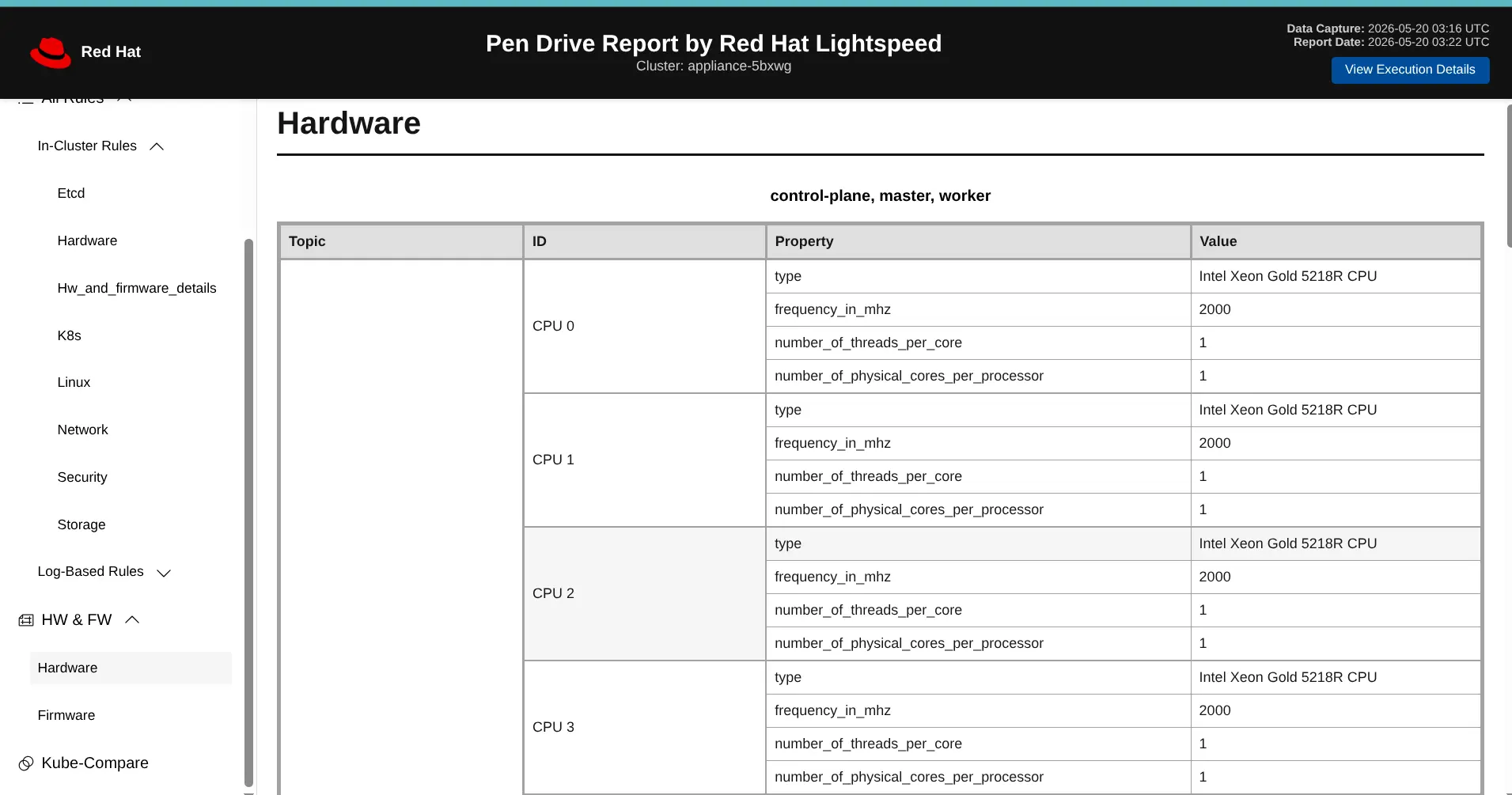
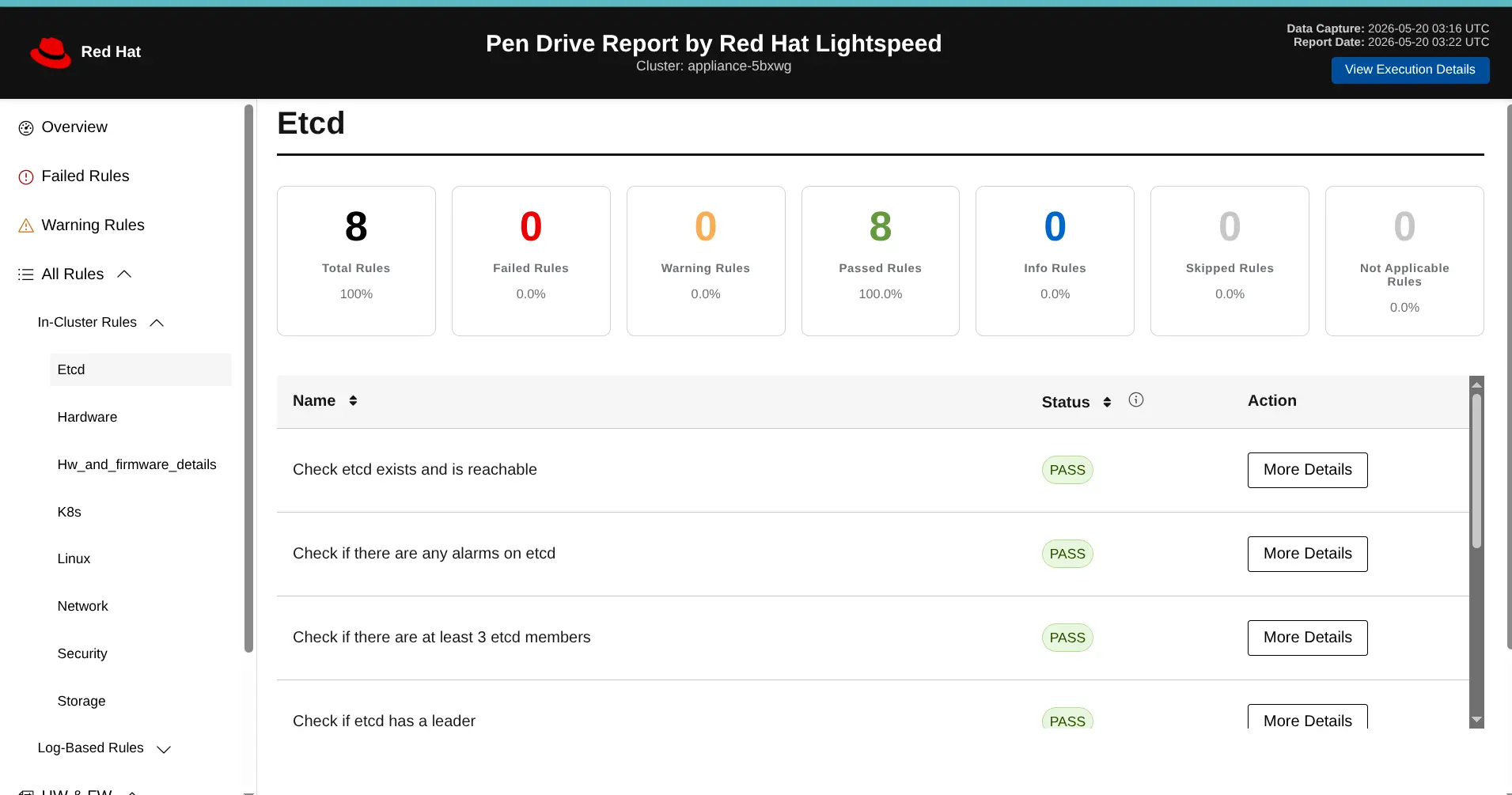
Let's start with the in-cluster-check capability, the least resource intensive option available. In this mode, the tool executes a targeted set of commands to provide basic cluster health analysis. Co-developed with our partner Nokia, this mode was originally designed for telecommunication clusters, but its low footprint made it a valuable addition for all environments. It checks key operational areas, including hardware and firmware inventory (figure 1), hostgroup consistency, and baseline cluster health (figure 2).
Red Hat and partner field teams actively contribute to this recommendation set based on a collaborative knowledge model.
Kube-compare capabilities
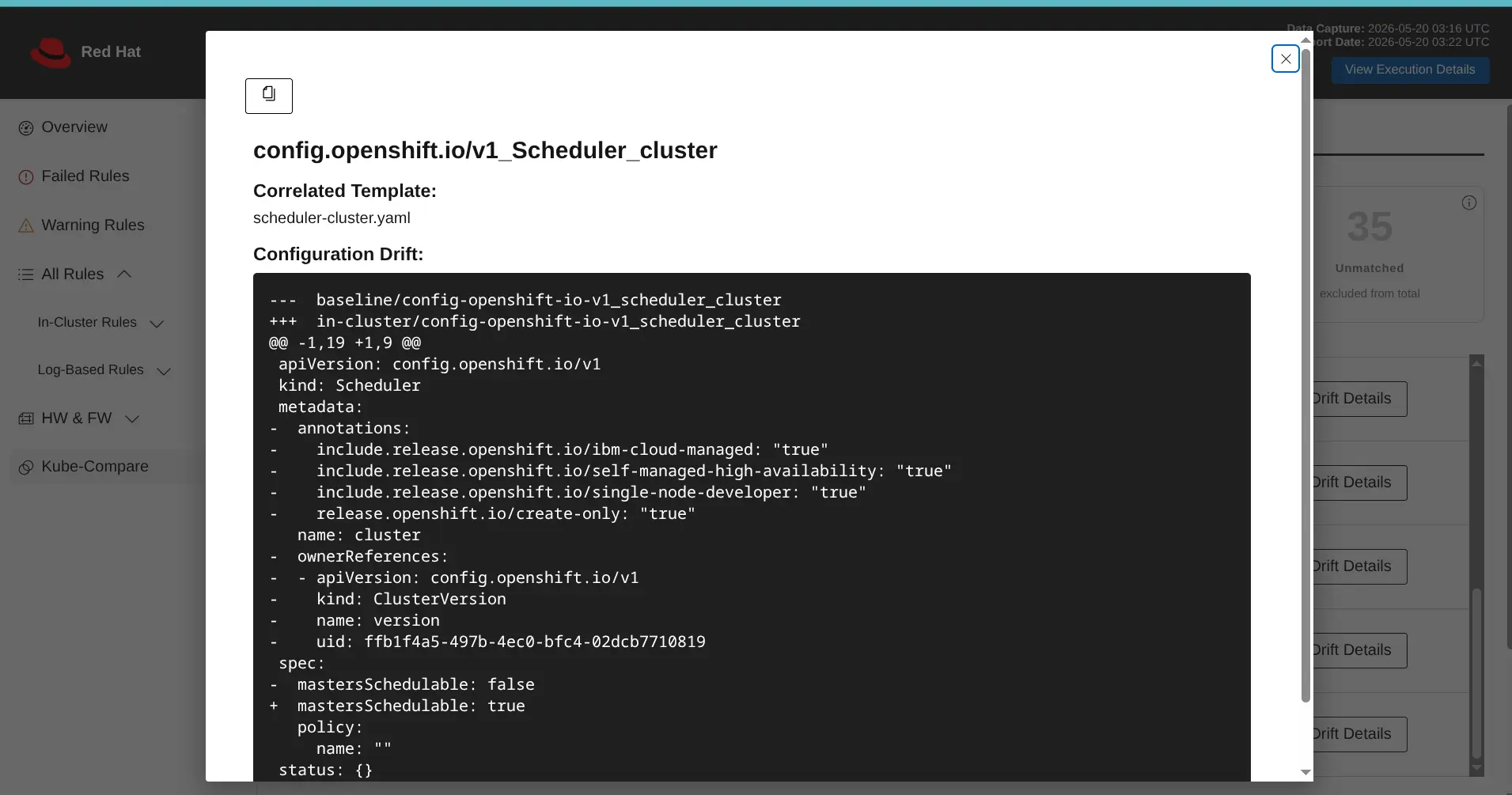
Kube-compare run performs cluster drift analysis by comparing actual cluster configurations against a pre-existing cluster blueprint provided by Red Hat or a partner in the Red Hat Design System blueprint (figure 3).
Full run capabilities
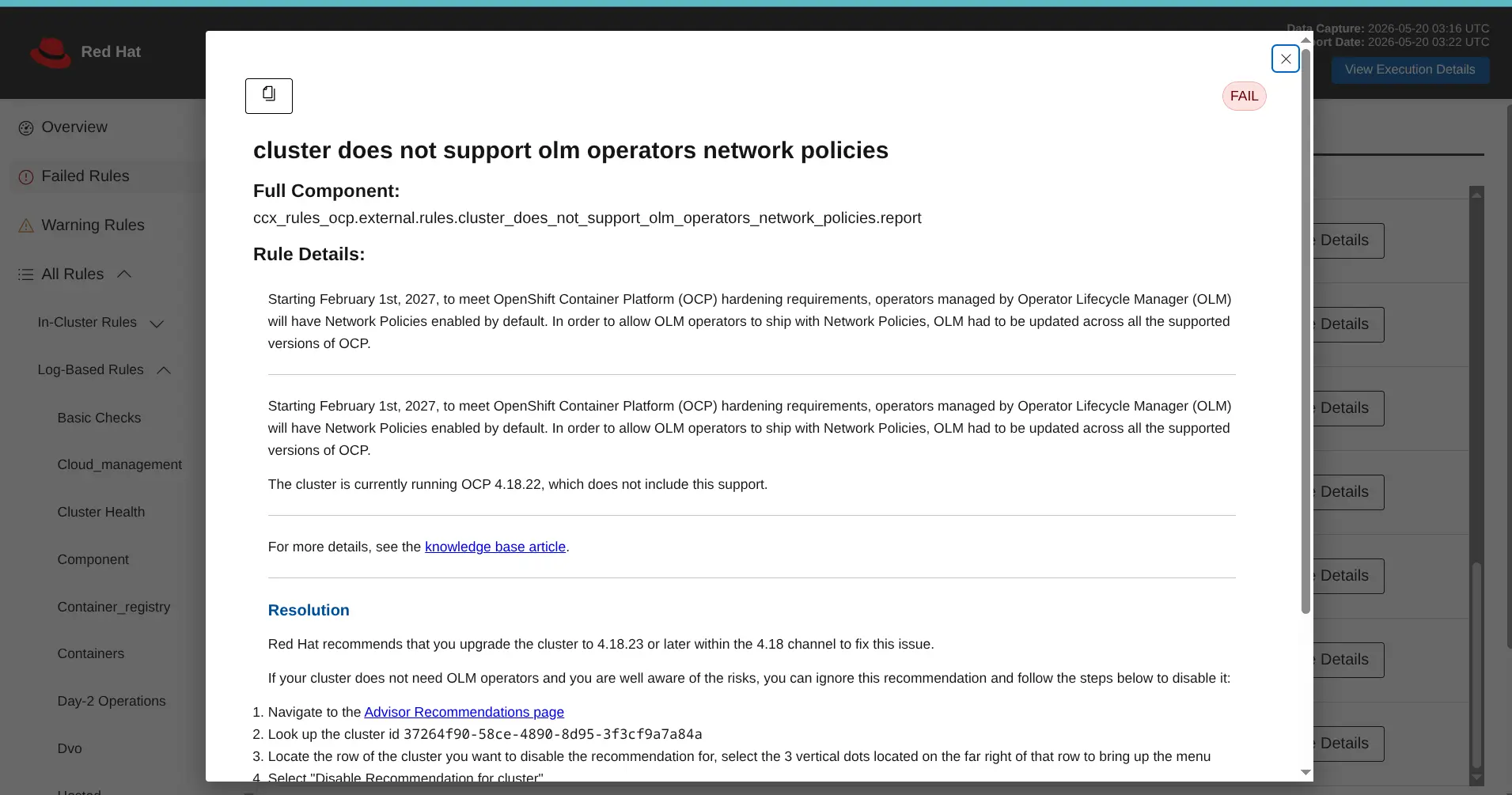
The full run option collects and analyses an optimised must-gather archive, inspecting the last 24 hours of cluster metrics, configurations, logs, and other resources. The option provides the most comprehensive look at the cluster's state and drift, complete with proactive recommendations for problem resolution (figure 4).
How does it work?
The pen drive tool is designed to run at any location that has connectivity with the actual cluster to be checked using the Podman toolchain. You can download the image directly from the Red Hat Ecosystem Catalog and load it onto a USB-drive, laptop, jump host, Red Hat Advanced Cluster Manager Hub cluster, or a cluster itself.
Once downloaded, the tool supports both interactive and non-interactive commands across the following workflows:
full-run: An optimized workflow that collects lightweight must-gather data while fetching default must-gather pod logs directly from the cluster. It then scans against Red Hat Lightspeed rules, in-cluster rules, and kube-compare (if cluster reference is given).gather: Collects comprehensive must-gather data from the cluster for offsite or delayed.scan: Scans Red Hat Lightspeed rules against an existing must-gather archive.in-cluster-check: A lightweight run that executes direct rule checks on cluster nodes without collecting must-gather data. Preferred for live traffic environments with minimal cluster impact.kube-compare: Detects configuration drift by comparing the live cluster against a mounted reference directory containing a known baseline configuration.
The analysis generates both a JSON file (suitable for automation and parsing for instance in workflow management tools) and a standalone, user-friendly HTML file that highlights key findings and recommendations derived from these.
Conclusion
Sized at just a few hundred megabytes of data, pen drive is a compact yet powerful addition to any Red Hat OpenShift DevOps engineer's toolkit. Because it operates entirely offline, it is well-suited for even the most restricted and isolated environments. Pen drive, powered by Red Hat Lightspeed, is available to all Red Hat OpenShift subscribers. Download the image today and give it a try!
Prova prodotto
Red Hat OpenShift Container Platform | Versione di prova del prodotto
Sull'autore
Red Hatter since 2010, Dosek's professional career started with virtualization technologies and transformed via variety of roles at Red Hat through to hybrid cloud. His focus is at improving product experience with assistance of Red Hat Insights.
Altri risultati simili a questo
Sicurezza: Red Hat Technical Supportability Review with AI
Red Hat OpenShift 4.21: scalabilità più intelligente, migrazione più rapida ed efficienza basata sull'IA
The Agile_Revolution | Command Line Heroes
DevOps_Tear Down That Wall | Command Line Heroes
Scopri di più
- Ebook: Gestire l'infrastruttura composta da più ambienti cloud
- Ebook: Un framework IT efficiente come base per il successo dell'impresa moderna
- Inizia la tua prova: Red Hat Enterprise Linux
Ricerca per canale

Automazione
Novità sull'automazione IT di tecnologie, team e ambienti

Intelligenza artificiale
Aggiornamenti sulle piattaforme che consentono alle aziende di eseguire carichi di lavoro IA ovunque

Hybrid cloud open source
Scopri come affrontare il futuro in modo più agile grazie al cloud ibrido

Sicurezza
Le ultime novità sulle nostre soluzioni per ridurre i rischi nelle tecnologie e negli ambienti

Edge computing
Aggiornamenti sulle piattaforme che semplificano l'operatività edge

Infrastruttura
Le ultime novità sulla piattaforma Linux aziendale leader a livello mondiale

Applicazioni
Approfondimenti sulle nostre soluzioni alle sfide applicative più difficili

Virtualizzazione
Il futuro della virtualizzazione negli ambienti aziendali per i carichi di lavoro on premise o nel cloud
