
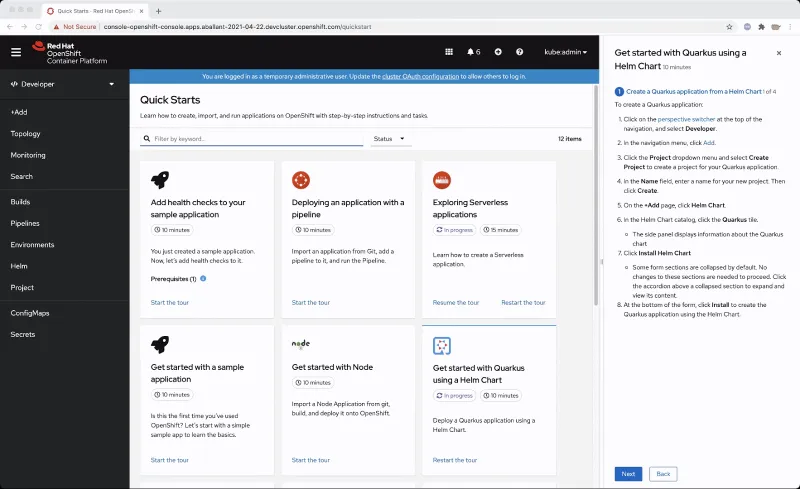
Navigation hints are tips that are featured in some quick starts to point to parts of the navigation.
After quick starts were initially added to OpenShift in 4.7, we saw the need to make the quick starts more integrated and interactive with the UI. We wanted to make it easier to figure out what areas of the UI a quick start might point you towards to complete a quick start.
That’s where the idea to add navigation hints came from. With navigation hints, users who have less OpenShift experience are able to get more familiarized with OpenShift’s navigation and layout.
If a quick start features a navigation hint, it will appear as a link in the quick start. You can click on the link to reveal the navigation hint which will appear as a blue rectangle around the navigation touch point. The navigation hint will go through a subtle animation cycle to point out where the navigation point is. Navigation hints are static and are always accessible from the quick start.
If you are writing a custom quick start, adding navigation hints is a great way to customize it.
Adding navigation hints to your quick starts:
- Introduces users to new parts of the UI that they might not have known about before.
- Points out navigation elements in an interactive way.
- Provides more context and support to the user while they complete a quick start.
If you’re interested in adding navigation hints to your quick start, consult this list of navigation elements that are currently supported as navigation hints:
- Perspective switcher
- Navigations elements in the administrator perspective such as:
- Home
- Operators
- Workloads
- Serverless
- Networking
- Storage
- Service catalog
- Compute
- User management
- Administration
- Navigations elements in the developer perspective such as:
- Add
- Topology
- Search
- Project
- Helm
- Navigation elements in both perspectives such as:
- Builds
- Pipelines
- Monitoring
- Masthead elements such as:
- CloudShell
- Utility menu
- User menu
- Applications
- Import
- Help
- Notifications
Try It Out
If you’d like to try this new feature, or if you’re just getting started with OpenShift, visit Try OpenShift to get instant access to a cluster.
And, as always, we want to connect with users like you. Learn more about what the OpenShift design team is up to on our OpenShift Design site, and be sure to catch us on the OpenShift Twitch channel.
Sull'autore
Altri risultati simili a questo
I partner di Red Hat sono una risorsa per i provider telco
Il paradosso degli agenti e il caso dell'IA ibrida
Crack the Cloud_Open | Command Line Heroes
Edge computing covered and diced | Technically Speaking
Ricerca per canale

Automazione
Novità sull'automazione IT di tecnologie, team e ambienti

Intelligenza artificiale
Aggiornamenti sulle piattaforme che consentono alle aziende di eseguire carichi di lavoro IA ovunque

Hybrid cloud open source
Scopri come affrontare il futuro in modo più agile grazie al cloud ibrido

Sicurezza
Le ultime novità sulle nostre soluzioni per ridurre i rischi nelle tecnologie e negli ambienti

Edge computing
Aggiornamenti sulle piattaforme che semplificano l'operatività edge

Infrastruttura
Le ultime novità sulla piattaforma Linux aziendale leader a livello mondiale

Applicazioni
Approfondimenti sulle nostre soluzioni alle sfide applicative più difficili

Virtualizzazione
Il futuro della virtualizzazione negli ambienti aziendali per i carichi di lavoro on premise o nel cloud
