
Many organizations now operate under strict data governance requirements—whether driven by the EU’s General Data Protection Regulation (GDPR), Digital Operational Resilience Act (DORA), or NIS2 directive, by other national security classifications, or by sector-specific regulations in financial services, healthcare, government, and defense. These organizations, like everyone today, are increasingly seeking to adopt AI-powered infrastructure management and intelligence, but regulatory constraints mean they must figure out how to do so without sending data to the cloud.
Red Hat Lightspeed (formerly Red Hat Insights) is a predictive analytics service that provides proactive infrastructure health analysis, vulnerability scanning reporting, and remediation guidance. But for disconnected, air-gapped, or privacy-sensitive and regulated environments, sending host telemetry to an external cloud service is a no-go, and may not even be physically possible.
Red Hat Satellite 6.19 can help solve this problem. With the Red Hat Lightspeed on premise capability, the advisor engine, vulnerability analysis, host inventory, Kafka message bus, API gateway, and remediation framework all run as a set of containerized microservices directly on your Satellite server. No data leaves your infrastructure. We plan to bring even more functionality for Red Hat Lightspeed on premise in future versions.
NOTE: This feature was originally referred to as Insights on Premises, or IOP. For the purposes of backend compatibility and integration, various individual container images, such as iop-gateway-rhel9:6.19, along with other artifacts, retain this original naming convention within the internal service architecture.
Built for data sovereignty
Red Hat Lightspeed on premise is suitable for environments subject to:
- GDPR: Personal data processing stays within your data residency boundary.
- DORA: Critical information and communications technology (ICT) service data remains within the control of regulated entities.
- NIS2 directive: Essential and important entity infrastructure data stays on-premise.
- National security classifications: Works with air-gapped deployments with no external data flow.
- Financial services regulations (BaFin, FCA, etc.): Infrastructure telemetry never leaves the regulated perimeter.
- Healthcare (HIPAA, other national equivalents): System configuration data stays within the covered entity.
When Red Hat Lightspeed on premise is enabled:
- All host telemetry stays local. Facts, package lists, vulnerability assessments, and advisor recommendations are processed and stored in Satellite's PostgreSQL database. Nothing is transmitted externally.
- CVE data is a controlled import. The vulnerability service uses a static cvemap.xml file. If you are in a completely disconnected environment, you can download this file and transfer it on your own schedule. You decide when and how security metadata enters your environment.
- Not a single bit goes to the cloud. Red Hat Lightspeed on premise services have no outbound network requirements. They operate identically whether Satellite has internet access or sits in a fully air-gapped network.
Installing Red Hat Lightspeed on premise
The prerequisites for installation are:
- Red Hat Satellite 6.19 (or 6.18+) installed and operational
- Internal databases (Red Hat Lightspeed on premise cannot be used with external PostgreSQL)
- Sufficient free resources: the 19 Red Lightspeed on premise containers add approximately 4 to 6 GB of memory usage and some CPU usage as well
Please note that the Satellite service will restart as part of the setup process, so you should perform these steps during a planned maintenance window.
To initiate the setup in a connected environment, simply execute the following command on the Satellite server:
#satellite-installer --enable-iopThe installer will:
- Pull container images from
registry.redhat.io - Create the
iop-core-networkPodman network - Deploy and start all Red Hat Lightspeed on premise services as
systemd-managed Podman quadlets - Configure the Satellite web UI to display the Red Hat Lightspeed menu items
- Create Kafka topics for inter-service messaging
The process takes approximately 10 to 15 minutes, depending on network speed for the image pulls.
In a connected environment, CVE data will be populated automatically.
To begin installation from a disconnected or air-gapped environment, load the container images from the Satellite ISO. If you installed Satellite in a disconnected environment, all of these necessary container images will be included in this ISO:
#cd /media/sat6/
.#/setup_containers
This loads the Red Hat Lightspeed on premise container images into the local Podman storage.
Next, enable Red Hat Lightspeed on premise:
#satellite-installer --enable-iopNow you’ll want to transfer CVE data. On an internet-connected host, download the appropriate file:
#curl -o cvemap.xml https://security.access.redhat.com/data/meta/v1/cvemap.xmlTransfer cvemap.xml to the Satellite server using your approved secure transfer method, then:
#cp cvemap.xml /var/lib/foreman/This file is approximately 50 MB.
In a disconnected environment, data must be manually refreshed periodically (weekly or as part of your patch management cycle) to keep vulnerability data current.
Using Red Hat Lightspeed on premise
If everything is installed correctly, the Red Hat Lightspeed panel in the Satellite GUI will point to the local installation. The Recommendations tab should now be visible after the install, as shown in Figure 1. In this example, there are currently no systems affected by any recommendations.
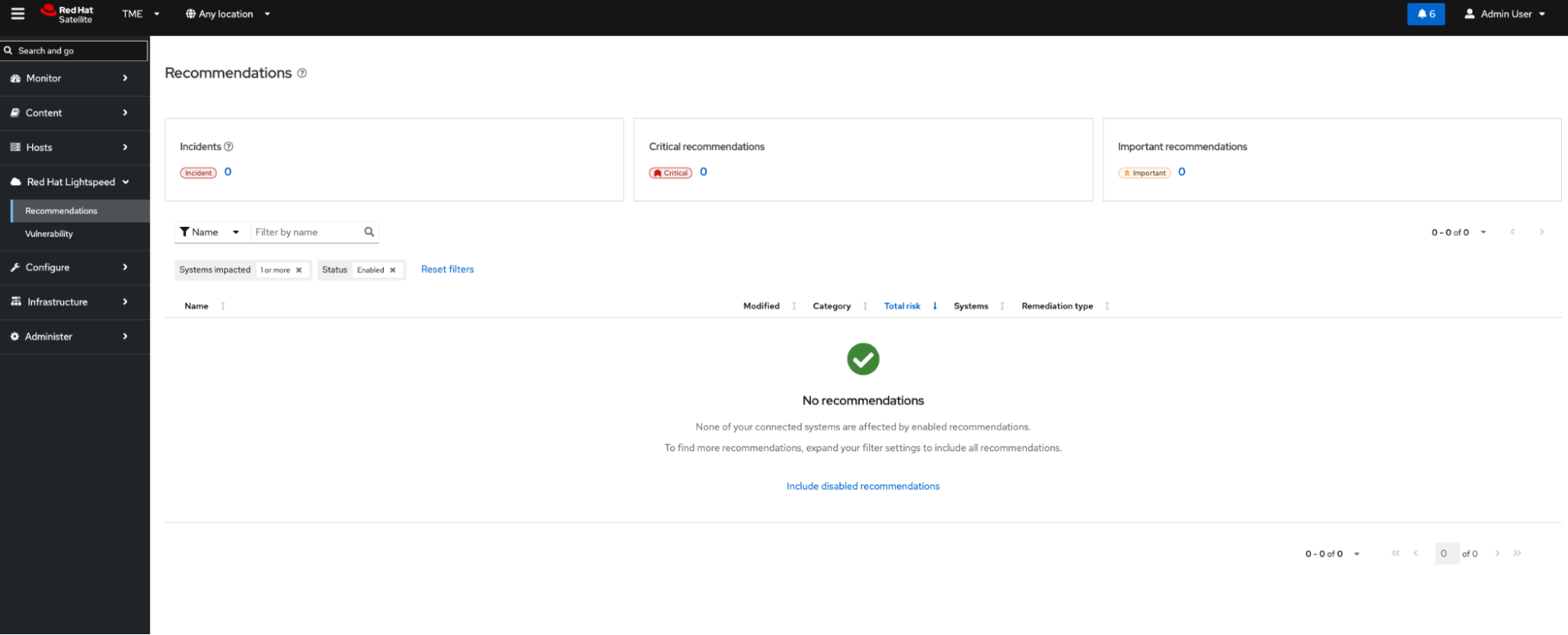
Figure 1. The Recommendations tab in the Red Hat Lightspeed panel.
You can also take a look at the Vulnerabilities tab. In the example in Figure 2, currently no systems have identified CVEs.
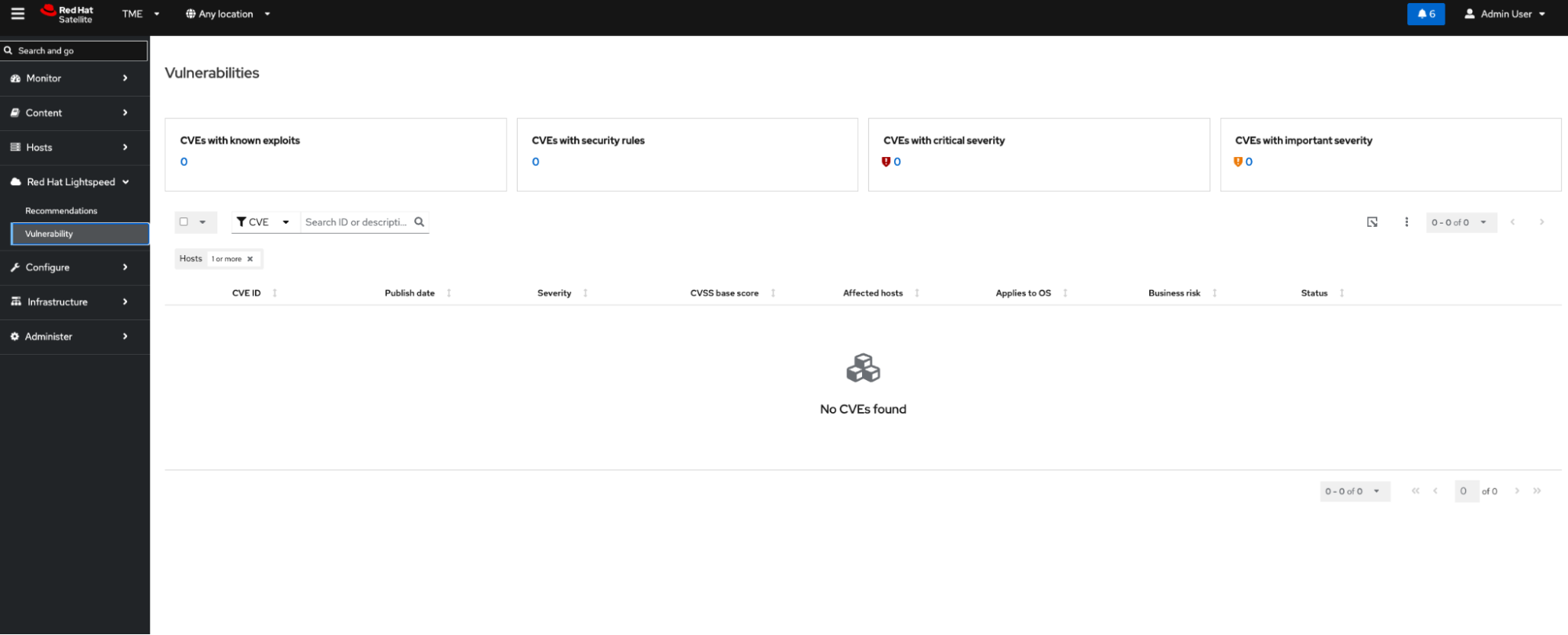
Figure 2. Screenshot showing the Vulnerabilities tab in the Red Hat Lightspeed panel.
Registering hosts
The next step is to register hosts to Red Hat Lightspeed on premise. If a host is already registered to your Satellite server, use these commands:
#sudo dnf install insights-client
#sudo insights-client --register
It is a good idea to use the remote execution feature of Satellite or Red Hat Ansible Automation Platform to install clients on a mass scale.
If you just need to force data to upload when a system is already registered to Red Hat Lightspeed, use this command:
#sudo insights-clientFor new hosts, use the Satellite UI registration workflow:
- Navigate to Hosts > Register Host
- Generate a registration script
- Set Setup Red Hat Lightspeed to Yes (override)
- Run the generated script on the target host
After registration, host facts and package data are collected by the insights-client.
Once Red Hat Lightspeed is successfully populated with intelligence and hosts are registered and are able to send the data to Red Hat Lightspeed on premise, advisor recommendations and vulnerability assessments will begin to surface within the dashboard. For instance, as Figure 3 illustrates, in a scenario where a Leapp pre-upgrade check has been performed on a node, an in-place upgrade inhibitor will be flagged among the recommendations. Should a misconfiguration occur, the Recommendations tab in the Red Hat Lightspeed panel will show a clearly worded description of the issue and provide a starting point for building a remediation plan. This highlights the platform's remediation capabilities, designed to streamline and accelerate major Red Hat Enterprise Linux release upgrades being installed simultaneously across extensive server fleets.
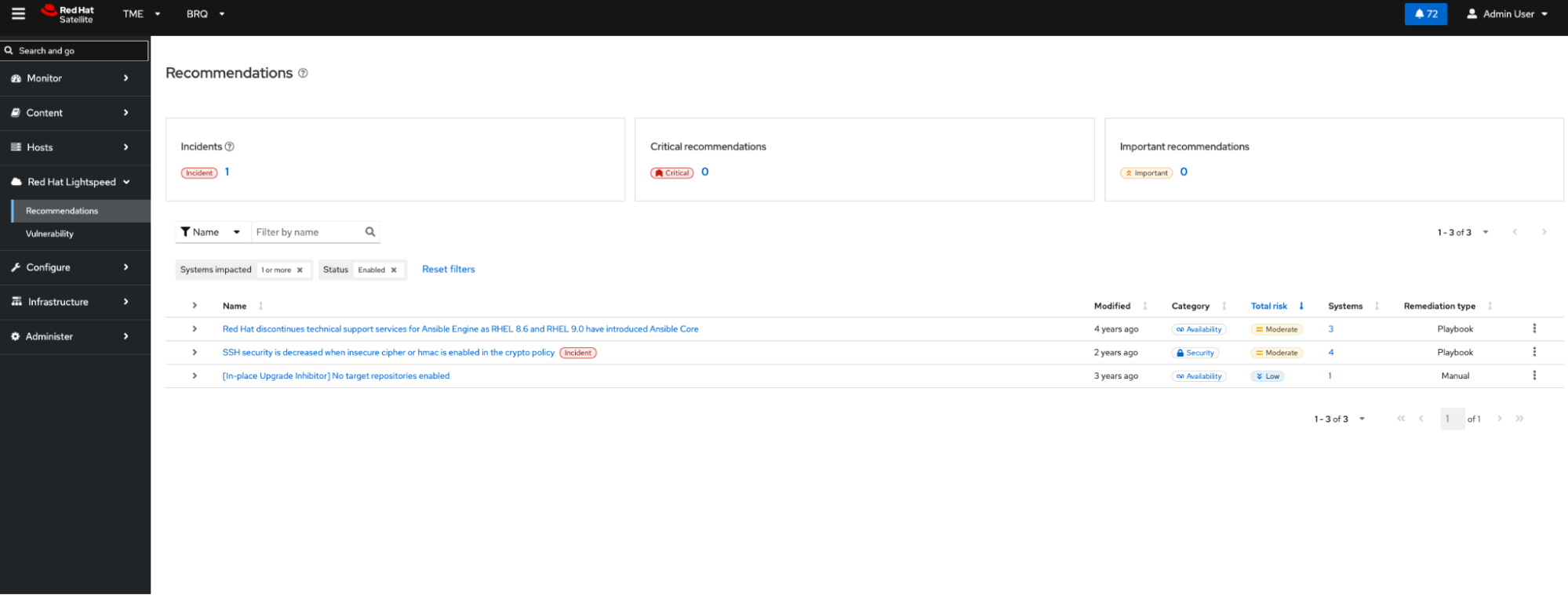
Figure 3. Red Hat Lightspeed offers recommendations on problems and potential remediation.
Figure 4 illustrates Red Hat Lightspeed’s vulnerability assessments. Should a CVE be identified, the user can take action within the Vulnerabilities tab of the Red Hat Lightspeed panel to learn more and plan a remediation.
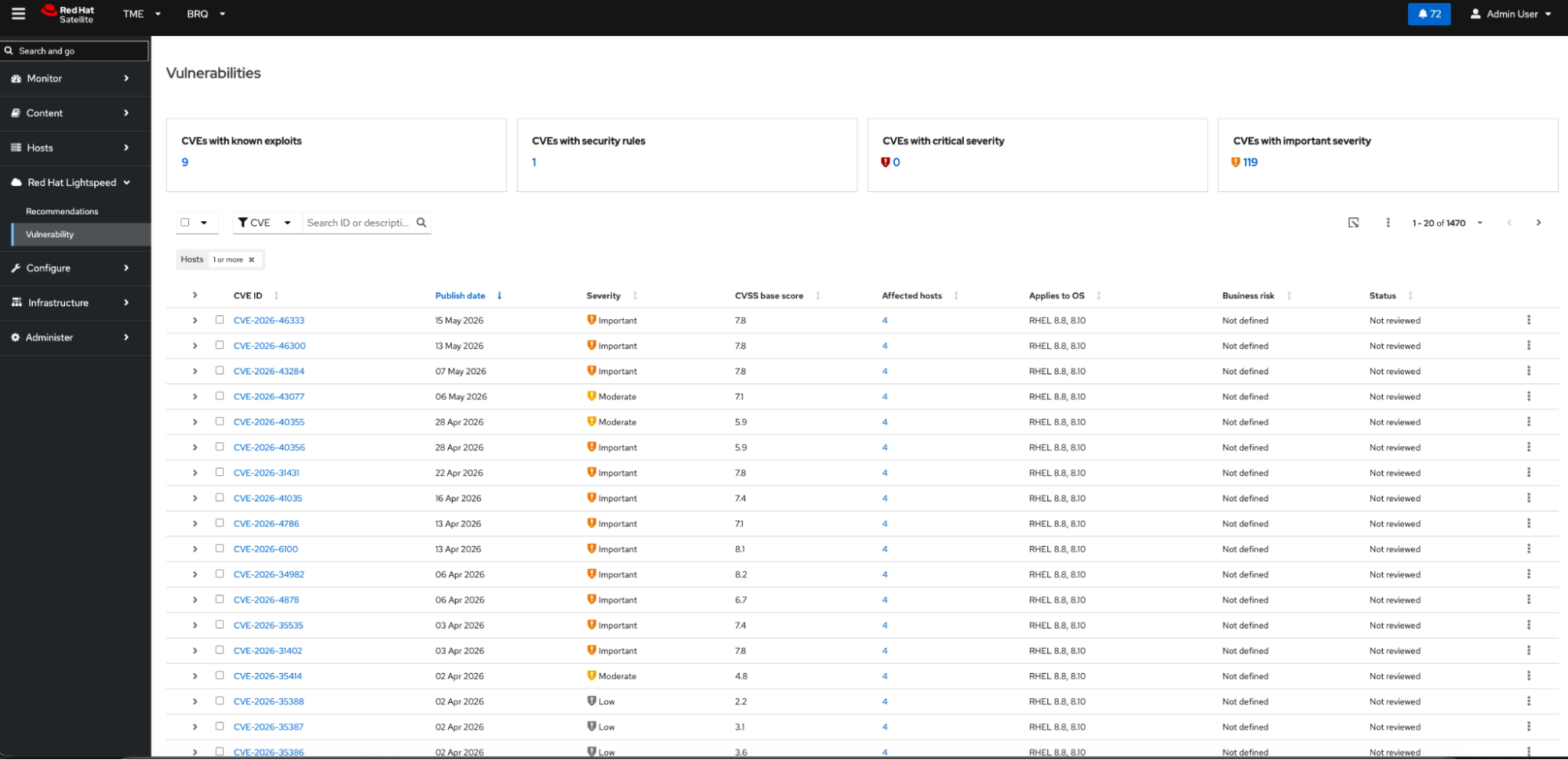
Figure 4. The Vulnerabilities panel within Red Hat Lightspeed.
Next steps
For information and important deployment-specific details regarding setting up your Red Hat Lightspeed on premise environment, please be sure to visit our documentation hub to learn more. Have a question about how Red Hat Lightspeed on premise would work in your organization? Give us a shout at satellite@redhat.com.
Prova prodotto
Red Hat Enterprise Linux AI | Versione di prova
Sull'autore
Štefan is a Technical Account Manager at Red Hat, where he started in 2015 in Technical Support for Satellite and systems management. He specializes in helping telecommunications providers modernize and automate large-scale infrastructure using Red Hat technologies, with a focus on RHEL, Satellite, automation, and AI-driven operations.
As a trusted technical advisor for major EMEA telecommunications customers, Štefan partners with engineering, operations, and leadership teams to solve complex technical challenges and drive successful technology adoption. His experience spans solution architecture, infrastructure modernization, operational automation, and customer success across some of Europe's largest telecom environments.
In recent years, he has focused on practical applications of AI — building agentic workflows that integrate large language models with enterprise infrastructure platforms via MCP servers to improve operational efficiency and decision-making.
A regular speaker at customer workshops, user groups, and technical events, Štefan is passionate about making emerging technologies accessible and delivering measurable business value through innovation.
Altri risultati simili a questo
L'evoluzione dell'automazione dell'infrastruttura nell'era dell'IA: quattro punti chiave dal Red Hat Summit 2026
Le minacce dell'IA si muovono rapidamente. Anche le tue difese dovrebbero farlo.
Untangling Networks | Compiler
Operating System Management | Compiler
Ricerca per canale

Automazione
Novità sull'automazione IT di tecnologie, team e ambienti

Intelligenza artificiale
Aggiornamenti sulle piattaforme che consentono alle aziende di eseguire carichi di lavoro IA ovunque

Hybrid cloud open source
Scopri come affrontare il futuro in modo più agile grazie al cloud ibrido

Sicurezza
Le ultime novità sulle nostre soluzioni per ridurre i rischi nelle tecnologie e negli ambienti

Edge computing
Aggiornamenti sulle piattaforme che semplificano l'operatività edge

Infrastruttura
Le ultime novità sulla piattaforma Linux aziendale leader a livello mondiale

Applicazioni
Approfondimenti sulle nostre soluzioni alle sfide applicative più difficili

Virtualizzazione
Il futuro della virtualizzazione negli ambienti aziendali per i carichi di lavoro on premise o nel cloud
