DISCLAIMER: THE ALL-IN-ONE (AIO) OCP DEPLOYMENT IS A COMMERCIALLY UNSUPPORTED OCP CONFIGURATION INTENDED FOR TESTING OR DEMO PURPOSES.
Back in the 3.x days, I documented the All-in-One (AIO) deployment of OCP 3.11 for lab environments and other possible use cases. That blog post is available here.
With OCP4.2 (and OCP4.3 nightly builds) the all-in-one (AIO) deployment is also possible. Before going into the details I should highlight that this particular setup does have the same DNS requirements and prerequisites as any other OCP 4.x deployment.
This approach is NOT the best option for a local development environment on a laptop. This AIO is for external deployments in a home lab or cloud-based lab. If you are looking for an OCP 4.x development environment to run in a laptop, I highly recommend using RedHat CodeReady Containers, which is a maintained solution for that specific purpose.
Back to the all-in-one deployment: There are two approaches to achieve the OCP4.2 all-in-one configuration:
- Option 1: Customizing the manifests before installation
- During the installation process, generate the manifests with “openshift-install create manifests --dir ./aio”. Then proceed to update the resulting ingress manifest in “./aio/manifests” and inject replacement manifests for the CVO, etcd-quorum-guard. After this, then generate the ignition files for the installation.
- This is highly customizable and can be set so it does not require any post-install configuration. This method requires advanced OpenShift skills and it is NOT covered in this blog post.
- Option 2: Customize the cluster during and after deployment
- After the “bootkube.service” bootstrap process completes, update CVO to disable management of the etcd-quorum-guard Deployment and scale to one the etcd-quorum-guard and ingress controller. This is the approach covered in this blog.
The Design
NOTE: This document assumes the reader is familiar with the OCP4x installation process.
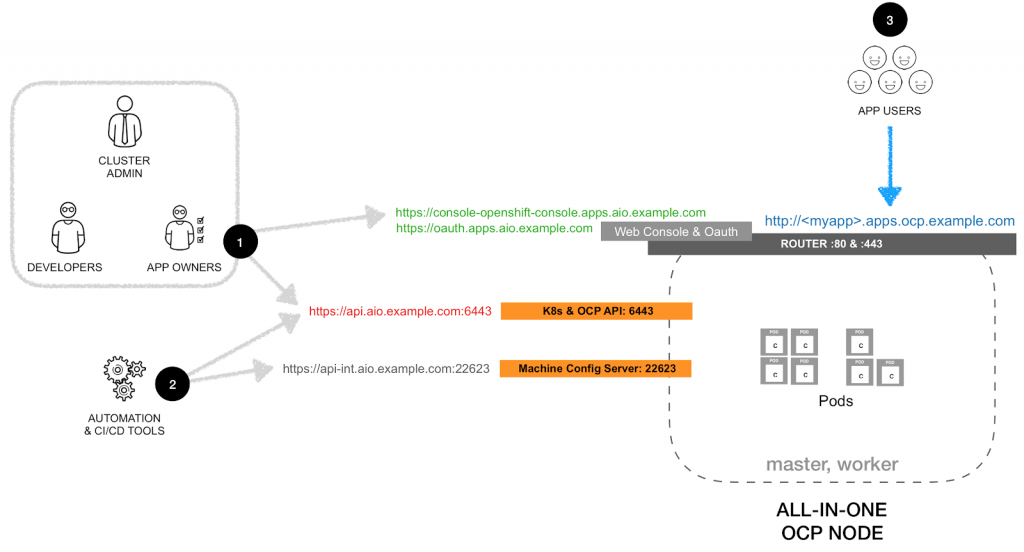
The final deployment will have cluster admins, developers, application owners (see #1), automation tools (see #2) and users of the applications (see #3) going to the same IP, but through different ports or routes. The logical view is as shown in the following diagram:
The host characteristics that I tested for this configuration:
- VM or bare-metal
- 8 vCPU
- 16GB RAM
- 20GB Disk
Before Deployment
- Setup the
install-config.yamlto deploy a single master and no workers
apiVersion: v1

baseDomain: example.com

compute:

- hyperthreading: Enabled

name: worker

replicas: 0

controlPlane:

hyperthreading: Enabled

name: master

replicas: 1

metadata:

name: aio

networking:

clusterNetworks:

- cidr: 10.128.0.0/14

hostPrefix: 23

networkType: OpenShiftSDN

serviceNetwork:

- 172.30.0.0/16

platform:

none: {}

pullSecret: ''

sshKey: 'ssh-rsa AAA...'
During Deployment
- During installation, there is still need for a temporary external load balancer (or the poor-man's version; modify the DNS entries).
- For the installation, prepare the DNS equivalent to this:
aio.example.com

etcd-0.aio.example.com

apps.aio.example.com

*.apps.aio.example.com

api-int.aio.example.com

api.aio.example.com
# etcd Service Record
 _etcd-server-ssl._tcp.aio.example.com. IN SRV 0 0 2380 etcd-0.aio.example.com.
- After
bootkube.servicecompletes modify the DNS
aio.example.com

etcd-0.aio.example.com

apps.aio.example.com

*.apps.aio.example.com

api-int.aio.example.com

api.aio.example.com
# etcd Service Record
 _etcd-server-ssl._tcp.aio.example.com. IN SRV 0 0 2380 etcd-0.aio.example.com.
- The single node will be shown with both roles (master and worker)
$ oc get nodes

NAME STATUS ROLES AGE VERSION

aio Ready master,worker 33m v1.16.2
- Set
etcd-quorum-guardto unmanaged state
oc patch clusterversion/version --type='merge' -p "$(cat <<- EOF

spec:

overrides:

- group: apps/v1

kind: Deployment

name: etcd-quorum-guard

namespace: openshift-machine-config-operator

unmanaged: true

EOF

)"
- Downscale
etcd-quorum-guardto one:
oc scale --replicas=1 deployment/etcd-quorum-guard -n openshift-machine-config-operator
- Downscale the number of routers to one:
oc scale --replicas=1 ingresscontroller/default -n openshift-ingress-operator
- (Recommended) Downscale the number of consoles, authentication, OLM and monitoring services to one:
oc scale --replicas=1 deployment.apps/console -n openshift-console

oc scale --replicas=1 deployment.apps/downloads -n openshift-console
oc scale --replicas=1 deployment.apps/oauth-openshift -n openshift-authentication
oc scale --replicas=1 deployment.apps/packageserver -n openshift-operator-lifecycle-manager
# NOTE: When enabled, the Operator will auto-scale this services back to original quantity
 oc scale --replicas=1 deployment.apps/prometheus-adapter -n openshift-monitoring
 oc scale --replicas=1 deployment.apps/thanos-querier -n openshift-monitoring
 oc scale --replicas=1 statefulset.apps/prometheus-k8s -n openshift-monitoring
 oc scale --replicas=1 statefulset.apps/alertmanager-main -n openshift-monitoring
- (optional) Setup image-registry to use ephemeral storage.
WARNING: Only use ephemeral storage for internal registry for testing purposes.
oc patch configs.imageregistry.operator.openshift.io cluster --type merge \

--patch '{"spec":{"storage":{"emptyDir":{}}}}'
oc patch configs.imageregistry.operator.openshift.io cluster --type merge \
 --patch '{"spec":{"managementState":"Managed"}}'
NOTE: Wait until the image-registry operator completes the update before using the registry.
Sull'autore

Altri risultati simili a questo
Smetti di gestire il passato e inizia a costruire il futuro dell'IT
Potenziata, pronta e a costo zero: l’evoluzione della sicurezza dei container
Air-gapped Networks | Compiler
The Containers_Derby | Command Line Heroes
Ricerca per canale

Automazione
Novità sull'automazione IT di tecnologie, team e ambienti

Intelligenza artificiale
Aggiornamenti sulle piattaforme che consentono alle aziende di eseguire carichi di lavoro IA ovunque

Hybrid cloud open source
Scopri come affrontare il futuro in modo più agile grazie al cloud ibrido

Sicurezza
Le ultime novità sulle nostre soluzioni per ridurre i rischi nelle tecnologie e negli ambienti

Edge computing
Aggiornamenti sulle piattaforme che semplificano l'operatività edge

Infrastruttura
Le ultime novità sulla piattaforma Linux aziendale leader a livello mondiale

Applicazioni
Approfondimenti sulle nostre soluzioni alle sfide applicative più difficili

Virtualizzazione
Il futuro della virtualizzazione negli ambienti aziendali per i carichi di lavoro on premise o nel cloud
