
This article discusses how to use Red Hat AMQ streams to automate deployment and management of a Kafka cluster.
Background
Deploying Kafka manually can be a complex and challenging process. Here are some key challenges associated with manual Kafka deployment:
- Configuration complexity
- Scaling
- Version compatibility
- High availability and fault tolerance
- Security
- Monitoring and alerts
- Backup and recovery
- Resource management
- Documentation and knowledge transfer
- Change management
- Consistency across environments
Why use GitOps for Kafka
GitOps is a DevOps methodology that leverages Git repositories as the source of truth for declarative infrastructure and application definitions. Running Kafka in a GitOps way can provide several benefits to your Kafka deployment and overall infrastructure management:
- Self-service infrastructure: With GitOps, teams can request Kafka resources or changes through code submissions and automated pipelines, reducing the bottleneck of infrastructure provisioning.
- Multi-environment support: You can easily manage multiple Kafka environments (e.g., development, staging, production) by maintaining separate Git repositories or branches for each environment, each with its own configuration.
- Version control: Using Git as the source of truth means that all changes to your Kafka setup are tracked and versioned. This makes it easier to audit changes, roll back to previous configurations, and collaborate with a team on infrastructure management.
- Continuous integration/continuous deployment (CI/CD): GitOps enables you to implement CI/CD pipelines for your Kafka infrastructure. You can set up automated testing and validation processes that trigger deployments when changes are pushed to the Git repository. This helps in ensuring that your Kafka clusters are in the desired state and reduces the risk of manual errors during updates.
- Auditing and compliance: GitOps provides an audit trail for all changes made to your Kafka infrastructure. This is essential for compliance and regulatory requirements, as you can easily demonstrate who made what changes and when.
- Disaster recovery and rollback: In case of issues or failures, GitOps allows you to quickly roll back to a known good state by reverting to a previous commit in your Git repository. This helps ensure a faster recovery process.
- Collaboration: GitOps encourages collaboration among team members. Different team members can work on separate branches or forks of the Git repository, and changes can be reviewed and merged through pull requests. This promotes best practices and reduces the risk of making unverified changes.
- Immutable infrastructure: GitOps promotes the idea of immutable infrastructure, where you don't modify existing infrastructure but instead create new resources or configurations as code. This minimizes drift in your Kafka clusters and makes it easier to reproduce and scale environments.
- Observability: GitOps can be integrated with observability tools to monitor and alert on changes to your Kafka infrastructure. This helps in detecting and responding to issues more proactively. We can deploy Grafana dashboards for AMQ streams as well using GitOps.
Prerequisites
- Red Hat OpenShift 4.12 or above
- GitHub Repository - https://github.com/veniceofcode/amq-streams
- Working knowledge of GitOps using OpenShift GitOps / ArgoCD
- Knowledge of Kafka around a few basic concepts such as topics, brokers , producers, consumers
- Knowledge of Kustomize
Architecture
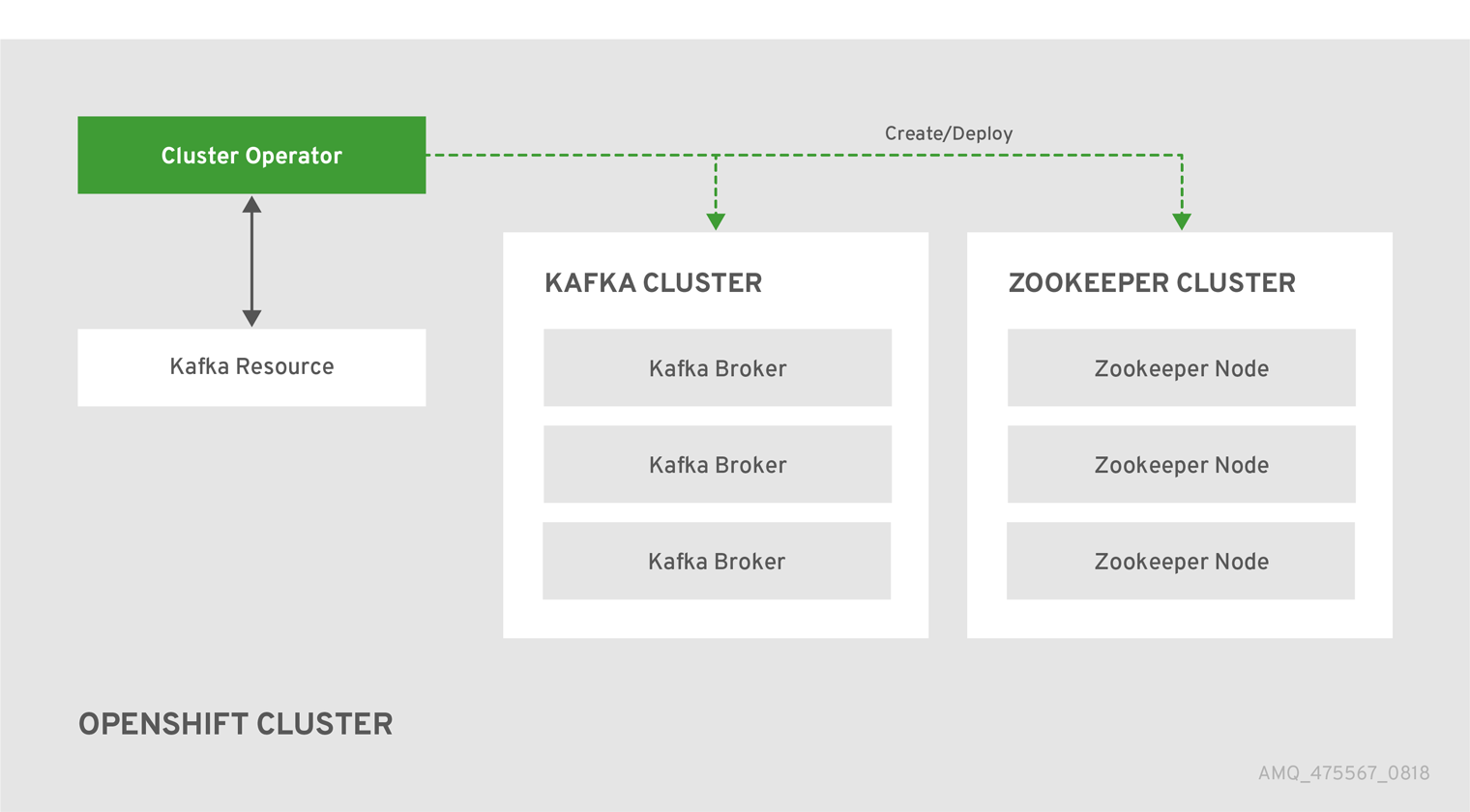
How to deploy OpenShift GitOps operators with ArgoCD
Step 1 - Install OpenShift GitOps operator in the target OpenShift cluster where AMQ Streams needs to be deployed. Ensure the ArgoCD UI is accessible and able to log in using admin credentials post-installation of the operator.
$ oc apply -k https://github.com/redhat-cop/gitops-catalog/openshift-gitops-operator/operator/overlays/latest
Step 2 - Fork the Git repo https://github.com/veniceofcode/amq-streams.
Step 3 - Create an ArgoCD application with a name amq-streams-kafka-operator that needs to be deployed from the ArgoCD UI. While creating the application, the following Git repository and path needs to be used:
- Git repo - https://github.com/veniceofcode/amq-streams
- Git branch - main
- Path - /components/amq-streams-operator/base
- Auto sync - Enabled
YAML view from ArgoCD application
apiVersion: argoproj.io/v1alpha1
kind: Application
metadata:
  name: amq-streams-kafka-operator
spec:
  destination:
    name: ''
    namespace: ''
    server: 'https://kubernetes.default.svc'
  source:
    path: components/amq-streams-operator/base
    repoURL: 'https://github.com/veniceofcode/amq-streams'
    targetRevision: main
  sources: []
  project: default
  syncPolicy:
    automated:
      prune: false
      selfHeal: false
    syncOptions:
      - CreateNamespace=true
The source file is located here.
Step 4 - Create an ArgoCD application with a name amq-streams-kafka-cluster that needs to be deployed from the ArgoCD UI:
- Git repo - https://github.com/veniceofcode/amq-streams
- Git branch - main
- Path - /components/amq-streams-kafka-instance/base
- Auto sync - Enabled
YAML view from ArgoCD application
apiVersion: argoproj.io/v1alpha1
kind: Application
metadata:
 name: amq-streams-kafka-cluster
spec:
 destination:
   name: ''
   namespace: amq-streams-kafka-cluster
   server: 'https://kubernetes.default.svc'
 source:
   path: components/amq-streams-kafka-instance/base
   repoURL: 'https://github.com/veniceofcode/amq-streams'
   targetRevision: main
 sources: []
 project: default
 syncPolicy:
   automated:
     prune: false
     selfHeal: false
   syncOptions:
     - CreateNamespace=true
The source file is located here.
Troubleshooting
You may encounter this error:
kafkas.kafka.strimzi.io is forbidden: User "system:serviceaccount:openshift-gitops:openshift-gitops-argocd-application-controller" cannot create resource "kafkas" in API group "kafka.strimzi.io" in the namespace "amq-streams-kafka-cluster"
To fix this, use the oc command to grant the admin role to the service account:
system:serviceaccount:openshift-gitops:openshift-gitops-argocd-application-controller in amq-streams-kafka-cluster:

$ oc adm policy add-role-to-user admin \
system:serviceaccount:openshift-gitops:openshift-gitops-argocd-application-controller \
-n amq-streams-kafka-cluster

[...]

clusterrole.rbac.authorization.k8s.io/admin added: system:serviceaccount:openshift-gitops:openshift-gitops-argocd-application-controller
Kafka and AMQ on OpenShift
You now have Kafka running on an OpenShift cluster. You can produce test messages to verify that it works. The process of setting up Kafka on OpenShift is quick, and with ArgoCD it's an almost automatic process. Try it out on your own cluster.
References
Sull'autore
Sr. Solution Architect at Red Hat with a demonstrated history of working with Microservices, REST APIs, OpenShift/Kubernetes, API Management, Event Streaming, DevOps and GitOps.
Altri risultati simili a questo
L'evoluzione dell'automazione dell'infrastruttura nell'era dell'IA: quattro punti chiave dal Red Hat Summit 2026
Le minacce dell'IA si muovono rapidamente. Anche le tue difese dovrebbero farlo.
Random Acts Of Automation | Compiler
Untangling Networks | Compiler
Ricerca per canale

Automazione
Novità sull'automazione IT di tecnologie, team e ambienti

Intelligenza artificiale
Aggiornamenti sulle piattaforme che consentono alle aziende di eseguire carichi di lavoro IA ovunque

Hybrid cloud open source
Scopri come affrontare il futuro in modo più agile grazie al cloud ibrido

Sicurezza
Le ultime novità sulle nostre soluzioni per ridurre i rischi nelle tecnologie e negli ambienti

Edge computing
Aggiornamenti sulle piattaforme che semplificano l'operatività edge

Infrastruttura
Le ultime novità sulla piattaforma Linux aziendale leader a livello mondiale

Applicazioni
Approfondimenti sulle nostre soluzioni alle sfide applicative più difficili

Virtualizzazione
Il futuro della virtualizzazione negli ambienti aziendali per i carichi di lavoro on premise o nel cloud
