
Sometimes as admins, we need to share files across systems quickly. For whatever reason, we need to get a single tar or conf file from one system to another, or maybe copy a group of files between systems. We find that we need to install a package or utility to share the files, or we may need to enable a feature to share the content. Regardless of the situation, we can use Python's SimpleHTTPServer module as a quick web server.
Python -m SimpleHTTPServer
The SimpleHTTPServer module is a Python module that enables a developer to lay the foundation for developing a web server. However, as sysadmins, we can use the module to serve files from a directory.
Usage
Python must be installed to use the SimpleHTTPServer module. Python may be installed as a dependency to an application or service that is already running on the system. Run python -V to verify its presence. To use the module for our purposes, run the following command from the directory with the files we want to share:
python -m SimpleHTTPServer
* Note: The module has been renamed http.server in python3
The module loads and serves any files within the directory on port 8000 by default.
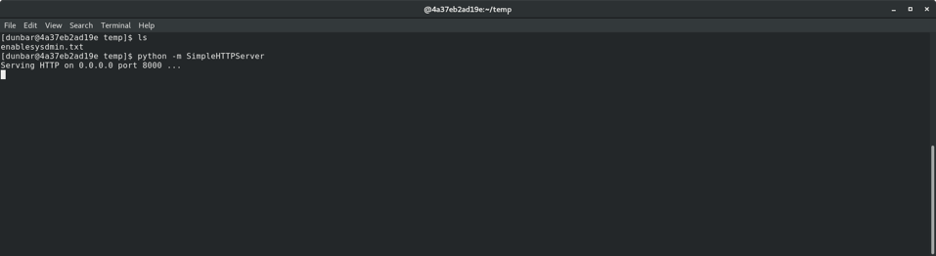
From the remote system, browse to http://<ip> using your browser of choice. A directory listing will be displayed where you can open or download any file.

Another option is to use wget or curl to download the files to the remote system.
wget http://<ip>:8000/filename
curl http://<ip>:8000/filename
This simple local HTTP server is a nice little utility to use in those times when you need to transfer files quickly across systems.
Use cases
This tip is not a replacement for actual file-hosting solutions in business environments. The SimpleHTTPServer module is actually a development tool used as a framework tool to lay the foundation for a full-blown web server with all the necessary security features included. However, we can use the module for our purposes to:
- Quickly serve kickstart files in a pinch - Copy the
/root/anaconda-ks.cfgor/root/original-ks.cfgto a folder and serve withpython -m SimpleHTTPServer. Edit the grub config at boot, and away you go. - Share a file to/from a VM - Copy a file to a folder and serve with
python -m SimpleHTTPServer. - Serve a file on an allowed port of firewall - Copy a file to a folder and serve with
python -m SimpleHTTPServer port
Other options
You can also use a while loop with ncat or /dev/tcp/host/port for transport… but that is another article. I hope you find this option a useful tool in your toolbox.
Gotchas
You may need to open ports in your firewall:
# firewall-cmd --add-port=portnumber/tcp
[ Download now: A sysadmin's guide to Bash scripting. ]
Sull'autore
Stephen Wilson is a Principal Architect at Red Hat and a seasoned subject matter expert who thrives at the intersection of open source innovation and mission-critical stability. With a career built on the bedrock of Red Hat Enterprise Linux, Stephen navigates the complexities of modern IT—from orchestrating massive Red Hat OpenShift deployments to streamlining legacy workloads through modern virtualization strategies.
As a strategic guide for organizations, Stephen helps enterprise architects and IT operations leaders bridge the gap between on-premises reliability and cloud agility. His approach focuses on building secure, scalable systems that allow customers to realize the full value of their technology investment. Whether he is hardening information systems or helping teams evolve toward cloud-native ecosystems, Stephen is committed to mentorship and sharing the expertise that comes directly from the source.
A dedicated family man, Stephen lives with his wife and three children. He finds that the principles of a good architect—patience, clear communication, and handling a bit of chaos—apply just as much to parenting as they do to a Kubernetes cluster.
Altri risultati simili a questo
Red Hat Enterprise Linux Long-Life Add-On: un percorso verso RHEL senza una scadenza predeterminata
Qual è il modo migliore per connettere la tua infrastruttura a Red Hat Lightspeed?
Infrastructure At The Edge | Compiler
Operating System Management | Compiler
Ricerca per canale

Automazione
Novità sull'automazione IT di tecnologie, team e ambienti

Intelligenza artificiale
Aggiornamenti sulle piattaforme che consentono alle aziende di eseguire carichi di lavoro IA ovunque

Hybrid cloud open source
Scopri come affrontare il futuro in modo più agile grazie al cloud ibrido

Sicurezza
Le ultime novità sulle nostre soluzioni per ridurre i rischi nelle tecnologie e negli ambienti

Edge computing
Aggiornamenti sulle piattaforme che semplificano l'operatività edge

Infrastruttura
Le ultime novità sulla piattaforma Linux aziendale leader a livello mondiale

Applicazioni
Approfondimenti sulle nostre soluzioni alle sfide applicative più difficili

Virtualizzazione
Il futuro della virtualizzazione negli ambienti aziendali per i carichi di lavoro on premise o nel cloud
