
When a server gets more traffic than it can handle, delays happen. If it's a web server, then the websites it hosts are slow to respond to user interactions. Services provided are inconsistent, and users could lose data or experience inconvenient interruptions. To prevent this, you can run a load balancer, which distributes traffic loads across several servers running duplicate services to prevent bottlenecks.
Load balancing is important for bare-metal servers and containers running on a Kubernetes cluster. The principle is the same, even though the implementation differs. On my hardware, I use the open source HAProxy.
Configuring HAProxy on a Linux server is quick and pays dividends in scalability, flexibility, efficiency, and reliability.
What is HAProxy?
HAProxy (short for High Availability Proxy) is a software-based TCP/HTTP load balancer. It sends client requests to multiple servers to evenly distribute incoming traffic.
By default, HAProxy uses port number 80. Incoming traffic communicates first with HAProxy, which serves as a reverse proxy and forwards requests to an available endpoint, as defined by the load balancing algorithm you've chosen.
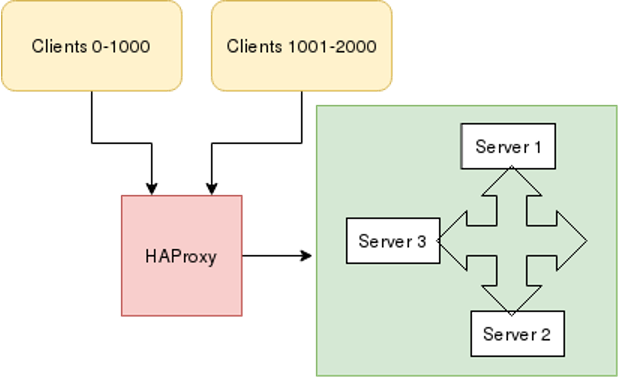
This article configures HAProxy for Fedora, CentOS, and RHEL machines. Similar implementations exist for other distributions.
[ Get an overview of Kubernetes storage and how it’s implemented in the eBook Storage Patterns for Kubernetes for Dummies. ]
Configure HAProxy
Suppose you host an Apache httpd server on three machines using the default port number 80 and HAProxy on another server. For testing, use different content in each web server's index.html so that you can tell them apart.
To configure HAProxy on the load balancing machine, first install the HAProxy package:
$ sudo dnf install haproxyWhen you configure HAProxy on any machine, that machine works as a load balancer that routes incoming traffic to one of your three web servers.
Once you've installed the HAProxy package on your machine, open /etc/haproxy/haproxy.conf in your favorite text editor:
frontend sample_httpd
   bind *:80
   mode tcp
   default_backend sample_httpd
   option tcplog
backend sample_httpd
   balance roundrobin
   mode tcp
   server master 192.168.122.104:80 check
   server node 192.168.122.64:80 check
   server server1 192.168.122.108:80 check
In this example, the frontend sample_httpd listens on port number 80, directing traffic to the default backend sample_httpd with mode tcp. In the backend section, the load balancing algorithm is set to roundrobin. There are several algorithms to choose from, including roundrobin, static-rr, leastconn, first, random, and many more. HAProxy documentation covers these algorithms, so for real-world uses, check to see what works best for your setup.
Finally, add the IP addresses of all three backend machines with a port number. The backend manages all requests.
Restart the HAProxy service after this configuration:
$ sudo systemctl restart haproxyBefore starting HAProxy, check the configuration for mistakes. For in-depth error checking, use these options:
$ sudo haproxy -c -f /etc/haproxy/haproxy.cfgFinally, use the curl command to contact the IP address of the HAProxy load balancing server:
$ curl 192.168.122.224
Hello from webserver2
$ curl 192.168.122.224
Hello from webserver3
$ curl 192.168.122.224
Hello from webserver1
As you can see, when the HAProxy server is contacted, it routes traffic to the three backend machines hosting httpd.
Load balancing is critical
Managing traffic on your servers is an important skill, and HAProxy is the ideal tool for the job. Load balancing increases reliability and performance while lowering user frustration. HAProxy is a simple, scalable, and effective way of load balancing among busy web servers.
Editor's note: Modified 1/3/2023 to clarify that HAProxy is not an Apache-sponsored project and to link to the open source community version.
Über den Autor
Shiwani Biradar is an Associate Technical support Engineer in Red Hat. She loves contributing to open source projects and communities. Shiwani never stops exploring new technologies. If you don't find her exploring technologies then you will find her exploring food. She is familiar with Linux, Cloud, and DevOps tools and enjoys technical writing, watching TV series, and spending time with family.
Ähnliche Einträge
Red Hat Enterprise Linux Long-Life Add-On: RHEL ohne Enddatum
Red Hat Lightspeed: Infrastruktur optimal anbinden
Container Roundup | Compiler
Untangling Networks | Compiler
Nach Thema durchsuchen

Automatisierung
Das Neueste zum Thema IT-Automatisierung für Technologien, Teams und Umgebungen

Künstliche Intelligenz
Erfahren Sie das Neueste von den Plattformen, die es Kunden ermöglichen, KI-Workloads beliebig auszuführen

Open Hybrid Cloud
Erfahren Sie, wie wir eine flexiblere Zukunft mit Hybrid Clouds schaffen.

Sicherheit
Erfahren Sie, wie wir Risiken in verschiedenen Umgebungen und Technologien reduzieren

Edge Computing
Erfahren Sie das Neueste von den Plattformen, die die Operations am Edge vereinfachen

Infrastruktur
Erfahren Sie das Neueste von der weltweit führenden Linux-Plattform für Unternehmen

Anwendungen
Entdecken Sie unsere Lösungen für komplexe Herausforderungen bei Anwendungen

Virtualisierung
Erfahren Sie das Neueste über die Virtualisierung von Workloads in Cloud- oder On-Premise-Umgebungen
