
In my previous article, I introduced Rust, explained how to install it, and created a simple Rust project. With the help of a container and OpenShift's "import from Git" functionality, you can onboard a Rust application onto OpenShift quickly.
[ Keep Rust syntax and tips on hand with this free Rust cheat sheet. ]
You can find the Rust project used in this example in my GitHub repository. The code is based on a repo created by the development team at Actix, a web framework for Rust. The most important files inside the repo include the dockerfile, Cargo.toml, and src/main.rs:
- The
dockerfilepulls the latest Rust image and runs thecargo buildcommand. - The
Cargo.tomlfile includes the Actix web dependency and package information. - The
main.rsscript contains the web server code, which displays "Hello, Openshift!" on port 8080.
Onboard Rust using OpenShift Web Console
- Log into the OpenShift Web Console.
- Click on Developer on the left sidebar at the very top.
- Click the Add button.
- Select the Import from Git option.
- Add the Git repository URL:
https://github.com/nnlama/rust_k8s_webserver - Click Create.
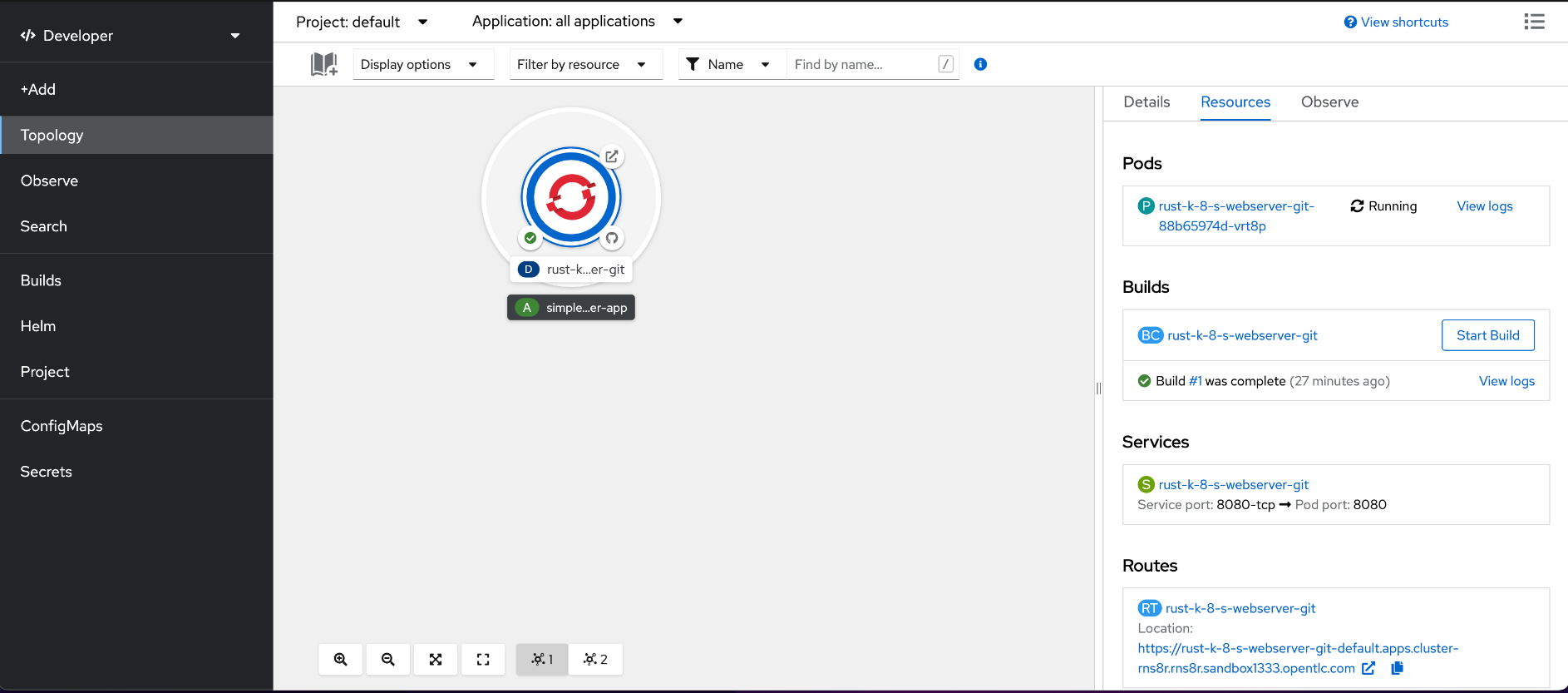
Cargo builds the project in five to 10 minutes. You must have these OpenShift resources:
- One pod in the completed stage to build the Rust application
- One pod in the running stage to run the Rust web server
- One service
- One route to expose the Rust application
Access the route to the application under the Networking tab on the OpenShift Web Console. Copy and paste the URL into your local browser to see a "Hello OpenShift!" message.

Congratulations! You have successfully onboarded your first Rust application on OpenShift. If you are interested in contributing to the Rust community, please visit the Rust Programming Language Handbook and Rustaceans.org for more information on becoming an official Rustacean.
Über den Autor
Nicole Lama is a first-generation Panamanian-American with a bachelor's in biomedical sciences and a master's in bioinformatics and computational biology. Since 2015, she has worked with academics, tech startups, and Fortune 500 companies to help meet their data extraction, transformation, mobilization, storage, analytics, and visualization needs. She specializes in Python, machine learning, and open source technology.
Ähnliche Einträge
Mit Red Hat OpenShift Cloud Services Lieferengpässe umgehen
Die Agenten-Herausforderung bewältigen: Vom monolithischen Prompt zum modularen agentischen Workflow
Learning the BASICs | Command Line Heroes
The Great Stack Debate | Compiler: Stack/Unstuck
Nach Thema durchsuchen

Automatisierung
Das Neueste zum Thema IT-Automatisierung für Technologien, Teams und Umgebungen

Künstliche Intelligenz
Erfahren Sie das Neueste von den Plattformen, die es Kunden ermöglichen, KI-Workloads beliebig auszuführen

Open Hybrid Cloud
Erfahren Sie, wie wir eine flexiblere Zukunft mit Hybrid Clouds schaffen.

Sicherheit
Erfahren Sie, wie wir Risiken in verschiedenen Umgebungen und Technologien reduzieren

Edge Computing
Erfahren Sie das Neueste von den Plattformen, die die Operations am Edge vereinfachen

Infrastruktur
Erfahren Sie das Neueste von der weltweit führenden Linux-Plattform für Unternehmen

Anwendungen
Entdecken Sie unsere Lösungen für komplexe Herausforderungen bei Anwendungen

Virtualisierung
Erfahren Sie das Neueste über die Virtualisierung von Workloads in Cloud- oder On-Premise-Umgebungen
