

Welcome to another post in our Getting Started series. In our previous post, we discussed how you can set up and use LDAP in your Red Hat Ansible Tower instance. In this post we are going to discuss a new feature in regard to Windows authentication with Kerberos. Before we get started, please note that these changes will not affect the current configuration you are using if you have previously used Kerberos with Ansible Tower. Your setup should function the same way as before.
Using Kerberos to Connect to Windows
Using Kerberos with Ansible and Ansible Tower to connect to your Windows hosts before the release of Ansible 2.3 required some prior scaffolding tasks be set up before you were able to fully use it. The necessary packages for Kerberos are still required to be on the machine that Ansible Tower is installed on. The documentation on the required materials and configuration changes can be found here if you are just starting out or need a refresher.
The main change that comes to using Kerberos with Ansible and Ansble Tower is how Ansible manages Kerberos “tokens” or “tickets." Ansible Tower defaults to automatically managing Kerberos tickets (as of Ansible 2.3) when both the username and password are specified in the machine credential for a host that is configured for Kerberos. A new ticket is created in a temporary credential cache for each host, before each task executes to minimize the chance of ticket expiration. The temporary credential caches are deleted after each task, and will not interfere with the default credential cache. Automatic ticket management requires a standard kinit binary on the control host system path. Please note that this is enabled by default on all new instances of Ansible Tower (version 3.2 and up).
If you would like to disable this feature or use a different location or binary name in your configuration, the steps to do that can be found here in the Ansible Documentation.
Using Kerberos with Machine Credentials
To use the feature within Ansible Tower, you will need to create a machine credential to apply to the template that will be running against an inventory that is configured for Kerberos. If you are unsure of how to create a Machine Credential, we wrote a blog post that covers all of the basics and the types of credentials found in Ansible Tower.Creating the Kerberos Credential
Kerberos doesn’t have its own type of credential within Ansible Tower; instead, the functionality that was described above can be utilized within a Machine Credential. When you are creating a Machine Credential, there will only be a slight tweak to the way that you enter in the required items. Utilizing a user that has sufficient rights to check out a Kerberos token, add the username into the required field using the following format: user@domain. Once that is done, add the associated password to the credential and select Save.
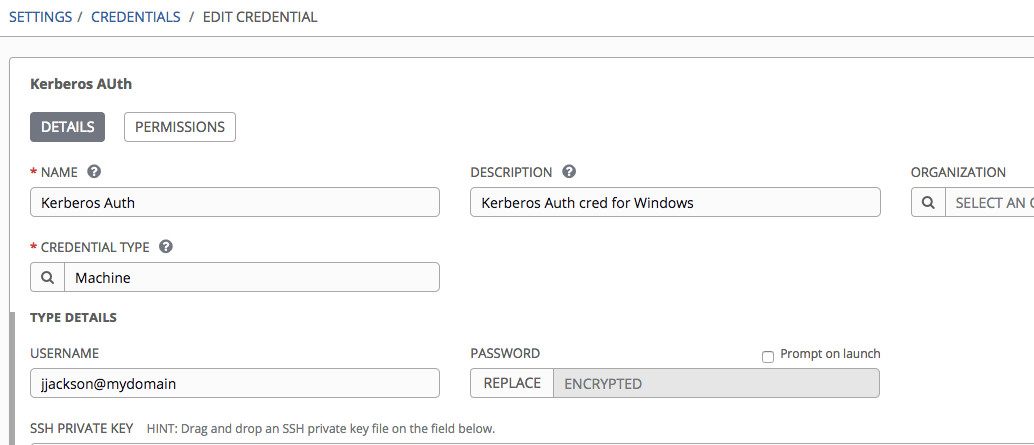
Once the credential is saved, it can be used like any other machine credential within your Ansible Tower instance. Just remember that the auto-management of the Kerberos ticket will only be invoked with all of the prerequisites met.
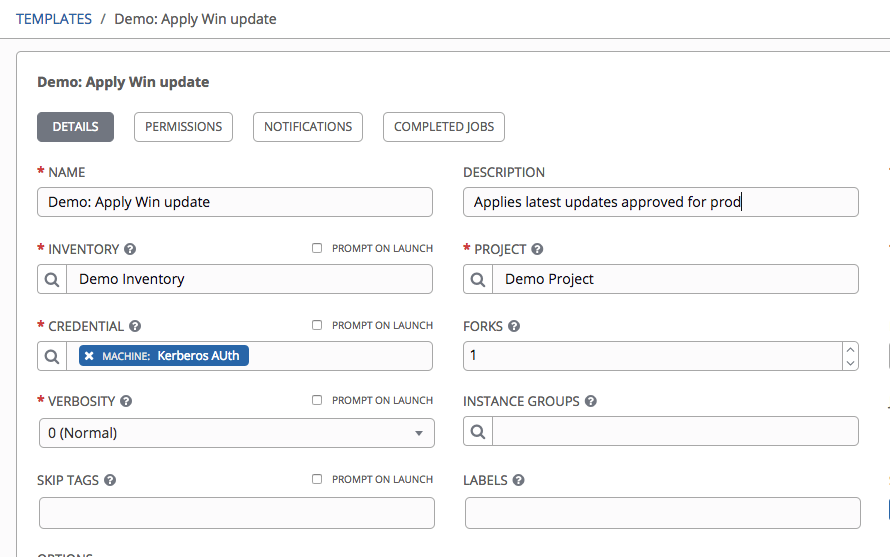
Those and other facts about using Kerberos within Ansible Tower can be found here in our documentation.
Ansible and Ansible Tower are actively and enthusiastically developed for new features and stability, which means it can be a challenge to keep up with the release cycle. We are always aiming to improve the user experience and provide easy and stable automation.
If you are new to Ansible and want to get started with it, visit our Getting Started page to get up and running quickly and gain the knowledge of automation with Ansible Tower.
Über den Autor
Ähnliche Einträge
Ansible Automation Platform 2.7: Execution Environment Builder
Stabilen Code behalten: Mit Lightwell schneller zum Ziel
Random Acts Of Automation | Compiler
How Red Hat cleared IT debt for scalable AI
Nach Thema durchsuchen

Automatisierung
Das Neueste zum Thema IT-Automatisierung für Technologien, Teams und Umgebungen

Künstliche Intelligenz
Erfahren Sie das Neueste von den Plattformen, die es Kunden ermöglichen, KI-Workloads beliebig auszuführen

Open Hybrid Cloud
Erfahren Sie, wie wir eine flexiblere Zukunft mit Hybrid Clouds schaffen.

Sicherheit
Erfahren Sie, wie wir Risiken in verschiedenen Umgebungen und Technologien reduzieren

Edge Computing
Erfahren Sie das Neueste von den Plattformen, die die Operations am Edge vereinfachen

Infrastruktur
Erfahren Sie das Neueste von der weltweit führenden Linux-Plattform für Unternehmen

Anwendungen
Entdecken Sie unsere Lösungen für komplexe Herausforderungen bei Anwendungen

Virtualisierung
Erfahren Sie das Neueste über die Virtualisierung von Workloads in Cloud- oder On-Premise-Umgebungen
