
OpenStack's Identity service, Keystone, verifies the user's identity and provides information about which resources the user has access to.
The Keystone project provides authentication, authorization, and other services such as delivering the service catalog, as this diagram shows:

It is important to note that the Identity service also provides the authorization for a user between services. For example, does the user have the authority to access a particular image in Glance for Nova and create a virtual machine (VM) from it?
Due to its critical role in authentication, authorization, and managing the catalog of services and their endpoints, the Identity service is the first service installed during an OpenStack deployment.
How the Identity service authenticates
Whether you're using OpenStack's Horizon dashboard or the command-line interface (CLI), requests to the Identity service are made via an API call. In the following diagram, it seems like a fairly easy process with a single call being made and with a single answer received:

The Identity service's role in launching a VM
Now let's dive deeper into the steps for a user to launch a VM.
[ Learn more OpenStack usage tips by building a lab in five minutes with three simple commands. ]
The following diagram shows that the initial API call authenticates the user's credentials, creates a temporary token for the user, and creates a generic catalog.
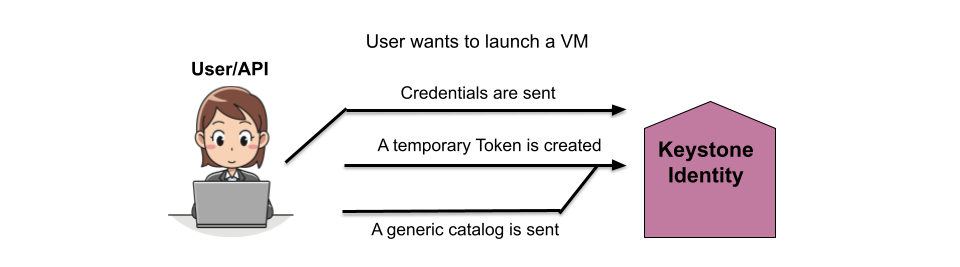
In the next step, the Identity service replies with the temporary token and the list of tenants the user has access to.

The user then selects the tenant from the provided list and receives a list of services they are authorized to access in that tenant and a token for that tenant. The user then connects to the correct endpoint based on the selected service and sends the token.
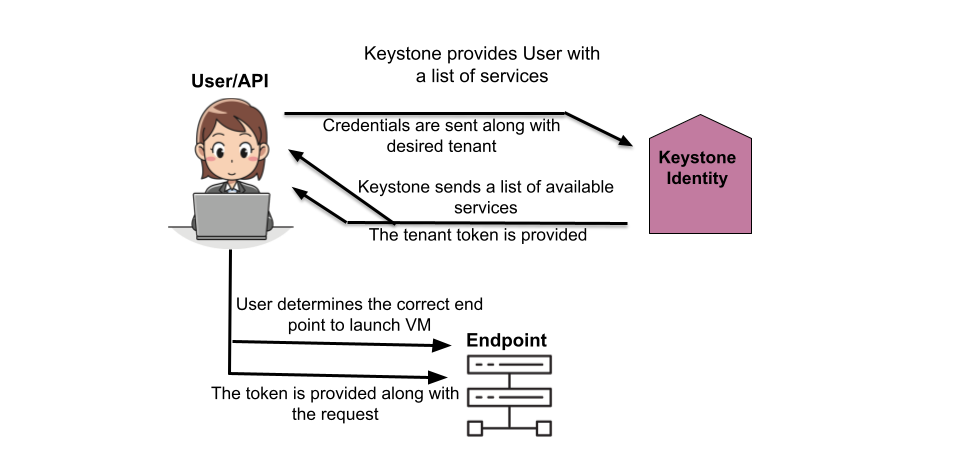
The Identity service then verifies that the token is correct and also that the user has permission to access the requested service (compute, in this case), as well as any other services the compute services might need to access to complete the request.

The Identity service then authorizes the user for the tenant, verifies the token is correct for the request, and confirms the user. The service also verifies the user has the correct permissions for the request based on its own policies.
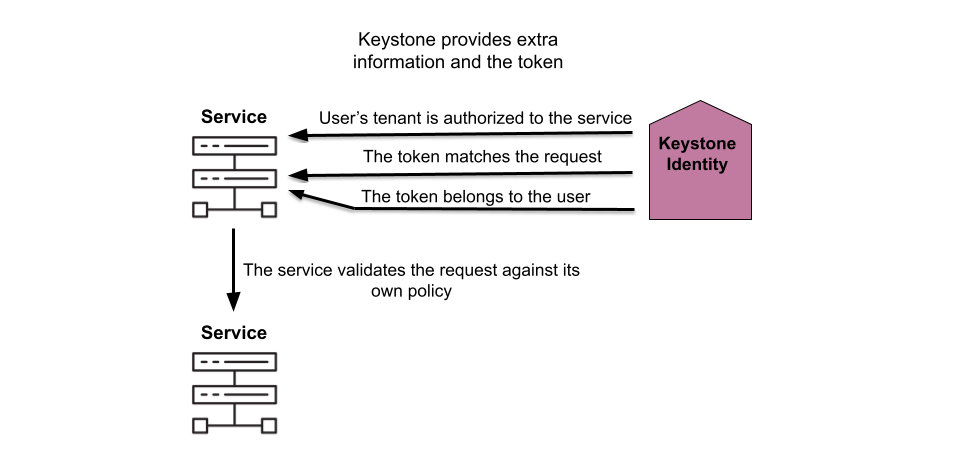
With the user authorized and their permissions verified, the other services involved create the new VM.

Finally, the compute service informs the user the VM is created and how to connect to it.

Wrap up
Walking through the process of creating a VM demonstrates where the Identity service fits in with the other services. The authentication and authorization processes Keystone provides make it clear why this service is installed before any of the others when deploying OpenStack.
[ Download now: A system administrator's guide to IT automation.]
Über den Autor
Amy Marrich is a Principal Technical Marketing Manager at Red Hat. She previously worked at a small open source e-assessment company in Luxembourg, where she was the Open Source Community and Global Training Manager. Previously, she was the OpenStack Instructor at Linux Academy and a Linux System Engineer on the Platform Engineering Cloud Operations team at Rackspace. She currently serves on the OpenStack Board, is an active member of the Openstack Ansible project, and was previously the chair of the OpenStack User Committee. Amy spends her free time competing in performance events (agility, FASt Cat, and dock diving) with her Dalmatians and competing in dressage with her Connemara pony.
Ähnliche Einträge
Stabilen Code behalten: Mit Lightwell schneller zum Ziel
Die neue Währung für geschäftliche Agilität im KI-Zeitalter
Can Compliance Be A Piece Of Cake? | Compiler
Collaboration In Product Security | Compiler
Nach Thema durchsuchen

Automatisierung
Das Neueste zum Thema IT-Automatisierung für Technologien, Teams und Umgebungen

Künstliche Intelligenz
Erfahren Sie das Neueste von den Plattformen, die es Kunden ermöglichen, KI-Workloads beliebig auszuführen

Open Hybrid Cloud
Erfahren Sie, wie wir eine flexiblere Zukunft mit Hybrid Clouds schaffen.

Sicherheit
Erfahren Sie, wie wir Risiken in verschiedenen Umgebungen und Technologien reduzieren

Edge Computing
Erfahren Sie das Neueste von den Plattformen, die die Operations am Edge vereinfachen

Infrastruktur
Erfahren Sie das Neueste von der weltweit führenden Linux-Plattform für Unternehmen

Anwendungen
Entdecken Sie unsere Lösungen für komplexe Herausforderungen bei Anwendungen

Virtualisierung
Erfahren Sie das Neueste über die Virtualisierung von Workloads in Cloud- oder On-Premise-Umgebungen
