The TAP device plugin provides the ability to create tap devices in containers. A TAP device provides frame reception and transmission for user space programs. It can be seen as an interface, which, instead of receiving frames from a traditional network interface, receives them from user space applications, and instead of sending frames via a traditional network interface, writes them to the user space application. For more information please see here: https://www.kernel.org/doc/html/v5.8/networking/tuntap.html
Installing
The feature will be available in OpenShift 4.13 as Developer Preview. No further installation steps are required.
Configuring a TAP device
A sample TAP device CNI plugin configuration is shown below:
       {
         "type": "tap",
         "multiQueue": true,
         "selinuxcontext": "system_u:system_r:container_t:s0"
         "owner": 0,
         "group": 0,
         "ipam": {...}
       }
Below is an explanation of the individual attributes of the configuration section:
- Type - type of plugin: “tap.”
- MultiQueue - enable multiqueue.
- SELinuxcontext - for systems with the SELinux security module enabled, the context under which to create the TAP device.
- Owner - the user owning the TAP device. If not specified the TAP device will have no owner assigned. If specified, the owner will be user with the specified user id, with 0 being the root user.
- Group - the group owning the tap device. If not specified the TAP device will have no owner assigned. If specified, the group will be user with the specified group id.
To configure a TAP plugin in OpenShift a network-attachment-definition must be created:
apiVersion: k8s.cni.cncf.io/v1
kind: NetworkAttachmentDefinition
metadata:
  name: tap
  namespace: mmirecki
spec:
  config: '{
     "cniVersion": "0.4.0",
     "name": "tap",
     "plugins": [
       {
         "type": "tap",
         "owner": 0,
         "group": 0,
         "multiQueue": true,
         "selinuxcontext": "system_u:system_r:container_t:s0"
         "ipam": {...}
       }
     ]
  }'
The above created network must then be specified in the networks annotation of a pod:
---
apiVersion: v1
kind: Pod
metadata:
  annotations:
    k8s.v1.cni.cncf.io/networks: '[
      {
       "name": "tap",
       "namespace": "mmirecki",
       "interface": "ext0",
       "mac": "50:00:00:00:00:10"
      }
    ]'
Example use case
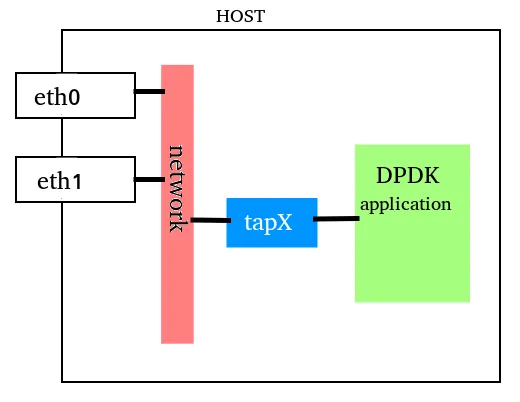
A sample use case for tap devices is creating TAP devices for use with DPDK applications.
Some DPDK applications use regular kernel networking to send low-volume traffic such as logs or messages. The DPDK application can use a TAP device for the slow path communication between the DPDK workload and the kernel networking.
Status
The TAP device feature will be available in OpenShift 4.13 as Developer Preview.
The use cases for the feature and available options are based on limited customer feedback. Additional feedback on possible use cases and missing functionality are welcome. Please contact your Red Hat account manager for further details.
Über den Autor

Ähnliche Einträge
Red Hat to acquire Chatterbox Labs: Frequently Asked Questions
Key considerations for 2026 planning: Insights from IDC
Edge computing covered and diced | Technically Speaking
Nach Thema durchsuchen

Automatisierung
Das Neueste zum Thema IT-Automatisierung für Technologien, Teams und Umgebungen

Künstliche Intelligenz
Erfahren Sie das Neueste von den Plattformen, die es Kunden ermöglichen, KI-Workloads beliebig auszuführen

Open Hybrid Cloud
Erfahren Sie, wie wir eine flexiblere Zukunft mit Hybrid Clouds schaffen.

Sicherheit
Erfahren Sie, wie wir Risiken in verschiedenen Umgebungen und Technologien reduzieren

Edge Computing
Erfahren Sie das Neueste von den Plattformen, die die Operations am Edge vereinfachen

Infrastruktur
Erfahren Sie das Neueste von der weltweit führenden Linux-Plattform für Unternehmen

Anwendungen
Entdecken Sie unsere Lösungen für komplexe Herausforderungen bei Anwendungen

Virtualisierung
Erfahren Sie das Neueste über die Virtualisierung von Workloads in Cloud- oder On-Premise-Umgebungen
