
In Red Hat 3scale API Management, we can manage any HTTP(S)-based APIs - including REST and SOAP. With REST, it is particularly straightforward as individual URL paths usually map quite nicely to operations. By operations, we mean fine-grained tasks and services which providers may wish to a) get visibility into and b) apply control access to.
With SOAP, there is more of a challenge, as it is typical for multiple operations to share the same endpoint. Yet providers may still want to get the same visibility and control they get with SOAP as they get with REST.
Context
Before we tackle SOAP, let’s add some context by showing how we deal with REST. This will be partially applicable for SOAP as well.
Figure 1 - 3scale mapping of URL patterns to logical methods - applicable for REST
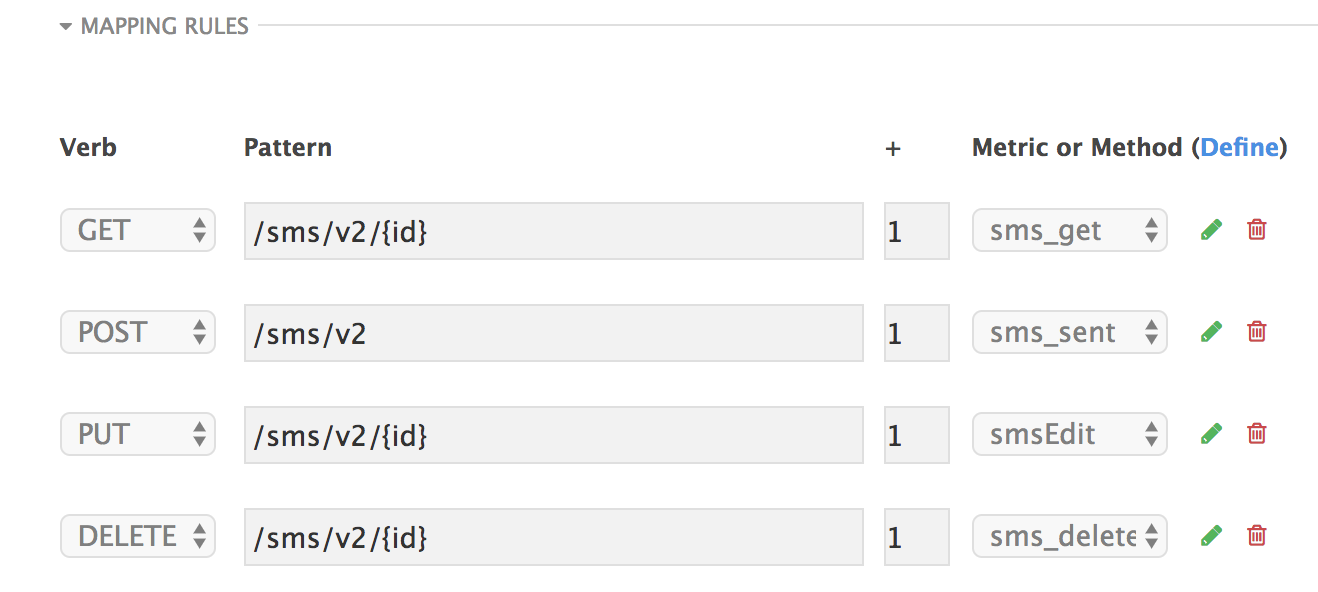
Here we have an example of a simple SMS-based API with 4 CRUD-based operations. As you can see, the specific nature of the URL patterns facilitates direct mapping to the logical methods on which access control is applied, and visibility is available in the analytics component of Red Hat 3scale API Management.
Sometimes, SOAP operations are set up such that individual URL paths do map to individual operations. In these cases, we can treat SOAP identically to REST. We just need to map our POST based SOAP endpoints to logical methods and that’s our configuration complete. Docker or Openshift will pull down these configurations to the API gateway, and we’re done.
More often than not, however, multiple SOAP operations share the same endpoint, so we need a different approach to the management of these services.
While it’s possible to inspect the request payload at the gateway, this would add overhead and latency to the calls. We definitely wish to avoid this and keep the gateway as lean as possible.
Approach
Therefore we use an HTTP header that identifies the operation. We use the SOAPAction header by default, though this can be customized. At the gateway, we read this header, along with the API key, App ID, or JWT, and send both to the 3scale API Manager in a report and authorize call, as shown. All other headers are, as always with the 3scale gateway, untouched and passed through to the back end.
Figure 2 - API call flow
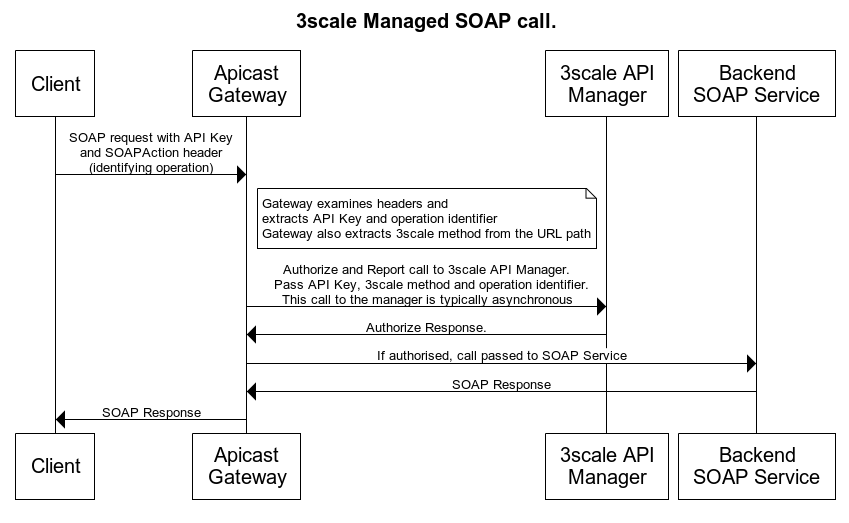
*In our case we use the ‘SOAPAction’ header. This can be modified if required. See the example implementation in my Github repo.
3scale configuration and resulting data capture
On the 3scale API manager, we configure the SOAP endpoint the same way we configure a REST endpoint.
- On the APIs screen, first create a service.
- In the configuration, name the service.
- Give a system name.
- Choose Nginx Apicast self managed.
- Choose your Auth Mode (API Key in my case).
- Click Create Service.
- On the new service, choose Integration -> edit APIcast configuration.
- Then configure the SOAP endpoint URL path, as shown in the figure.
Figure 3 - Mapping SOAP endpoint URL path to 3scale method
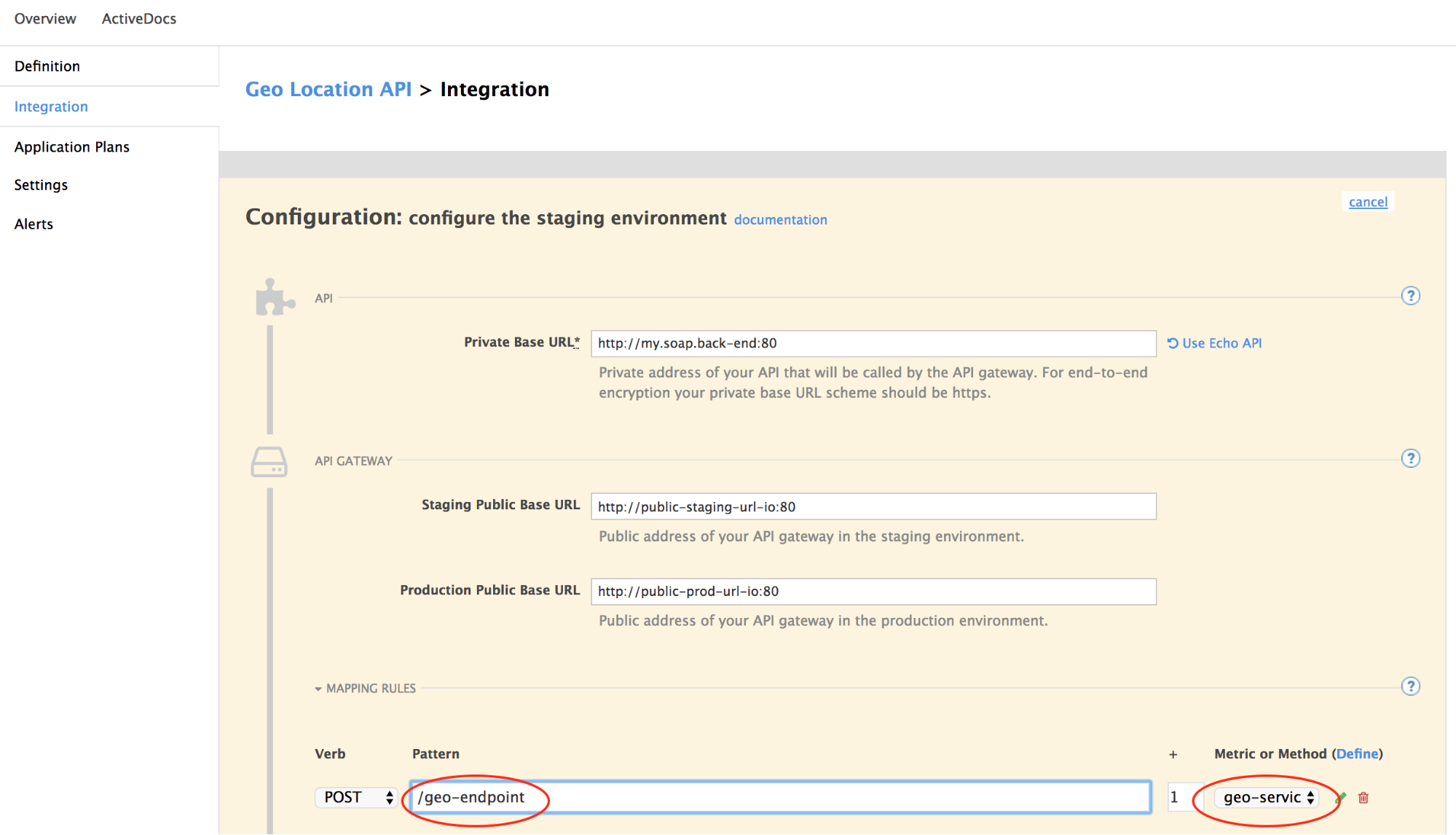
In my case, I use a fictitious geolocation SOAP service, identified by the path /geo-endpoint. I map this to a logical 3scale method geo-service. This will cause all SOAP requests to this endpoint to be authorized and reported to 3scale under this method.
Additionally, in order to get the fine-grained, operation-level access control and traffic visibility, we define 3scale metrics for each operation.
- Navigate to API -> Your SOAP API -> Definition.
- Create a Method for each endpoint, in my case just one geo-service.
- Additionally create a Metric for each SOAP operation your service exposes. In my case I’ve configured possible operations city, country, etc., as shown in Figure 4.
Figure 4 - API definition with method and multiple metrics representing operations
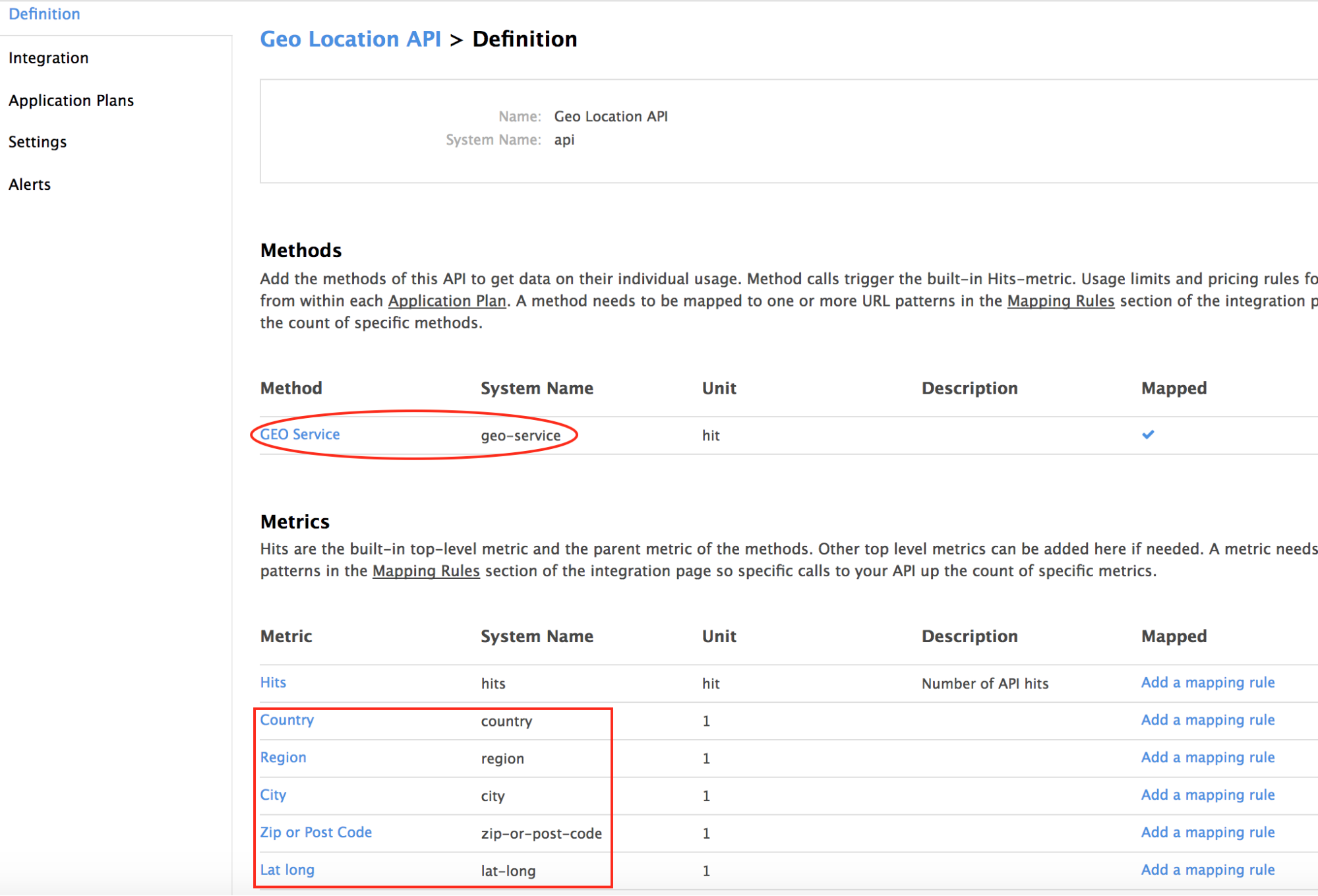
At this point, in your 3scale application plans (access policies), you could now control access with rate limits to each of these metrics and the method.
In your analytics section, you now get overall traffic visibility at the method level and at the individual metric level.
Figure 5 - Method level visibility showing overall traffic to SOAP service endpoint
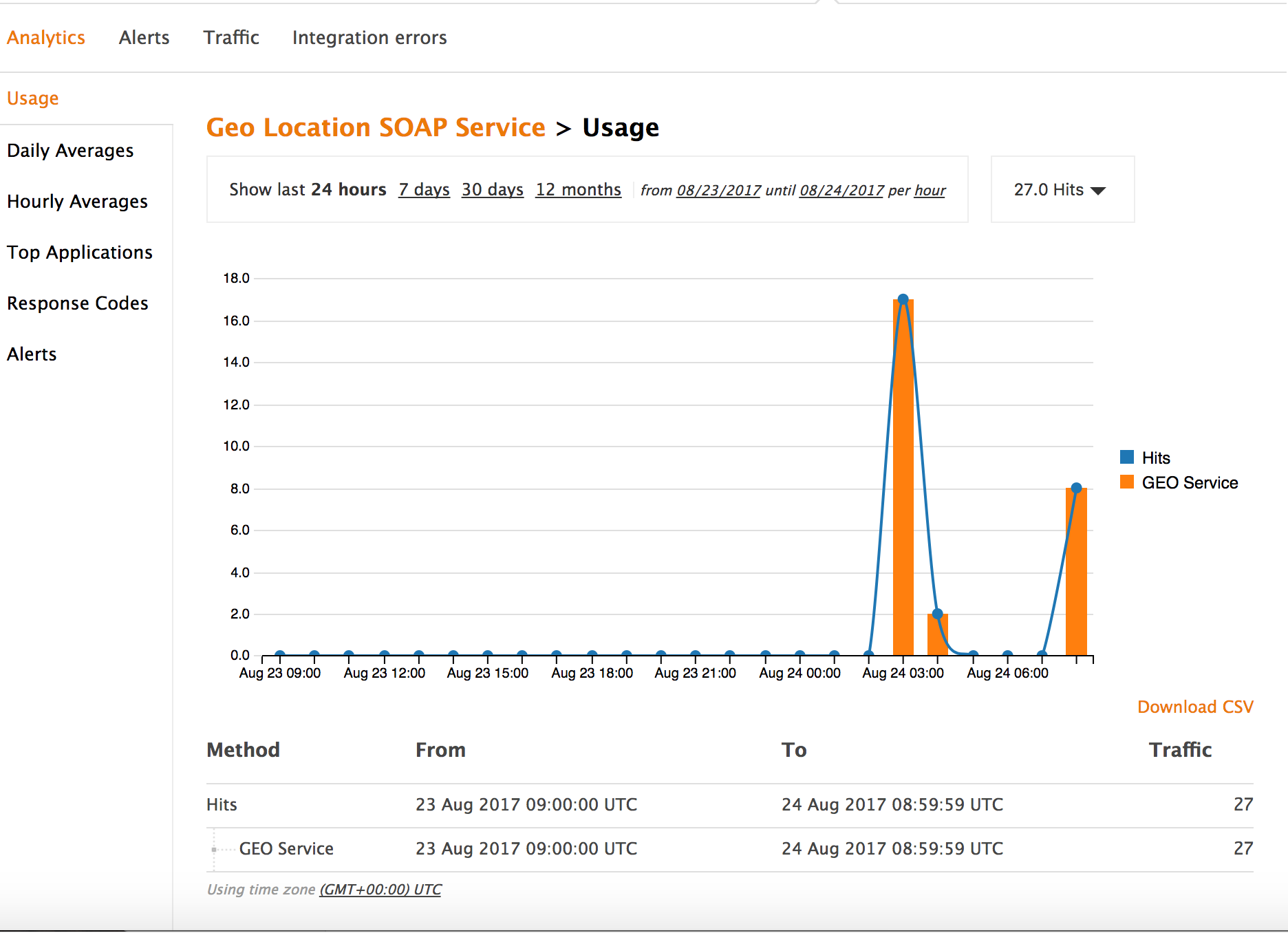
Figure 6 - Metric level visibility showing traffic to individual SOAP operations

Do-it-yourself example
First, configure the 3scale API manager. Make equivalent configurations for your service as I did. Then open my Github Repo for the simple gateway installation instructions. In there, you’ll find details on how to do the installation on a raw Docker gateway or a gateway hosted on Openshift.
Über den Autor
Ähnliche Einträge
Jenseits des Horizonts: Den Übergang zwischen der Technologie von heute und der KI von morgen gestalten
Automatisierung im Rechenzentrum: vom Hype zur Überlebensstrategie
Communicating the Value of Connecting Systems | Code Comments
Nach Thema durchsuchen

Automatisierung
Das Neueste zum Thema IT-Automatisierung für Technologien, Teams und Umgebungen

Künstliche Intelligenz
Erfahren Sie das Neueste von den Plattformen, die es Kunden ermöglichen, KI-Workloads beliebig auszuführen

Open Hybrid Cloud
Erfahren Sie, wie wir eine flexiblere Zukunft mit Hybrid Clouds schaffen.

Sicherheit
Erfahren Sie, wie wir Risiken in verschiedenen Umgebungen und Technologien reduzieren

Edge Computing
Erfahren Sie das Neueste von den Plattformen, die die Operations am Edge vereinfachen

Infrastruktur
Erfahren Sie das Neueste von der weltweit führenden Linux-Plattform für Unternehmen

Anwendungen
Entdecken Sie unsere Lösungen für komplexe Herausforderungen bei Anwendungen

Virtualisierung
Erfahren Sie das Neueste über die Virtualisierung von Workloads in Cloud- oder On-Premise-Umgebungen
