



Confidential containers are containers deployed within a Trusted Execution Environment (TEE), which allows you to protect your application code and secrets when deployed in untrusted environments. In our previous articles, we introduced the Red Hat OpenShift confidential containers (CoCo) solution and relevant use cases. We demonstrated how components of the CoCo solution, spread across trusted and untrusted environments, including confidential virtual machine (CVM), guest components, TEEs, Red Hat build of Trustee operator operator, Trustee agents, and more, work together as part of the solution.
In this article, we take you a step further to discuss key deployment considerations for the Red Hat OpenShift CoCo solution and its components, including:
- How do you bootstrap, verify, and trust the TEE in an untrusted environment?
- What are the components of your trusted environment?
- What are the workload (pod) requirements when deployed in the TEE environment?
We discuss the Trusted Computing Base (TCB), including hardware, firmware, and software components for the CoCo solution, and provide guidance on constructing it when deploying the OpenShift CoCo solution. We will also discuss the workload (pod) requirements when deployed within a TEE, and discuss current tech preview limitations.
Trusted Computing Base for confidential containers
The Trusted Computing Base (TCB) refers to the set of all hardware, firmware, and software components critical to a system's security. For the CoCo solution, as discussed below, the TCB includes the TEE, including its container runtime environment and container images, attestation service (AS), key broker (KBS) and management services (KMS), CI/CD services creating container images, and the OpenShift worker node services. A robust TCB ensures that your confidential data has increased security, meets stringent regulatory requirements, and protects against potential breaches.
For more information on AS, KBS, and KMS, read our Introduction to Confidential Containers Trustee: Attestation Services Solution Overview and Use Cases.
Trusting the TEE
Before you can trust a TEE with your confidential data, you must first trust the TCB used to construct the TEE. The figure below shows the TCB for setting up a trusted TEE under the CoCo solution:

A TEE is only as trustworthy as the remote attestation service used to verify it (“Attestation Service” in the diagram above). When using a third-party attestation service, the entity controlling the service, its employees, a government, or an attacker who compromises the system can falsely claim that a chosen TEE is valid and running a legitimate image. Such falsification enables an untrusted entity to steal or alter any secrets or confidential data you provide to the TEE.
A TEE is only as trustworthy as the key management service that releases secrets (“Key Management” in the diagram above). When using third-party key management services, the entity in control of the key management services (or its employees, or a government, or an attacker) can use the keys to decrypt your data in transit or at rest, to falsify identities, or to sign malicious code that will execute as part of the TEE and gain access to confidential data.
A container running inside a TEE is only as trustworthy as the associated container image (“Image” in the diagram above). When using third-party CI/CD services (“CI/CD pipelines” in the diagram above), the entity in control of the CI/CD services (or its employees, a government, or an attacker) can integrate a backdoor into the image or otherwise alter it in ways that will allow access to confidential data. Containers can be verified using their signatures. The image provider uses a private key to sign the image. Anyone with access to such a private key can replace the container image with a malicious or misconfigured one, allowing access to confidential data. Therefore, parties you do not trust should not have access to the private key.
As you see, to trust the TEE that runs the CoCo workload, you need to trust the TCB consisting of the remote attestation services, key management services, CI/CD pipelines, etc. You need a trusted environment that serves as your trust anchor, using which you will verify and trust the TEE that will run the CoCo workload.
The trust anchor
A trust anchor in the context of the OpenShift CoCo solution is an OpenShift cluster running in an environment you fully trust and control.
Following are a few examples of the trust anchor:
- An OpenShift on-prem deployment
- An OpenShift cluster running in a restricted region in the public cloud (GCP, AWS, Azure etc…)
- An OpenShift managed cluster (ARO, ROSA etc…)
As mentioned in the previous section, following is a minimum set of services that should exist in your OpenShift trust anchor:
- Attestation service - provided by the OpenShift Red Hat build of Trustee operator
- Key Management service - provided by a combination of OpenShift Secrets or any secret store operator (like vault, external secret store operator etc) and Key Broker Service (KBS) provided by OpenShift Red Hat build of Trustee operator
- CI/CD pipelines - provided by OpenShift pipelines operator or other similar services
The following diagram shows the trust anchor services:
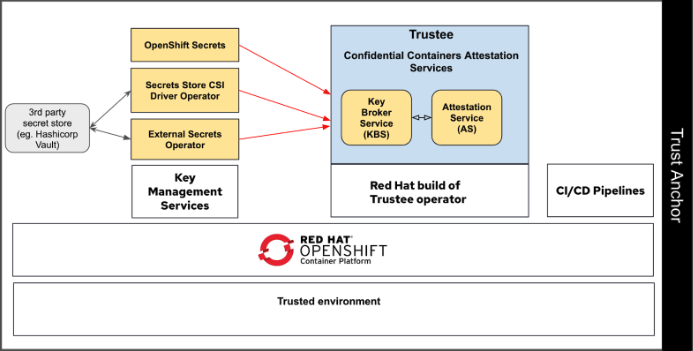
An important point to note is that although the trust anchor contains services such as the attestation service, key management service and CI/CD, the confidential container workloads themselves may or may not be running in the trust anchor. The confidential container workloads utilize the services from the trust anchor. Depending on the deployment, you may have separate OpenShift clusters where one is functioning as the trust anchor and the other is used for deploying confidential container workloads (leveraging the trust anchor cluster).
Networking considerations for the OpenShift trust anchor
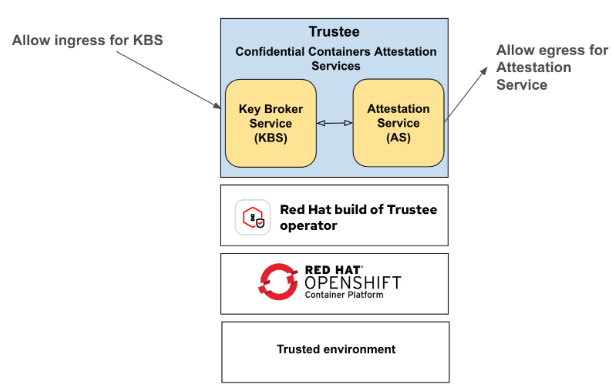
The following are the minimal networking requirements you should consider when deploying your trust anchor:
- Ingress access to KBS - you must allow ingress access to the Key Broker Service (KBS), deployed by the Red Hat build of Trustee operator, for the TEEs in the untrusted environment to connect to as part of the attestation process
- Egress access for AS - Allow AS access to external network to be able to pull certificates from Intel and AMD as part of the attestation process
Key management services in the OpenShift trust anchor
The following are the minimal key management services requirements you should consider when deploying your trust anchor:
- KBS can be used to provide OpenShift "Secret" objects to TEEs
- KBS can be used to provide secrets managed via external secrets operator or secrets store CSI driver to the TEEs

In the subsequent sections, we'll discuss a few examples of creating TEEs in untrusted environments. Note that these examples are not exhaustive, and we provide them here to help you understand the possibilities available with the OpenShift CoCo solution.
Creating TEEs in an untrusted environment using OpenShift trust anchor
You can use an OpenShift cluster as a trust anchor with one or more additional OpenShift CoCo workload clusters deployed in untrusted environments. The OpenShift cluster in the untrusted environment can be either self-managed or managed.
As mentioned previously, although the OpenShift trust anchor cluster and the cluster used for creating confidential containers share the same TCB, they can reside on different locations all together. For example, the trust anchor runs on a bare-metal local deployment while the CoCo cluster runs on a public cloud.
Separating the trust anchor cluster from the CoCo workloads cluster
The OpenShift cluster acting as the trust anchor and the OpenShift cluster used to run the CoCo workload are separate.
This is a preferred deployment model due to clear separation between the cluster acting as a trust anchor for the CoCo workloads from the cluster actually running the CoCo workloads. The following diagram shows this deployment type:

Note that the OpenShift sandboxed containers operator which is responsible for enabling CoCo support is installed in the workload cluster (left OpenShift cluster in the untrusted environment shown in the diagram above).
Sharing a single cluster for the trust anchor and CoCo workloads cluster
You may also use the same OpenShift cluster that is used as the trust anchor for running your CoCo workloads in an untrusted environment. The following diagram describes this scenario. Note that the OpenShift sandboxed containers operator is also deployed in the same cluster as it's the one responsible for enabling CoCo support:

Additional approaches for commissioning trust anchor services
You may want to commission some trust anchor services from the cloud provider if it aligns with your security needs as this approach opens up additional attack vectors coming from the cloud provider services. The services may include the cloud provider's Attestation, Secret Store, or CI/CD services. You may also decide to run the trust anchor services in a standalone environment.
Here are some examples
- You can use the TEE attestation services provided by the cloud provider to validate the TEE environment, followed by the Key Broker Service provided by the Red Hat build of Trustee operator to release a key to the workload
- You can use the Red Hat build of Trustee operator to verify the TEE environment before releasing a secret managed by the cloud provider vault service
- You can run the CoCo attestation service on a trusted virtual machine eg. via podman
These are some possibilities where you can use a combination of cloud provider-commissioned trust anchor services and OpenShift trust anchor services to meet your security and usability needs. We will explore these options in future blogs.
Workload Considerations when using OpenShift confidential containers solution
Pod spec changes
You'll need to use the kata-remote runtimeClassName to create a CoCo pod
apiVersion: v1
kind: Pod
metadata:
 name: coco-pod
spec:
 runtimeClassName: kata-remote
 containers:
   - name: coco-pod
     image: my.registry.io/image:1.0
...
Pod interaction changes
For CoCo pods, you must disable Kubernetes exec you must disable API to avoid cluster admin to execute a shell or any other process inside the pod. Further, it's a good practice to disable the Kubernetes log API also unless you are sure no sensitive data is logged.
Disabling of Kubernetes API is enabled via the Kata agent policy framework that executes inside the CoCo pod. Please refer to the product documentation for more details on Kata-agent policy and how to customize it for the CoCo pods.
Retrieving secrets from the KBS
The CVM includes the Confidential Data Hub (CDH) component, which exposes REST API endpoints at http://127.0.0.1:8006/cdh for container workloads to retrieve secrets.
More details on CDH is available in the following blog.
The following diagram shows a high level overview of the CDH components involved:
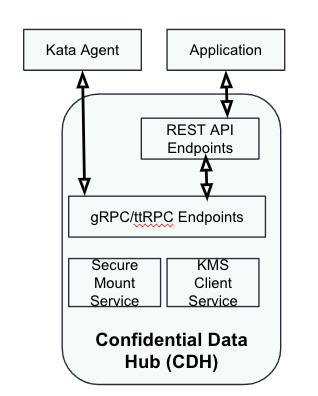
A workload requests a secret resource by calling the CDH's /resource endpoint. Here is an example from a sample CoCo pod to retrieve key (key1) from the KBS:
apiVersion: v1
kind: Pod
metadata:
  name: app
  labels:
    app: app
spec:
  runtimeClassName: kata-remote
  initContainers:
    - name: get-key
      image: registry.access.redhat.com/ubi9/ubi:9.3
      command:
        - sh
        - -c
        - |
          curl -o /keys/key1 http://127.0.0.1:8006/cdh/resource/default/mysecret/key1
      volumeMounts:
        - name: keys
          mountPath: /keys
  containers:
    - name: app
   ...
  volumes:
    - name: keys
      emptyDir:
        medium: Memory
In-guest image pull and CVM root disk size requirements
The container images for a pod are downloaded inside the CVM. However currently, the image is also downloaded on the worker node but the image downloaded on the worker node is not used by the CoCo pod.
Further, a LUKS encrypted scratch space using ephemeral key is created to store the downloaded container image layers. The scratch space uses the free space in the CVM root disk.
Depending on your workload image requirement, you might need to increase the root disk size of the instance. You'll find details on how to specify the root disk size for a CoCo pod in the product documentation.
No native support for encrypted pod-to-pod communication
Any pod-to-pod communication is unencrypted, and you must use TLS at the application level for any pod-to-pod communication.
Summary
In this blog, we reviewed the key deployment considerations for the OpenShift confidential containers solution, building on our previous introduction to the CoCo solution. We also explored the essential components that form the solution's Trusted Computing Base (TCB), including the Trusted Execution Environment (TEE), attestation services, secret store, and CI/CD pipelines.
We looked at the importance of a trust anchor, typically a trusted OpenShift cluster, which provides the foundation for establishing a secure TCB. This trust anchor is crucial for verifying the TEE in an untrusted environment. We also discussed the potential of using cloud provider-commissioned trust anchor services in conjunction with OpenShift services to meet various security needs.
Über die Autoren
Pradipta is working in the area of confidential containers to enhance the privacy and security of container workloads running in the public cloud. He is one of the project maintainers of the CNCF confidential containers project.
Jens Freimann is a Software Engineering Manager at Red Hat with a focus on OpenShift sandboxed containers and Confidential Containers. He has been with Red Hat for more than six years, during which he has made contributions to low-level virtualization features in QEMU, KVM and virtio(-net). Freimann is passionate about Confidential Computing and has a keen interest in helping organizations implement the technology. Freimann has over 15 years of experience in the tech industry and has held various technical roles throughout his career.
Ähnliche Einträge
Stabilen Code behalten: Mit Lightwell schneller zum Ziel
Die neue Währung für geschäftliche Agilität im KI-Zeitalter
Can Compliance Be A Piece Of Cake? | Compiler
Scaling with Orchestrators | Compiler
Mehr erfahren
- E-Book: Mehr Sicherheit in der Hybrid Cloud
- E-Book: Ein mehrschichtiger Sicherheitsansatz für Container und Kubernetes
Nach Thema durchsuchen

Automatisierung
Das Neueste zum Thema IT-Automatisierung für Technologien, Teams und Umgebungen

Künstliche Intelligenz
Erfahren Sie das Neueste von den Plattformen, die es Kunden ermöglichen, KI-Workloads beliebig auszuführen

Open Hybrid Cloud
Erfahren Sie, wie wir eine flexiblere Zukunft mit Hybrid Clouds schaffen.

Sicherheit
Erfahren Sie, wie wir Risiken in verschiedenen Umgebungen und Technologien reduzieren

Edge Computing
Erfahren Sie das Neueste von den Plattformen, die die Operations am Edge vereinfachen

Infrastruktur
Erfahren Sie das Neueste von der weltweit führenden Linux-Plattform für Unternehmen

Anwendungen
Entdecken Sie unsere Lösungen für komplexe Herausforderungen bei Anwendungen

Virtualisierung
Erfahren Sie das Neueste über die Virtualisierung von Workloads in Cloud- oder On-Premise-Umgebungen
