
We’re nearing the release of oVirt 3.3, and I’ve been testing out all the new features — and using oVirt to do it, courtesy of nested KVM.
KVM takes advantage of virtualization-enabling hardware extensions that most recent processors provide. Nested KVM enables KVM hypervisors to make these extensions available to their guest instances.
Nested KVM typically takes takes a bit of configuration to get up and running: on the host side, you need to make sure that nested virtualization is enabled, and on the guest side, you need to make sure that your guest VM’s is emulating a virt-capable processor.
With oVirt, you can take care of both the host and guest configuration chores by installing a vdsm hook on your host machine(s):
$> sudo yum install -y vdsm-hook-nestedvtDepending on your networking configuration, there’s a separate hook required to allow your nested host to pass traffic from its guests up through the machine in which it's hosted:
$> sudo yum install -y vdsm-hook-macspoofNext, you need to enable the mac-spoofing option in oVirt’s web admin console, restart the engine for that setting to take effect, and restart vdsm for the two vdsm hooks to take effect:
$> sudo engine-config -s "UserDefinedVMProperties=macspoof=(true|false)" $> sudo service ovirt-engine restart $> sudo service vdsmd restartAfter vdsm restarts, you can check to see that your hooks are installed in your host’s "Host Hooks" tab:
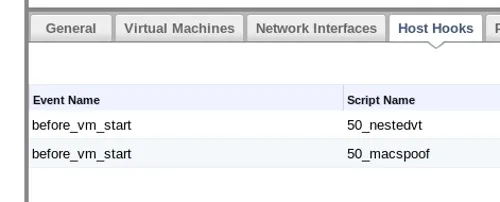
With the nestedvt vdsm hook installed, every guest launched from your nested-enabled hosts will inherit its own KVM-hosting capability. To enable the mac-spoofing, you have to visit the Custom Properties tab of the Edit Server Virtual Machine dialog, select "macspoof" from the "Please select a key" dropdown menu, and set the value to "true."

On my test machine, an HP ProLiant DL380p Gen8 with Sandybridge-family processors, I found that shortly after launching Fedora guest VM on my nested KVM hypervisor, the nested guest would pause and refuse to re-start. Casting about online for a solution, I found other, similar-sounding nested VM pause reports, with a suggested solution of running the problematic VMs with a earlier processor definition.
I got around this issue by changing the processor definition for my guest hypervisor from Sandybridge to Nehalem. oVirt makes this switch fairly easy — I took care of it by changing my cluster CPU type Sandybridge to Nehalem.

Nested KVM comes with a performance hit, but I’ve had no trouble testing oVirt (and other forms of KVM-based virtualization, such as OpenStack) in oVirt-hosted virtual machines.
Stay tuned for more coverage of oVirt 3.3, and be sure to follow us on Twitter at @redhatopen for news on oVirt and other open source projects in the Red Hat world.
Über den Autor
Ähnliche Einträge
Red Hat Ansible All-Stars gestalten die Zukunft der Automatisierung
Die neue Währung für geschäftliche Agilität im KI-Zeitalter
Random Acts Of Automation | Compiler
How Red Hat cleared IT debt for scalable AI
Nach Thema durchsuchen

Automatisierung
Das Neueste zum Thema IT-Automatisierung für Technologien, Teams und Umgebungen

Künstliche Intelligenz
Erfahren Sie das Neueste von den Plattformen, die es Kunden ermöglichen, KI-Workloads beliebig auszuführen

Open Hybrid Cloud
Erfahren Sie, wie wir eine flexiblere Zukunft mit Hybrid Clouds schaffen.

Sicherheit
Erfahren Sie, wie wir Risiken in verschiedenen Umgebungen und Technologien reduzieren

Edge Computing
Erfahren Sie das Neueste von den Plattformen, die die Operations am Edge vereinfachen

Infrastruktur
Erfahren Sie das Neueste von der weltweit führenden Linux-Plattform für Unternehmen

Anwendungen
Entdecken Sie unsere Lösungen für komplexe Herausforderungen bei Anwendungen

Virtualisierung
Erfahren Sie das Neueste über die Virtualisierung von Workloads in Cloud- oder On-Premise-Umgebungen
