
This post was written by Christian Hernandez, Solution Architect of the OpenShift Tiger Team.
OpenShift can integrate with underlying infrastructure, enabling OpenShift to dynamically interact with the infrastructure and extend its functionality.
Specifically, this can allow us to set up OpenShift to process a PersistentVolumeClaim and then allocate that storage dynamically.
I am going to cover what is needed to get started with dynamically provisioning storage:
- Cloud Providers (in this example; AWS)
- StorageClasses
- Default StorageClass
Cloud Providers
Using a configured cloud provider such as AWS, you can setup/install OpenShift with the ability to access AWS services. This can be done at install or after the fact.
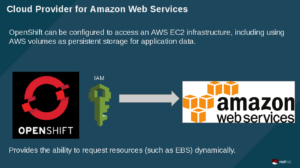
In short, OpenShift uses the defined IAM account to interact with AWS and make requests for resources. In the example that follows, OpenShift will be using this account to request a new EBS volume.
I setup the cloud provider on install. If done correctly, you'll see this on your masters/nodes
[root@master ~]# cat /etc/origin/cloudprovider/aws.conf

[Global]

Zone = us-west-1b
StorageClasses
In OpenShift, you are able to define a StorageClass. This lets administrators define different classes of storage that map to backend EBS volumes. Also, this mechanism helps in managing tiered storage.
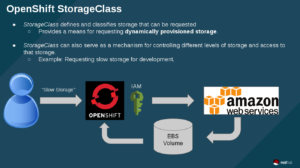
In the above image, the user requests "slow storage" (which is a storage category set up by an OpenShift admin), then OpenShift uses the IAM account to request EBS storage to be created. Finally AWS creates the storage and OpenShift binds the claim to the backend volume.
Default StorageClass
Administrators can also set up a "default" StorageClass. This is useful when a user doesn't request a particular kind of storage or when using a template that needs a persistent storage volume.
 The workflow here is the same as before - except here OpenShift says "since no StorageClass was defined; I'm just going to use the default class". The rest of the workflow is the same.
NOTE: Keep in mind that by default, requesting storage is unrestricted, so you may want to set up quotas for your projects.
Example
I have an OpenShift cluster setup with the AWS cloud-provider plugin.
This means that anytime a user requests storage; I will have to manually create a persistentVolume. I can create a storageClass that will automatically create the requested storage (if the request comes in with the same name)
Here I am creating a storage system called "aws-ebs-slow":
Now, the user can request storage by name "aws-ebs-slow:
Now when I check my PersistentVolumeClaim I should see a "Bound" status. This means I can go ahead and use it and attach it to my application:
Adding the volume to my application will trigger a new deployment (thus giving me a new pod with the mounted filesystem). Here you can see that uploader-2-5tmkh is the name of my new pod and that a new EBS volume was attached as /dev/xvdbe:
So what about those times when someone uses a template, 'just wants storage', or just doesn't specify the class of storage? Easy! We just set up a default storageClass by annotating it:
storageclass.beta.kubernetes.io/is-default-class: "true"
Now we can fire off an application that requires storage (e.g. rocketchat's MongoDB instance) and OpenShift will take the storage claim and provision an EBS volume based on the defined parameters of the default StorageClass. Cool!
As you can see storage was dynamically requested and provisioned without the need of a pv or a pvc.
NOTE: For those who are wondering; RocketChat templates can be found here.
Conclusion
In this blog, we explored how to dynamically allocate storage and how you can provide tiered storage. Also, we went through how to set up default tiers and went through an example on how to automatically attach storage.
Über den Autor
Christian is a well-rounded technologist with experience in infrastructure engineering, system administration, enterprise architecture, tech support, advocacy, and product management. He is passionate about open source and containerizing the world one application at a time. He is currently a maintainer of the OpenGitOps project, a maintainer of the Argo project, and works as a Technical Marketing Engineer and Tech Lead at Cisco. He focuses on GitOps practices, DevOps, Kubernetes, network security, and containers.
Ähnliche Einträge
Red Hat Partner sind eine wichtige Ressource für Telcos
Das agentische Paradoxon und die hybride KI-Strategie
Crack the Cloud_Open | Command Line Heroes
Edge computing covered and diced | Technically Speaking
Nach Thema durchsuchen

Automatisierung
Das Neueste zum Thema IT-Automatisierung für Technologien, Teams und Umgebungen

Künstliche Intelligenz
Erfahren Sie das Neueste von den Plattformen, die es Kunden ermöglichen, KI-Workloads beliebig auszuführen

Open Hybrid Cloud
Erfahren Sie, wie wir eine flexiblere Zukunft mit Hybrid Clouds schaffen.

Sicherheit
Erfahren Sie, wie wir Risiken in verschiedenen Umgebungen und Technologien reduzieren

Edge Computing
Erfahren Sie das Neueste von den Plattformen, die die Operations am Edge vereinfachen

Infrastruktur
Erfahren Sie das Neueste von der weltweit führenden Linux-Plattform für Unternehmen

Anwendungen
Entdecken Sie unsere Lösungen für komplexe Herausforderungen bei Anwendungen

Virtualisierung
Erfahren Sie das Neueste über die Virtualisierung von Workloads in Cloud- oder On-Premise-Umgebungen
