
In a previous article, I introduced GnuPG by verifying a signed file and encrypting a file for a recipient by using a public key. I have also shared how to create a key pair and export a public key so that we could receive encrypted messages. In this article, I will demonstrate how to sign files before sharing via email or publishing on a web site.
With GnuPG, there are multiple methods of signing a file.
$ gpg --help | grep -i sign
Sign, check, encrypt or decrypt
 -s, --sign          make a signature
     --clear-sign     make a clear text signature
 -b, --detach-sign   make a detached signature
     --verify          verify a signature
As each option is discussed, I will sign a simple text file.
$ cat sample.txt
Sample text for gpg signing
Make a signature
With the --sign option, the file is effectively encrypted with the private key. The public key is required to view the contents of the file. This both forces the recipient to verify the origin and removes any clear text content from transit. It is not private since anyone with the public key can decrypt the file.
$ gpg -s sample.txtThis results in a file named sample.txt.gpg.
$ file sample*
sample.txt:     ASCII text
sample.txt.gpg: data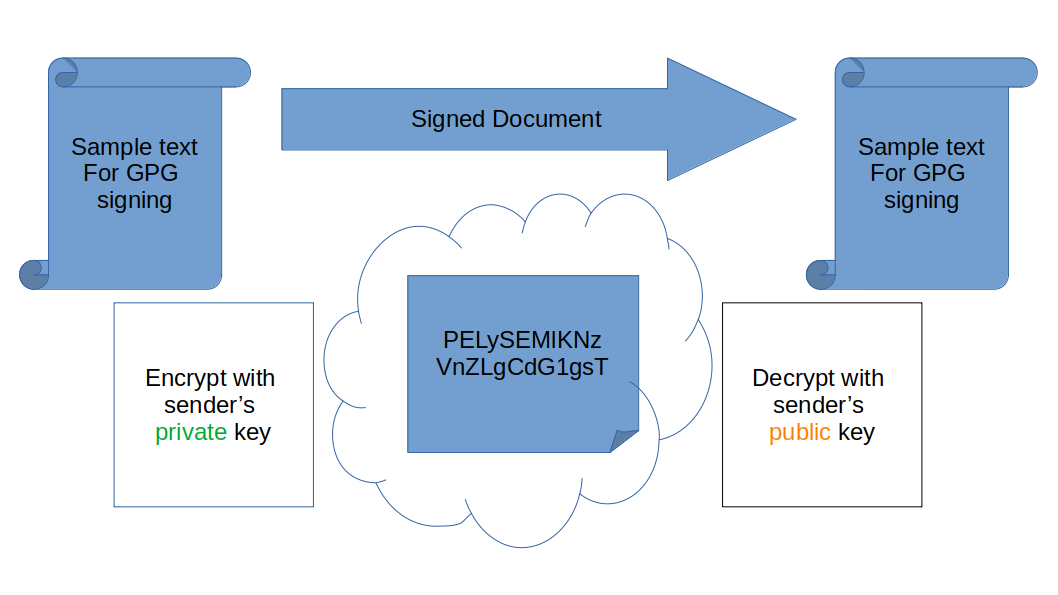
To verify only the signature, use the --verify option. To both view the contents and show the signature verification, use the --decrypt option.
$ gpg --decrypt sample.txt.gpg
Sample text for gpg signing

gpg: Signature made Sat 30 May 2020 09:16:24 AM EDT
gpg:             using DSA key 15AC***********
...omitted...
Make a detached signature
The detached signature option is available to provide everyone with the option of viewing the message without having the public key. This creates a separate signature file that is used to verify the original message if desired. In its simplest form, this file contains a hash of the original message and is encrypted with the private key. Anyone with the public key can open the signature and then compare hashes to verify the integrity of the signed file.
Create the signature file by using the --detach-sign option.
$ gpg -b sample.txtThe result is a separate .sig data file.
$ file sample*
sample.txt:     ASCII text
sample.txt.gpg: data
sample.txt.sig: data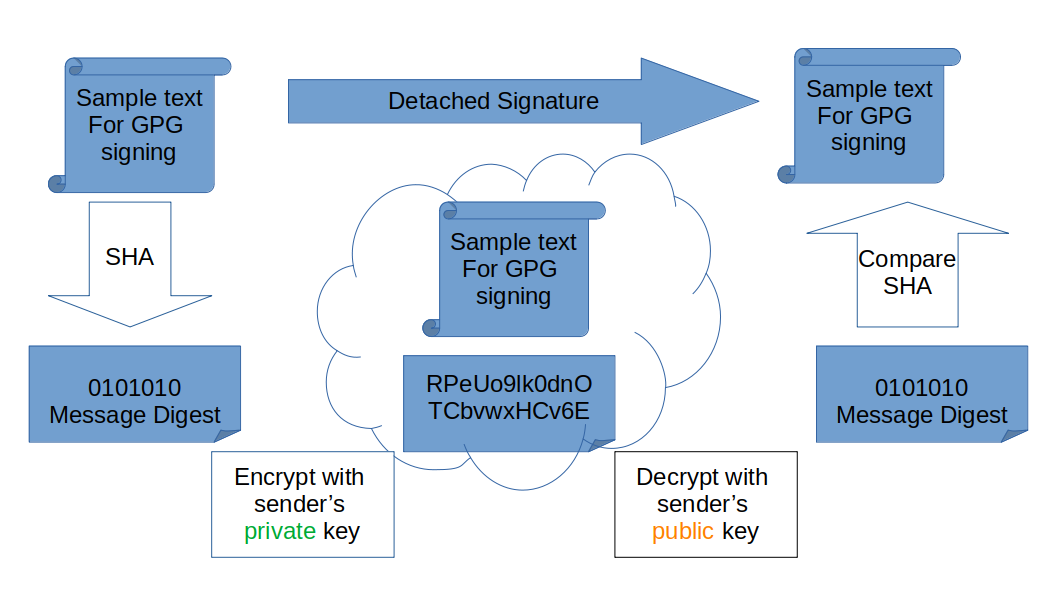
If you do not want to share, post, or email a data file, you can sign the file with the --armor option, and it will create an ASCII text file with the signature. It will also use the .asc extension instead of the .sig extension:
$ cat sample.txt.asc
-----BEGIN PGP SIGNATURE-----

iF0EABECAB0WIQQVrPeUo9lk0dnOTCbvwxHCv6EJdAUCXtO/yAAKCRDvwxHCv6EJ
dC2BAJ49fIcOdBUdE0PELySEMlKNzVnZLgCdG1gsTim3gab2dgL6qagHArSlgq8=
=IvP/
-----END PGP SIGNATURE-----
The original plain text file and the separate signature file must both be made available to the recipient.
To verify the signature, specify the signature file and then the original file.
$ gpg --verify sample.txt.sig sample.txtIf the default names have been used you can leave off the name of the unencrypted file.
$ gpg --verify sample.txt.sig
gpg: assuming signed data in 'sample.txt'
gpg: Signature made Sat 30 May 2020 09:23:53 AM EDT
...omitted...
Make a clear text signature
The --clear-sign option is a newer option in terms of the long history of GPG and is very common for files published to web sites such as the Fedora download CHECKSUM files. The contents are readable by anyone. The signature information is also available in the same file for those that want to verify the origin and integrity of the contents.

The --clear-sign option will create a new file with the .asc extension.
$ gpg --clear-sign sample.txt$ file sample*
sample.txt: ASCII text
sample.txt.asc: ASCII text
sample.txt.gpg: data
sample.txt.sig: dataTo verify the signature, use the --verify option:
$ gpg --verify sample.txt.asc
gpg: Signature made Sat 30 May 2020 09:27:56 AM EDT
...omitted...
gpg: WARNING: not a detached signature; file 'sample.txt' was NOT verified!
Note that a message is displayed during the verification process warning that the associated original file is not checked. You can rename this file before posting it on your website. The verification will still check the file contents.
While this is often the most convenient method for the consumers of your products, there is a warning in the GPG man page that detached signatures are the better option when full verification is required.
From the gpg man page:
Note: When verifying a cleartext signature, GPG verifies only what makes up the cleartext signed data and not any extra data outside of the cleartext signature or the header lines directly following the dash marker line. The --output option may be used to write out the actual signed data, but there are other pitfalls with this format as well. It is suggested to avoid cleartext signatures in favor of detached signatures.
Using a specific keypair
The above examples were all signed with the first private key available in my keyring. I might want to use a different key when I am signing a file for publication on a website. A keypair is created specifically for the project or product. The keypair can even be on a new shared keyring.
$ gpg --keyring /etc/gpgkeys --no-default-keyring --full-gen-key <other options>When a file is signed or encrypted, be sure to also specify the --keyring option.
Even if only one person is using the key to sign files, make a separate keypair to use for signing. Do not use the same key for other daily tasks such as personal email encryption. You can list the private key names available with gpg --list-secret. The ID, name, or email can be used to identify the key.
To sign the file with a specific key from a keyring, use the --local-user identity option.
$ gpg --local-user "My Project 2" --clear-sign sample.txtWrap up
If your simple text file is a list of checksum hashes for your product downloads, that file, any signature files, and the public key used to verify the signatures can all be posted to a web site. Consumers can then verify the downloads before installing any software on their systems.
[ Want to learn more about security? Check out the IT security and compliance checklist. ]
Über den Autor
Susan Lauber is a Consultant and Technical Trainer with her own company, Lauber System Solutions, Inc. She has over 25 years of experience working with Information Systems and specializes in Open Source technologies, specifically platform and data center installation, interoperability, automation, and security.
Susan is always an open source advocate and ambassador of projects she follows. She contributes to projects mostly by way of documentation and QA processes. She has contributed to Fedora Magazine and Opensource.com and is the author of "Linux Command Line Complete Video Course" (2016, Prentice Hall).
Susan is an independent instructor for several companies and holds an alphabet of certifications in those products. She is also a Certified Information Systems Security Professional (CISSP) and a Certified Technical Trainer (CTT). She has been a Red Hat Certified Instructor since 1999 and a co-author and contributor to several Red Hat Training student guides.
Follow her on twitter @laubersm to see what she is reading. Posts include a variety of technology topics as well as some travel, animals, sports, and other randomness.
Ähnliche Einträge
Stabilen Code behalten: Mit Lightwell schneller zum Ziel
Die neue Währung für geschäftliche Agilität im KI-Zeitalter
Can Compliance Be A Piece Of Cake? | Compiler
Infrastructure At The Edge | Compiler
Nach Thema durchsuchen

Automatisierung
Das Neueste zum Thema IT-Automatisierung für Technologien, Teams und Umgebungen

Künstliche Intelligenz
Erfahren Sie das Neueste von den Plattformen, die es Kunden ermöglichen, KI-Workloads beliebig auszuführen

Open Hybrid Cloud
Erfahren Sie, wie wir eine flexiblere Zukunft mit Hybrid Clouds schaffen.

Sicherheit
Erfahren Sie, wie wir Risiken in verschiedenen Umgebungen und Technologien reduzieren

Edge Computing
Erfahren Sie das Neueste von den Plattformen, die die Operations am Edge vereinfachen

Infrastruktur
Erfahren Sie das Neueste von der weltweit führenden Linux-Plattform für Unternehmen

Anwendungen
Entdecken Sie unsere Lösungen für komplexe Herausforderungen bei Anwendungen

Virtualisierung
Erfahren Sie das Neueste über die Virtualisierung von Workloads in Cloud- oder On-Premise-Umgebungen
