
Migration Toolkit for Containers (MTC) helps migrate stateful and stateless applications between OpenShift clusters. The most common use case for MTC has been migrating workloads from OpenShift 3 clusters to newer OpenShift 4 clusters facilitating cluster upgrades. In this article we introduce State Only Migration, a kind of migration designed to migrate the application state between clusters where the application manifests are deployed using OpenShift GitOps.
State Only Migration
After Red Hat announced OpenShift GitOps earlier this year, an increasing number of OpenShift users are moving towards leveraging GitOps workflows for cluster configuration and continuous application delivery using ArgoCD and OpenShift Pipelines. As a result, we expect a significant chunk of MTC users adapting to these technologies to deploy their applications in the target clusters. The users looking to migrate their workloads will simply use OpenShift GitOps to deploy the stateless components of their applications. However, they will still be required to migrate the state of the applications from the source to the target cluster. With State Only Migration, we aim to solve this problem. They can use MTC to migrate the application state while the stateless components can be migrated by the external mechanism of their choice:
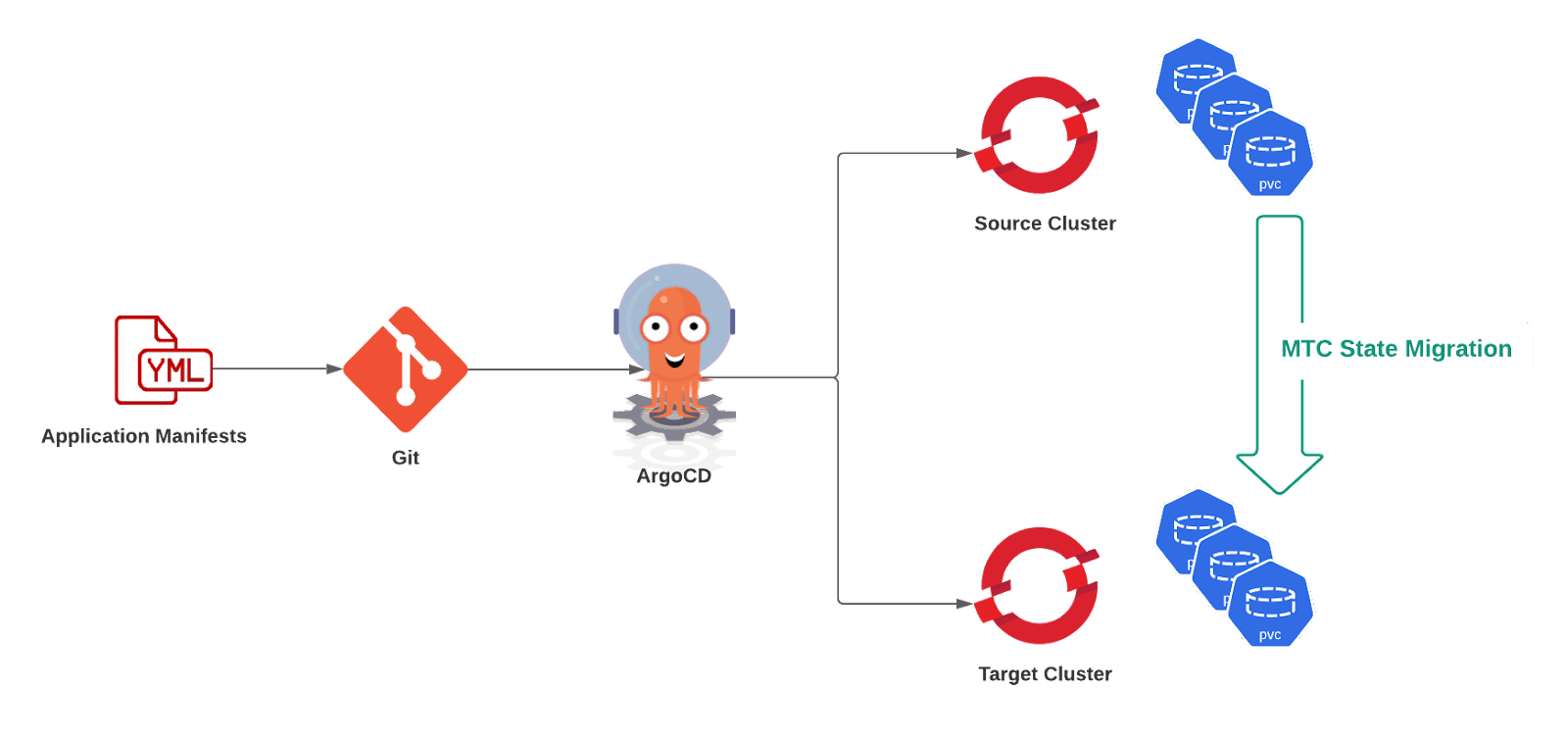
Application state
MTC provides a powerful two-step migration workflow in that Stage migration allows users to migrate PersistentVolume data, while a Final migration allows migrating Kubernetes resources along with any remaining PersistentVolume data. The Stage migration is designed to migrate application state incrementally and can be performed before a Final migration as many times as needed.
The applications running atop OpenShift typically use PersistentVolumes to persist their state. To enable state-only migration, MTC 1.6.0 develops on the idea of stage migration and introduces additional new features to address specific needs of GitOps migration use cases. One of such features is to allow migrating data to volumes that are already provisioned in the target cluster. This ensures that the applications that have their volumes pre-created in the target cluster can still be synchronized with their source cluster counterparts. This feature can also be used when the users simply wish to change the underlying storage classes of their existing PVCs. They can create new PVCs using a different storage class and migrate data to them. To migrate application state, MTC uses Rsync to synchronize data between the source and the target PVC over an OpenShift Route secured by “stunnel,” which is called Direct Volume Migration (DVM). As of MTC 1.6.0, the state migration flows are only supported through DVM.
The state transfer capabilities offered by MTC enable users to leverage newer technologies like OpenShift GitOps for their migration needs while still leaving a path for migrating the application state.
You can find more information about MTC in the OpenShift documentation under the "Migration Toolkit for Containers" section.
Über den Autor
Ähnliche Einträge
Red Hat Partner sind eine wichtige Ressource für Telcos
Das agentische Paradoxon und die hybride KI-Strategie
Crack the Cloud_Open | Command Line Heroes
Edge computing covered and diced | Technically Speaking
Nach Thema durchsuchen

Automatisierung
Das Neueste zum Thema IT-Automatisierung für Technologien, Teams und Umgebungen

Künstliche Intelligenz
Erfahren Sie das Neueste von den Plattformen, die es Kunden ermöglichen, KI-Workloads beliebig auszuführen

Open Hybrid Cloud
Erfahren Sie, wie wir eine flexiblere Zukunft mit Hybrid Clouds schaffen.

Sicherheit
Erfahren Sie, wie wir Risiken in verschiedenen Umgebungen und Technologien reduzieren

Edge Computing
Erfahren Sie das Neueste von den Plattformen, die die Operations am Edge vereinfachen

Infrastruktur
Erfahren Sie das Neueste von der weltweit führenden Linux-Plattform für Unternehmen

Anwendungen
Entdecken Sie unsere Lösungen für komplexe Herausforderungen bei Anwendungen

Virtualisierung
Erfahren Sie das Neueste über die Virtualisierung von Workloads in Cloud- oder On-Premise-Umgebungen
