
An Operator Lifecycle Manager (OLM) CatalogSource is a collection of operator metadata. OLM uses CatalogSources to build the list of available operators that can be installed from OperatorHub in the OpenShift web console. In OpenShift 4.3, the web console has added support for managing the out-of-the-box CatalogSources as well as adding your own custom CatalogSources.
You can create a custom CatalogSource using the OLM Operator Registry. The operator-framework/operator-registry repository has a Dockerfile to build a minimal registry server image using some example manifests and can be used to create your own custom catalog images. Run the following commands (replacing quay.io/my-organization/example-registry with your own repository) to build the example. You’ll need a repository at an image registry like quay.io for your image.
git clone https://github.com/operator-framework/operator-registry.git

cd operator-registry

docker build -t quay.io/my-organization/example-registry:latest -f upstream-example.Dockerfile .

docker push quay.io/my-organization/example-registry:latest
To add the catalog source in OpenShift console, log in as a cluster administration. Go to the Cluster Settings page under the Administration navigation section and click on the Global Configuration tab. This page lists the configuration resources for various cluster components and is a great place to explore what cluster configuration is available.
Click the OperatorHub link and then click the Sources tab to see the currently installed CatalogSources.
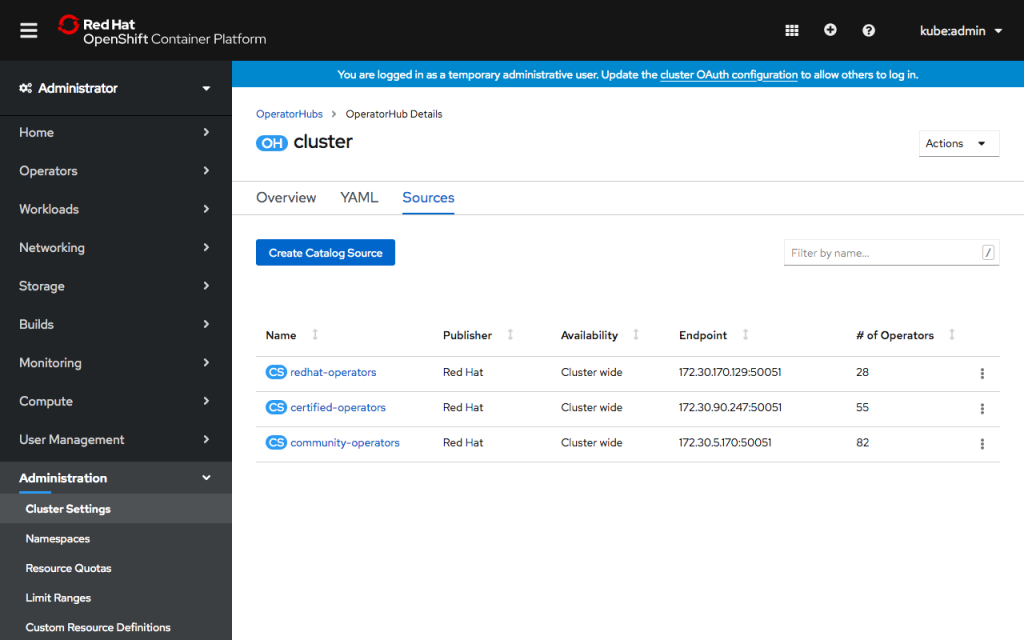
You’ll see several already present on the cluster, which populate OperatorHub with Red Hat, Certified and Community operators. These default catalog sources can now be enabled and disabled inside OpenShift console from the action menu for each table row.
To add a new CatalogSource, click Create Catalog Source. In the form, give the CatalogSource a name and optionally a display name and publisher. Enter the image name you built above. You can choose whether the CatalogSource is available for all namespaces or a single namespace.
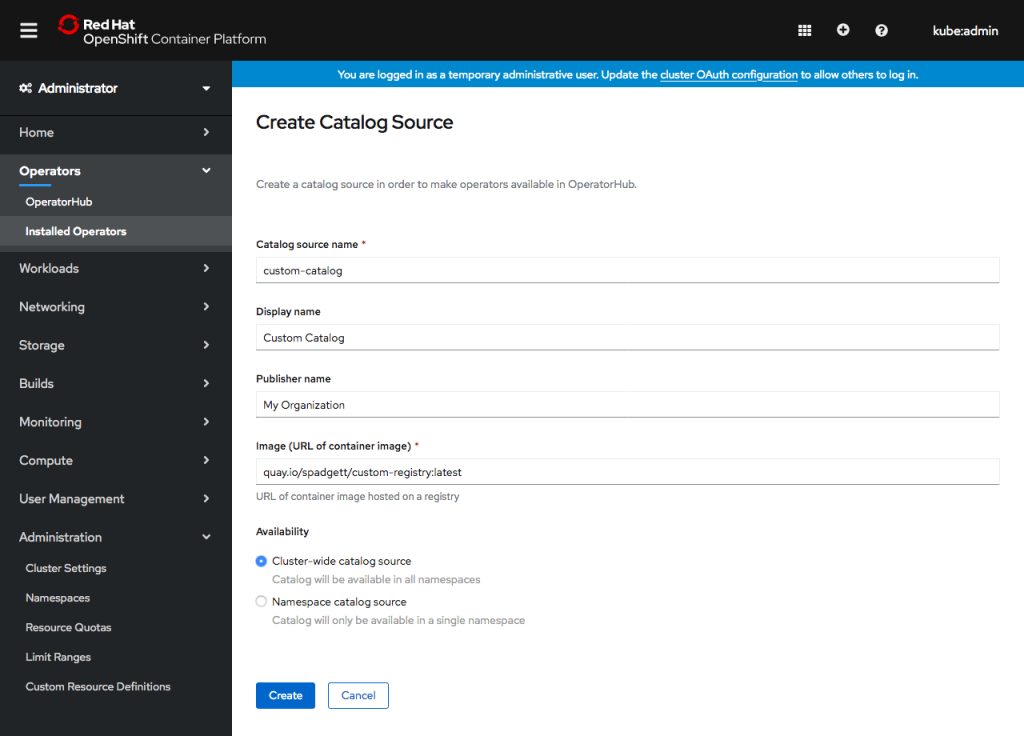
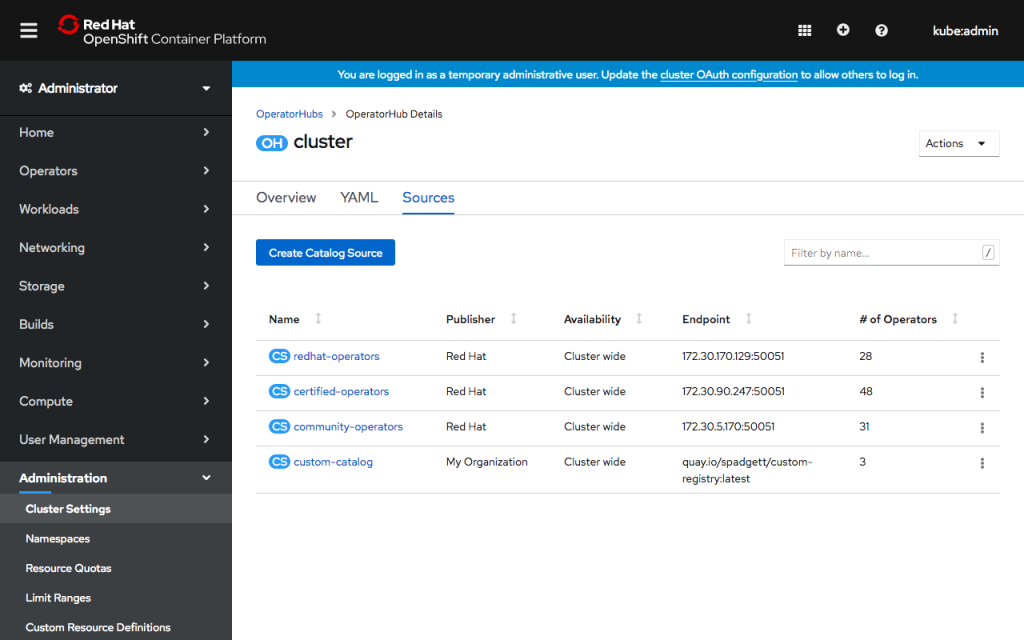
Click Create. You’ll see the new catalog source in the list. After a few minutes, OLM will load the catalog, and console will show the number of operators available.
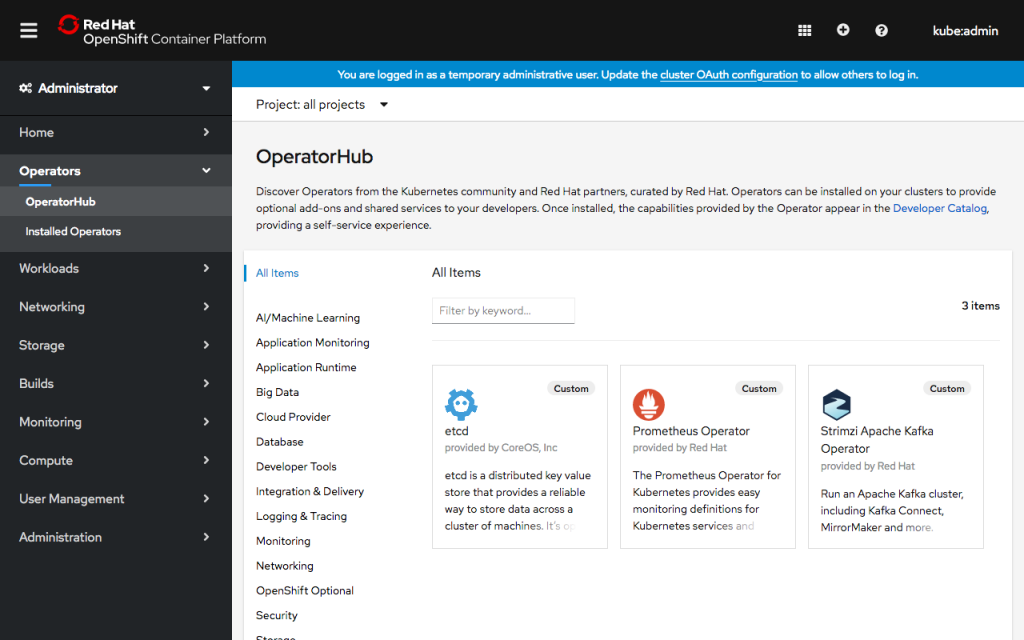
Visit the OperatorHub page under the Operators navigation section to see the new operators! Operators from a custom CatalogSource will be categorized as Provider Type “Custom,” and you can use the click the Provider Type “Custom” filter to the left of the page to see just the new operators.
If you’d like to learn more about what the OpenShift team is up to or provide feedback on any of the new 4.3 features, please take this brief 3-minute survey.
Über den Autor
Ähnliche Einträge
Zero Trust: Die letzte Verteidigungslinie bei CVEs
4 Gründe für den Image-Modus von Red Hat Enterprise Linux
Scaling with Orchestrators | Compiler
Container Roundup | Compiler
Nach Thema durchsuchen

Automatisierung
Das Neueste zum Thema IT-Automatisierung für Technologien, Teams und Umgebungen

Künstliche Intelligenz
Erfahren Sie das Neueste von den Plattformen, die es Kunden ermöglichen, KI-Workloads beliebig auszuführen

Open Hybrid Cloud
Erfahren Sie, wie wir eine flexiblere Zukunft mit Hybrid Clouds schaffen.

Sicherheit
Erfahren Sie, wie wir Risiken in verschiedenen Umgebungen und Technologien reduzieren

Edge Computing
Erfahren Sie das Neueste von den Plattformen, die die Operations am Edge vereinfachen

Infrastruktur
Erfahren Sie das Neueste von der weltweit führenden Linux-Plattform für Unternehmen

Anwendungen
Entdecken Sie unsere Lösungen für komplexe Herausforderungen bei Anwendungen

Virtualisierung
Erfahren Sie das Neueste über die Virtualisierung von Workloads in Cloud- oder On-Premise-Umgebungen
