
Experienced sysadmins will usually customize their Linux systems to suit their needs and to create a consistent environment. But what if you are working in an environment where you do not have the authority to make permanent changes? Or you are just helping someone from another department? Sometimes the other server may be running a different "flavor" of Linux or even a different type of Unix.
Here are some quick and dirty tricks that can be useful in some practical situations.
[ Readers also liked: More stupid Bash tricks: Variables, find, file descriptors, and remote operations ]
Know the rules and know when to break rules
Variables should have clear names to make them easy to understand, to be self-documented, and to keep our mental health. I suppose everybody agrees with that.
But sometimes, you are pressed to troubleshoot a production issue in the middle of the night, and you want to move fast.
Other times you also need to save some typing because you know you will need to run some long commands multiple times. In a normal situation, you would create aliases and put them in your login profiles. However, we are talking about an unfamiliar environment here, when you are focusing on resolving the incident.
The classic case of "too many network connections going wild"
You're paged at 2 AM because "something" isn't working. Everything worked normally until this night.
Starting with some variation of the ss command (or netstat, if you are a little older, like me), you notice hundreds of connections in a TIME-WAIT and CLOSE-WAIT in your main server.
Note: In the animation below, we use the ss -4a command to list all the IPv4 connections. But we are more interested in the ones that are in WAIT state:
You can see that all those connections seem to point to port 50505 in at least two servers. The destination IP and port are in Field #6. See the image below.
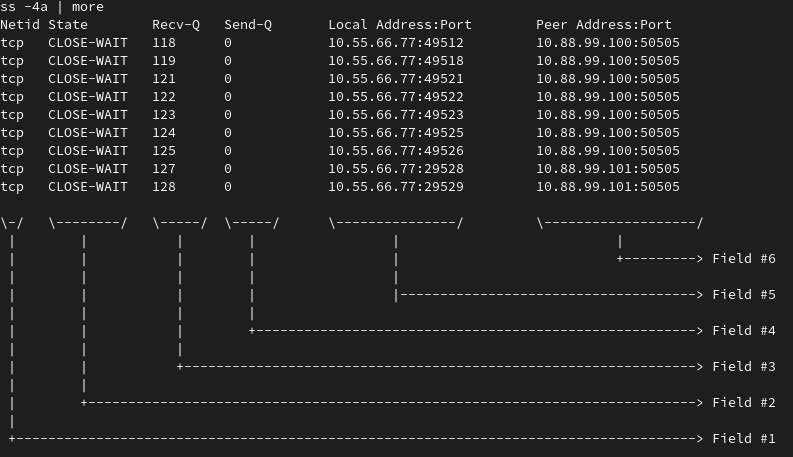
Now you want to find out how many connections are pending for each target IP.
We can accomplish this by tweaking the ss command that we used previously:
The sequence of steps is the following:
- We start reviewing the header and first 10 lines using the command
ss -4a | grep WAIT | head - Then we
pipethat toawk, which in this case is used to print field #6 (we are assuming that spaces are the default separator). - After that, we
sortthe previous output because next, we want to have a count of the distinct destination servers involved. - Finally, we use
uniq -cto present the count of unique lines. As we are in the final step for this task, we need to remove theheadcommand we have been using while we were constructing the output.
At this point in the investigation, you can start to make some correlations, such as, "The other two destinations are affected, so the root cause is either at the cluster level or network/firewall related."
There are certainly ways to customize the output of ss to show only the column you are interested in. But it may be something that you may not want to search at 2 AM. This was just one example, and in many other situations, you will have other commands with multiple options.
Here, the idea is to show a quick way to work with the output that is probably familiar to you, from some commands that you already used (but you do not need or want to memorize ALL the possible ways to configure their output).
The classic case of "low free disk space"
Another example from real life: You are troubleshooting an issue and find out that one file system is at 100 percent of its capacity.
There may be many subdirectories and files in production, so you may have to come up with some way to classify the "worst directories" because the problem (or solution) could be in one or more.
In the next example, I will show a very simple scenario to illustrate the point.
The sequence of steps is:
- We go to the file system where the disk space is low (I used my home directory as an example).
- Then, we use the command
df -k *to show the sizes of directories in kilobytes. - That requires some classification for us to find the big ones, but just
sortis not enough because, by default, this command will not treat the numbers as values but just characters. - We add
-nto thesortcommand, which now shows us the biggest directories. - In case we have to navigate to many other directories, creating an
aliasmight be useful.
[ Learn the basics of using Kubernetes in this free cheat sheet. ]
Wrap up
There are commands that are useful in different situations, such as grep, awk, sort. Knowing some basic options and combining them can be very effective when you need to manipulate and simplify output from other commands or when processing text files.
These commands exist in almost every Unix variation, old or new, which makes it beneficial to have them in your bag of tricks. You never know when these tools will save your life (wink).
Über den Autor
Roberto Nozaki (RHCSA/RHCE/RHCA) is an Automation Principal Consultant at Red Hat Canada where he specializes in IT automation with Ansible. He has experience in the financial, retail, and telecommunications sectors, having performed different roles in his career, from programming in mainframe environments to delivering IBM/Tivoli and Netcool products as a pre-sales and post-sales consultant.
Roberto has been a computer and software programming enthusiast for over 35 years. He is currently interested in hacking what he considers to be the ultimate hardware and software: our bodies and our minds.
Roberto lives in Toronto, and when he is not studying and working with Linux and Ansible, he likes to meditate, play the electric guitar, and research neuroscience, altered states of consciousness, biohacking, and spirituality.
Ähnliche Einträge
Post-Quanten-Sicherheit für Finanzdienstleister
Red Hat Enterprise Linux Long-Life Add-On: RHEL ohne Enddatum
Infrastructure At The Edge | Compiler
Operating System Management | Compiler
Nach Thema durchsuchen

Automatisierung
Das Neueste zum Thema IT-Automatisierung für Technologien, Teams und Umgebungen

Künstliche Intelligenz
Erfahren Sie das Neueste von den Plattformen, die es Kunden ermöglichen, KI-Workloads beliebig auszuführen

Open Hybrid Cloud
Erfahren Sie, wie wir eine flexiblere Zukunft mit Hybrid Clouds schaffen.

Sicherheit
Erfahren Sie, wie wir Risiken in verschiedenen Umgebungen und Technologien reduzieren

Edge Computing
Erfahren Sie das Neueste von den Plattformen, die die Operations am Edge vereinfachen

Infrastruktur
Erfahren Sie das Neueste von der weltweit führenden Linux-Plattform für Unternehmen

Anwendungen
Entdecken Sie unsere Lösungen für komplexe Herausforderungen bei Anwendungen

Virtualisierung
Erfahren Sie das Neueste über die Virtualisierung von Workloads in Cloud- oder On-Premise-Umgebungen
