
GUIs are nice pieces of software. They often help with a lot of daily tasks. For example, they let you visualize what you're doing on the system, surf the internet, and much more, but they don't belong on servers. The reason for this strong claim comes from the fact that sysadmins shouldn’t be using a server as a desktop, and generally speaking, a server can be administered completely via the command line interface (CLI).
A full-fledged desktop environment is also resource-heavy. It can easily require 2 GB of RAM and three gigabytes or more disk space just to exist. Yes, you can install lightweight GUIs, but again, resources are unnecessarily wasted.
[ You might also enjoy: Balancing Linux security with usability ]
There are other practical issues with a GUI on a server too. To use a GUI, you will probably use SSH X-Server forwarding, which is very slow as SSH encrypts the traffic. There are other ways to manage the server. You can either physically connect to the server (in case of bare metal) or have access to the hypervisor console, which you might or might not be able to, depending on security policies, access, geographic location, and so on.
Who uses a GUI on a server?
Every so often, though, you find that people, especially those coming from different backgrounds, prefer to have a desktop environment installed on their servers as they are not familiar with any shell. However, don't forget that skills can be learned and, after a certain amount of time, those who are administering Linux will find themselves more at home with the GNU/Linux shell.
Of course, visualizing server configurations still helps even the most experienced of us, but RHEL provides Cockpit for that. It is a lightweight browser-based administration tool for Linux.
How do I get rid of the desktop environment?
I have tried many times to eliminate the desktop environment on servers, recommending that administrators use Cockpit. However, it took some time to find a way to cleanly remove GNOME (the default desktop environment on RHEL) without reinstalling the OS.
It turns out that this is possible, but it requires a couple of extra steps.
When you want to learn what is installed on your systems, as usual, DNF comes in handy. Try this command:
$ dnf grouplist
You can see the Installed Environment Groups category. Those groups are there to help manage software collections. Notice the Installed Environment Groups listed below:
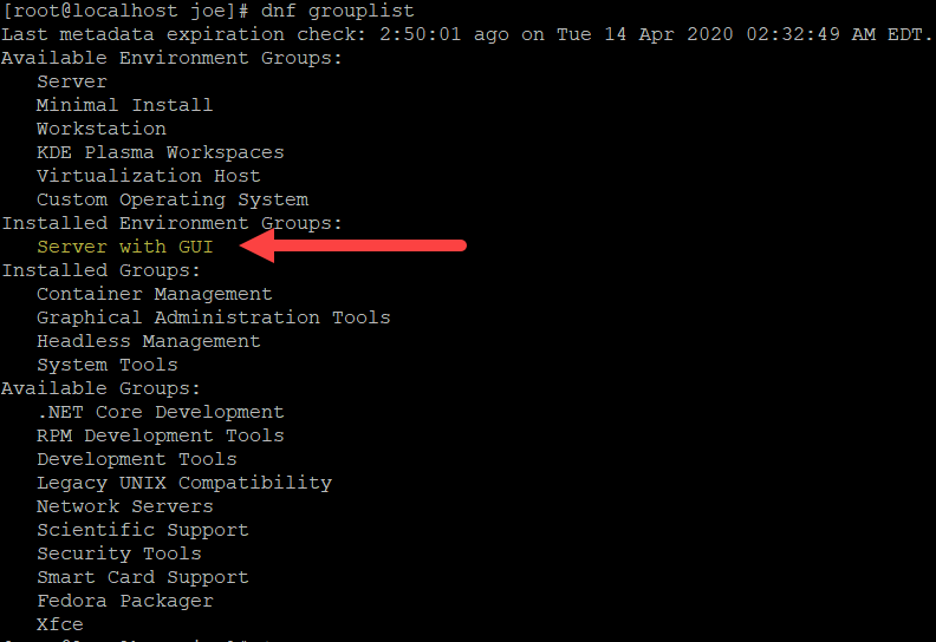
As you can see, the Installed Environment Group is Server with GUI. This is the default during a standard installation via the RHEL ISO.
Remove the GUI
You want to install everything you need to replace your GUI-based tooling and then remove the GUI altogether.
As a first step, you need to install the group Minimal install. This will update the dependencies and make sure that the removal of the Server with GUI group won’t break anything.
Afterward, you also need the Server group. This will help enable Cockpit, the admin tool I mentioned earlier.
Use the following steps:
$ dnf groupinstall -y “Minimal Install”
$ dnf groupremove -y “Server with GUI”
$ dnf groupinstall -y “Server”
Finally, you can enable Cockpit with two additional simple steps:
systemctl enable --now cockpit.socket
sudo firewall-cmd --add-service=cockpit --permanent
To learn more about Cockpit and how to use it, take a look at, An introduction to Cockpit, a browser-based administration tool for Linux.
[ Free online course: Red Hat Enterprise Linux technical overview. ]
Wrapping up
In this article, you learned how to cleanly remove a default desktop environment from a RHEL 8 server in favor of Cockpit. This allows you to save resources and still comfortably manage the system with a browser-based software component.
Über den Autor
Italian-born and Swiss-based Cloud and infrastructure Enthusiast, Linux Users since 1998. Avid traveler, foodie, and die-hard cyclist, if he is not tinkering with a complex computing environment, you can find him in the woods or in the kitchen.
Currently, he is working as a senior consultant helping customers to reach their success.
Ähnliche Einträge
Red Hat Enterprise Linux Long-Life Add-On: RHEL ohne Enddatum
Red Hat Lightspeed: Infrastruktur optimal anbinden
Infrastructure At The Edge | Compiler
Operating System Management | Compiler
Nach Thema durchsuchen

Automatisierung
Das Neueste zum Thema IT-Automatisierung für Technologien, Teams und Umgebungen

Künstliche Intelligenz
Erfahren Sie das Neueste von den Plattformen, die es Kunden ermöglichen, KI-Workloads beliebig auszuführen

Open Hybrid Cloud
Erfahren Sie, wie wir eine flexiblere Zukunft mit Hybrid Clouds schaffen.

Sicherheit
Erfahren Sie, wie wir Risiken in verschiedenen Umgebungen und Technologien reduzieren

Edge Computing
Erfahren Sie das Neueste von den Plattformen, die die Operations am Edge vereinfachen

Infrastruktur
Erfahren Sie das Neueste von der weltweit führenden Linux-Plattform für Unternehmen

Anwendungen
Entdecken Sie unsere Lösungen für komplexe Herausforderungen bei Anwendungen

Virtualisierung
Erfahren Sie das Neueste über die Virtualisierung von Workloads in Cloud- oder On-Premise-Umgebungen
