
In cases where kickstarting or using scripts to automate the post-provisioning of systems is not feasible or practical, it can be a challenge to create test systems for yourself or coworkers. For example, if you're trying to use various Red Hat Satellite systems for your own learning, it would take a long time to install a virtual machine, sync content, create content views, and so on. What if you finally get the system built how you want it, but while studying, you accidentally make it unusable? Either you're trying to debug a system when you don’t know how it works in the first place or you're going through the time-consuming process of rebuilding it from scratch. If you make these systems available to your coworkers, then the likelihood of a system becoming unusable increases.
[ You might also like: Logical Volume Manager (LVM) versus standard partitioning in Linux ]
As a solution to these challenges, I used Logical Volume Manager (LVM) snapshots. To begin, I first created a new virtual machine (VM) whose backing store was a logical volume. I installed the operating system, configured services, and set the system up as a gold image. I then took a snapshot of the LVM and booted the virtual machine from that snapshot. When the system needed to be reset back to the gold state, it was a simple process of destroying and removing the current VM and creating a new snapshot. I could then start the virtual machine from that recreated snapshot.
To make this more accessible to users, a WebUI was created, which used PEAR components, PHP, and sudo access for Apache to run the default lvremove, lvcreate, virsh, and xm commands. In addition, two custom scripts were created, one of which would simply SSH to the VM and run who to see if anybody was using it, and the other was a script that would execute those LVM commands to virsh destroy $1, lvremove /dev/vgvms/$1.ss -f, and then lvcreate -L +5G -s -n $1.ss /dev/vgvms/$1.gold. Using this method, it was important to make sure the VM name matched the LVM name and that the snapshot was *.ss with the gold image named as *.gold.
I had a little title with a link to lorenz, which was a system using the same type of setup but was a hypervisor for basic RHEL clients, not Satellite servers. The main table in the WebUI gets populated with code:
if(is_array($inactive_guests)) {
  foreach ($inactive_guests as $key=>$value) {
    $tpl->setVariable(array(
                            'server_name'  => $key,
                            'virsh_status' => $value['status'],
                            'fqdn' => $value['fqdn'],
                            'userinfo' => $value['userinfo'],
                            'notes' => $value['notes'],
                            'inactivecontrols' => inactive_controls($key)));
    $tpl->parse('inactiveserver');
  }
}
The WebUI displays those fields for each system, giving this output:
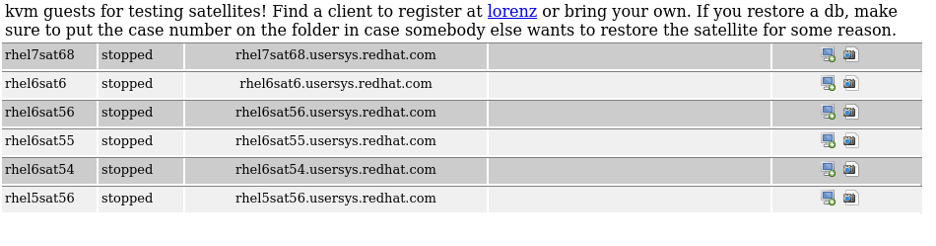
The main advantages of this method are that you can quickly restore to a known good state, the WebUI reports if anybody is using a particular system, and it’s a straightforward system to set up. However, some of the drawbacks are that it’s fairly storage-intensive and there's no way to reserve a system to prevent somebody else from using it or restoring it to the golden state. However, with a little additional development, those issues could be addressed.
Credits for the initial development of this project go to Jeremy Agee and Patrick Wiggins. You may download the WebUI source code.
[ Free course: Red Hat Satellite Technical Overview. ]
Über den Autor
I am a Senior Principal Security Architect at Verizon. Before that, I worked at Red Hat in various roles such as consulting and in the Solutions Architect where I specialized in Smart Management, Ansible, and OpenShift. In my free time, I enjoy spending time with my family, exercising, and woodworking.
Ähnliche Einträge
Post-Quanten-Sicherheit für Finanzdienstleister
Red Hat Enterprise Linux Long-Life Add-On: RHEL ohne Enddatum
Infrastructure At The Edge | Compiler
Operating System Management | Compiler
Nach Thema durchsuchen

Automatisierung
Das Neueste zum Thema IT-Automatisierung für Technologien, Teams und Umgebungen

Künstliche Intelligenz
Erfahren Sie das Neueste von den Plattformen, die es Kunden ermöglichen, KI-Workloads beliebig auszuführen

Open Hybrid Cloud
Erfahren Sie, wie wir eine flexiblere Zukunft mit Hybrid Clouds schaffen.

Sicherheit
Erfahren Sie, wie wir Risiken in verschiedenen Umgebungen und Technologien reduzieren

Edge Computing
Erfahren Sie das Neueste von den Plattformen, die die Operations am Edge vereinfachen

Infrastruktur
Erfahren Sie das Neueste von der weltweit führenden Linux-Plattform für Unternehmen

Anwendungen
Entdecken Sie unsere Lösungen für komplexe Herausforderungen bei Anwendungen

Virtualisierung
Erfahren Sie das Neueste über die Virtualisierung von Workloads in Cloud- oder On-Premise-Umgebungen
