Modernize Citrix virtual desktops with OpenShift Virtualization
Bringing Citrix Virtual Apps and Desktops to a modern infrastructure
Citrix Virtual Apps and Desktops offers control of virtual machines (VMs), applications, and more so that end users can independently access devices anywhere. This level of control allows end user flexibility and productivity while improving management and security. However, the underlying hypervisor supporting these workloads are just as important. As hypervisors in the marketplace increase in cost and face innovation limitations, many users must make a tough choice: reshape their entire application landscape or adapt to evolving hypervisor restrictions.
With Red Hat® OpenShift® Virtualization, users can maintain their existing Citrix Virtual Apps and Desktops workloads on a trusted, consistent, and comprehensive application platform that is ready for the future. Based on the open source KubeVirt project and Kernel-based Virtual Machine (KVM), an open source Linux® technology, users are able to migrate and manage VMs directly on top of modern infrastructure with cloud-native tooling, helping to bring products to market in less time.
Running Citrix Virtual Apps and Desktops on OpenShift Virtualization on premise helps to modernize, unify, and scale workloads using cloud-native principles while taking advantage of existing investments, such as:
- Unified management: Run your Citrix Virtual Apps and Desktops services alongside containers and serverless workloads on a single platform with consistent tooling. Your Citrix Virtual Apps and Desktops administrators can keep using Citrix Studio, using a new OpenShift connection, while Red Hat OpenShift handles VM provisioning, scaling, and automation behind the scenes. That means fewer tools, less isolated team structures, and less operational overhead.
- Scalability and performance: Red Hat OpenShift provides architecture that can support thousands of nodes and scales quickly to meet demand. Whether you are spinning up new Citrix VMs or expanding infrastructure for seasonal load, adding capacity is simple.
- Security: Red Hat OpenShift includes built-in protections like role-based access control (RBAC), SELinux enforcement, secure boot, and network policies that apply to both VMs and containers, so your Citrix workloads get modern security coverage without custom tooling.
- Path towards modernization: OpenShift Virtualization offers a smooth path for infrastructure or application modernization. Through cloud-native tooling that applies to both VMs and containers, users can explore modern development processes for their Citrix Virtual Apps and Desktops workloads at their own pace.
- Partner ecosystem: In addition to Citrix, OpenShift Virtualization works with a wide variety of ecosystem partners to meet user needs without vendor lock-in.
Run your Citrix workloads on a trusted, comprehensive, and consistent application platform through Red Hat OpenShift Virtualization.
Run and manage your Citrix VMs without compromise
OpenShift Virtualization allows you to continue maintaining the operation of your Citrix VMs on a modern application platform, offering flexible deployment options on-premise to suit your specific requirements. OpenShift Virtualization works efficiently with your Citrix VMs to provide different management options for a consistent and reliable experience.
Maintain control with self-managed deployments
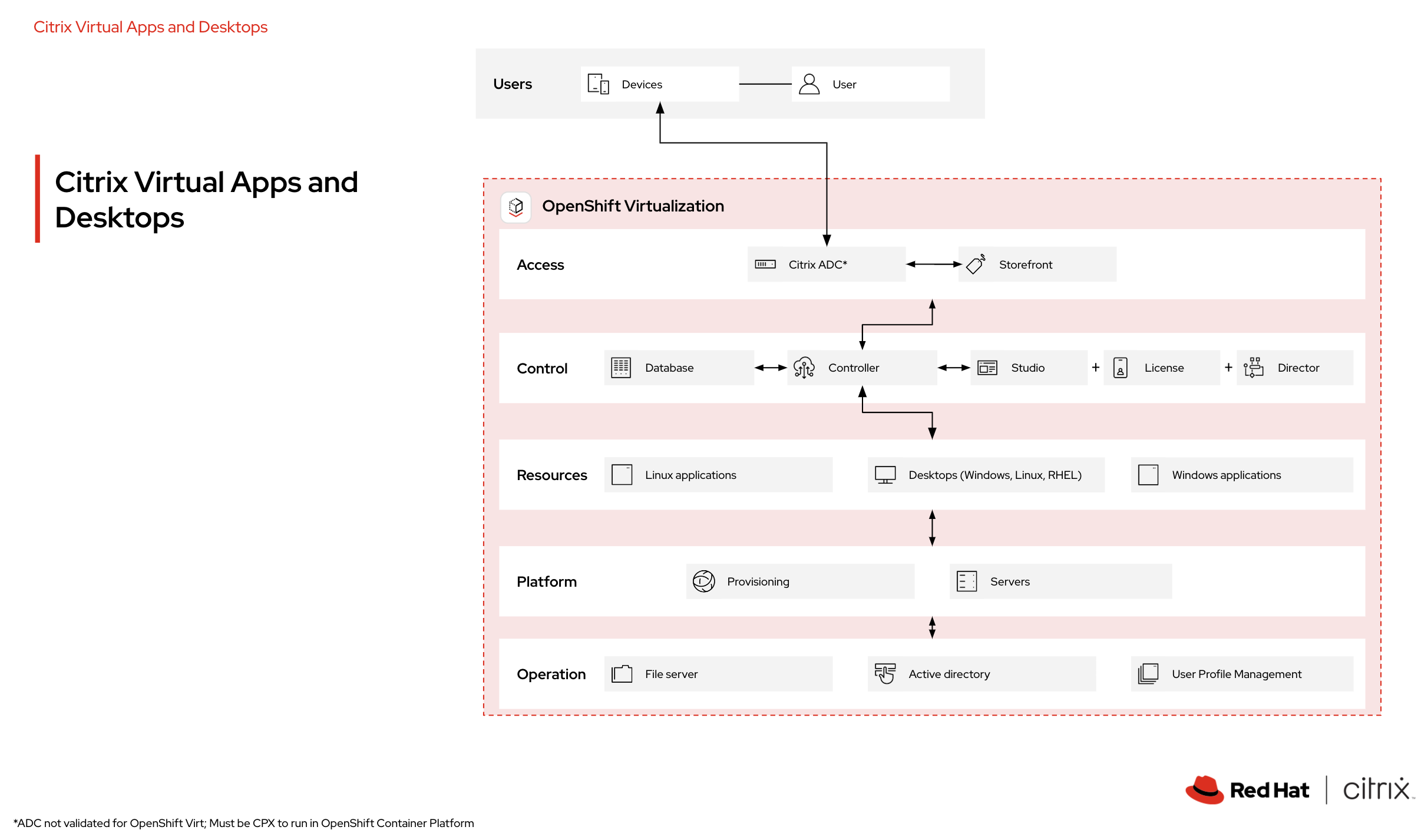
Users can manage their existing Citrix Virtual Apps and Desktops workloads directly on top of OpenShift Virtualization for a unified management experience with tools that are already familiar. VMs operate within the Kubernetes-managed cluster, but behave like traditional VMs.
When deploying Citrix Virtual Apps and Desktops on OpenShift Virtualization, users are responsible for installing and managing key infrastructure components within a site. These components, installed on either virtual or physical servers in the user's datacenter, include:
- Delivery Controller: The central management component of a site. Each site requires at least 1 Delivery Controller, installed on at least 1 server in the datacenter.
- Database: A Microsoft SQL Server database is essential for every site, storing configuration and session information as well as data collected and managed by Delivery Controller services.
- Citrix StoreFront: Authenticates users and manages stores of desktops and applications. It can host an enterprise application store, offering users self-service access to available desktops and applications. StoreFront also tracks user application subscriptions, shortcut names, and other related data.
- Citrix License Server: Manages Citrix product licenses, communicating with the Delivery Controller for session licensing and with Citrix Studio to allocate license files.
- Citrix Gateway: For external connections (outside the corporate firewall), Citrix Virtual Apps and Desktops can take advantage of Citrix Gateway (formerly Access Gateway and NetScaler Gateway) to harden these connections with Transport Layer Security (TLS). This Secure Sockets Layer (SSL) virtual private network (VPN) appliance, deployed in the demilitarized zone (DMZ), provides a single point of access through the corporate firewall, supporting security.
- Citrix Director: A web-based tool for IT support and help desk teams to monitor environments, troubleshoot issues proactively, and perform end user support tasks. One Citrix Director deployment can monitor multiple Citrix Virtual Apps or Citrix Virtual Desktops sites.
- Citrix Studio: This is the management console for configuring and managing your Citrix Virtual Apps and Desktops deployment. Citrix Studio consolidates management, eliminating the need for separate consoles. It provides wizards for environment setup, creating workloads for applications and desktops, and assigning them to users. Citrix Studio also facilitates the allocation and tracking of Citrix licenses.
Supported options with managed services
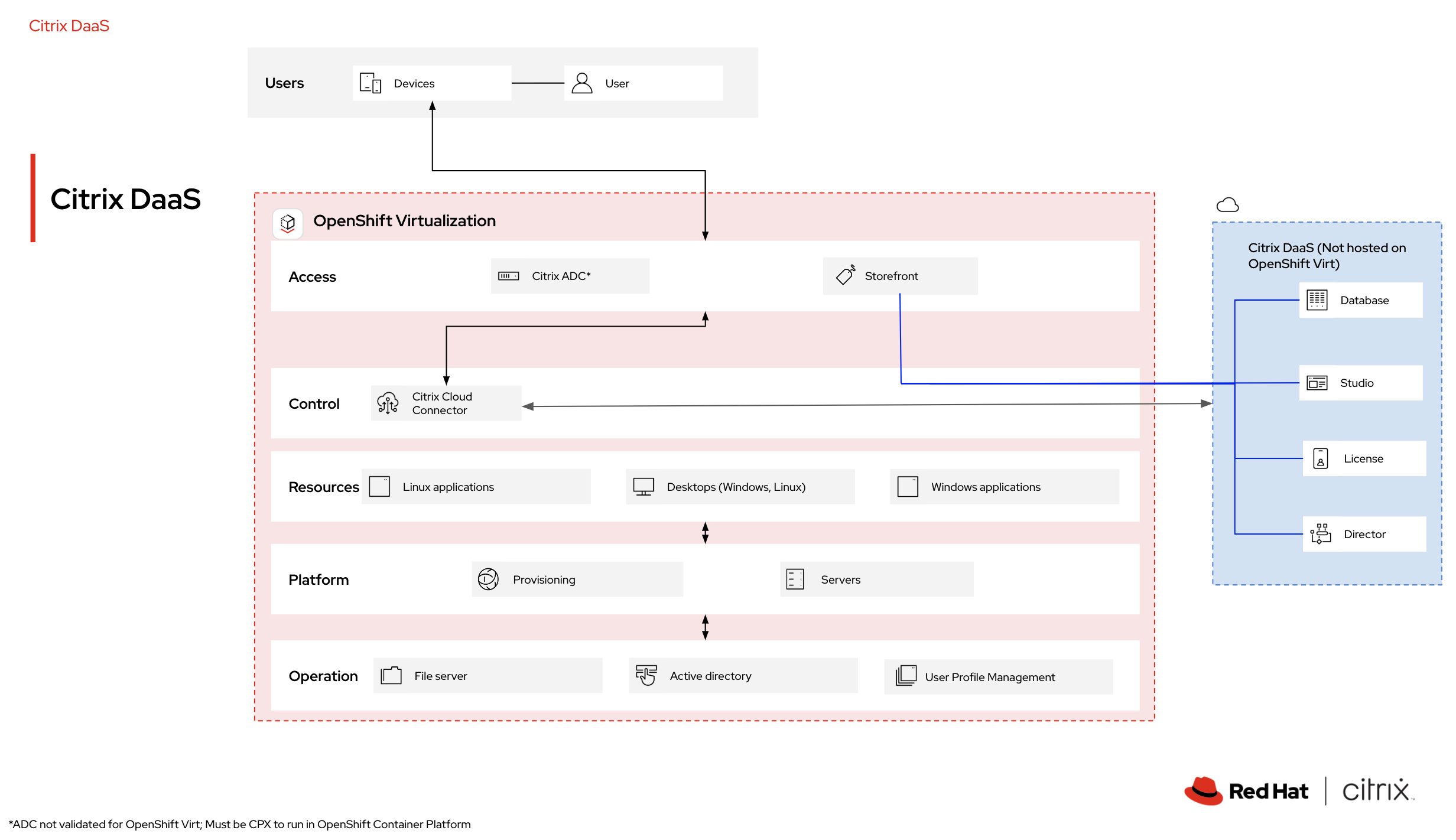
For users looking for collaborative support, Citrix Desktop as a Service (DaaS) offers a Citrix-managed control plane solution that simplifies the delivery of security-focused virtual applications and desktops to any device. With Citrix DaaS, most installation, setup, and upgrade tasks are handled by Citrix, so users can focus on application development rather than server maintenance. Customers retain complete control over their applications and policies while ensuring an optimal user experience across all devices.
While the control plane components are managed by Citrix with DaaS, additional elements of the application can be hosted on OpenShift Virtualization for a consistent and flexible user experience. With this option, users can free up their time and resources by reducing the operational burden of managing the underlying infrastructure and platform components.
Learn more about how to modernize your Virtual Desktop Infrastructure environment
To discover how to deploy Citrix Virtual Apps and Desktops with Red Hat OpenShift Virtualization, visit the Citrix partner page on the Red Hat Ecosystem Catalog. Watch the video to see how to deploy Citrix VMs efficiently on a modern infrastructure with Red Hat OpenShift.
Explore the Red Hat virtualization ecosystem
To learn more about how Red Hat software partners add value to Red Hat OpenShift Virtualization, visit the Red Hat Virtualization Partner page.