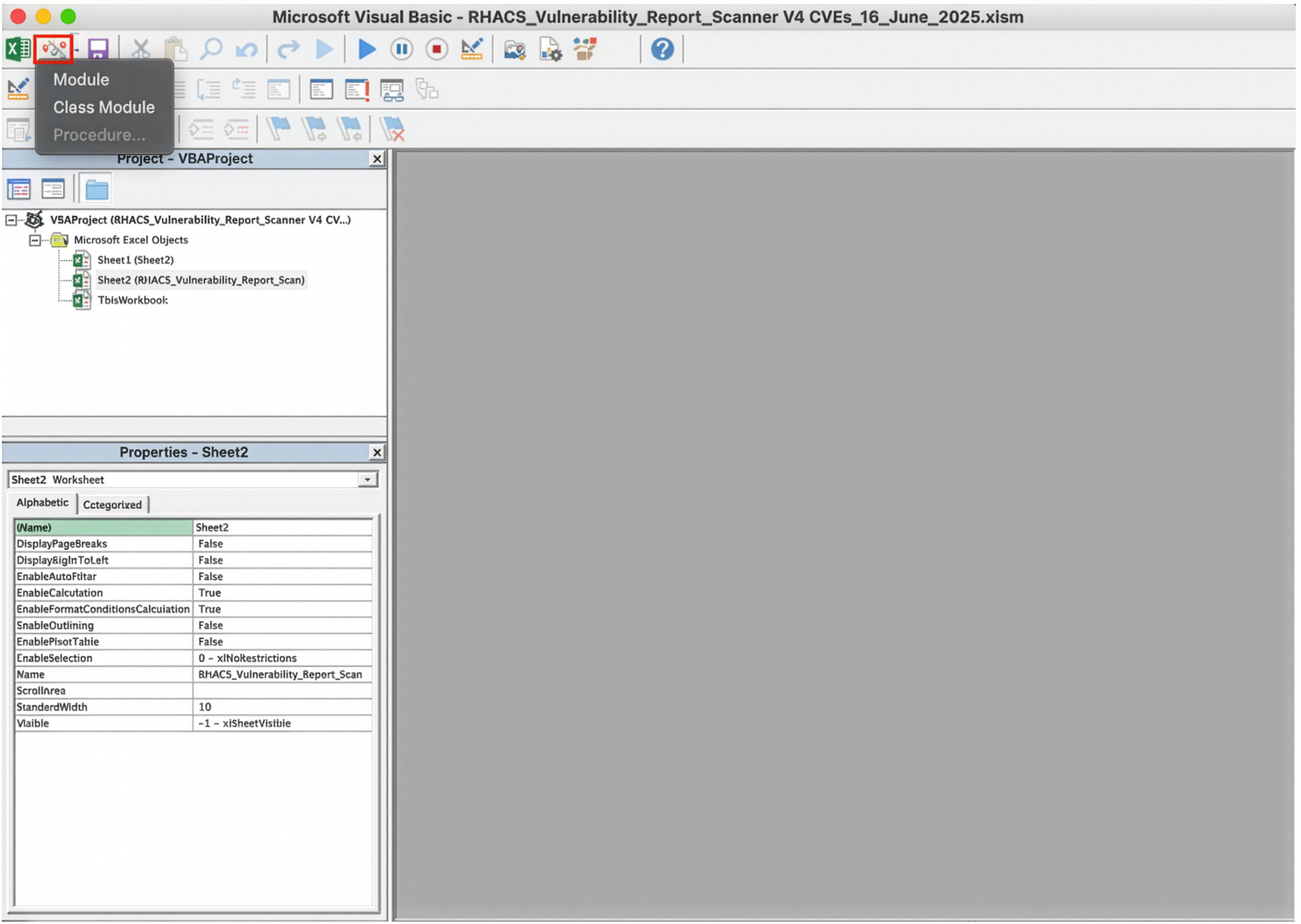
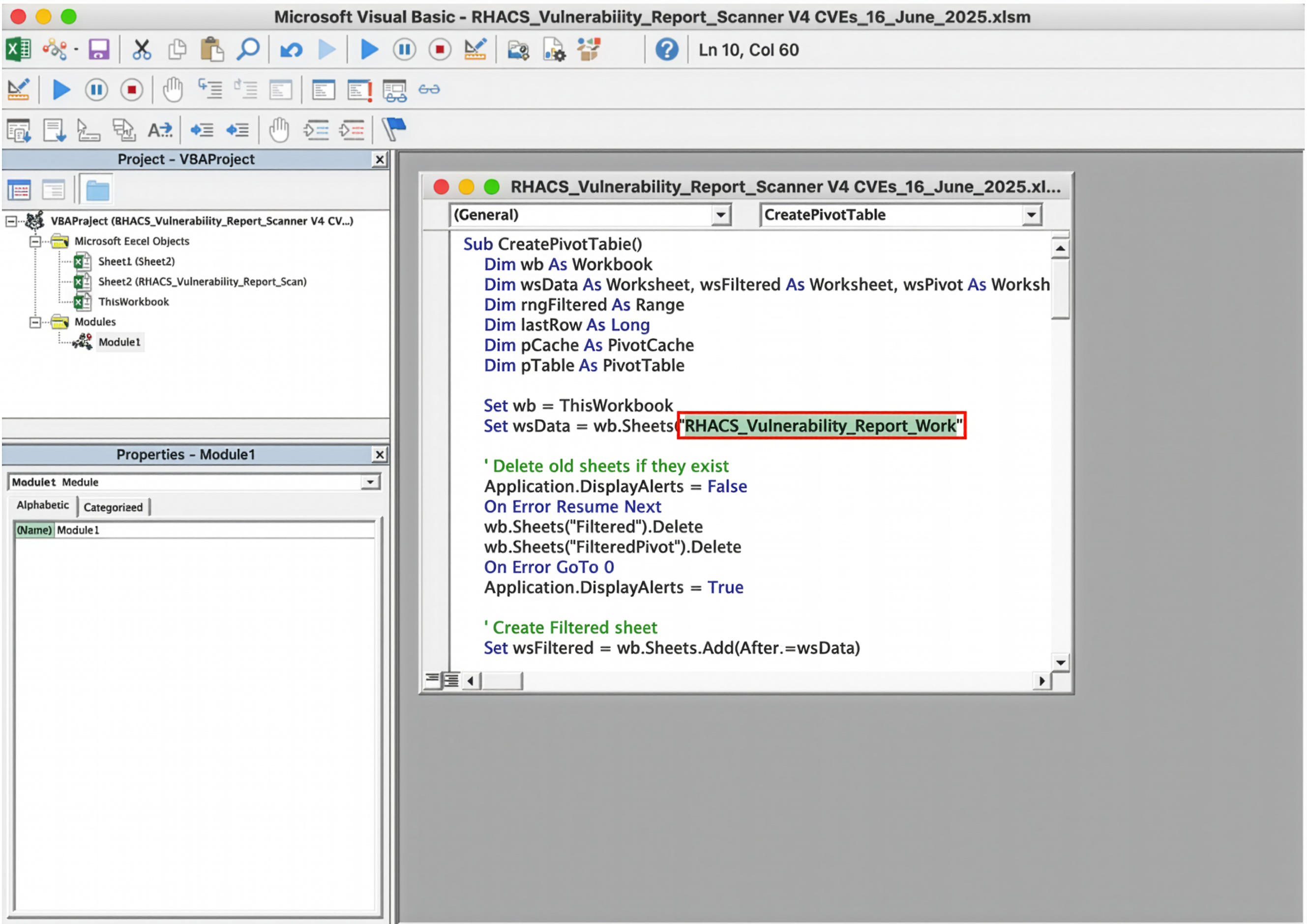
Option 2. VBA macros (refer to appendix B for detailed instructions)
- Automate pivot table creation using Excel macros.
- Sample script is available for reference.
For the 3rd step, enrich the data using the Red Hat CVE Database and VEX files to determine whether a fix exists, if a workaround is available, or if it is a false positive.
And as a final step, categorize each CVE as remediable, false positive, or residual, and take action using Ansible Playbooks—such as deferring CVEs or marking false positives—to improve dashboard accuracy and reduce security team workload.
Understanding and utilizing Red Hat VEX files
Red Hat VEX files provide essential context for more effective CVE triage by helping security teams determine the actual relevance and impact of vulnerabilities on Red Hat products.
Metadata. VEX files contain detailed metadata for each vulnerability, including the CVE ID, CWE classification, and discovery date:
“cve”: “CVE-2023-49568”,
“cwe”: {
“id”: “CWE-400”,
“name”: “Uncontrolled Resource Consumption”
},
“discovery_date”: “2024-01-12T00:00:00+00:00”
}
Additional descriptive information is provided through the notes object, summarizing the vulnerability, its impact, and Red Hat’s position and evaluation of the vulnerability:
{
“notes”: [
{
“category”: “description”,
“text”: “A denial of service (DoS) vulnerability was found
in the go library go-git. This issue may allow an attacker
to perform denial of service attacks by providing specially
crafted responses from a Git server, which can trigger
resource exhaustion in go-git clients.”,
“title”: “Vulnerability description”
},
{
“category”: “summary”,
“text”: “go-git: Maliciously crafted Git server replies can
cause DoS on go-git clients”,
“title”: “Vulnerability summary”
},
{
“category”: “other”,
“text”: “This problem only affects the go implementation
and not the original git cli code. Applications using only
in-memory filesystems are not affected by this issue. Clients
should be limited to connect to only trusted git servers to
reduce the risk of compromise.”,
“title”: “Statement”
},
{
“category”: “general”,
“text”: “The CVSS score(s) listed for this vulnerability do
not reflect the associated product’s status, and are included
for informational purposes to better understand the severity
of this vulnerability.”,
“title”: “CVSS score applicability”
}
]
}
Product tree. The product tree maps the affected component to specific Red Hat products and their corresponding product IDs:
{
“category”: “default_component_of”,
“full_product_name”: {
“name”: “kernel as a component of Red Hat Enterprise Linux 6”,
“product_id”: “red_hat_enterprise_linux_6:kernel”
},
“product_reference”: “kernel”,
“relates_to_product_reference”: “red_hat_enterprise_linux_6”
}
Product status. This section indicates the vulnerability status across different Red Hat products—whether it is fixed, affected, not affected, or under investigation:
{
“product_status”: {
“fixed”: [],
“known_affected”: [],
“known_not_affected”: [],
“under_investigation”: []
}
}
Justification flags. Justification flags explain why a product is unaffected by a CVE, such as vulnerable_code_not_present:
“flags”: [
{
“label”: “vulnerable_code_not_present”,
“product_ids”: [
“7Client-7.9.Z:kernel-headers-0:3.10.0-1160.99.1.el7.ppc64”,
“7Client-7.9.Z:kernel-headers-0:3.10.0-1160.99.1.el7.ppc64le”,
“...”
]
}
]
Remediations section. This section provides actionable guidance including vendor fixes, workarounds, and no planned fix.
Vendor fix example:
{
“category”: “vendor_fix”,
“details”: “For details on how to apply this update, which
includes the changes described in this advisory, refer to:\n
nhttps://access.redhat.com/articles/11258\n\nThe system must be
rebooted for this update to take effect.”,
“product_ids”: [
“7Server-7.4.AUS:kernel-0:3.10.0-693.112.1.el7.src”,
“7Server-7.4.AUS:kernel-0:3.10.0-693.112.1.el7.x86_64”,
“...”
],
“url”: “https://access.redhat.com/errata/RHSA-2023:4819”
}
Workaround example:
{
“category”: “workaround”,
“details”: “Users can restrict the usage of gitRepo volumes in
their cluster using policies such as ValidatingAdmissionPolicy.
nThe following CEL expression can be used as part of the policy
to restrict the use of gitRepo volumes:\n\n~~~\nhas(object.spec.
volumes) || !object.spec.volumes.exists(v, has(v.gitRepo))\n~~”,
“product_ids”: [
“...”,
“red_hat_ansible_automation_platform_2:automation-controller”,
“red_hat_openshift_container_platform_4:openshift4/cnf-tests-rhel8”,
“...”
]
}
No planned fixed example:
{
“category”: “no_fix_planned”,
“details”: “Will not fix”,
“product_ids”: [
“red_hat_openshift_container_platform_4:systemd”
]
}
More details on VEX structure can be found in the Red Hat Security Data Guidelines.
Example workflow for CVE triage using VEX
To triage a vulnerability using Red Hat’s VEX data, start by identifying the affected package or component from the cleaned vulnerability report. For instance, you may observe a flagged component such as systemd, openshift-clients, or libnetwork in the report.
Next, open the relevant VEX JSON file and search for the flagged component. Locate the associated Red Hat product in the product_tree section, such as red_hat_enterprise_linux_9 or red_hat_openshift_container_platform_4. For example, when searching for systemd in the context of CVE-2020-1712, you may find different product statuses depending on the platform.
Review the product_status object to determine Red Hat’s official stance on the CVE. Key status values include known_not_affected, known_affected, or fixed. Pay attention to justification flags in the flags section such as vulnerable_code_not_present, which provide deeper insight into why a product may not be impacted. For CVE-2020-1712, Red Hat Enterprise Linux 9 is marked as known_not_affected, while Red Hat OpenShift is marked known_affected.
Further context is often provided in the statement and remediations sections. These sections may link to relevant RHSAs, offer workaround instructions, or clarify product behavior. For example, CVE-2023-49568 includes a note that the vulnerable Git functionality exists only in the Go-based implementation, not the native Git CLI.
With this information, classify the CVE based on these data points as a remediable risk, false positive, or residual risk. This will be covered in the next section.
Finally, take the appropriate action within Red Hat Advanced Cluster Security. False positives can be suppressed. Remediable risks should be deferred with justifications and workaround guidance. Residual risks should be monitored, with compensating controls applied or escalated via Red Hat Support if necessary.
Refer to examples in appendix C.