
OpenShift continues to gain momentum in the container platform and Platform-as-a-Service (PaaS) area, with many developers and organizations already using it in production to deliver large scale, mission-critical apps.
In the following scenario, some of the most appreciated and used features are related to the advanced deployment techniques. Since OpenShift can easily spawn different versions of the same application and send traffic to them, it is an obvious option to help you implement rolling updates, Blue-Green deployments, canary releases, and so on. In this post, we’ll show you how to easily customize the OpenShift router in order to provide advanced, content-based A/B routing in your applications.
Splitting Traffic in OpenShift
From the OCP user interface/CLI, it’s a trivial task to split traffic in a round robin way, setting different weights (for example, 90% of clients routed to blue version of the app, 10% to the green version) and implementing the aforementioned deployment strategies.
What is often useful, in other cases, is content-based routing in order to smartly route your clients to the version of the application you want, looking into the request itself.
Usually, you may need to retrieve information about the client software version, the geolocation of the device, the logged user or any other kind of useful data, and use that to pick the right destination for your client. That info could be stored, as an example, in HTTP headers (for example, populated by hardware network appliances or by the client themselves), or in other places in your HTTP payload.
While OpenShift supports out of the box weighted load balancing, in order to implement content-based routing, you need some further customizations. Ways to achieve this behavior include:
- Customizing HAProxy configuration
- Delegating the routing to a pod, which may use Apache Camel to inspect and route the requests
- Configuring a service mesh, like Istio
In this post, we are referring to first approach.
HAProxy
HAProxy is the default implementation of the routing layer of OpenShift, getting all the traffic coming from outside the platform, and addressing it to the pods implementing the application, which may be serving rest services, web apps, or other kinds of stuff. HAProxy is extremely configurable and scriptable. What we did for this example, is inject some custom configuration before the default config, in order to have a "fallback" in case no rules are matched for custom routing. In order to see how to change the default configuration of the HAProxy in OpenShift, or to have more information, you may refer to: https://docs.openshift.com/container-platform/3.6/install_config/router/customized_haproxy_router.html#obtaining-router-configuration-template
The relevant snippet of the configuration file is the following:
# Custom snippet for balancing through HTTP headers

{{- range $cfgIdx, $cfg := .State }}

{{- if (ne (index $cfg.Annotations "haproxy.router.openshift.io/cbr-header") "") }}

acl custom_header_{{index $cfg.Annotations "haproxy.router.openshift.io/cbr-header"}} hdr_sub(cbr-header) {{index $cfg.Annotations "haproxy.router.openshift.io/cbr-header"}}

use_backend be_http:{{$cfgIdx}} if custom_header_{{index $cfg.Annotations "haproxy.router.openshift.io/cbr-header"}}

{{- end }}

{{- end }}
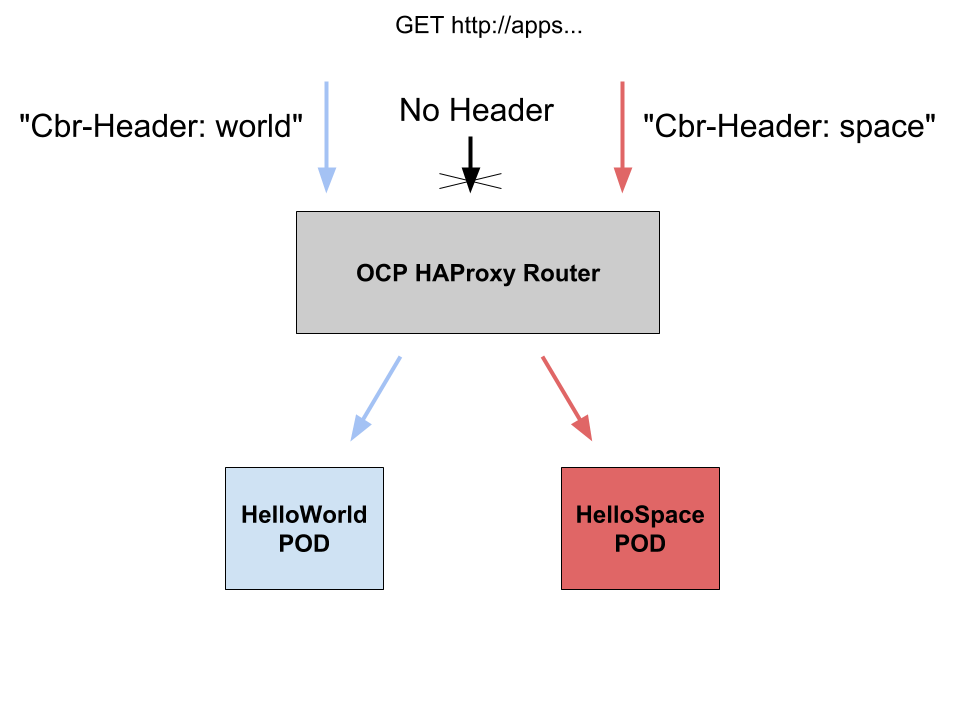
What this configuration does, basically, is to look for an annotation of the OpenShift route (haproxy.router.openshift.io/cbr-header). If the route doesn't have that annotation, the default behavior will apply. Otherwise, the HAProxy for each request will read the annotation content and route to the according to the backend application.
Testing
So in order to test this configuration, we created two very easy web applications which print 2 messages (“Hello world” and “Hello space”):
$ oc get dc

NAME         REVISION   DESIRED   CURRENT   TRIGGERED BY

hellospace   2          1         1         config,image(hellospace:latest)

helloworld   1          1         1         config,image(helloworld:latest)
We have, of course, 2 routes for those apps:
$ oc get routes

NAME         HOST/PORT                                        PATH      SERVICES     PORT       TERMINATION   WILDCARD

hellospace   hellospace-myproject.apps.192.168.42.53.nip.io             hellospace   8080-tcp                 None

helloworld   helloworld-myproject.apps.192.168.42.53.nip.io             helloworld   8080-tcp                 None
Then we have added our custom annotation to the routes:
$ oc get route hellospace -o yaml | head

apiVersion: v1

kind: Route

metadata:

  annotations:

    haproxy.router.openshift.io/cbr-header: space

    openshift.io/host.generated: "true"

  creationTimestamp: 2017-08-28T12:28:28Z

  name: hellospace

  namespace: myproject

  resourceVersion: "16059"
$ oc get route helloworld -o yaml | head
 apiVersion: v1
 kind: Route
 metadata:
 annotations:
 haproxy.router.openshift.io/cbr-header: world
 openshift.io/generated-by: OpenShiftWebConsole
 openshift.io/host.generated: "true"
 creationTimestamp: 2017-08-28T09:20:17Z
 labels:
 app: helloworld
Now if we call the 2 routes directly, everything works as expected:
$ curl http://helloworld-myproject.apps.192.168.42.53.nip.io

Hello World!
$ curl http://hellospace-myproject.apps.192.168.42.53.nip.io
 Hello Space!

But if we call the route at a higher level (DNS wildcard), using our custom header, the magic happens:
$ curl --header "Cbr-Header: space" http://apps.192.168.42.53.nip.io

Hello Space!
$ curl --header "Cbr-Header: world" http://apps.192.168.42.53.nip.io
 Hello World!
Please take into account that if you call the same URL without specifying the custom header, you will end up with the usual “application unavailable” page:
$ curl http://apps.192.168.42.53.nip.io | grep h1

  % Total    % Received % Xferd  Average Speed   Time    Time     Time  Current

                                 Dload  Upload   Total   Spent    Left  Speed

100  3131    0  3131    0     0   515k      0 --:--:-- --:--:-- --:--:--  611k

  h1 {

    h1 {

      <h1>Application is not available</h1>
In Summary
In this post we've seen how easy is to customize the OpenShift router in order to provide load balancing capabilities based on HTTP headers. This will allow you to provide advanced, content-based A/B routing in your applications.
This technique is not limited to HTTP headers, but could also be used with any content in your HTTP payload. The main point to be aware of is the potential performance penalty that this technique can bring, since you will start to have complex checks in any request. This may, of course, be tested with load simulation in order to understand if it is impactful or not.
Hope you find this technique useful!
執筆者紹介
類似検索
Ansible 2.7のVisual Execution Environment Builder とコンテンツ検出
安定したコードの書き換えを停止:Lightwell が収益と開発者の作業速度を保護する方法
Can agentic AI patch the internet?
Random Acts Of Automation | Compiler
チャンネル別に見る

自動化
テクノロジー、チームおよび環境に関する IT 自動化の最新情報

AI (人工知能)
お客様が AI ワークロードをどこでも自由に実行することを可能にするプラットフォームについてのアップデート

オープン・ハイブリッドクラウド
ハイブリッドクラウドで柔軟に未来を築く方法をご確認ください。

セキュリティ
環境やテクノロジー全体に及ぶリスクを軽減する方法に関する最新情報

エッジコンピューティング
エッジでの運用を単純化するプラットフォームのアップデート

インフラストラクチャ
世界有数のエンタープライズ向け Linux プラットフォームの最新情報

アプリケーション
アプリケーションの最も困難な課題に対する Red Hat ソリューションの詳細

仮想化
オンプレミスまたは複数クラウドでのワークロードに対応するエンタープライズ仮想化の将来についてご覧ください
